Welcome Guest ( Log In | Register )

Outline · [ Standard ] · Linear+

 [DIY] Demb Diffuser!, 15 mins only. New with Pictures.

views
     
TSNewbieeeeee
post Oct 4 2010, 09:59 AM, updated 14y ago

:)
******
Senior Member
1,286 posts

Joined: Aug 2010
From: Home


Firstly, I would like to appologise if I've posted this in the wrong section. Mod / Admin pls move it if its wrong. icon_question.gif
And I would also like to appologise if this has been done before. Pls forgive me for whatever wrong I've did. This is my first try.
sad.gif


Umm okay.. So this is my DIY Demb diffuser.. Sucks tho.. Effect maybe is 60-70% of Demb, Which means.. 60% xRm195.00 = Save Rm117.00! drool.gif

Lets start.


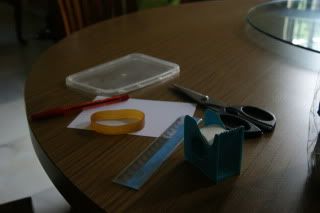
First, You would need :-
1 x Scissors
1 x Surgery Tape
1 x Pen
1 x Ruler
1 x Thick rubber band / Velcro
1 x Transparent tupper-ware cover
1 x Photo Paper ( For printing photos )

Yeap~ Thats all! rclxms.gif

user posted image


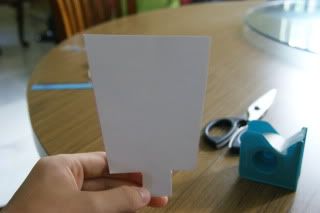
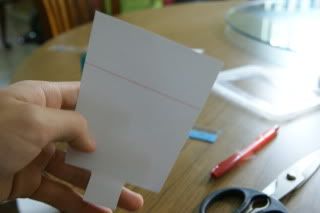
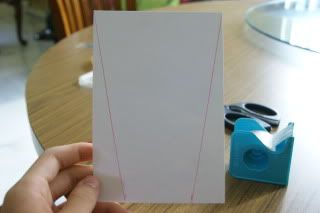
Okay, Firstly.. Measure 1 inch (up to you) and draw a line across to the corner of the other end. And cut it along the line.
user posted image


Then, Cut the end so that it'll be easier to slide in to position ( will know why in the end ) smile.gif

user posted image


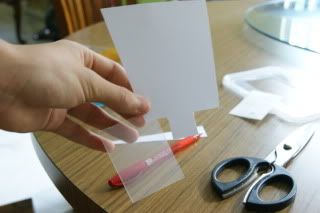
Next, Cut a small piece out from the tupper-ware cover.
user posted image


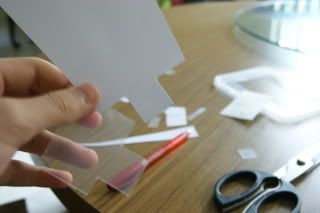
Trace the bounce card shape onto the cover and cut it out.
user posted image


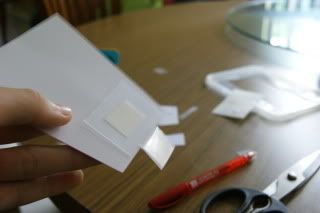
Finally, Tape it to the back of the bounce card. ( This is to strengthen the bounce card )
user posted image


Thats it for the bounce card. thumbup.gif


Now its time to make the Diffuser! icon_idea.gif


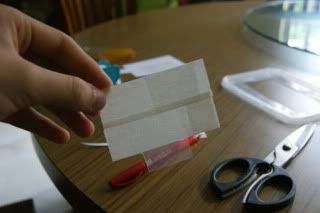
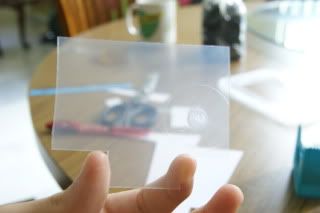
First, Cut out the same shape (for the legs) as the bounce card.
user posted image


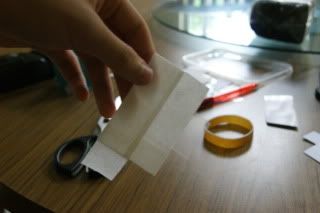
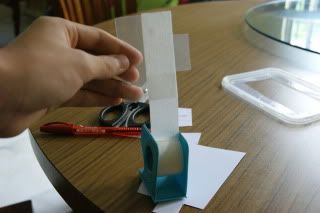
Then, Use the surgery tape to tape around it.
user posted image


It'll turn out to be something like that. biggrin.gif

user posted image

This post has been edited by Newbieeeeee: Oct 4 2010, 04:43 PM
TSNewbieeeeee
post Oct 4 2010, 10:19 AM

:)
******
Senior Member
1,286 posts

Joined: Aug 2010
From: Home


But I prefer my light to be more diffused so I add another layer of surgery tape to it. biggrin.gif

user posted image

And I also cut the bounce card shorter so that it bounces less light. blush.gif

user posted image

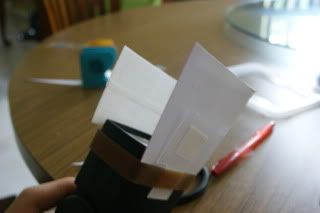
Lastly, Use the rubberband / velcro to secure the bounce card and diffuser to yr flashgun. And its DONE! rclxms.gif

Final product :-

user posted image


Well, Whats the effect?

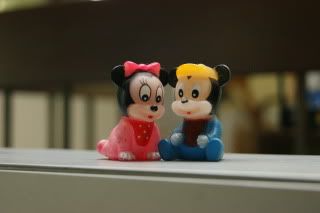
Before (Ceiling bounce),
user posted image user posted image


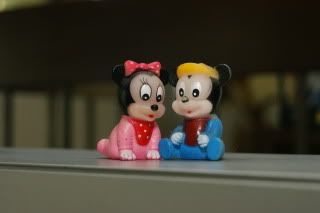
After (Ceiling bounce + 'Demb'),

user posted image user posted image


Well, Good luck to you guys trying this. Can leave a msg here or PM me if u dun understand. Pls correct me if I'm wrong. Tyvm! notworthy.gif

Thank you for viewing, Everyone! Have a good day =D rclxm9.gif

------------------------------------------------------------------------------------------------------
Added different pictures (tiger) upon request.

This post has been edited by Newbieeeeee: Oct 4 2010, 04:46 PM
TSNewbieeeeee
post Oct 4 2010, 11:23 AM

:)
******
Senior Member
1,286 posts

Joined: Aug 2010
From: Home


Ahh I tried posting a reply to this but it still says too many..

Sure. I'll take one now.

And no.. I'm using the transparent tupper-ware cover and tape it with surgery tape. So can control how many layers of surgery tape to put.. more = more diffused.


This post has been edited by Newbieeeeee: Oct 4 2010, 11:40 AM
khaiandrew
post Oct 4 2010, 12:10 PM

Fuji <3
******
Senior Member
1,271 posts

Joined: Sep 2009
From: Petaling Jaya


Nice thread, thanks for this info biggrin.gif
MechaHerc
post Oct 4 2010, 12:32 PM

アルファ ソニ
******
Senior Member
1,967 posts

Joined: Jan 2007
From: Side 3


bro, u can use photobucket, flickr or for sharing photos..
TSNewbieeeeee
post Oct 4 2010, 12:36 PM

:)
******
Senior Member
1,286 posts

Joined: Aug 2010
From: Home


QUOTE(khaiandrew @ Oct 4 2010, 12:10 PM)
Nice thread, thanks for this info biggrin.gif
*

Thank you!

QUOTE(MechaHerc @ Oct 4 2010, 12:32 PM)
bro, u can use photobucket, flickr or for sharing photos..
*
I do use Photobucket.. Isn't that the only way to post pictures on this forum? Got other ways one kah? O.O
MechaHerc
post Oct 4 2010, 12:58 PM

アルファ ソニ
******
Senior Member
1,967 posts

Joined: Jan 2007
From: Side 3


using photo sharing website n embed the photo link here is more efficient way bro. biggrin.gif
TSNewbieeeeee
post Oct 4 2010, 01:02 PM

:)
******
Senior Member
1,286 posts

Joined: Aug 2010
From: Home


Not sure how to do that.. I've seen ppl do it b4 tho.. =/
flame_burstz
post Oct 4 2010, 01:57 PM

Getting Started
**
Junior Member
115 posts

Joined: Apr 2009
From: Shah Alam


Interesting! Thanks for sharing bro!
TSNewbieeeeee
post Oct 4 2010, 02:14 PM

:)
******
Senior Member
1,286 posts

Joined: Aug 2010
From: Home


QUOTE(flame_burstz @ Oct 4 2010, 01:57 PM)
Interesting! Thanks for sharing bro!
*
Thank you! =D
mybiebie
post Oct 4 2010, 02:32 PM

Regular
******
Senior Member
1,419 posts

Joined: Oct 2007
cool....thks...must try.
shadowshine
post Oct 4 2010, 04:15 PM

Casual
***
Junior Member
302 posts

Joined: Jan 2010


Very nice... maybe can share the measurement also... thanks. smile.gif
TSNewbieeeeee
post Oct 4 2010, 04:20 PM

:)
******
Senior Member
1,286 posts

Joined: Aug 2010
From: Home


QUOTE(shadowshine @ Oct 4 2010, 04:15 PM)
Very nice... maybe can share the measurement also... thanks. smile.gif
*
Ahh~ Thank you for requesting, but measurements actually depends on your flash. And gotta try to see which suits your flash. If its too harsh, can try to add another layer of surgery tape or cut the bounce card shorter. =)
DecaPix
post Oct 4 2010, 04:25 PM

5 star monkey
*******
Senior Member
3,000 posts

Joined: Aug 2008
From: PeeJay
i tot if too harsh make the bounce card bigger so that bigger area so the it's more diffused?
you can see the area under the cap still a bit dark and need more forward light.

overall good effort.
should take a picture without flash so we know what is the base condition tongue.gif
vikingw2k
post Oct 4 2010, 04:25 PM

LYN T-Zone'z Guardian
Group Icon
VIP
9,778 posts

Joined: Jun 2005
From: KL(Wangsa Maju) , Seremban 2


QUOTE(Newbieeeeee @ Oct 4 2010, 09:59 AM)

I'm so sorry.. I'm only alloved to post a limited amt of pictures. So I've removed some.
Maximum 10 pictures allowed in one post. Having said so, you could always reserve a few post. Say, post 3 post, and you can have 30 pictures in each of them smile.gif

» Click to show Spoiler - click again to hide... «


Anyway, I've invis some of the post for you to edit and include more pics should you see fit. cheers.gif

This post has been edited by vikingw2k: Oct 4 2010, 04:27 PM
TSNewbieeeeee
post Oct 4 2010, 04:31 PM

:)
******
Senior Member
1,286 posts

Joined: Aug 2010
From: Home


QUOTE(vikingw2k @ Oct 4 2010, 04:25 PM)
Maximum 10 pictures allowed in one post. Having said so, you could always reserve a few post. Say, post 3 post, and you can have 30 pictures in each of them smile.gif

» Click to show Spoiler - click again to hide... «


Anyway, I've invis some of the post for you to edit and include more pics should you see fit. cheers.gif
*
Ahh I see! Thank you very much! I'll add more photos then.

QUOTE(DecaPix @ Oct 4 2010, 04:25 PM)
i tot if too harsh make the bounce card bigger so that bigger area so the it's more diffused?
you can see the area under the cap still a bit dark and need more forward light.

overall good effort.
should take a picture without flash so we know what is the base condition tongue.gif
*
Umm not sure abt this, But if its shorter = bounce less light? =D
Okay~ I'll snap a shot now and upload it. biggrin.gif

This post has been edited by Newbieeeeee: Oct 4 2010, 04:45 PM
jagged
post Oct 4 2010, 08:12 PM

Enthusiast
*****
Senior Member
757 posts

Joined: May 2005


Good & interesting share, thanks bro..
TSNewbieeeeee
post Oct 4 2010, 09:07 PM

:)
******
Senior Member
1,286 posts

Joined: Aug 2010
From: Home


QUOTE(jagged @ Oct 4 2010, 08:12 PM)
Good & interesting share, thanks bro..
*
U're welcome! Go try it. 15 mins.. Very simple.
mike xtreme
post Oct 5 2010, 03:06 PM

Getting Started
**
Junior Member
93 posts

Joined: Nov 2008


good way to do it! but sadly i only use a sb400
TSNewbieeeeee
post Oct 5 2010, 04:32 PM

:)
******
Senior Member
1,286 posts

Joined: Aug 2010
From: Home


Ahh~ can also what.. Whatever flash also can use!
mike xtreme
post Oct 5 2010, 04:52 PM

Getting Started
**
Junior Member
93 posts

Joined: Nov 2008


QUOTE(Newbieeeeee @ Oct 5 2010, 04:32 PM)
Ahh~ can also what.. Whatever flash also can use!
*
i cant really imagine how to make it work yet hahaha perhaps u can give me a little insight on that?
TSNewbieeeeee
post Oct 5 2010, 10:53 PM

:)
******
Senior Member
1,286 posts

Joined: Aug 2010
From: Home


I'm a Sony user.. O.o
edtan5
post Oct 9 2010, 05:46 PM

retired MT-ian
******
Senior Member
1,524 posts

Joined: Apr 2006
From: from mlk with lub


looks interesting. can you please take the pic of the finished diffuser with the whole flashgun? maybe from a few angle. been wondering how does the light bounce biggrin.gif
TSNewbieeeeee
post Oct 15 2010, 08:33 PM

:)
******
Senior Member
1,286 posts

Joined: Aug 2010
From: Home


I took of one already. Its there.
zafirahrizuan
post May 5 2011, 09:23 PM

New Member
*
Junior Member
36 posts

Joined: Jun 2010
From: Bombay Scottish School, Churchgate


hey
This cool DIY project !
thanks for sharing with us biggrin.gif
GreenyBeelz
post Jan 22 2012, 05:45 PM

Getting Started
**
Junior Member
223 posts

Joined: Dec 2011
QUOTE(Newbieeeeee @ Oct 15 2010, 08:33 PM)
I took of one already.  Its there.
*
can i get a nice single flash portrait using this demb diffuser?
TSNewbieeeeee
post Feb 4 2012, 05:03 PM

:)
******
Senior Member
1,286 posts

Joined: Aug 2010
From: Home


QUOTE(zafirahrizuan @ May 5 2011, 09:23 PM)
hey
This cool DIY project !
thanks for sharing with us biggrin.gif
*
You're welcome! biggrin.gif

QUOTE(GreenyBeelz @ Jan 22 2012, 05:45 PM)
can i get a nice single flash portrait using this demb diffuser?
*
Umm. It doesnt really affect the picture. I mean, all it does it bounce light forward and diffusing it. I think the flash power is the key to a nice picture. smile.gif

This post has been edited by Newbieeeeee: Feb 4 2012, 05:03 PM
BuyerSellers
post Feb 19 2012, 11:33 AM

Casual
***
Junior Member
306 posts

Joined: Dec 2011
Thanks for the sharing, will try it out one of this day, bravo..
camera whizz
post Apr 21 2013, 06:14 PM

Getting Started
**
Junior Member
99 posts

Joined: Mar 2011
very good idea, thanks smile.gif


Change to:
| Lo-Fi Version
0.0250sec    0.43    5 queries    GZIP Disabled
Time is now: 17th December 2025 - 02:51 AM