

hi guys, new to android here...
my wildfire seems to unable to start the wifi after an update... any advice?
[Official] HTC Wildfire v2, Bring Your Friends to You
[Official] HTC Wildfire v2, Bring Your Friends to You
|
|
 Oct 9 2010, 02:17 PM Oct 9 2010, 02:17 PM
Return to original view | Post
#1
|
 
Junior Member
310 posts Joined: Nov 2006 From: Bukit Mertajam  
|
hi guys, new to android here...
my wildfire seems to unable to start the wifi after an update... any advice? |
|
|
|
|
|
Oct 9 2010, 02:38 PM
Return to original view | Post
#2
|
|
Junior Member
310 posts Joined: Nov 2006 From: Bukit Mertajam
|
QUOTE(xngjn @ Oct 9 2010, 02:30 PM) what update u have done? i forgot jor which update izit... that day surfing net using 3g then it suddenly prompt that update is available then i press update lor...Added on October 9, 2010, 2:31 pm lol. duno that time what the price already. maybe they give update to wildfire. u already enough money buy desire HD.   then after that wifi unable to start already... Firmware Version 2.1-update1 Baseband version 13.45.55.24H_3.35.15.31 Kernel version 2.6.29-4266b2e1 htc-kernel@and18-2 #1 Wed May 19 21:21:28 CST 2010 Build number 1.25.708.2 CL227575 release-keys Software number 1.25.708.2 Browser version Webkit 3.1 any help? |
|
|
Oct 9 2010, 02:45 PM
Return to original view | Post
#3
|
|
Junior Member
310 posts Joined: Nov 2006 From: Bukit Mertajam
|
QUOTE(xngjn @ Oct 9 2010, 02:43 PM) this is my software information. i also dint hav update notification. after reset also cant start wifi? it seems like our build number and software number is different... does that means anything?Firmware Version 2.1-update1 Baseband version 13.45.55.24H_3.35.15.31 Kernel version 2.6.29-4266b2e1 htc-kernel@and18-2 #1 Wed May 19 21:21:28 CST 2010 Build number 1.15.707.1 CL185145 release-keys Software number 1.15.707.1 Browser version Webkit 3.1 yep, after reset still no luck... >.< |
|
|
Oct 9 2010, 03:29 PM
Return to original view | Post
#4
|
|
Junior Member
310 posts Joined: Nov 2006 From: Bukit Mertajam
|
one more question, i'm trying unrevoked3 on my wildfire but its stuck at waiting for device like forever... any advice?
|
|
|
Oct 9 2010, 03:50 PM
Return to original view | Post
#5
|
|
Junior Member
310 posts Joined: Nov 2006 From: Bukit Mertajam
|
QUOTE(xngjn @ Oct 9 2010, 03:44 PM) u need conect yours phone to pc. and yours pc should able to recognize yours phone. u go device manager should see it write android phone. if no means u not yet install the driver for yours phone. i have installed the HBOOT driver and Android Bootloader Interface is listed under Android Phone.but now when i connect my phone to the pc, in device manager there is ADB under Other device there... advice? |
|
|
Oct 9 2010, 03:55 PM
Return to original view | Post
#6
|
|
Junior Member
310 posts Joined: Nov 2006 From: Bukit Mertajam
|
QUOTE(xngjn @ Oct 9 2010, 03:52 PM) print screen and show me. Attached thumbnail(s) 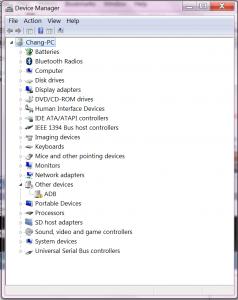
|
|
|
|
|
|
Oct 9 2010, 04:06 PM
Return to original view | Post
#7
|
|
Junior Member
310 posts Joined: Nov 2006 From: Bukit Mertajam
|
QUOTE(xngjn @ Oct 9 2010, 04:00 PM) that is cos not yet install driver. u need right click and select "update driver software">>"browse my computer for driver software">> select the location of driver. i've tried and its says that windows could not find driver software...if no mistake the driver is "android_winusb.inf" u wil see in the "android-usb-driver.zip" which u hav downloaded. advice? Attached thumbnail(s) 
|
|
|
Oct 9 2010, 04:30 PM
Return to original view | Post
#8
|
|
Junior Member
310 posts Joined: Nov 2006 From: Bukit Mertajam
|
QUOTE(xngjn @ Oct 9 2010, 04:11 PM) then u try select the floder(Android USB Driver). and install . u got view the HBoot video. behind there got. u can view for more understanding. i tried selecting the folder Android USB Driver but no luck too... i did see the video but nothing helps too...btw, does a 64-bit windows works? because i'm using 64-bit win7... advice? |
|
|
Oct 9 2010, 04:43 PM
Return to original view | Post
#9
|
|
Junior Member
310 posts Joined: Nov 2006 From: Bukit Mertajam
|
QUOTE(xngjn @ Oct 9 2010, 04:35 PM) after select it dint popup a msg? still the same as windows could not find driver software...advice? |
|
|
Oct 9 2010, 04:51 PM
Return to original view | Post
#10
|
|
Junior Member
310 posts Joined: Nov 2006 From: Bukit Mertajam
|
QUOTE(xngjn @ Oct 9 2010, 04:48 PM) u have install HTC Sync before? the web say should uninstall HTC Sync first. i think the driver should work for windows 7 64bit too. nop. havent install htc sync b4... |
|
|
Oct 9 2010, 06:00 PM
Return to original view | Post
#11
|
|
Junior Member
310 posts Joined: Nov 2006 From: Bukit Mertajam
|
QUOTE(HMMaster @ Oct 9 2010, 05:19 PM) drivers are "bit-ness" sensitive. 32-bit driver will only work on 32-bit OS. Is the driver you using specify that it is for 64-bit OS? it does not have the option to choose whether 32-bit or 64-bit driver to download...but i don think is the 32-bit 64-bit problem because i tried it on a 32-bit win7 too and the outcome is still the same... advice? |
|
|
Oct 9 2010, 07:08 PM
Return to original view | Post
#12
|
|
Junior Member
310 posts Joined: Nov 2006 From: Bukit Mertajam
|
QUOTE(xngjn @ Oct 9 2010, 06:37 PM) u should have download; it worked... thanks a lot...reflash_package.exe (Unrevoked3) android-usb-driver.zip (Hboot for windows) *i have Hboot and Unrevoked3 link at my signature 1. boot into hboot (volume down + power) 2. now device manager >> Other Device - Android 1.0 3. right click Update driver software >Browse My Computer For Driver Software> choose Android USB Driver( the file u just extract) 4. u will see Android Bootloader Interface under Android Phone in Device Manager 5. restart yours phone 6. enavle USB debuging 7. in device manager u will see ADB under Other device 8. right click select Update Driver Software>Browse My Computer for Driver Software>Let me pick from a list of a device drivers on my computer>android phone>Android ADB Interface 9. after install complete u will see Android ADB Interface under Android phone 10. now can run reflash_package.exe 11. just wait... unrevoked will do all for u (yours phone will reboot several time) 12. now yours phone will boot to ClockworkMod Recovery v2.5.0.1 13. select reboot system now for go in HTC sense 14. u will have Superuser in yours menu. 15. congratulation. u have success root yours phone. the next thing is find new ROM for yours phone |
| Change to: |  0.0401sec 0.0401sec
 0.47 0.47
 7 queries 7 queries
 GZIP Disabled GZIP Disabled
Time is now: 10th December 2025 - 02:47 PM |
 Quote
Quote