Welcome Guest ( Log In | Register )

Outline · [ Standard ] · Linear+

 Asus Maximus III Extreme & Intel® Core™ i5 655k, Overclocking The Unlocked Clarkdale

views
     
TSdblooi
post Sep 29 2010, 09:59 PM, updated 16y ago

......
******
Senior Member
1,404 posts

Joined: Apr 2006
From: ......


Lately i got my hands on some hardware, the Intel® Core™ i5 655k & Asus® Maximus III Extreme.

You may find the detailed product info here & here.

Hardware Unboxing
Let's quickly go through the hardware unboxing,
user posted image
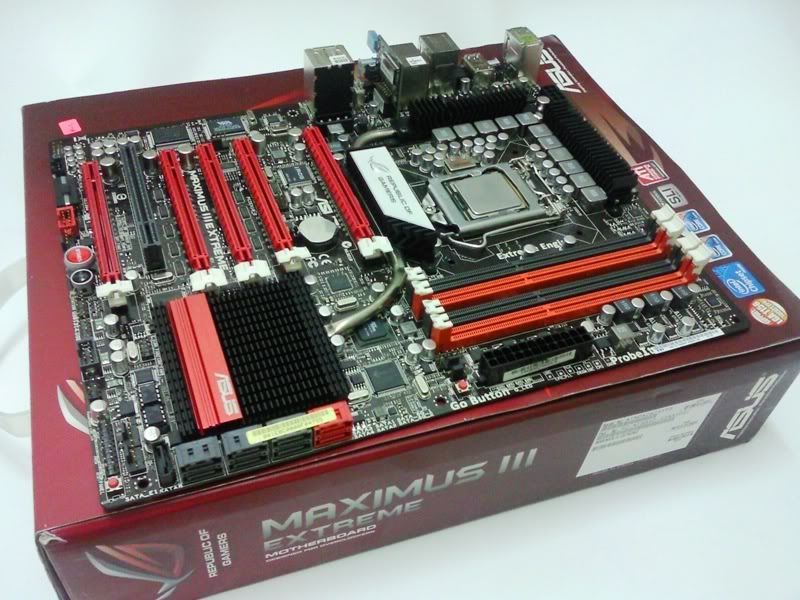
The Asus Maximus III Extreme is an Intel® P55 Express Chipset motherboard, supports Intel® Socket 1156 Core™ i7 Processor/Core™ i5 Processor/Core™ i3 Processor.
user posted image
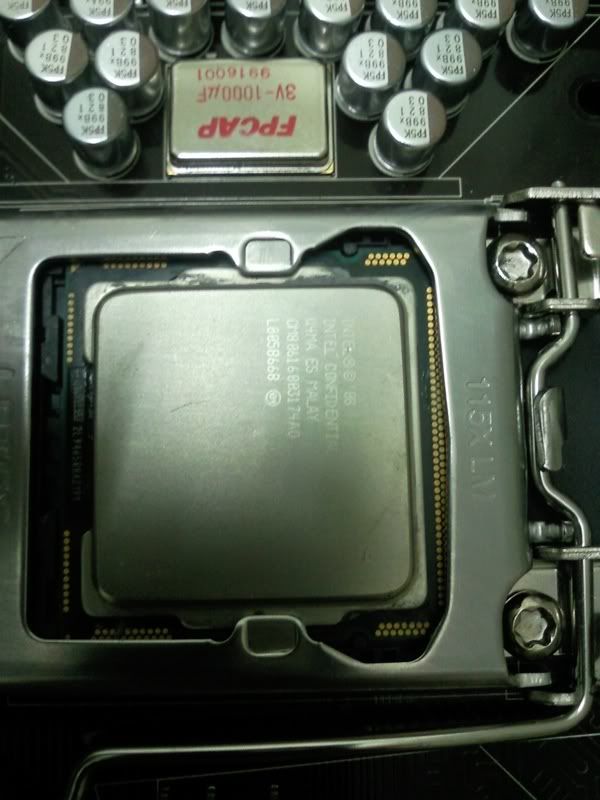
Closer look at the CPU ( a bit blur though tongue.gif ) , the Intel® Core™ i5 655k is a CPU with unlocked CPU multiplier.
You may choose max up to 63x multiplier.
user posted image
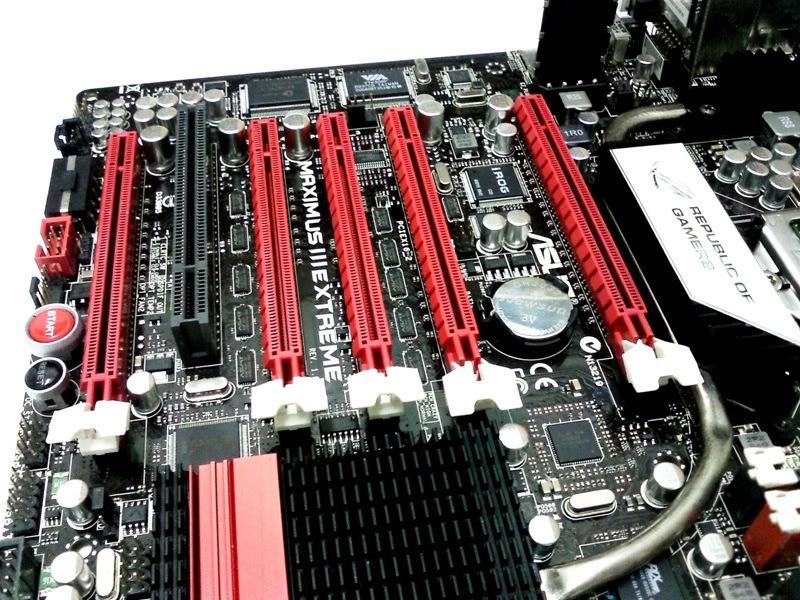
5 x PCIe 2.0 x16 Supports single at x16, dual at x16, triple at x 16 x16 x8, quad x8, or 5 x8.
Supports NVIDIA® SLI™ Technology / ATI® CrossFireX™ Technology.
On Board Power & Reset buttons ready for naked pc users.
user posted image
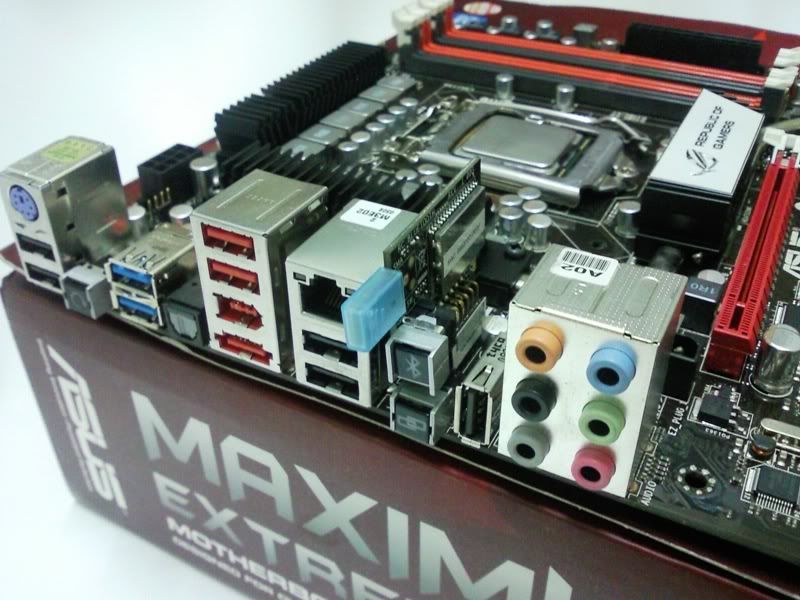
Closer look at rear panel. There are a few interesting features here:
Onboard Clear CMOS button - Clear CMOS with a single push.
RC Bluetooth - The top button on the little expansion card, it can bridge connection with smart phone & overclocking the system via the phone!
I've tested on it, the user interface is simple yet full of overclocking settings & the response is surprisingly fast. Very innovative feature.
ROG Connect - The USB port (known as ROG connect port) besides the bluetooth expansion card, it links the system to a notebook through a USB
cable, allowing users to monitor the system status as well as to make on-the-fly parameter adjustments at hardware level.
USB BIOS Flashback - plug the thumb drive into the ROG Connect port & push the ROG Connect button (bottom button) for 2 seconds, BIOS would be
automatically flashed under standby power.

user posted image
Q_LED: Onboard debug tool, provides updates on POST status.
Go Button: A dual function button, A quick press of this before POST enables the MemOK feature which diagnoses memory issues and patches
them to increase the chances of a successful boot. Holding it for a longer period before POST will load a configured set
of BIOS settings that user previously assigned to the GO button.
LN2 Jumper: Above Go Button, help the CPU recover from a frozen state.
ProbeIt: DMM measurement points for voltages.


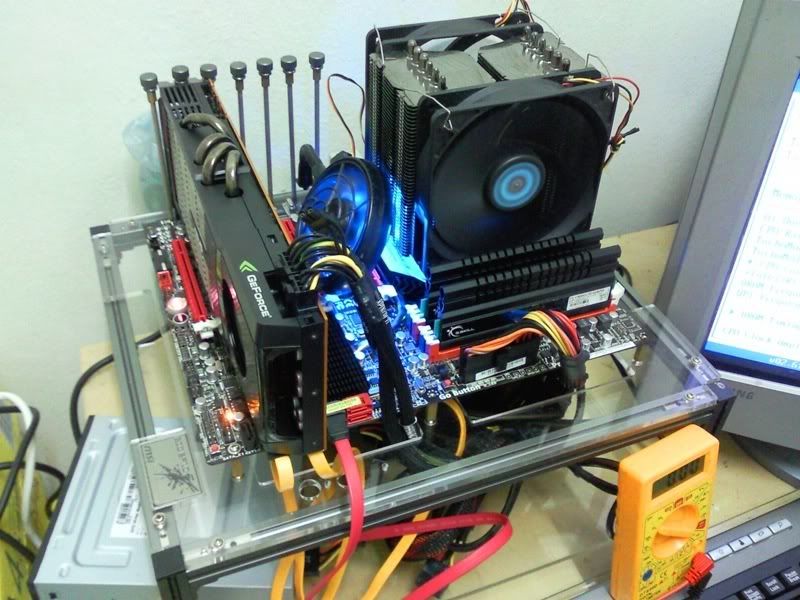
Test Bed
user posted image
* CPU: Intel® Core™ i5 655k@3.2GHz, cooled by Prolimatech Megashadow Deluxe edition.
* Motherboard: Asus Maximus III Extreme
* RAM: Gskill F3-17600CL7D-4GBPIS 4GB kit
* VGA: Asus ENG 480 GTX
* HDD: Patriot Warp V2.0 30GB SSD X 2 (RAID 0 mode)
* PSU: Antec CP850 Watt Modular PSU
* OS: Windows 7 Ultimate 32 bit


Overclocking Stability Test

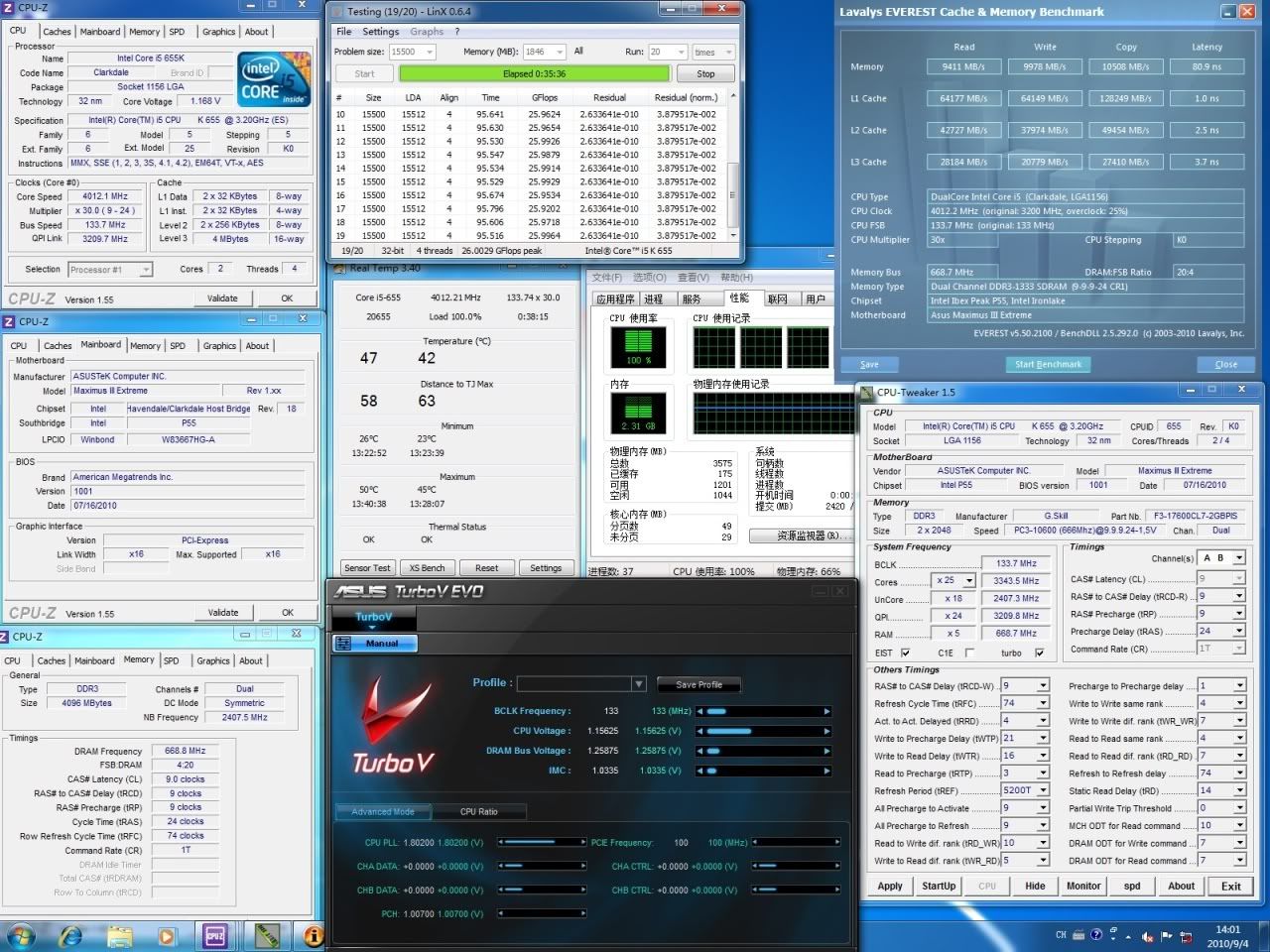
4GHz ( 133 bclk x 30 ) @ 1.15625v
user posted image
Since this is a K series CPU ( with unlocked multiplier), let's utilise the feature. laugh.gif
By adjusting the multiplier and cpu voltage, the clockspeed raised to 4GHz without sweat.
Screenshot captured in mist of LinX stress testing.
p/s: CPU-Z provides inaccurate Vcore value, Vcore bios set to 1.15625v. DMM shows 1.162v load, 1.164 idle.
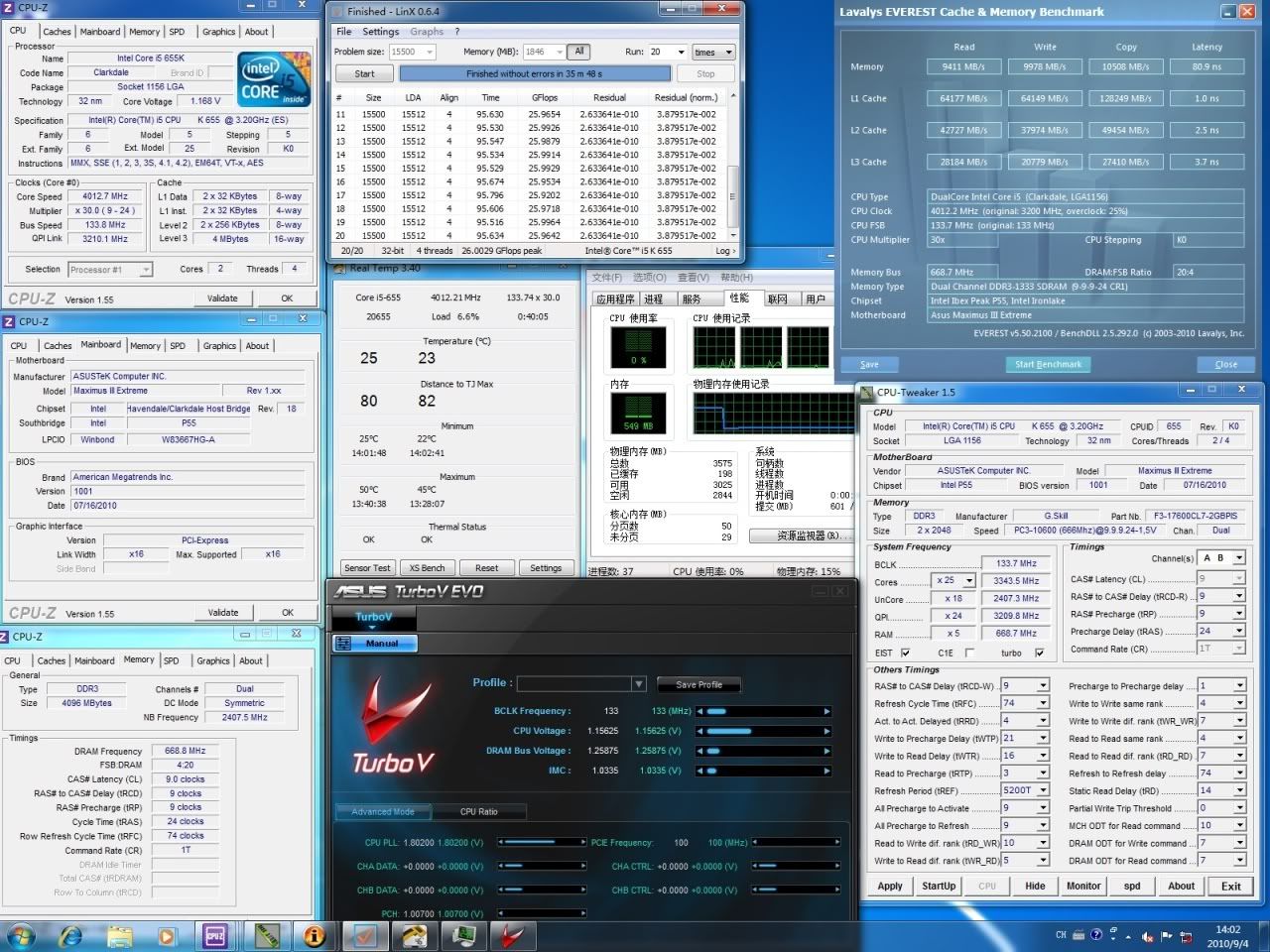
user posted image
LinX finished without error. laugh.gif

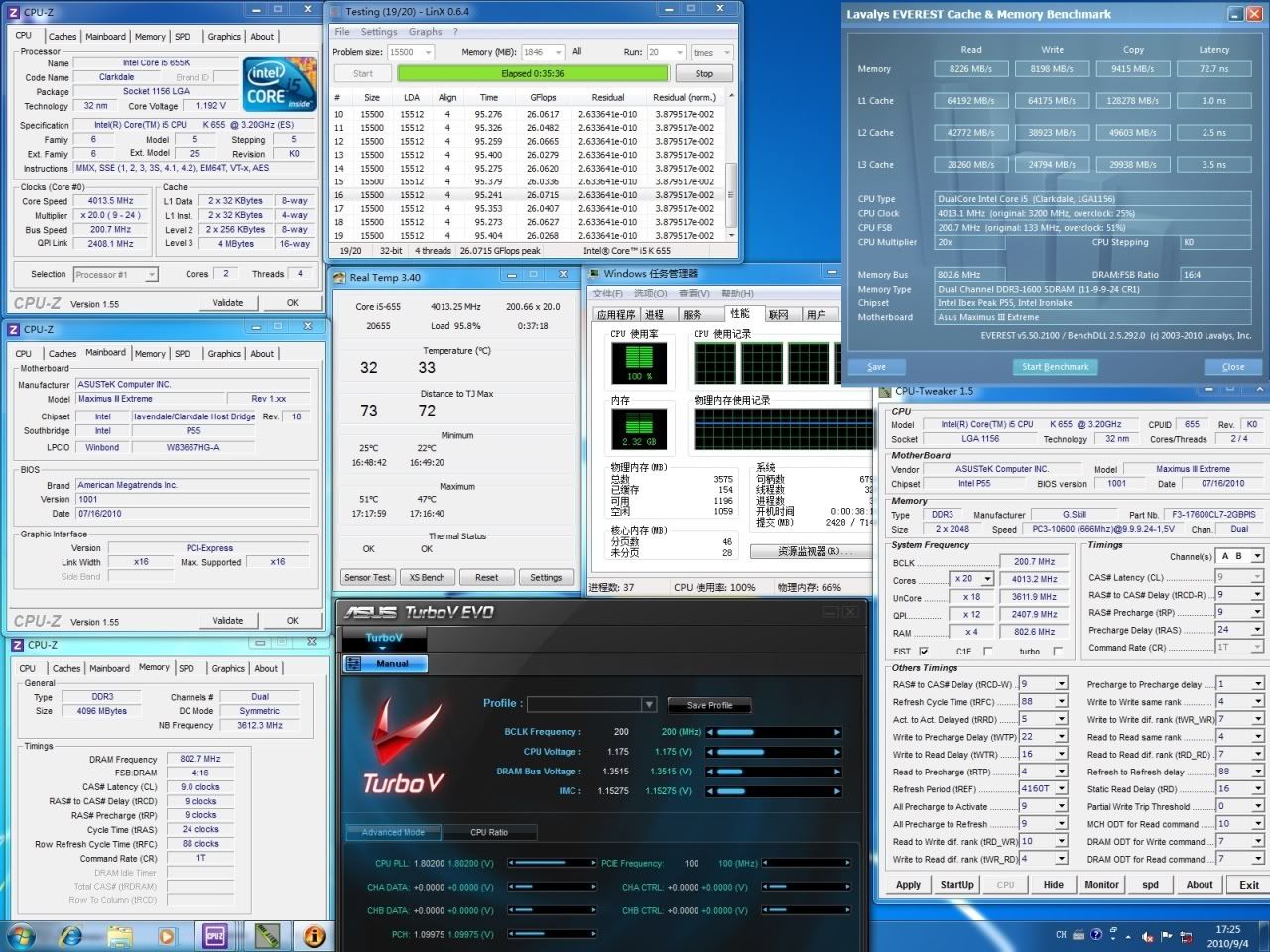
CPU: 4GHz ( 200 bclk x 20 ) @ 1.175v
(LOW QPI Link)
user posted image
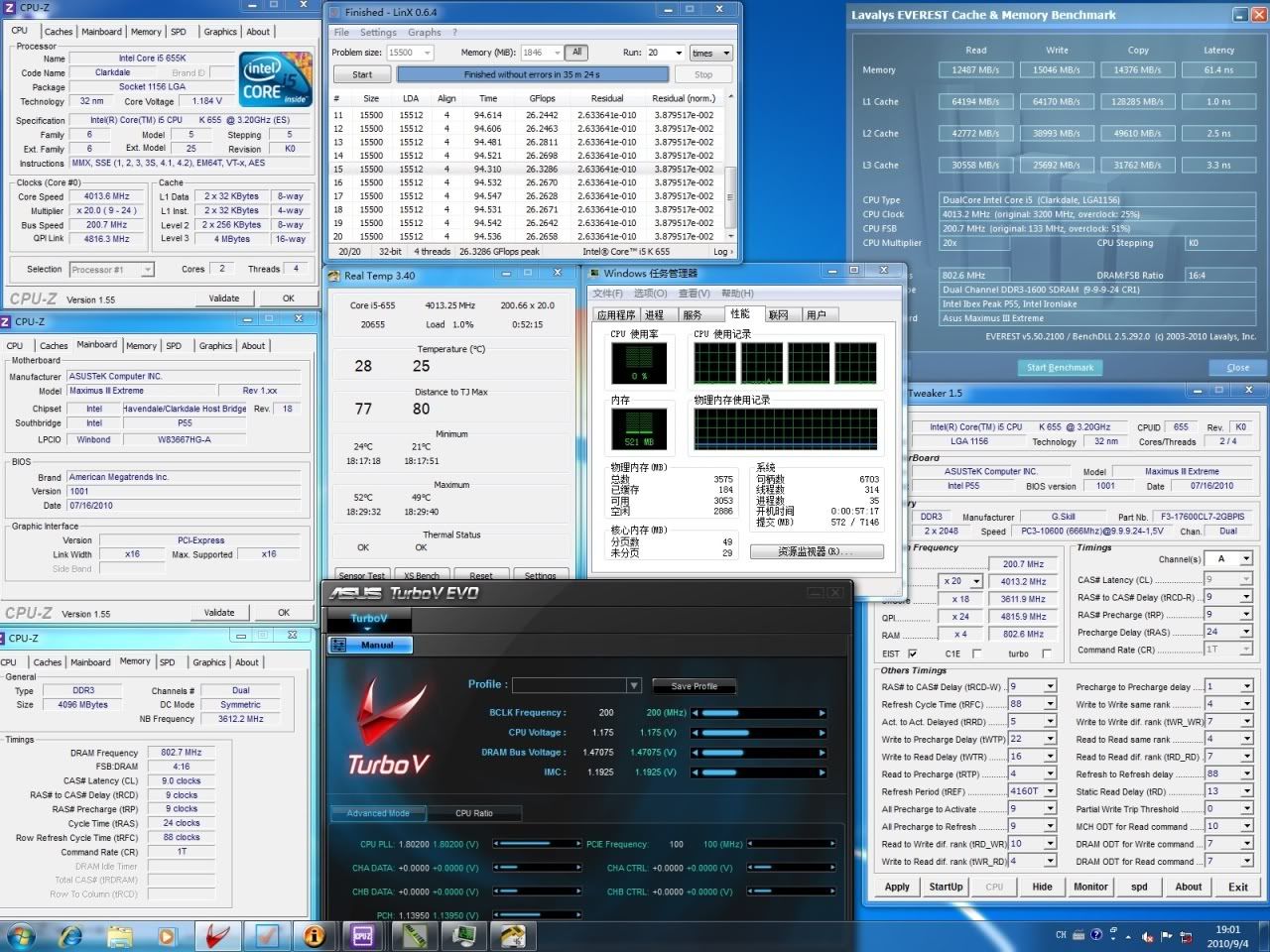
Done with easy overclocking settings, let's try some standard overclocking settings.
Now the bclk has been raised to 200MHz, CPU multiplier lower down to 20. QPI ratio set to x12 on purpose.
Other votlages settings refer to screenshot. Stress test running.
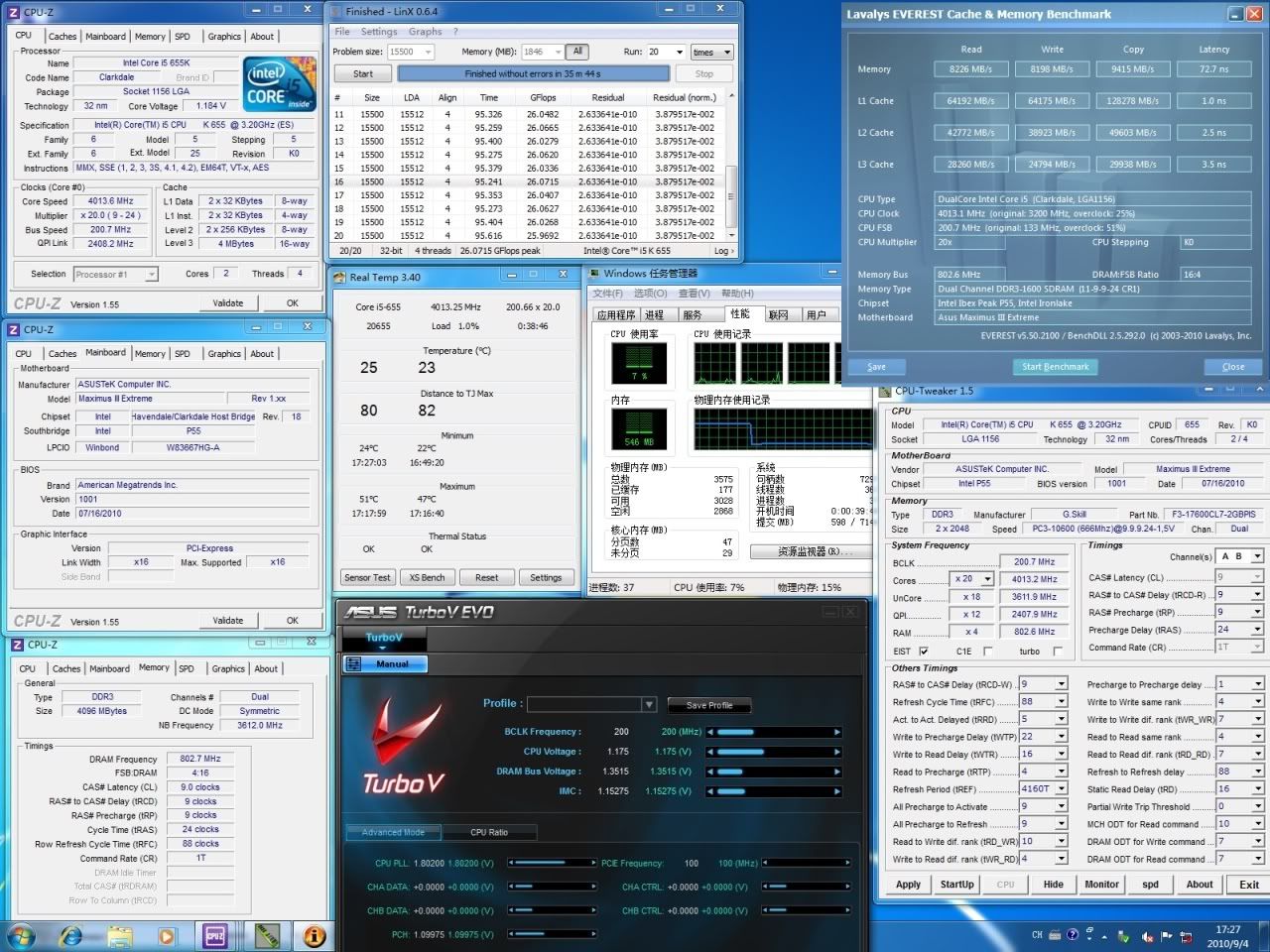
user posted image
LinX finished without error. However you may observed that memory benchmark scored lower than previous settings.
TSdblooi
post Sep 29 2010, 09:59 PM

......
******
Senior Member
1,404 posts

Joined: Apr 2006
From: ......


CPU: 4GHz ( 200 bclk x 20 ) @ 1.175v
(HIGH QPI Link)
user posted image
Now the QPI ratio raised to x24, QPI Link running at 4800MHz, VTT and Vdimm increased to 1.19v and 1.47v respectively.
The rest of the settings are all same as previous screenshot.
LinX finished without error, there are average 0.2GFlops gain per loop compared to previous settings.
Note at the memory benchmark, there is huge memory performance gain over the previous settings.
QPI Link is important in Clarkdale oc, try to keep a Clarkdale system running at high QPI link for optimum performance.


Max Bclk Challenge
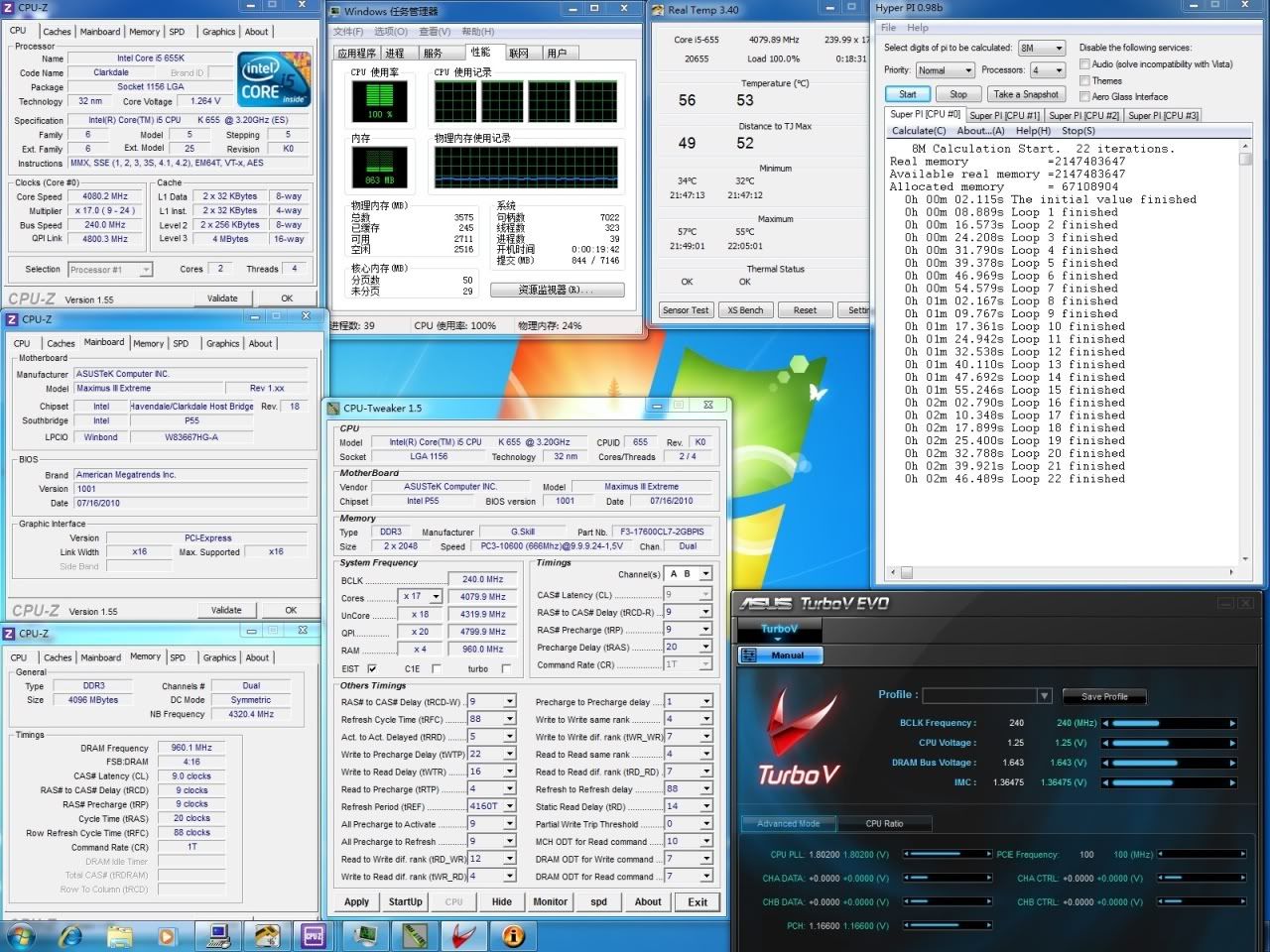
While the system is tested stable at 4GHz CPU clockspeed, let's find out what's the max Bclk it can do (under reasonable voltages setting tongue.gif ).
user posted image
Max Bclk achieved is 240MHz, with VTT set to 1.3645v. Running 4 threads of Hyper Pi 8M.

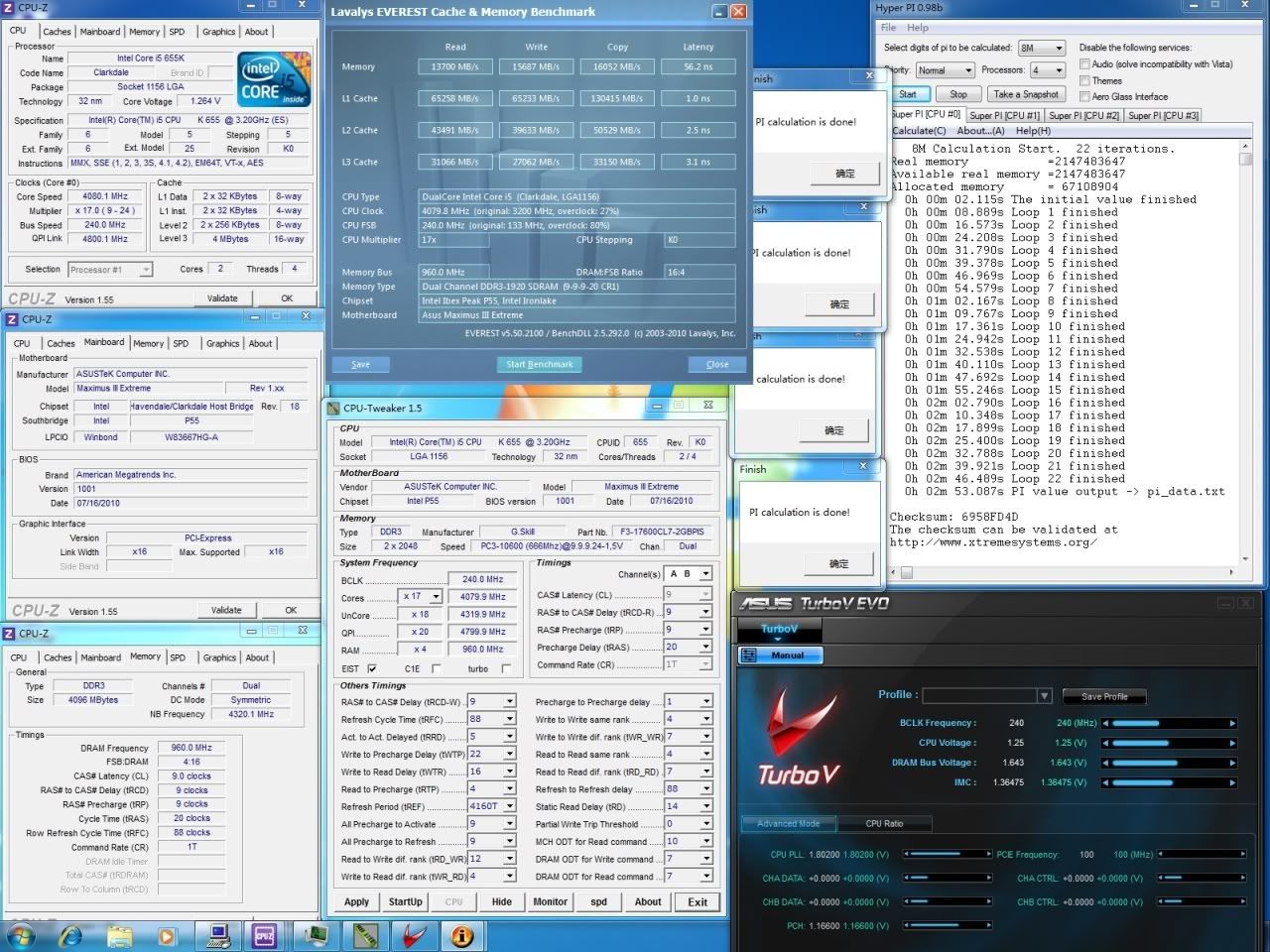
user posted image
4 threads of Hyper Pi 8M Completed. Didn't run LinX stress test though as it's not recommended settings for 24/7 usage.


Sweet Spot
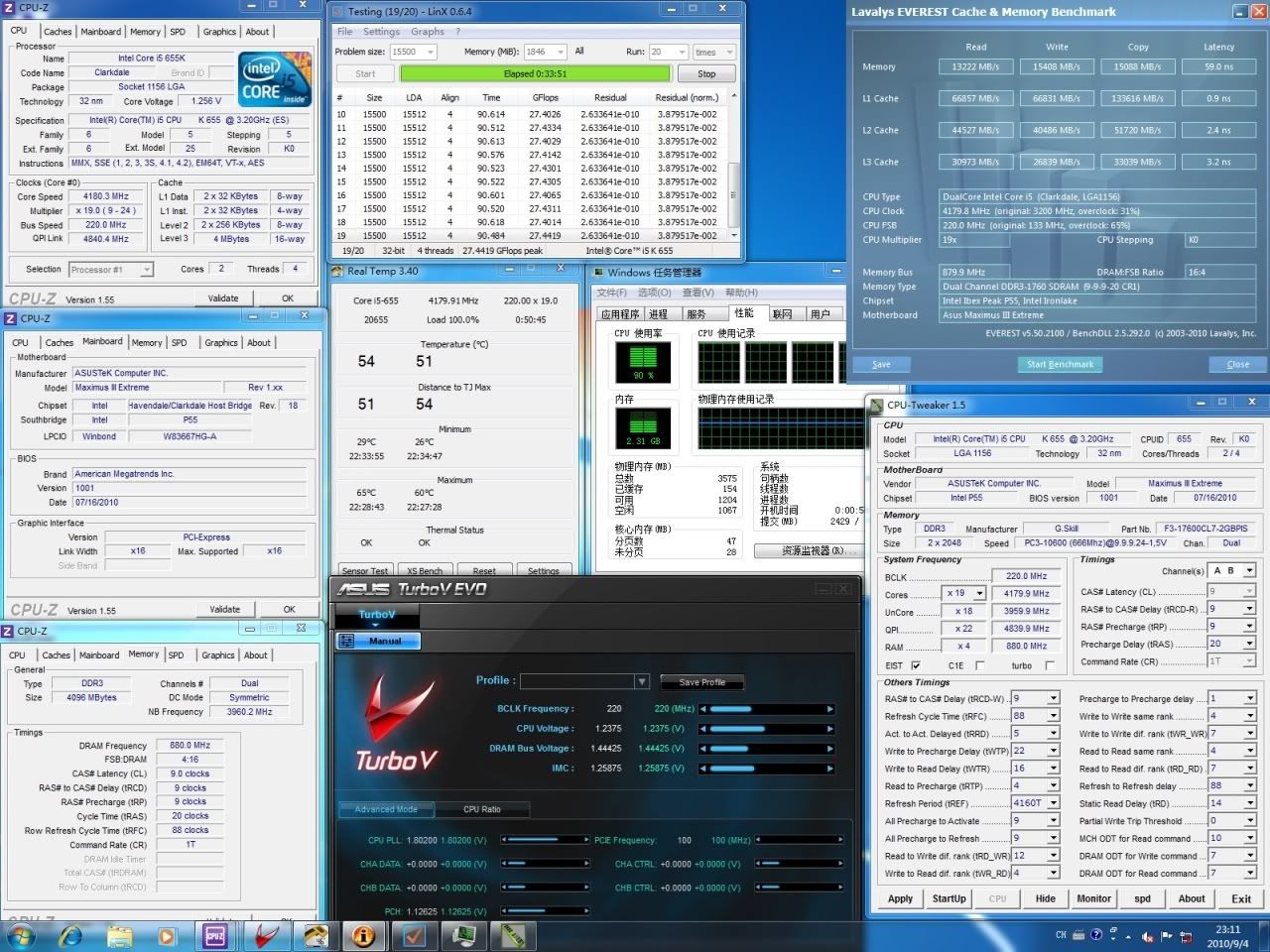
After torturing the system for few ten hours, I've sorted out a specific set of settings where i think it should be sweet spot for 24/7 usage.

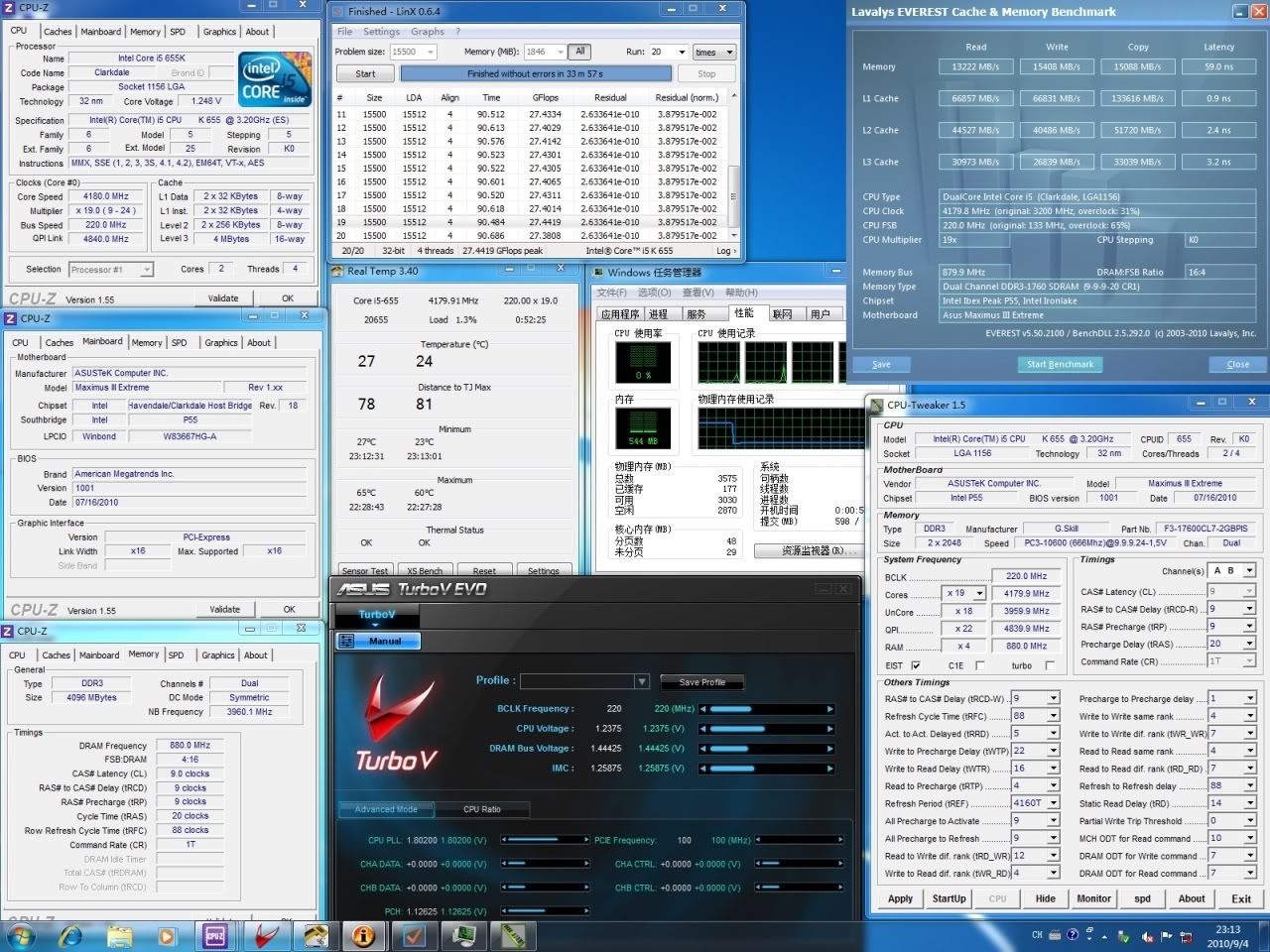
4.18GHz ( 220 bclk x 19) @ 1.2365v
user posted image
CPU clockspeed raised to 4.18GHz with the 220MHz Bclk x 19 multiplier combination, Vcore applied is 1.2365v.
The rest of the settings can be found in the screenshot. Running LinX to check on the stability.

user posted image
LinX finished without error.


Benchmark test
The system has been proven stable to run @ 4.2GHz for 24/7 usage,
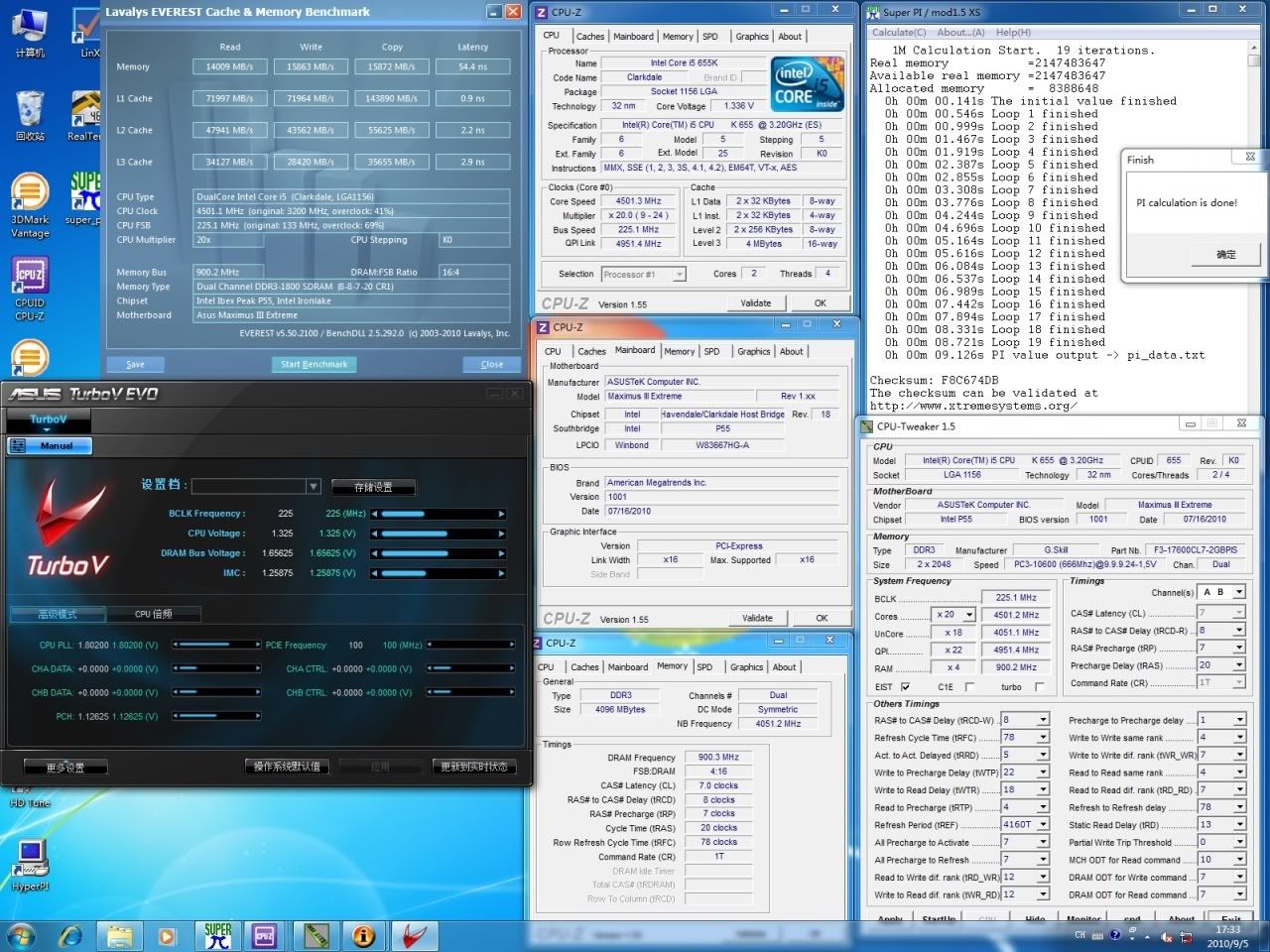
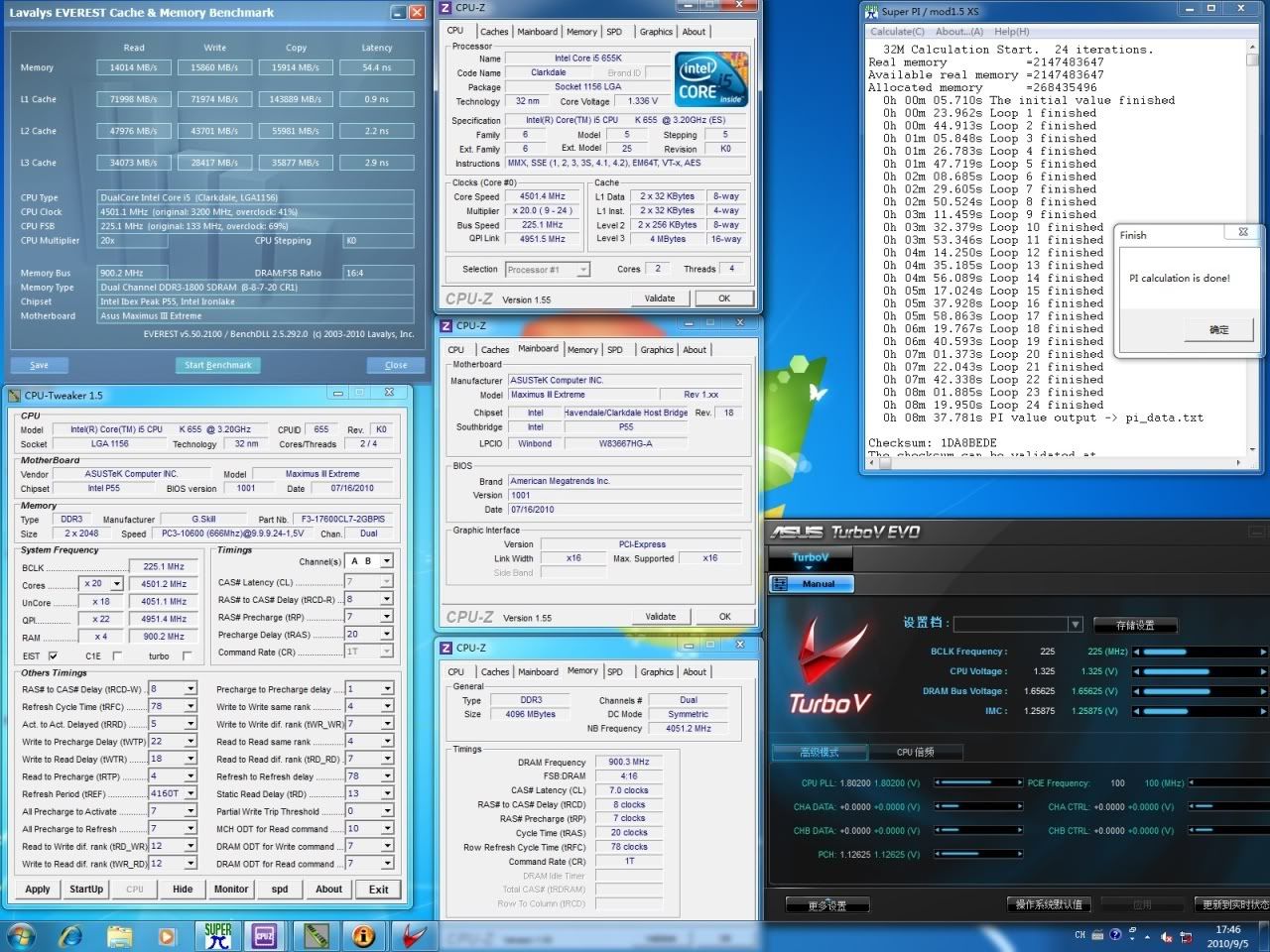
now I raised the CPU speed 4.5GHz for a few quick benchmark test.

user posted image
Start with 2D benchmark, the most popular Super Pi 1M.
Benchmark completed in 9.126s.


user posted image
Followed by Super Pi 32M, test completed in 8m 37.781s.


user posted image
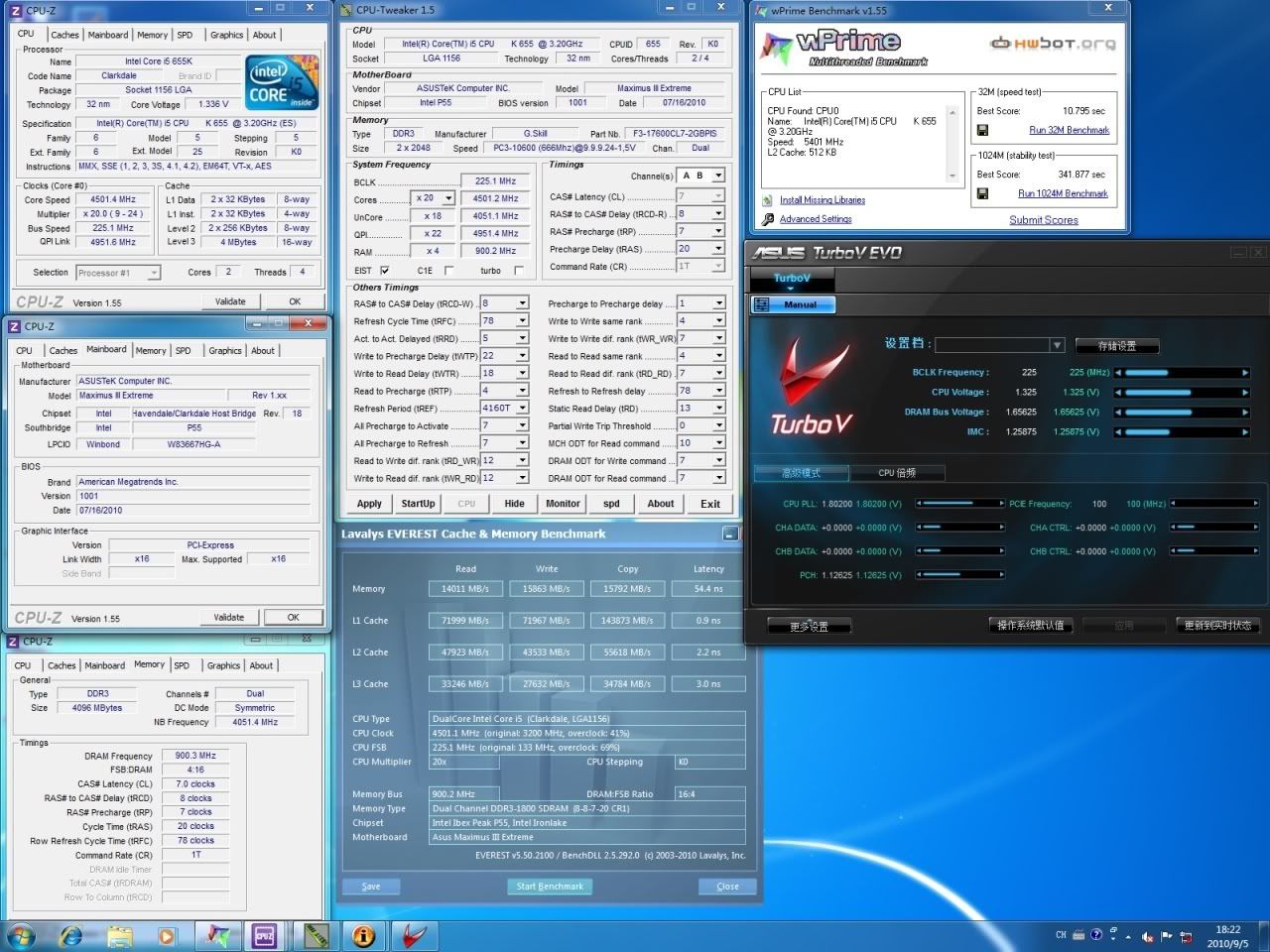
Some say Super Pi isn't good enough to determine a system performance as it's single threaded benchmark.
Hence here comes the wprime multithreaded benchmark test.
Both wprime 32M & 1024M test completed successfully in 10.795s & 341.877s respectively.


user posted image
Done with 2D benchmark test, let's do some 3D benchies.
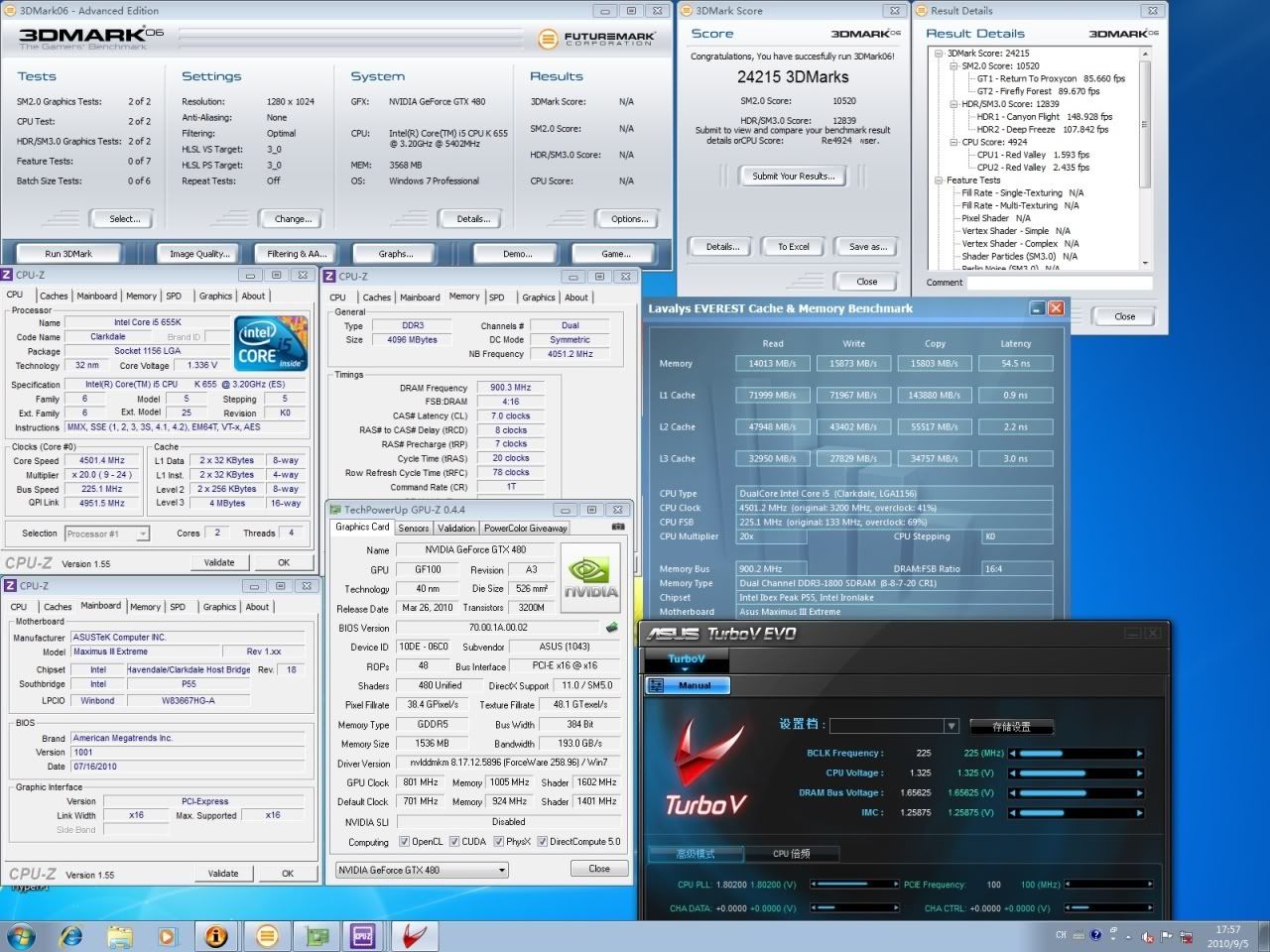
Start with 3DMark06, CPU speed maintained as 4.5GHz and graphic card overclocked to 800/1005.
Scored 24215 3DMarks.


user posted image
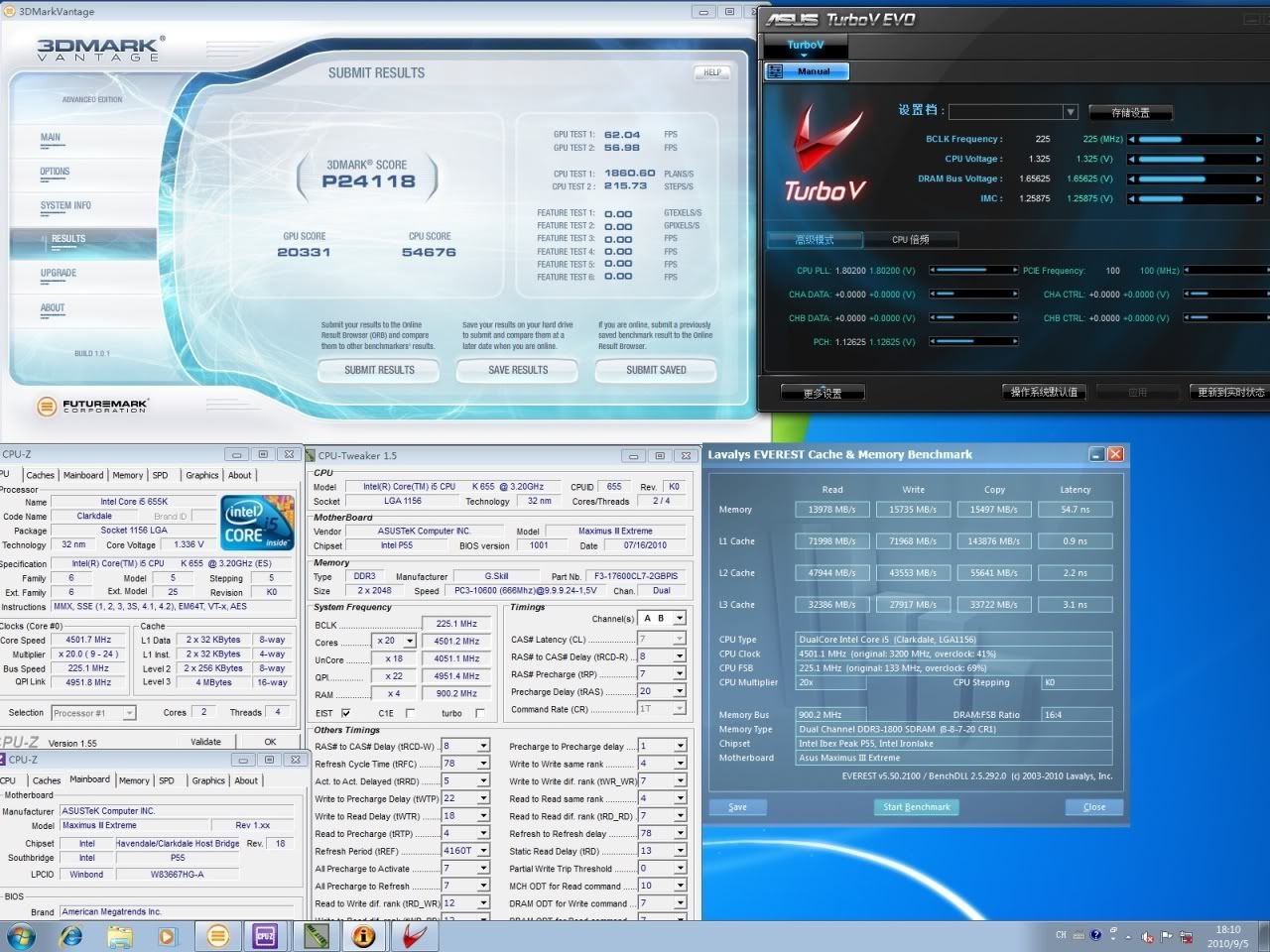
Followed by 3DMark Vantage performance mode, obtained P24118 pts. tongue.gif

This post has been edited by dblooi: Sep 29 2010, 10:31 PM
TSdblooi
post Sep 29 2010, 10:00 PM

......
******
Senior Member
1,404 posts

Joined: Apr 2006
From: ......


user posted image
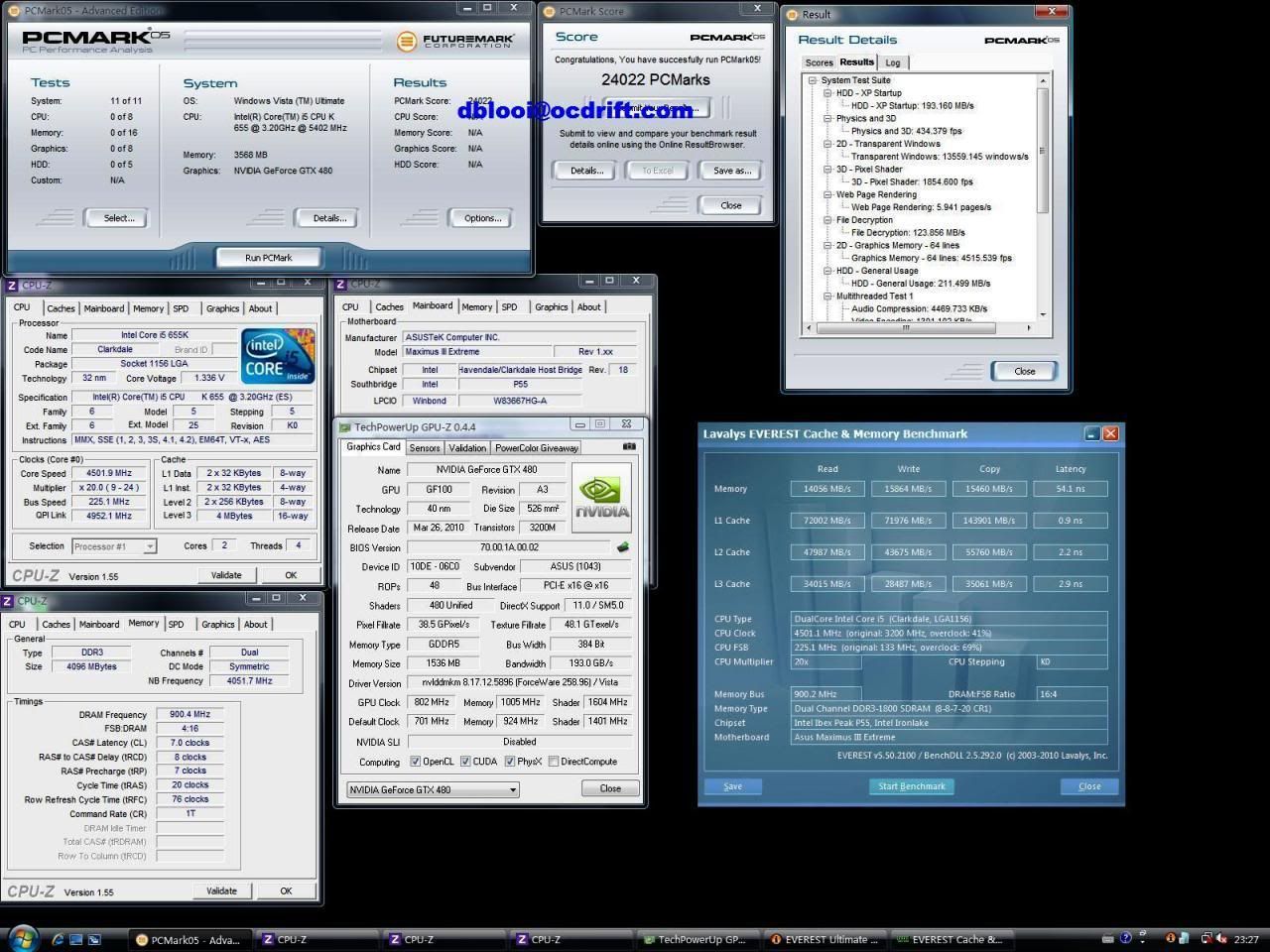
The next benchmark is PCMark05. For those who don't know,it determines overall system performance.
PCMark05 completed with 24022 pts. It's the highest score so far in hwbot Core™ i5 655k category.


Extreme Overclocking
Bored with ordinary overclocking pattern? Let's have some extreme fun! tongue.gif
user posted image
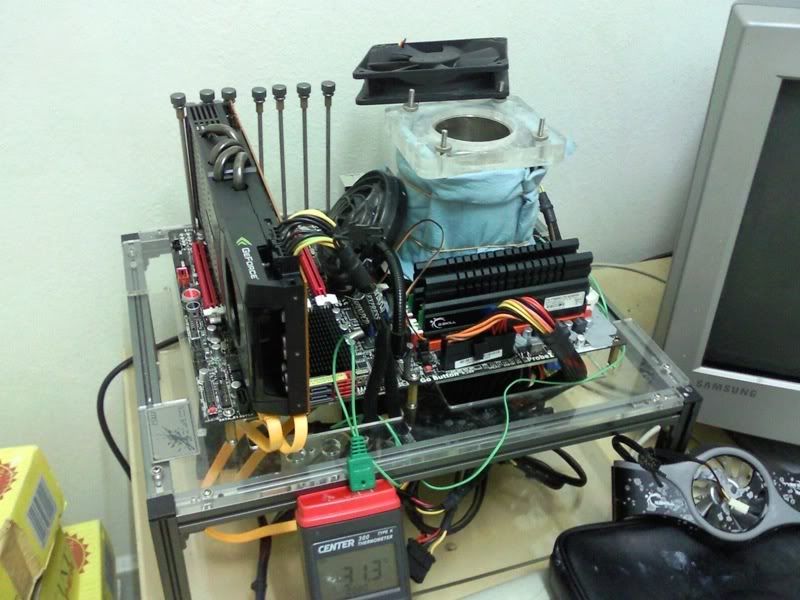
This is how the rig looks,Liquid Nitrogen is used to cool down the CPU.

user posted image
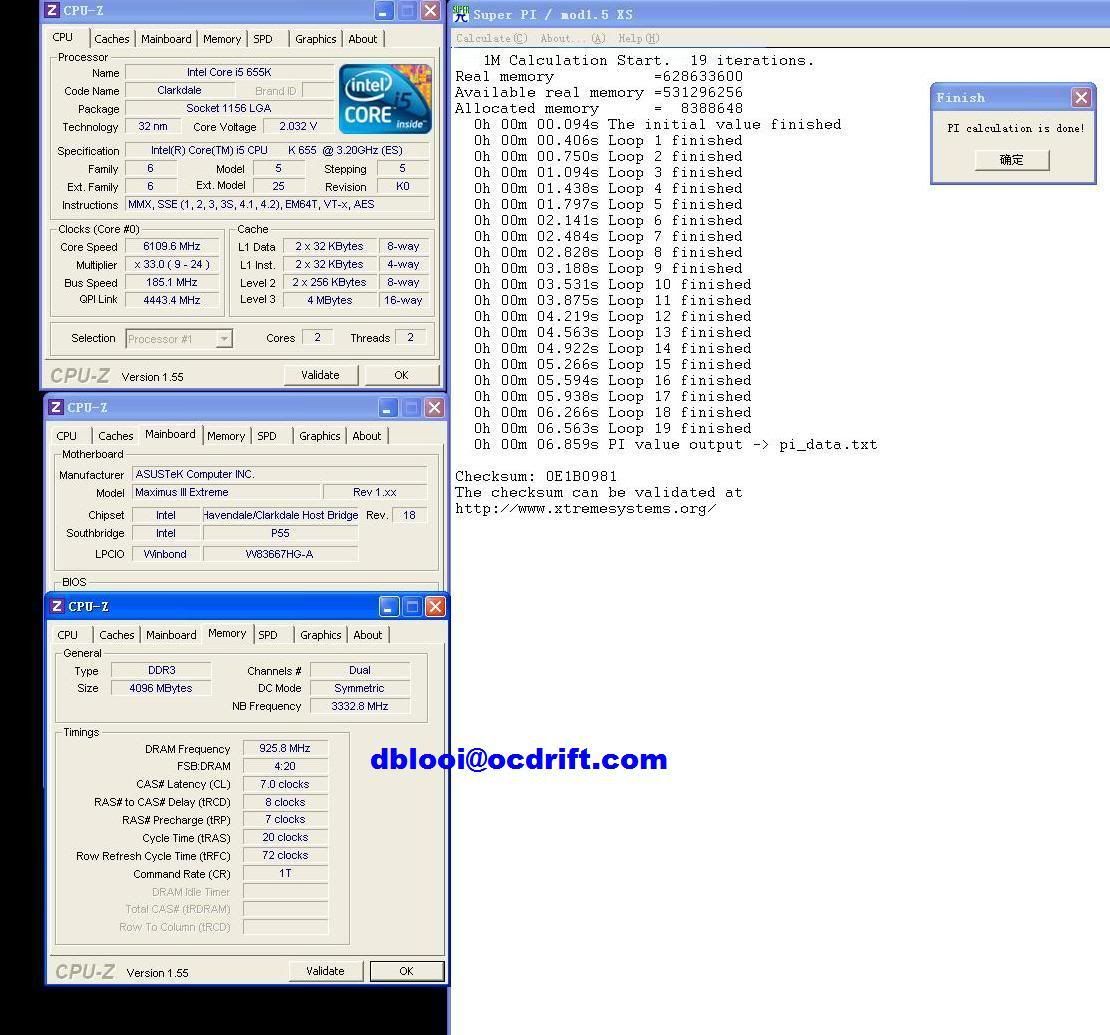
Start with Super Pi 1M, managed to push the CPU speed to 6.1GHz & test completed in 6.859s!

user posted image
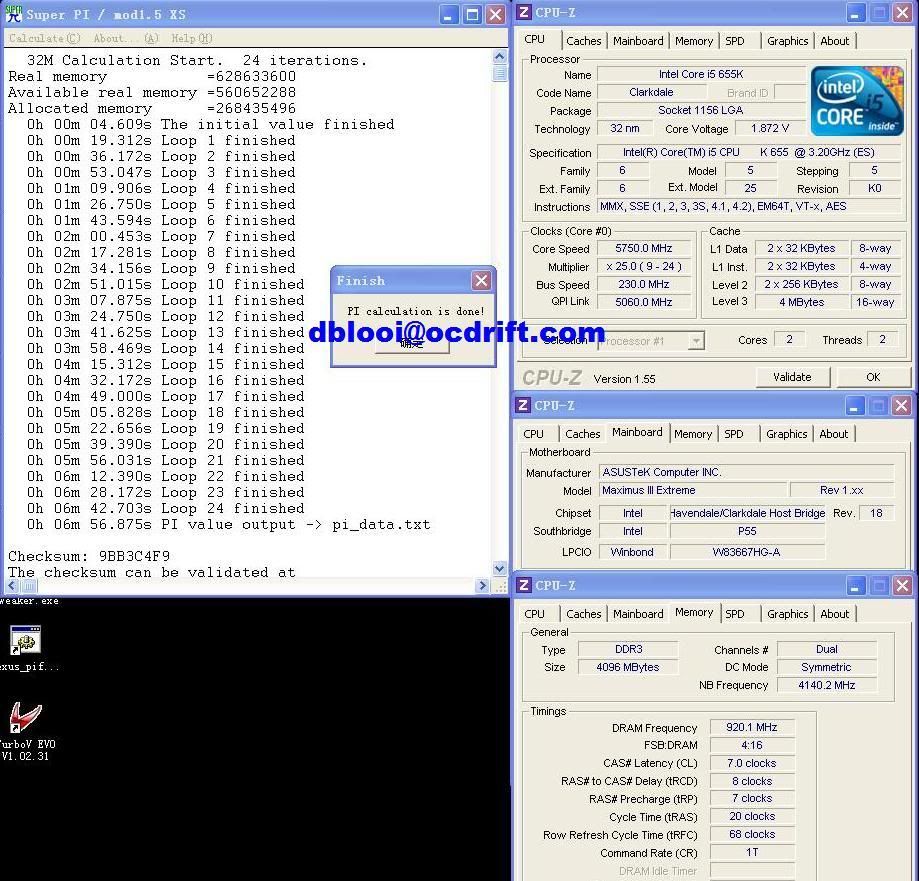
Followed by Super Pi 32M, managed to obtain sub 7min score @ CPU speed 5.75GHz.


user posted image
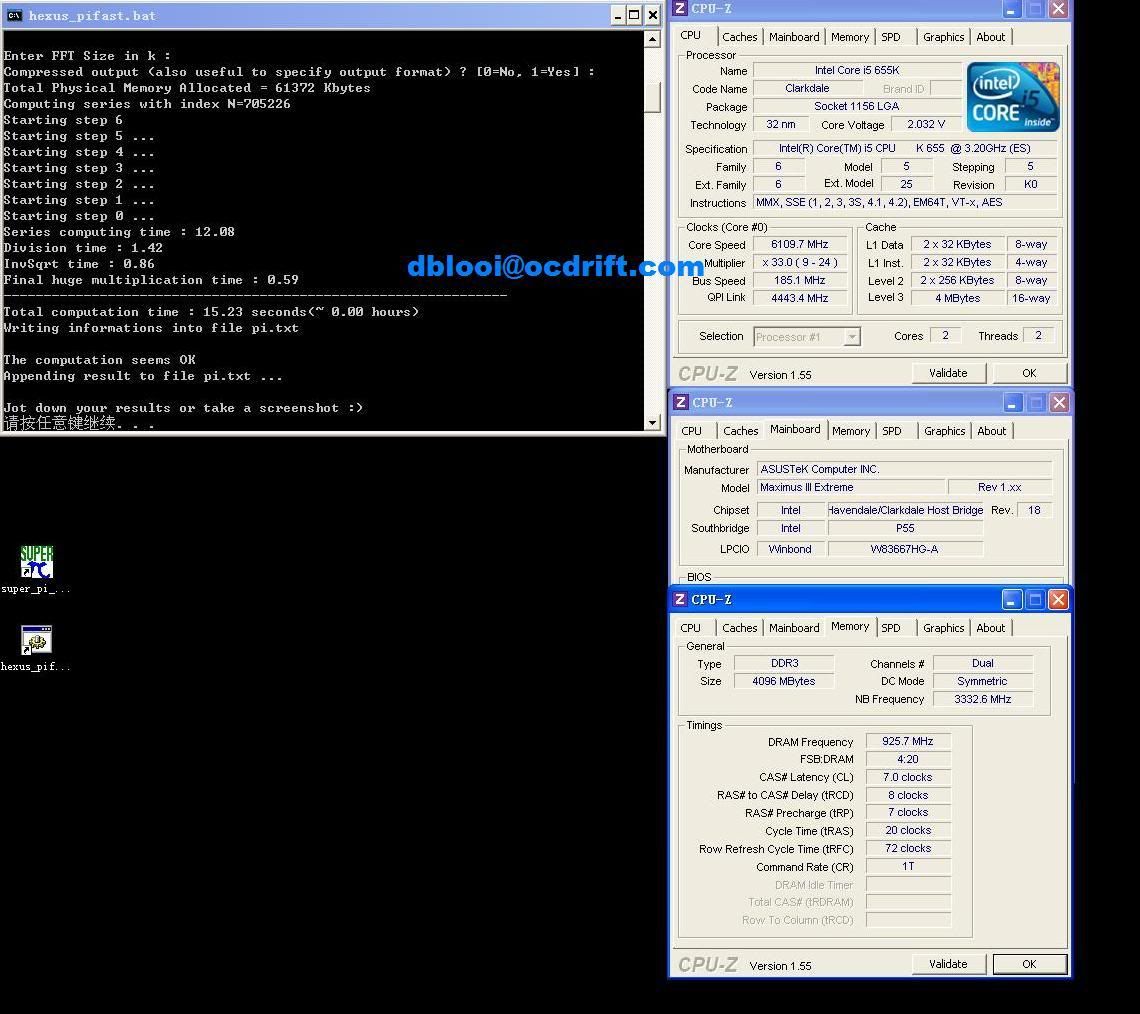
and 15.23s in Pi Fast @ 6.1GHz.

That's all from me, thanks for viewing.
Note: Special thanks to Asustek Malaysia & HWM Malaysia .

This post has been edited by dblooi: Sep 29 2010, 10:20 PM
TSdblooi
post Sep 29 2010, 10:00 PM

......
******
Senior Member
1,404 posts

Joined: Apr 2006
From: ......


Reserved

This post has been edited by dblooi: Sep 29 2010, 10:03 PM
xixo_12
post Sep 29 2010, 10:10 PM

i!Retired!i
*******
Senior Member
7,318 posts

Joined: Nov 2006
From: Pulau Sipadan

msi big bang bench table tongue.gif
anyway nice bro.. thumbup.gif
TSdblooi
post Sep 29 2010, 10:17 PM

......
******
Senior Member
1,404 posts

Joined: Apr 2006
From: ......


QUOTE(xixo_12 @ Sep 29 2010, 10:10 PM)
msi big bang bench table tongue.gif
anyway nice bro.. thumbup.gif
*
This is ONE MALAYSIA spirit tongue.gif
Thanks bro XD
hilmiangah
post Sep 29 2010, 10:32 PM

Kongsi Gelap Elite Ramadass
Group Icon
Elite
5,602 posts

Joined: Jul 2007
From: The Holiest Of Hole


me wanna oc something too sad.gif
verdict
post Sep 29 2010, 10:42 PM

Time is Flying By
*******
Senior Member
2,458 posts

Joined: Apr 2008
From: M A N C A V E


Wow! nicely done master DB~ Highest so far on hwbot Core™ i5 655k category! thumbup.gif

cant wait to touch those high end stuff~ drool.gif

This post has been edited by verdict: Sep 29 2010, 10:50 PM
louislkw
post Sep 29 2010, 10:52 PM

Casual
***
Junior Member
434 posts

Joined: Jul 2010
From: ^Newbie^


Great clock.

Spotted your name in Asus 1156 Overclocking contest. Keep it up for first 3. smile.gif
cstkl1
post Sep 30 2010, 12:56 AM

Look at all my stars!!
Group Icon
Elite
6,799 posts

Joined: Jan 2003

eh why u keep running pcmark05?? since its hdd based

its kindda easy to break 25k just with hdd help
TSdblooi
post Sep 30 2010, 10:07 AM

......
******
Senior Member
1,404 posts

Joined: Apr 2006
From: ......


QUOTE(hilmiangah @ Sep 29 2010, 10:32 PM)
me wanna oc something too sad.gif
*
i3 530 + H55 + Value ram = unlimited oc fun tongue.gif

QUOTE(verdict @ Sep 29 2010, 10:42 PM)
Wow! nicely done master DB~ Highest so far on hwbot Core™ i5 655k category! thumbup.gif

cant wait to touch those high end stuff~ drool.gif
*
Bro, check the no. of submission in category, 4 persons only tongue.gif

QUOTE(louislkw @ Sep 29 2010, 10:52 PM)
Great clock.

Spotted your name in Asus 1156 Overclocking contest. Keep it up for first 3. smile.gif
*
Thanks bro, will try my best : )

QUOTE(cstkl1 @ Sep 30 2010, 12:56 AM)
eh why u keep running pcmark05?? since its hdd based

its kindda easy to break 25k just with hdd help
*
Bro, just trying to play around with all the benchmark with hwbot pts. icon_rolleyes.gif
Talking about hdd, if you ask me in this modern day which hardware in the system bottlenecks computing performance the most,
My answer would be the hdd, and I think the scoring system of PCmark05 somehow reflecting/ leveling the real world computing experience in certain extent.
But of coz, understand the concern of majority - how come a system component that could not change voltages, could not be overclocked & could not change any parameter settings actually contributing that much of pts. tongue.gif
verdict
post Sep 30 2010, 07:01 PM

Time is Flying By
*******
Senior Member
2,458 posts

Joined: Apr 2008
From: M A N C A V E


SSD lovahhh~dayyumm... sweat.gif
CzarXVII
post Sep 30 2010, 07:25 PM

Casual
***
Junior Member
394 posts

Joined: May 2009
What a monster ohmy.gif
Thx for the review rclxms.gif rclxms.gif

This post has been edited by CzarXVII: Sep 30 2010, 07:26 PM
selfdz87
post Oct 4 2010, 07:14 PM

~5Ghz+ Club~
*****
Senior Member
932 posts

Joined: Dec 2008
From: Paris With Love


nice review bro.... thumbup.gif
keep it up... nod.gif nod.gif


Change to:
| Lo-Fi Version
0.0227sec    0.32    5 queries    GZIP Disabled
Time is now: 7th December 2025 - 11:29 PM