Welcome Guest ( Log In | Register )

Bump Topic Topic Closed RSS Feed

Outline · [ Standard ] · Linear+

 Samsung Galaxy 5 GT-I5503 (New Official Thread), The Budget Android Phone You Waiting

views
     
tesllian
post Sep 30 2010, 04:51 PM

New Member
*
Junior Member
10 posts

Joined: Jul 2009


hi all,, i just bought my galaxy 5 yesterday and im so in love it with it smile.gif bought it at Digital Mall, PJ frm a trusted distibutor, PDA Expert Mobility,,,

at the moment i'm facing 1 problem with my galaxy 5,,, im hoping that anyone could help me figure out this problem,,, *so sad*

My problem is,, i tried to connect Wi-fi from McD and some restaurants with free wi-fi,,, i can connect without any problem.

But when i went back to my house and tried to connect to my own house's secured wifi, it seemed that my galaxy 5 couldn't make a connection with it,, im currectly using Aztec modem and i really don't have any idea about it since my laptop and other phone can connect to my house's wi-fi without any problem,,,,

is there anyone out there would like to help me out regarding this problem? i'm still so excited with my first android phone but get really upset when i can't connect to wi-fi at my own house sad.gif

ur help is much appreciated and thank u in advance smile.gif


tesllian
post Sep 30 2010, 05:11 PM

New Member
*
Junior Member
10 posts

Joined: Jul 2009


QUOTE(StupidGuyPlayComp @ Sep 30 2010, 04:55 PM)
Your aztec router setting correct?
DHCP setting?
*
err,,, i'm not sure (bcause i don't know how to check the setting). but if the setting is not right then how come my other devices (laptop) can connect to it except for my g5?
tesllian
post Sep 30 2010, 05:34 PM

New Member
*
Junior Member
10 posts

Joined: Jul 2009


QUOTE(sjn hassan @ Sep 30 2010, 05:16 PM)
i think u'r HP got a problem with the security...btw what type of security do u use?  hmm.gif

** just connect to my Bro's secured network..he's using WPA2 type
*
my using wep security,,
tesllian
post Sep 30 2010, 05:35 PM

New Member
*
Junior Member
10 posts

Joined: Jul 2009


how do i check whether my router is the problem? meaning how to do the setting for aztec router so tht my g5 cn connect to the wifi
tesllian
post Sep 30 2010, 05:39 PM

New Member
*
Junior Member
10 posts

Joined: Jul 2009


QUOTE(StupidGuyPlayComp @ Sep 30 2010, 05:35 PM)
99% is your setting problem...........

you need to follow your laptop setting, most possibility your laptop and aztec modem are not using DHCP
*
thnk u for the info,,, but im just a gurl who dunno about those settings,,huhu. cn u tell me how do i check whether or not my aztec is/is not using DHCP ?
tesllian
post Sep 30 2010, 05:42 PM

New Member
*
Junior Member
10 posts

Joined: Jul 2009


QUOTE(StupidGuyPlayComp @ Sep 30 2010, 05:41 PM)
smile.gif Sorry, I will explain further on tonight if you still unable connect.........I working now
*
oh alright. thx a lot wink.gif happy work-in smile.gif
tesllian
post Sep 30 2010, 06:08 PM

New Member
*
Junior Member
10 posts

Joined: Jul 2009


QUOTE(sjn hassan @ Sep 30 2010, 05:59 PM)
yup..WEP is common wifi security..all device should support it
If u are leng lui gurl then we can help..if not..sorry we are busy  tongue.gif

* what windows are u using now?XP / 7 ? imho u'r router is DHCP on...don't think normal user will set the DHCP to OFF. do u know how to check the wifi status at the laptop?
*
im now using windows 7,, err yes i dunno how to check wifi status on lptop biggrin.gif dumb me
tesllian
post Sep 30 2010, 07:56 PM

New Member
*
Junior Member
10 posts

Joined: Jul 2009


QUOTE(StupidGuyPlayComp @ Sep 30 2010, 07:48 PM)
Dont manually add the wifi, let it detect automatically............

your modem should let it broadcast, if your Galaxy 5 unable automatic detect, high possible the modem broadcast is off........

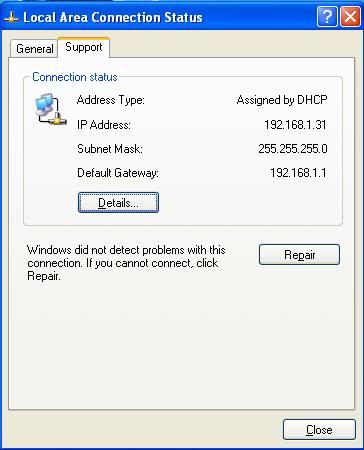
You know how to view the IP configuration on your laptop?

example
user posted image
*
my h5 can detect the wifi but just cannot connect to it (when my other device can connect to the wifi),, but when i go to any other places i cn connect,, this is driving me insane uhuhu


Added on September 30, 2010, 7:57 pmsory,, not h5, g5

This post has been edited by tesllian: Sep 30 2010, 07:57 PM
tesllian
post Sep 30 2010, 08:15 PM

New Member
*
Junior Member
10 posts

Joined: Jul 2009


QUOTE(StupidGuyPlayComp @ Sep 30 2010, 08:04 PM)
smile.gif How about DHCP and IP config?

I using WEP, but I able to connect


Added on September 30, 2010, 8:07 pm
USB tethering can, I try via "Easytethering"

I dint go further for wireless tethering, it said my phone not root and kernel not support.

kernel problem mean OS problem? hmm.gif
i knew ANdroid 2.1 is not support tethreing
*
i dunno how to check the config,,, if u dont mind maybe u cn tell me a bit biggrin.gif
tesllian
post Sep 30 2010, 08:32 PM

New Member
*
Junior Member
10 posts

Joined: Jul 2009


QUOTE(StupidGuyPlayComp @ Sep 30 2010, 08:19 PM)
You can view this window from your laptop? (wireless one)
is that show Assigned by DHCP?
user posted image
*
i cant find the box but i find sth else regarding the wireless info,, and it says " DHCP enabled"

Topic ClosedOptions
 

Change to:
| Lo-Fi Version
0.0483sec    0.35    7 queries    GZIP Disabled
Time is now: 1st December 2025 - 08:55 PM