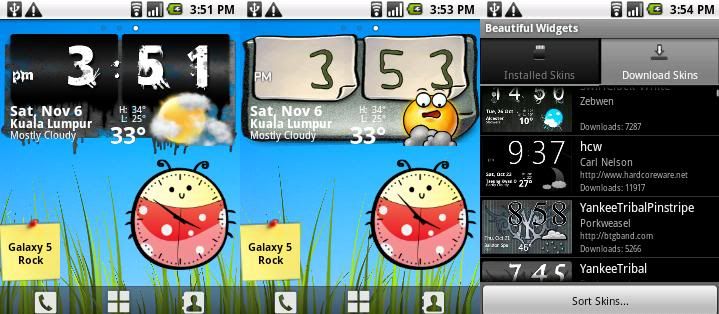
i see..seem my area had problem to access gps..from yellow to green then to grey then yellow and green again,..
Samsung Galaxy 5 GT-I5503 (New Official Thread), The Budget Android Phone You Waiting
Samsung Galaxy 5 GT-I5503 (New Official Thread), The Budget Android Phone You Waiting
|
|
 Nov 6 2010, 07:50 PM Nov 6 2010, 07:50 PM
|
 
Junior Member
419 posts Joined: Feb 2010  
|
i see..seem my area had problem to access gps..from yellow to green then to grey then yellow and green again,..
|
|
|
|
|
|
Nov 6 2010, 07:53 PM
|

All Stars
13,681 posts Joined: Mar 2006
|
QUOTE(chonkit @ Nov 6 2010, 07:50 PM) i see..seem my area had problem to access gps..from yellow to green then to grey then yellow and green again,.. Its normal, the "bar" only indicate respective satellite status..... Once it success locked, the top left "GPS Status Dot" will turn green |
|
|
Nov 6 2010, 07:59 PM
|
|
Junior Member
419 posts Joined: Feb 2010
|
ok..thx for the guidance..haha..now go try again..haha
|
|
|
Nov 6 2010, 08:53 PM
|
|
All Stars
13,681 posts Joined: Mar 2006
|
QUOTE(chonkit @ Nov 6 2010, 07:59 PM) ok..thx for the guidance..haha..now go try again..haha  first few time are difficult to lock..........need longer time first few time are difficult to lock..........need longer time |
|
|
Nov 6 2010, 08:57 PM
|

Junior Member
287 posts Joined: Jan 2007
|
QUOTE(StupidGuyPlayComp @ Nov 6 2010, 07:25 PM) Download the "GPS Test", once the signal turn green meaning locking successfully..............at least GPS test got some "movement in satellite", not as boring as papago during locking Added on November 6, 2010, 7:29 pm  Papago new map released, version 11-Nov 2010, hurry up go and download Papago new map released, version 11-Nov 2010, hurry up go and downloadPapago new map 04-11-2010 |
|
|
Nov 6 2010, 08:58 PM
|
|
All Stars
13,681 posts Joined: Mar 2006
|
QUOTE(gocke55014 @ Nov 6 2010, 08:57 PM) thanx a lot buddy, ive been waiting a long time for the map update... will try later.. hehehehe  I still downloading via my crappy internet connection, 295MB I still downloading via my crappy internet connection, 295MB  |
|
|
|
|
|
Nov 6 2010, 09:03 PM
|
|
Junior Member
287 posts Joined: Jan 2007
|
QUOTE(StupidGuyPlayComp @ Nov 6 2010, 08:58 PM) I still downloading via my crappy internet connection, 295MB |
|
|
Nov 6 2010, 09:04 PM
|
|
Junior Member
72 posts Joined: Oct 2010
|
QUOTE(StupidGuyPlayComp @ Nov 6 2010, 08:58 PM) I still downloading via my crappy internet connection, 295MB |
|
|
Nov 6 2010, 09:06 PM
|
|
All Stars
13,681 posts Joined: Mar 2006
|
QUOTE(jfan8ds @ Nov 6 2010, 09:04 PM) Once downloaded the new map, can the old one be deleted from SD card? Can.................. |
|
|
Nov 6 2010, 09:12 PM
|
|
Junior Member
72 posts Joined: Oct 2010
|
QUOTE(StupidGuyPlayComp @ Nov 6 2010, 09:06 PM) Can.................. That means the entire NaviSEA folder can be deleted? |
|
|
Nov 6 2010, 09:23 PM
|
|
All Stars
13,681 posts Joined: Mar 2006
|
Papago X5 Map Update version 4-Nov-2010
1. Open this link and choose "custom" to downlad, 295MB Papago Map Download - Click Here 2. Open the downloaded file "MFM-PPG-101104C.exe" 3. Choose map for "Android Papago X5" 4. Select a extract location on your computer 5. Get the folder "MFM-PPG-101104C" after the extraction 6. Enter above folder and copy all the file (261MB) 7. Replace all the file in phone SDCARD\NaviSEA\Maps\Malaysia\ This post has been edited by StupidGuyPlayComp: Nov 6 2010, 09:23 PM |
|
|
Nov 6 2010, 09:27 PM
|

Senior Member
987 posts Joined: Dec 2009 From: Kuala Lumpur
|
QUOTE(StupidGuyPlayComp @ Nov 6 2010, 10:23 PM) Papago X5 Map Update version 4-Nov-2010 this is for updating? if i dun have papago yet,can i use this? My idea is not 1. Open this link and choose "custom" to downlad, 295MB Papago Map Download - Click Here 2. Open the downloaded file "MFM-PPG-101104C.exe" 3. Choose map for "Android Papago X5" 4. Select a extract location on your computer 5. Get the folder "MFM-PPG-101104C" after the extraction 6. Enter above folder and copy all the file (261MB) 7. Replace all the file in phone SDCARD\NaviSEA\Maps\Malaysia\  |
|
|
Nov 6 2010, 09:27 PM
|
|
All Stars
13,681 posts Joined: Mar 2006
|
QUOTE(iwant2 @ Nov 6 2010, 09:27 PM) this is for updating? if i dun have papago yet,can i use this? My idea is not Cant, you need to install papago x5 first |
|
|
|
|
|
Nov 6 2010, 09:29 PM
|
|
Senior Member
987 posts Joined: Dec 2009 From: Kuala Lumpur
|
QUOTE(StupidGuyPlayComp @ Nov 6 2010, 10:27 PM) Cant, you need to install papago x5 first kk... im having problem with my hdd  |
|
|
Nov 6 2010, 09:52 PM
|

Senior Member
669 posts Joined: Jan 2006 From: Anfield
|
» Click to show Spoiler - click again to hide... «  thx bro... » Click to show Spoiler - click again to hide... « downloading it now.... » Click to show Spoiler - click again to hide... « thx again  |
|
|
Nov 6 2010, 09:52 PM
|

Junior Member
334 posts Joined: Jan 2009 From: sunway
|
SGPG,
1)thank you for the link for Ndrive !! downloading... 2)under which folder should i change the new map of Papago? could u explain the steps in brief? same as Garmin? copy & paste? 3) i never use the GPS Test app for my Papago, just turn and i'll lock in few minutes..BUT i just realize i never have the gps icon on top of my homescreen at all when using Papago, is that normal? 4) i cannot find the Gps Optimizer apps in the market...hmmm Added on November 6, 2010, 9:56 pmoh no, the Ndrive file corrupted..cannot extract using winRar This post has been edited by jass80: Nov 6 2010, 09:56 PM |
|
|
Nov 6 2010, 10:01 PM
|
|
All Stars
13,681 posts Joined: Mar 2006
|
QUOTE(jass80 @ Nov 6 2010, 09:52 PM) SGPG, Papago's map update guide posted at #11981)thank you for the link for Ndrive !! downloading... 2)under which folder should i change the new map of Papago? could u explain the steps in brief? same as Garmin? copy & paste? 3) i never use the GPS Test app for my Papago, just turn and i'll lock in few minutes..BUT i just realize i never have the gps icon on top of my homescreen at all when using Papago, is that normal? 4) i cannot find the Gps Optimizer apps in the market...hmmm Added on November 6, 2010, 9:56 pmoh no, the Ndrive file corrupted..cannot extract using winRar If no logo at top of papago meaning you already successful lock the sattelite, its normal Ndrive file corrupted? which link you down? |
|
|
Nov 6 2010, 10:04 PM
|
|
Junior Member
58 posts Joined: Mar 2007
|
Thanks for the recommended aps. Go chat is nice.
There is once when i was in fb, then suddenly got call. There's this noise. Is it because i was browsing or the line is bad? |
|
|
Nov 6 2010, 10:12 PM
|
|
Junior Member
419 posts Joined: Feb 2010
|
ei..any alarm apps recommended?
|
|
|
Nov 6 2010, 10:12 PM
|
|
Junior Member
334 posts Joined: Jan 2009 From: sunway
|
QUOTE(StupidGuyPlayComp @ Nov 6 2010, 10:01 PM) » Click to show Spoiler - click again to hide... « Ndrive file corrupted? which link you down? |
|
Topic ClosedOptions
|
| Change to: |  0.0177sec 0.0177sec
 0.64 0.64
 6 queries 6 queries
 GZIP Disabled GZIP Disabled
Time is now: 2nd December 2025 - 09:28 AM |
 Quote
Quote