

QUOTE(StupidGuyPlayComp @ Nov 6 2010, 04:04 PM)
 I m not sure, as I remember 1 of the forumer tried it before.............
Samsung Galaxy 5 GT-I5503 (New Official Thread), The Budget Android Phone You Waiting
|
|
 Nov 6 2010, 04:09 PM Nov 6 2010, 04:09 PM
|
 
Junior Member
39 posts Joined: Nov 2009 
|
QUOTE(StupidGuyPlayComp @ Nov 6 2010, 04:04 PM) I m not sure, as I remember 1 of the forumer tried it before............. |
|
|
|
|
|
Nov 6 2010, 04:10 PM
|

Junior Member
419 posts Joined: Feb 2010 
|
so google mail ,talk consider stock apps rite..haha..then i wont touch it..but y when i send chinese word song to my g5, the title of the song become weird character?
|
|
|
Nov 6 2010, 04:15 PM
|

Junior Member
243 posts Joined: Mar 2010 From: Ipoh
|
omg.. i have sms problem again.
i m using digi with handcent sms, but tis time i din on my gps, sms cant send out again. but after few minutes come back n try, then it works. sigh.. y is it like tis.. |
|
|
Nov 6 2010, 04:26 PM
|
|
Junior Member
419 posts Joined: Feb 2010
|
ei..y my g5 music player cant recognize chinese song de..the title of song is in weird character instead of the original word.
|
|
|
Nov 6 2010, 04:45 PM
|
|
Junior Member
72 posts Joined: Oct 2010
|
QUOTE(StupidGuyPlayComp @ Nov 6 2010, 02:58 PM)  G5 definitely better than e120 in term of processor............ G5 definitely better than e120 in term of processor............others spec almost the same Added on November 6, 2010, 2:59 pm I get the same result with you..........some forumer said that Galaxy 3 stock browser can show Flash Lite 3.1 installedAdded on November 6, 2010, 3:01 pm  Welcome...........you need to hold and tap for 2 second Welcome...........you need to hold and tap for 2 secondAdded on November 6, 2010, 3:03 pm It only customize able via 3rd party apps like ADW, launcher pro plus, ahome.........etceventhose with the 3rd party apps, you can customize yourselves, only base on the theme using Added on November 6, 2010, 3:04 pm Depend on the usage.............GPS draining the battery fast, wifi and 3g as well if none of above function using, 3 days no problem Added on November 6, 2010, 3:09 pm http://dl.dropbox.com/u/1566781/NDrive-10....-androboost.apk http://dl.dropbox.com/u/1566781/NDrive.rar pass:galaxys (the link provided by other forumer) GPS draining the battery fast, wifi and 3g as well if none of above function using, 3 days no problem - Do you mean if use papago or turning on built in GPS but without the papago? Added on November 6, 2010, 4:53 pmIs it normal, the phone will become slightly warm when using wifi? This post has been edited by jfan8ds: Nov 6 2010, 04:53 PM |
|
|
Nov 6 2010, 05:18 PM
|
|
Junior Member
419 posts Joined: Feb 2010
|
ei..sry ya..but how come my papago gps lock me at jalan p.ramlee when i din at there?
|
|
|
|
|
|
Nov 6 2010, 05:22 PM
|
|
Junior Member
243 posts Joined: Mar 2010 From: Ipoh
|
QUOTE(chonkit @ Nov 6 2010, 04:26 PM) ei..y my g5 music player cant recognize chinese song de..the title of song is in weird character instead of the original word. android os only able to detect utf mp3 tag, if not wrong.usually chinese songs mp3 tag are in big5 or GB. so u actually need to convert urself. |
|
|
Nov 6 2010, 05:24 PM
|
|
Junior Member
419 posts Joined: Feb 2010
|
QUOTE(genzi0401 @ Nov 6 2010, 05:22 PM) android os only able to detect utf mp3 tag, if not wrong. so can teach me how to convert it??usually chinese songs mp3 tag are in big5 or GB. so u actually need to convert urself. |
|
|
Nov 6 2010, 05:47 PM
|
|
Junior Member
243 posts Joined: Mar 2010 From: Ipoh
|
QUOTE(chonkit @ Nov 6 2010, 05:24 PM) so can teach me how to convert it?? download this mp3tag pc software.http://download.mp3tag.de/mp3tagv246asetup.exe then use this software in ur pc, right click the folder of mp3 where u wan to convert, choose mp3tag. when the software is opened, go to Tools --> Options --> Tags --> Mpeg in the Write segment, choose ID3v2.3 UTF-16 then click OK. then select all the mp3 files, then click on the Save icon at the top left corner. tat's all. |
|
|
Nov 6 2010, 06:07 PM
|

All Stars
13,681 posts Joined: Mar 2006
|
QUOTE(chonkit @ Nov 6 2010, 04:26 PM) ei..y my g5 music player cant recognize chinese song de..the title of song is in weird character instead of the original word. either you convert the ID3 tag or use 3rd party player, recommend "TTPod"Added on November 6, 2010, 6:08 pm QUOTE(genzi0401 @ Nov 6 2010, 04:15 PM) omg.. i have sms problem again. i m using digi with handcent sms, but tis time i din on my gps, sms cant send out again. but after few minutes come back n try, then it works. sigh.. y is it like tis.. Is that the telco problem, so far I din encounter another person on this issue?This post has been edited by StupidGuyPlayComp: Nov 6 2010, 06:08 PM |
|
|
Nov 6 2010, 06:10 PM
|
|
Junior Member
419 posts Joined: Feb 2010
|
Hey bro, dont say sorry..............i just to hope solve your problem
here for your reference, might can help Do remember, G5's GPS unable lock satellite in indoor, pls test it outdoor 1.Go to "Setting" - Location & Security - Use Wireless Networks(always keep tick) 2.Go to "Setting" - Location & Security - Use GPS Satellite (always keep tick) 3.Go to Android market download and install the apps "GPS Booster" 4.Restart phone 5.Go to outdoor (without tall building surrounding within 100m) 6.Open Papago 1st 1-3 times might need longer locking time, later will get better and better Optional : You can download "GPS Test" at Android market to view the satellite connection status i follow this guide and went out my hse to lock gps...but the satelit icon keep still blinking |
|
|
Nov 6 2010, 06:11 PM
|
|
All Stars
13,681 posts Joined: Mar 2006
|
QUOTE(jfan8ds @ Nov 6 2010, 04:45 PM) Depend on the usage............. GPS draining the battery fast, wifi and 3g as well if none of above function using, 3 days no problem - Do you mean if use papago or turning on built in GPS but without the papago? Added on November 6, 2010, 4:53 pmIs it normal, the phone will become slightly warm when using wifi? Turning on the GPS in "setting" is not turn on actually........wont consume batteryonly if you open papago, a satellite logo indicate on top of screen then it is real activation yes, wifi too much will hotter the machine, its normal Added on November 6, 2010, 6:13 pm QUOTE(chonkit @ Nov 6 2010, 06:10 PM) Hey bro, dont say sorry..............i just to hope solve your problem first few time need longer lock in time..............if more than 8 minute still unable lock, you can give up......try next timehere for your reference, might can help Do remember, G5's GPS unable lock satellite in indoor, pls test it outdoor 1.Go to "Setting" - Location & Security - Use Wireless Networks(always keep tick) 2.Go to "Setting" - Location & Security - Use GPS Satellite (always keep tick) 3.Go to Android market download and install the apps "GPS Booster" 4.Restart phone 5.Go to outdoor (without tall building surrounding within 100m) 6.Open Papago 1st 1-3 times might need longer locking time, later will get better and better Optional : You can download "GPS Test" at Android market to view the satellite connection status i follow this guide and went out my hse to lock gps...but the satelit icon keep still blinking pls remember try at outdoor within tall building nearby Added on November 6, 2010, 6:53 pm Tested NDrive on Galaxy 5, my comment, the POI is limited cause many road and building unable search, not as details as Papago X5, not as user friendly as Papago X5, function is more than Papago X5 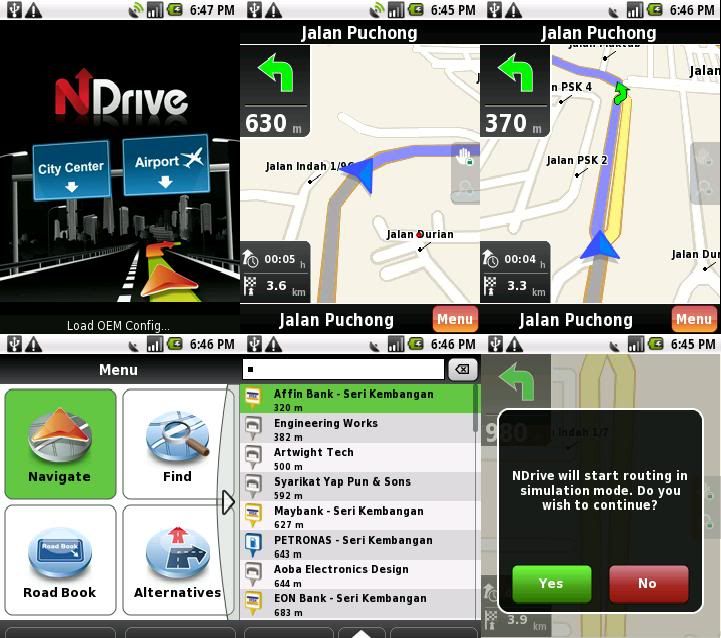 This post has been edited by StupidGuyPlayComp: Dec 6 2010, 09:29 PM |
|
|
Nov 6 2010, 07:18 PM
|
|
Junior Member
419 posts Joined: Feb 2010
|
hmm..mean nid to try more 8 min ya..haha..i trying later infront my hse de playground..see can lock boh..
|
|
|
|
|
|
Nov 6 2010, 07:25 PM
|
|
All Stars
13,681 posts Joined: Mar 2006
|
QUOTE(chonkit @ Nov 6 2010, 07:18 PM) hmm..mean nid to try more 8 min ya..haha..i trying later infront my hse de playground..see can lock boh.. Download the "GPS Test", once the signal turn green meaning locking successfully..............at least GPS test got some "movement in satellite", not as boring as papago during locking Added on November 6, 2010, 7:29 pm  Papago new map released, version 04-Nov 2010, hurry up go and download Papago new map released, version 04-Nov 2010, hurry up go and downloadPapago new map 04-11-2010 This post has been edited by StupidGuyPlayComp: Nov 6 2010, 08:59 PM |
|
|
Nov 6 2010, 07:39 PM
|

Senior Member
987 posts Joined: Dec 2009 From: Kuala Lumpur
|
QUOTE(genzi0401 @ Nov 6 2010, 12:07 PM) mayb, LOL can pm me the ndrive? i havent use papago yet as i m using in ipoh only, i never reali experience it when in outstation. havent have a chance to go outstation wit g5 yet. somehow, i do installed papago in my g5, jz in case if i need it. |
|
|
Nov 6 2010, 07:40 PM
|
|
All Stars
13,681 posts Joined: Mar 2006
|
QUOTE(iwant2 @ Nov 6 2010, 07:39 PM) can pm me the ndrive? i havent use papago yet Hey bro, i posted it at previous page.......enjoy |
|
|
Nov 6 2010, 07:42 PM
|
|
Senior Member
987 posts Joined: Dec 2009 From: Kuala Lumpur
|
QUOTE(StupidGuyPlayComp @ Nov 6 2010, 03:58 PM) Added on November 6, 2010, 3:04 pm Depend on the usage.............GPS draining the battery fast, wifi and 3g as well if none of above function using, 3 days no problem Added on November 6, 2010, 3:09 pm http://dl.dropbox.com/u/1566781/NDrive-10....-androboost.apk http://dl.dropbox.com/u/1566781/NDrive.rar pass:galaxys (the link provided by other forumer) |
|
|
Nov 6 2010, 07:43 PM
|
|
Junior Member
419 posts Joined: Feb 2010
|
i see..gps status stated gps on with yellow dots..mean not yet locking?
|
|
|
Nov 6 2010, 07:43 PM
|

Junior Member
120 posts Joined: Mar 2009 From: Shah Alam
|
QUOTE(BlueSpark @ Nov 5 2010, 11:02 PM) Yea, sounds stupid to me. Many of them here got it from fantasticmoon. U can try getting from him too. In order to validate the originality, u can check tHE imei of the phone by typing *06*#.How much you bought it for? Ori? How to prove its 100% ori? |
|
|
Nov 6 2010, 07:45 PM
|
|
All Stars
13,681 posts Joined: Mar 2006
|
QUOTE(chonkit @ Nov 6 2010, 07:43 PM) i see..gps status stated gps on with yellow dots..mean not yet locking? Yellow dot = in locking, not yet successGreen dot = Success locked, you can switch off GPS Test and open Papago now, will lock immediately |
|
Topic ClosedOptions
|
| Change to: |  0.0185sec 0.0185sec
 0.37 0.37
 6 queries 6 queries
 GZIP Disabled GZIP Disabled
Time is now: 3rd December 2025 - 02:16 AM |
 Quote
Quote