Outline ·
[ Standard ] ·
Linear+
[BULK] Amazon and Kindle 3 Heavy Items Bulk!, New Bulk 15 Just Opened!Shipped in quick
|
shy8629
|
 Oct 18 2010, 10:34 AM Oct 18 2010, 10:34 AM
|
New Member


|
For folks who are looking for leather Kindle cases, here are couple of them that I found which come with rather reasonable prices: (a) CrazyOnDigital Kindle Case - only available in Black USD11.99 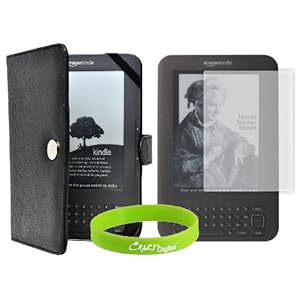 (b) CaseCrown for Kindle 3 - available in Black, Red, Hot Pink and Baby Pink USD12.21 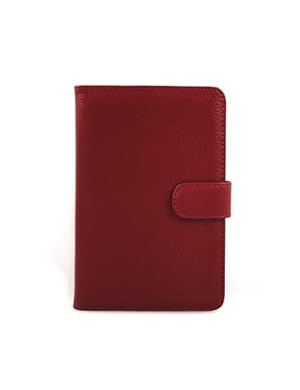 © rooCase Folio - available in Black (USD20.16), Graphite Grey, Magenta and Red (the rest USD25) 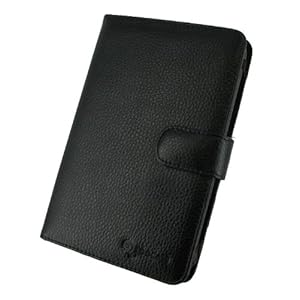 This post has been edited by shy8629: Oct 18 2010, 10:42 AM This post has been edited by shy8629: Oct 18 2010, 10:42 AM |
|
|
|
|
|
shy8629
|
Oct 18 2010, 02:06 PM
|
New Member
|
By the way havocx, have you applied the screen protector on your Kindle? If so, does the anti-glare feature truly works or it makes the screen even harder to read?
Another thing is, is it easy to apply it yourself?
|
|
|
|
|
|
shy8629
|
Oct 18 2010, 02:29 PM
|
New Member
|
In that case, do include the screen protector along with the case that I ordered, yeah. Thankie!  |
|
|
|
|
|
shy8629
|
Oct 20 2010, 08:10 PM
|
New Member
|
Anyone tried the text-to-speech feature? I found myself lovin' it so much and I feel that the male voice is much better than female one. A very convenient feature especially during a train ride, I think!  This post has been edited by shy8629: Oct 20 2010, 08:11 PM This post has been edited by shy8629: Oct 20 2010, 08:11 PM |
|
|
|
|
|
shy8629
|
Oct 26 2010, 10:21 PM
|
New Member
|
Thank you so much havocx for helping us =)
|
|
|
|
|
|
shy8629
|
Nov 22 2010, 07:14 PM
|
New Member
|
Just found out that my items had arrived! Thank you SO MUCH, havocx |
|
|
|
|
|
shy8629
|
Dec 28 2010, 11:30 PM
|
New Member
|
QUOTE(JC273 @ Dec 28 2010, 11:15 PM) I heard that some ebook reader have a built in dictionary. Does the kindle have that or do I have to download my own dictionary and put it in? The Kindle comes readily equipped with two dictionaries: (1) Oxford Dictionary of English and (2) The New Oxford American Dictionary p.s. Already on 5th Bulk!?! You really did a great job, havocx!  This post has been edited by shy8629: Dec 28 2010, 11:31 PM This post has been edited by shy8629: Dec 28 2010, 11:31 PM |
|
|
|
|
|
shy8629
|
Dec 31 2010, 10:47 PM
|
New Member
|
QUOTE(Zad @ Dec 31 2010, 10:15 PM) i saw some folks buy the kindle with the screen protecter and case. how it work actually? am i given a list to choose or what? If you intend to just buy the Kindle without the other accessories, you can do so. If you would like to choose your own accessories, you can go to this Kindle Accessories Page on Amazon.com and see what are the items that you intend to purchase. Basically, you buy the items that you want as each item comes as individual unit. Amazon does not bundle the Kindle, the cover and screen protector all together. p.s. Happy New Year to you too havocx! This post has been edited by shy8629: Dec 31 2010, 11:20 PM |
|
|
|
|
|
shy8629
|
Jan 4 2011, 11:10 AM
|
New Member
|
QUOTE(fluene @ Jan 4 2011, 10:32 AM) Another problem. When I copy and paste the mobi files from pc to the kindle, the kindle displays the first sentence of the book as its title instead of the name of the book. Why is this so and how can I make it display the name instead? You can use Calibre to make some changes and transfer that file back into your Kindle. |
|
|
|
|
|
shy8629
|
Jan 4 2011, 02:32 PM
|
New Member
|
QUOTE(fluene @ Jan 4 2011, 02:03 PM) It is the same with Calibre. Once I added them in Calibre, the name of the books will be gone. I had a hard time trying to figure out which is which Did you try changing the "Title" after you add the book in Calibre? You have to change the title first and only then transfer the book on your Kindle. However, before that, make sure that you have deleted the book that you previously added on the device first or else, I don't think it will work. |
|
|
|
|
|
shy8629
|
Jan 5 2011, 11:40 AM
|
New Member
|
QUOTE(havocx @ Jan 5 2011, 09:45 AM) Would like to help but am requesting again some files to work with. You see, the Kindle reads the metadata files which determines the title of the book. Need to look for where this links to and I cant replicate the problem without actual problem samples  havocx is definitely right about that. It would be much easier if we can see the file itself. I have had the same problem when I first transfer files to Kindle. So happened that the files didn't have the complete info in its metadata. All I did was key in the info manually on Calibre (Or you can also go to "Edit Metadata", enter the book ISBN and downloaded the info directly), reconvert, retransfer and the problem was solved. Again, it is still easier to see the file itself, just in case we didn't completely understand your problem or maybe the steps we explained was not completely clear. This post has been edited by shy8629: Jan 5 2011, 11:46 AM |
|
|
|
|
|
shy8629
|
Jan 6 2011, 01:41 PM
|
New Member
|
QUOTE(estara @ Jan 6 2011, 11:58 AM) Really appreciate greatly for all the updates and prompt replies from havocx. Excellent effort I'd say! Well said, mate! Cannot agree more |
|
|
|
|



 Quote
Quote

 0.0295sec
 0.49
0.49
 7 queries
 GZIP Disabled