Welcome Guest ( Log In | Register )

Outline · [ Standard ] · Linear+

 <HELP> PLAY PS3 ON PC LCD SCREEN FAQ

views
     
TSjiro85
post Sep 20 2010, 02:24 PM, updated 16y ago

New Member
*
Newbie
0 posts

Joined: Sep 2010
as my topic, anyone know how to do in this way c/w hdmi sound? what else cable i need to buy ? and which shop got sell and teach..?
and my lcd is brand LG flatron w2243s ..can ? i m not sure what is dvi port between i dunno my lcd got this port or not, if dun hv is there any cable cant convert and convert ?
please help ~
breaker84
post Sep 20 2010, 02:32 PM

\\//\\//\\//\\//
******
Senior Member
1,713 posts

Joined: Aug 2008
From: Shah Alam

you use PS3 slim or phat??
slim got no port for sound...
yur LCD got sound built in right???
9876789
post Sep 20 2010, 02:34 PM

lost soul
*****
Senior Member
866 posts

Joined: Jan 2003
From: KL


QUOTE(jiro85 @ Sep 20 2010, 02:24 PM)
as my topic, anyone know how to do in this way c/w hdmi sound? what else cable i need to buy ? and which shop got sell and teach..?
and my lcd is brand LG flatron w2243s ..can ? i m not sure what is dvi port between i dunno my lcd got this port or not, if dun hv is there any cable cant convert and convert ?
please help ~
*
1. if your monitor doesn't have HDMI port, you need a HDMI to DVI cable
» Click to show Spoiler - click again to hide... «


2. for the sound, if your monitor has no speaker, or the speaker has no sound, you need an RCA cable
» Click to show Spoiler - click again to hide... «


extra : the RCA cable is used to connect the PC speaker to an RCA hub (output)
» Click to show Spoiler - click again to hide... «

then from RCA hub to the RCA cable (input) come with your PS3


understand ?
breaker84
post Sep 20 2010, 02:44 PM

\\//\\//\\//\\//
******
Senior Member
1,713 posts

Joined: Aug 2008
From: Shah Alam

if PS3 Slim, how to use external speaker??

i use this, but still got no sound...
user posted image

This post has been edited by breaker84: Sep 20 2010, 02:46 PM
TSjiro85
post Sep 20 2010, 03:23 PM

New Member
*
Newbie
0 posts

Joined: Sep 2010
QUOTE(breaker84 @ Sep 20 2010, 03:32 PM)
you use PS3 slim or phat??
slim got no port for sound...
yur LCD got sound built in right???
*
mine is ps3 slim , and my lcd dun hv sound built in ,
underworld
post Sep 20 2010, 03:29 PM

Th3 D3vIL
******
Senior Member
1,182 posts

Joined: Jan 2003


ur lcd hav aux out ?
u can use the aux out n plug to ur speakers
TSjiro85
post Sep 20 2010, 03:29 PM

New Member
*
Newbie
0 posts

Joined: Sep 2010
QUOTE(9876789 @ Sep 20 2010, 03:34 PM)
1. if your monitor doesn't have HDMI port, you need a HDMI to DVI cable
» Click to show Spoiler - click again to hide... «


2. for the sound, if your monitor has no speaker, or the speaker has no sound, you need an RCA cable
» Click to show Spoiler - click again to hide... «


extra : the RCA cable is used to connect the PC speaker to an RCA hub (output)
» Click to show Spoiler - click again to hide... «

then from RCA hub to the RCA cable (input) come with your PS3
understand ?
*
so i need a hdmi to dvi cable , 1 rca cable and 1 rca hub .. i going to get it now thx ~


Added on September 20, 2010, 3:35 pmthat rca cable plug to my speaker or cpu ?


Added on September 20, 2010, 3:38 pm
QUOTE(underworld @ Sep 20 2010, 04:29 PM)
ur lcd hav aux out ?
u can use the aux out n plug to ur speakers
*
dont hv

This post has been edited by jiro85: Sep 20 2010, 03:38 PM
menteri
post Sep 20 2010, 03:46 PM

New Member
*
Junior Member
18 posts

Joined: Feb 2008
From: Putrajaya But Origin Terengganu Of COZZ
from the model u gave, i think the monitor got dvi port. so can use hdmi-dvi cable.
For the audio, u can use something like this...

standard ps3 rca cable which is bundled with the ps3
user posted image

connect to Y cable like this ( this Y cable can be bought at electrical shop, if youre in KL, go to jalan pasar, pudu.)
user posted image


then u connect a speaker to the audio jack.. so using this setup u dont need rca hub.


at the setting page, set ur display to output through hdmi and audio using rca.
nightshade_nova
post Sep 20 2010, 04:02 PM

Casual
***
Junior Member
443 posts

Joined: Jun 2007
From: 3rd from Sol


QUOTE(breaker84 @ Sep 20 2010, 02:44 PM)
if PS3 Slim, how to use external speaker??

i use this, but still got no sound...
user posted image
*
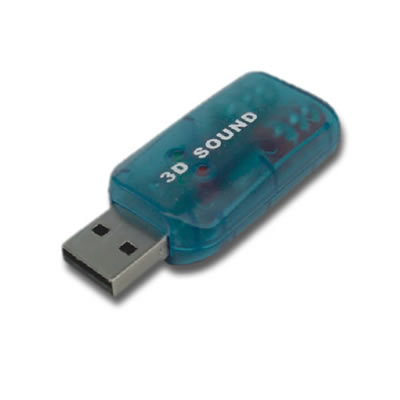
actually, from the ps3 usb, only voice chat come out, and mic in
so, it wont work

good for using pc headset, though
for example use steelseries headset, sound you put at monitor audio out jack (after getting sound through hdmi in your monitor)
at front, put mic in through usb soundcard at the front

and voila...sound+chat headset...no nid spend a lot for voice chat and sound
breaker84
post Sep 20 2010, 04:19 PM

\\//\\//\\//\\//
******
Senior Member
1,713 posts

Joined: Aug 2008
From: Shah Alam

QUOTE(nightshade_nova @ Sep 20 2010, 04:02 PM)
actually, from the ps3 usb, only voice chat come out, and mic in
so, it wont work

good for using pc headset, though
for example use steelseries headset, sound you put at monitor audio out jack (after getting sound through hdmi in your monitor)
at front, put mic in through usb soundcard at the front

and voila...sound+chat headset...no nid spend a lot for voice chat and sound
*
huh??/huh???
kindly step by step plez..... sweat.gif
TSjiro85
post Sep 20 2010, 06:17 PM

New Member
*
Newbie
0 posts

Joined: Sep 2010
QUOTE(menteri @ Sep 20 2010, 04:46 PM)
from the model u gave, i think the monitor got dvi port. so can use hdmi-dvi cable.
For the audio, u can use something like this...

standard ps3 rca cable which is bundled with the ps3
user posted image

connect to Y cable like this ( this Y cable can be bought at electrical shop, if youre in KL, go to jalan pasar, pudu.)
user posted image
then u connect a speaker to the audio jack.. so using this setup u dont need rca hub.
at the setting page, set ur display to output through hdmi and audio using rca.
*
ok i just bought a hdmi to dvi cable now going back home and have a try, that Y cable i will check it out later when i passby electrical shop XD


Added on September 20, 2010, 8:48 pmi use my hdmi-dvi cable and my lcd change to dvi but it came out blank screen ... how to solve this problem ? please help thanks ~


Added on September 20, 2010, 9:04 pmweird....my fujitsu 1 appear blank screen , i used my office's lcd philip's it worked perfect ... going use my futjisu lcd trade with my office 1 XD
finally can play ps3 on pc


Added on September 20, 2010, 9:06 pmthanks to 987698 and menteri XD ~ thanx ~~ between i havent buy tat Y cable so now got no sound ~ going to buy soon hope it work ~

This post has been edited by jiro85: Sep 20 2010, 09:06 PM

nightshade_nova
post Sep 20 2010, 10:15 PM

Casual
***
Junior Member
443 posts

Joined: Jun 2007
From: 3rd from Sol


QUOTE(breaker84 @ Sep 20 2010, 04:19 PM)
huh??/huh???
kindly step by step plez..... sweat.gif
*
z
if you put both green and pink cable through usb soundcard, can only hear ppl speak, no sound

so,

like normal, use hdmi through monitor
put usb soundcard at ps3 usb
pink mic cable from headset put through usb
green sound cable from headset put through monitor, like me, u2410 monitor

Attached Image

its cheaper than to buy ps3 compatible headset, which dont sell in malaysia and expensive


if your monitor no audio out, use setup like menteri posted

This post has been edited by nightshade_nova: Sep 20 2010, 10:16 PM
9876789
post Sep 20 2010, 10:59 PM

lost soul
*****
Senior Member
866 posts

Joined: Jan 2003
From: KL


RCA cable (av cable) + RCA hub is all you need to get the sound

steps :
1.from PS3, use ps3 rca cable as menteri mentioned
2.connect ps3 rca to RCA hub (input)
3.then connect the AV cable from rca hub (output) to your pc "microphone" port

through this setup

1. you don't need the Y cable
2. you don't need to unplug and reconnet the audio jack everytime you want to use your PC
( you only have to set the microphone "mute / unmute" in your PC as you wish)

This post has been edited by 9876789: Sep 20 2010, 11:02 PM
Vince1991
post Sep 25 2010, 12:00 AM

Getting Started
**
Junior Member
262 posts

Joined: Jul 2008
From: KL


QUOTE(breaker84 @ Sep 20 2010, 02:44 PM)
if PS3 Slim, how to use external speaker??

i use this, but still got no sound...
user posted image
*
friend.. from the sound settings you can set which type of output do you prefer or automatic or both or all..

there are HDMI, AV Cable and Optical Cable output.. your choice..


Added on September 25, 2010, 12:05 amFor Monitor, if it has a DVI port then get a HDMI to DVI cable for around RM40~100 and if it only have vga port then you're out of luck.

When turning on your PS3 for the 1st time, if you wanna use monitor then make sure there are no cables plugged in except for the HDMI to DVI cable..

As for a variety of standard PC speakers out there in the market, you can plug the red and white RCA to your speaker of the AV Cable that comes with the PS3..

If there is no sound, kindly go to your console's sound settings and set it to automatic or select AV Cable..

This post has been edited by Vince1991: Sep 25 2010, 12:05 AM
KEKwA2104
post Mar 19 2012, 01:39 PM

New Member
*
Newbie
0 posts

Joined: Dec 2010
do i need to turn on the cpu to play the ps3 on monitor/
terryfu
post Mar 19 2012, 03:11 PM

On my way
****
Junior Member
514 posts

Joined: Jan 2006
QUOTE(KEKwA2104 @ Mar 19 2012, 01:39 PM)
do i need to turn on the cpu to play the ps3 on monitor/
*
If your monitor power cord is connected to CPU, then yes u need to turn on CPU. If not, don't need to on CPU.

@TS (jiro85), is this your monitor? : http://www.lgsolutions.com/__downloads/pdf...3031008pr-3.pdf

If it is then you don't have a DVI port nor speakers, just standard VGA port. Everything the guys here advise on the Sound setup is correct except the video connection which you will need a VGA - HDMI connector (not sure whether got or not) or a converter to connect the RCA (red & white) cable.
deyamato
post Mar 21 2012, 07:50 PM

Casual
***
Junior Member
419 posts

Joined: Feb 2009
From: Petaling Jaya


I can intro you 1 led monitor
Model : LG E2341 got audio output , hdmi , dvi

This post has been edited by deyamato: Mar 23 2012, 11:07 AM


Change to:
| Lo-Fi Version
0.0225sec    1.21    6 queries    GZIP Disabled
Time is now: 20th December 2025 - 07:25 AM