Welcome Guest ( Log In | Register )

Bump Topic Topic Closed RSS Feed

Outline · [ Standard ] · Linear+

 Nokia 5800 XpressMusic a.k.a "TUBE" v.29, V52 is up. Time for another update~

views
     
mikuo
post Jan 7 2011, 09:52 AM

Getting Started
**
Junior Member
82 posts

Joined: Aug 2009
From: jb


QUOTE(boonwuilow @ Jan 7 2011, 08:22 AM)
U cannot downgrade the firmware, or else u can kill your phone.
But Phoenix still can revive dead phone.
After update u can't update your phone via FOTA.
This is why in some/most of the CFW had FOTA disable.


Added on January 7, 2011, 8:23 am
Your phone still can vibrate once when power button is pressed?
*
oooo....ic
yes i can vibrate bt no nokia logo nor screen
mikuo
post Jan 7 2011, 10:43 AM

Getting Started
**
Junior Member
82 posts

Joined: Aug 2009
From: jb


QUOTE(boonwuilow @ Jan 7 2011, 09:54 AM)
Now try flash with JAF
*
ok so i tried with jaf bt i am stuck
whenever i uncheck CRT 308, the phone model pops out n i choose the RM-356 of course
bt after that the MCU, PPM, CNT and APE variant light did not light up
n it keeps teling me to choose my phone model again and again

mikuo
post Jan 7 2011, 12:00 PM

Getting Started
**
Junior Member
82 posts

Joined: Aug 2009
From: jb


QUOTE(boonwuilow @ Jan 7 2011, 10:58 AM)
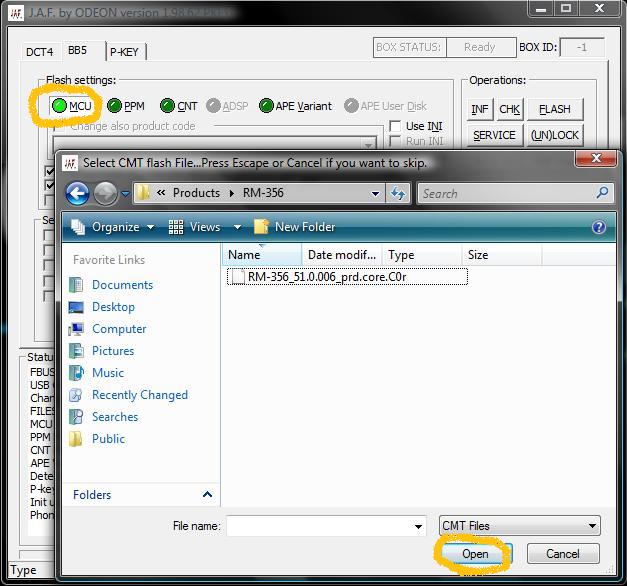
1)go to bb5 tab
2)Tick manual flash, dead USB
3)Untick CRT308
4)tick use ini

Is it in the Use ini windows does not has your phone model?
*
user posted image

Uploaded with ImageShack.us

what do i do nw? no "DONE!"
flash again?
=.=

This post has been edited by mikuo: Jan 7 2011, 12:00 PM
mikuo
post Jan 7 2011, 12:40 PM

Getting Started
**
Junior Member
82 posts

Joined: Aug 2009
From: jb


QUOTE(boonwuilow @ Jan 7 2011, 12:36 PM)
Where got downgrade?
*
i didnt downgrade
n i forgot to uncheck the damn CRT!!!!!! &^%&Q@)(*#
i went n close off all the stuff..... n my phone nw wont vibrate a thing....is it totally bricked?

2nd time with unchecked CRT

JAF version 1.98.62
Detected PKEY: 9000BC25
Card life counter: 99.99%
P-key nokia module version 01.02
FBUS INTERFACE NOT CONNECTED!!!
USB Cable Driver version: 7.1.36.0
Changing mode...Done!
FILES SET FOR FLASHING:
MCU Flash file: NONE
PPM Flash file: NONE
CNT Flash file: NONE
APE Variant file: NONE
Searching for JAF saved location of ini...
Checking path: C:\Program Files\Nokia\Phoenix\Products\RM-356\

Searching for default location of ini...
Checking path: \Products\RM-356\
Searching for JAF saved location of ini...
Checking path: C:\Program Files\Nokia\Phoenix\Products\RM-356\
Scanning ini files...
Searching for default location of ini...
Checking path: \Products\RM-356\
Checking path: C:\Program Files\Nokia\Phoenix\Products\RM-356\
FILES SET FOR FLASHING:
MCU Flash file: C:\Program Files\Nokia\Phoenix\Products\RM-356\RM-356_52.0.007_prd.core.C00
PPM Flash file: C:\Program Files\Nokia\Phoenix\Products\RM-356\RM-356_52.0.007_prd.rofs2.V19
CNT Flash file: C:\Program Files\Nokia\Phoenix\Products\RM-356\RM-356_52.0.007_C03_prd.rofs3.fpsx
APE Variant file: C:\Program Files\Nokia\Phoenix\Products\RM-356\RM-356_52.0.007_027_000_U001.uda.fpsx
Languages in ppm: English,Philipines,Bangladesh,Australia,Indonesia,India,Vietnam,New Zealand
Detected P-KEY: 9000BC25
P-key nokia module version 01.02
Init usb communication...
PRESS POWER ON NOW!
Searching for phone...Found
Sending RAW loader...
Using 009.012.005
Elf2flash 09.11.000
CMT RAW loader...
Patching RAW boot step1...
Patching RAW boot step2...
Patching RAW boot step3...
Sending RAW Loader...
....................Loader Sent!
Stage 2 starting..................PUBKEYS already sent...
PUBKEYS already sent...
...........Phone prepared OK!
Waiting for the phone to boot...
Searching for phone...
Status byte: 8000
Selecting CMT flash...
Result: 0000
Phone is in flash mode...
CMT blocks: 693, APE blocks: 0
Erasing cmt...
Processing C:\Program Files\Nokia\Phoenix\Products\RM-356\RM-356_52.0.007_prd.core.C00...
Erasing cmt zone 00040000 - 00082FFF ... Erase result: 0000
Erasing cmt zone 00083400 - 003FFFFF ... Erase result: 0000
Erasing cmt zone 00400000 - 007FFFFF ... Erase result: 0000
Erasing cmt zone 00800000 - 00D5FFFF ... Erase result: 0000
Erasing cmt zone 00D60000 - 09E5FFFF ... Erase result: 0000
Partition result: 0014
Processing C:\Program Files\Nokia\Phoenix\Products\RM-356\RM-356_52.0.007_prd.rofs2.V19...
Erasing cmt zone 02C80000 - 09D5FFFF ... Erase result: 0000
Processing C:\Program Files\Nokia\Phoenix\Products\RM-356\RM-356_52.0.007_027_000_U001.uda.fpsx...
Erasing cmt zone 09E60000 - 0F71FFFF ... Erase result: 0000
Send CMT CFG...

Writing cmt...
Processing C:\Program Files\Nokia\Phoenix\Products\RM-356\RM-356_52.0.007_prd.core.C00...
Sending CMT HASH for ADA
Sending CMT HASH for KEYS
Sending CMT HASH for PRIMAPP
Sending CMT HASH for RAP3NAND
Sending CMT HASH for PASUBTOC
cmt->PAPUB_CERTIFICATE_DATA_BB5 block detected
cmt->PAPUB_CERTIFICATE_DATA_BB5 block detected, sending...
cmt->PAPUB keys already sent...
Sending CMT HASH for SOS*UPDAPP
Sending CMT HASH for SOS*ENO
Sending CMT HASH for SOS*DSP0
Sending CMT HASH for SOS*ISASW
Sending CMT HASH for SOS+CORE
Sending CMT HASH for SOS+ROFS1
Processing C:\Program Files\Nokia\Phoenix\Products\RM-356\RM-356_52.0.007_prd.rofs2.V19...
Sending CMT HASH for SOS+ROFS2
Write result 27: 1701
Error sending cmd data...
Error writing cmt...

mikuo
post Jan 7 2011, 01:27 PM

Getting Started
**
Junior Member
82 posts

Joined: Aug 2009
From: jb


QUOTE(Dlim88 @ Jan 7 2011, 12:51 PM)
Hmm , tis is weird  sweat.gif
*
realli? omg....
cn a dead phone charge? cz my phone overheated
sure bound to b low batt
n i charged it.. my phonne keep blinking n making a "ting" noise
mikuo
post Jan 7 2011, 02:09 PM

Getting Started
**
Junior Member
82 posts

Joined: Aug 2009
From: jb


QUOTE(Xiia0Ban @ Jan 7 2011, 01:32 PM)
Is your phone still able to boot?
Even vibrate then show white screen still can be save...
I tried that a lot times.
*
while charging gt vibrate, no white screen
after off charger i tried to boot, no result

mikuo
post Jan 7 2011, 04:16 PM

Getting Started
**
Junior Member
82 posts

Joined: Aug 2009
From: jb


QUOTE(fesick @ Jan 6 2011, 02:02 PM)
well, i just wanna try the custom firmware.. seems good as from what i've read here.. this is my 1st time doing it and it didnt go well .. so i revert back to previous fw.. try install every fware that i found on net.. v30 till v50.. all of them.. flash the fw using jaf key method but stuck at "pooling" something² then at the end it cannot detect my phone and it wont boot at all..
*
bro i am oso having the same prob as u....after pooling my phone cant reboot also....
after that what did u do to revive ur phone?
mikuo
post Jan 7 2011, 07:53 PM

Getting Started
**
Junior Member
82 posts

Joined: Aug 2009
From: jb


QUOTE(Xiia0Ban @ Jan 7 2011, 07:19 PM)
Try reflash your FW to original FW 1st.
Since that 1 is easiest to flash.
But make sure you dont downgrade it.
If cannot, then good luck.. hmm.gif
*
previously i tried to use phoenix to flash my phone bt most phoenix guide was for the phoenix2008
the phoenix2010 i downloaded was with nokia fuse....
it seem lik it will succeed in flashing bt it keep got stuck in "initializing"

QUOTE(Dlim88 @ Jan 7 2011, 05:44 PM)
JAF version 1.98.62
Detected PKEY: 90009699
Card life counter: 99.99%
P-key nokia module version 01.02
FBUS INTERFACE NOT CONNECTED!!!
USB Cable Driver version: 7.1.36.0
Changing mode...Done!
Detected P-KEY: 90009699
P-key nokia module version 01.02
Init usb communication...
Failed! Aborting!

this was what i got when i checked the Use INI..... any idea where i went wrong?


T^T

This post has been edited by mikuo: Jan 7 2011, 07:56 PM
mikuo
post Jan 7 2011, 08:50 PM

Getting Started
**
Junior Member
82 posts

Joined: Aug 2009
From: jb


QUOTE(more2teayap @ Jan 7 2011, 08:16 PM)
Try untick normal mode and flash
*
tried to flash by unchecking the normal mode but unsucessful

MY PHONE IS BACK IN ACTION!!!! BANZAIII!!!! bt v52 fw...nt the cfw...
funny part is.... i flashed lik normal, checking the manual flash, dead usb and normal mode lik usual n i did it for many times since ytd and today as u can see in all of the post i posted asking question....
but all failed till jz now....it miraculously work.... wth....

but thx guys for all the help, guide and links!!! i appreciate all of ur help ^0^v

notworthy.gif notworthy.gif notworthy.gif notworthy.gif notworthy.gif notworthy.gif

any tips and reminder if i wanna flash to a c6 cfw? brows.gif

mikuo
post Jan 7 2011, 11:43 PM

Getting Started
**
Junior Member
82 posts

Joined: Aug 2009
From: jb


nw while trying to flash the cfw, CNT didnt light up.... is it stil save for flashing?
mikuo
post Jan 8 2011, 09:57 AM

Getting Started
**
Junior Member
82 posts

Joined: Aug 2009
From: jb


can themes be downloaded to c6 cfw?
mikuo
post Jan 8 2011, 03:31 PM

Getting Started
**
Junior Member
82 posts

Joined: Aug 2009
From: jb


another ques....there is a cfw i ddled with only 3 files which is the coo, fpsx and v01 files.... so, do i hav to download the c6 fw files and add these 3 files first b4 flashing?

This post has been edited by mikuo: Jan 8 2011, 04:15 PM
mikuo
post Jan 8 2011, 04:07 PM

Getting Started
**
Junior Member
82 posts

Joined: Aug 2009
From: jb


QUOTE(JustinLFJ @ Jan 8 2011, 04:02 PM)
Eh.. Don't blindly suggest people to Hard Reset their phone.. A lot of problems are caused by own user not reading changelogs and instructions of the CFW before flashing, and some can even be solved if u look hard enough.. So don't push for Hard Reset unless its really a problem like OS corrupted.

- Keep in mind that Hard Reset is the Last Resort

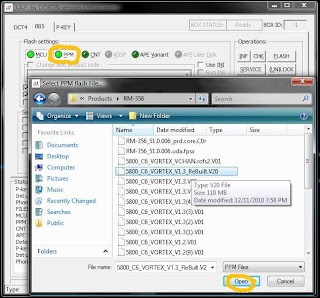
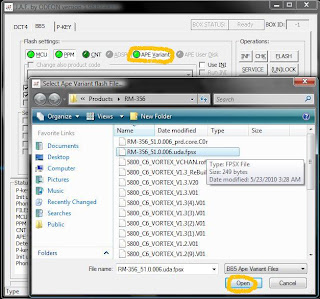
Following the Flashing guide on the FP does work for C6 CFWs. There's also an alternate method of flashing with JAF that only needs 3 of the CFW files, and they don't have to be in the RM-356 folder  cool2.gif

» Click to show Spoiler - click again to hide... «

I suppose thats the Vortex CFW right?

There's a 'Tutorial' section in the Vortex blog. Can't share it here sadly cause there are links to JAF there  doh.gif

» Click to show Spoiler - click again to hide... «

*
yupp~ hm...so shld i ddl the c6 firmware n store it in the Phoenix file first? from the pic, it seems to have many many files in there

This post has been edited by mikuo: Jan 8 2011, 04:16 PM
mikuo
post Jan 8 2011, 04:21 PM

Getting Started
**
Junior Member
82 posts

Joined: Aug 2009
From: jb


oooo,..... my cuurent cfw is a c6cfw.... so by straight flashing vortex's cfw which is also a c6 cfw wont crash the phone rite?
mikuo
post Jan 8 2011, 04:29 PM

Getting Started
**
Junior Member
82 posts

Joined: Aug 2009
From: jb


QUOTE(JustinLFJ @ Jan 8 2011, 04:26 PM)
As long as you're on the same version of the CORE file, it wont  nod.gif . Which version of C6 CFW are you on? v51? v52?

There are 2 options at the place you download from, right?
*
ooooo. ic ic smile.gif v52
yup yup
thx for the help! rclxm9.gif

mikuo
post Jan 8 2011, 11:33 PM

Getting Started
**
Junior Member
82 posts

Joined: Aug 2009
From: jb


QUOTE(Dlim88 @ Jan 8 2011, 11:00 PM)
Come come everyone use Vortex  rclxm9.gif
*
currently using vortex tongue.gif
but my music cant be detected in the library though i hav refreshed it....

Topic ClosedOptions
 

Change to:
| Lo-Fi Version
0.0445sec    0.40    7 queries    GZIP Disabled
Time is now: 5th December 2025 - 03:21 AM