Welcome Guest ( Log In | Register )

Outline · [ Standard ] · Linear+

 Travel with iPad, how to use hotel internet?

views
     
TSAlucard
post Sep 10 2010, 02:24 AM, updated 16y ago

Getting Started
**
Junior Member
77 posts

Joined: Jan 2003
From: Miri
I'll be doing quite a bit of traveling and thinking of just carrying along my iPad rather than a laptop. My current dilemma is how do I connect to the hotel room internet if they only have ethernet option and no wifi? Is there anything from d-link/belkin/etc that I could hook up to the LAN cable and activate wifi through it so I can use my iPad?
stringfellow
post Sep 10 2010, 02:27 AM

Ultrawide | 4K | VR
********
Senior Member
11,305 posts

Joined: Jan 2003
QUOTE(Alucard @ Sep 10 2010, 02:24 AM)
I'll be doing quite a bit of traveling and thinking of just carrying along my iPad rather than a laptop. My current dilemma is how do I connect to the hotel room internet if they only have ethernet option and no wifi? Is there anything from d-link/belkin/etc that I could hook up to the LAN cable and activate wifi through it so I can use my iPad?
*
Airport Express. Read up at that link.

I've been using this since I have my iPhone with me every work trip I go.

TSAlucard
post Sep 10 2010, 03:30 AM

Getting Started
**
Junior Member
77 posts

Joined: Jan 2003
From: Miri
Thanks mate, I've taken the plunge and ordered it, hopefully I can get it in the next few days to test it. Is it hard to configure?
cRazYee
post Sep 10 2010, 08:58 AM

Look at all my stars!!
*******
Senior Member
2,642 posts

Joined: Jan 2005
From: Penang
so hardcore?
use airport express while travel?

TSAlucard
post Sep 10 2010, 09:50 AM

Getting Started
**
Junior Member
77 posts

Joined: Jan 2003
From: Miri
QUOTE(cRazYee @ Sep 10 2010, 08:58 AM)
so hardcore?
use airport express while travel?
*
You have a solution to connect to Internet in hotel without wifi and laptop but with room's Ethernet port? Please share
cRazYee
post Sep 11 2010, 02:19 AM

Look at all my stars!!
*******
Senior Member
2,642 posts

Joined: Jan 2005
From: Penang
wow, not really travel that much
dont have any solution for u

i think his solution works, but may not be all the time
cuz my recent travel to holland, the hotel require some login shit to get to internet
vui_msia
post Sep 11 2010, 02:25 AM

Casual
***
Junior Member
367 posts

Joined: Mar 2006


QUOTE(cRazYee @ Sep 11 2010, 02:19 AM)
wow, not really travel that much
dont have any solution for u

i think his solution works, but may not be all the time
cuz my recent travel to holland, the hotel require some login shit to get to internet
*
u referring to proxy server etc? they allowed you to 'surf' only, buy not other data service such as ftp etc..
stringfellow
post Sep 11 2010, 03:54 AM

Ultrawide | 4K | VR
********
Senior Member
11,305 posts

Joined: Jan 2003
QUOTE(cRazYee @ Sep 11 2010, 02:19 AM)
wow, not really travel that much
dont have any solution for u

i think his solution works, but may not be all the time
cuz my recent travel to holland, the hotel require some login shit to get to internet
*
"Some login shit" still works. My stayover hotels in Australia, France and Italy requires "some login shit", the Airport Express acts as a tunnel to the iPad, and I'll be asked to login the minute I selected the WiFi SSID to join, with the purchase details/login page (username/password). Everything works the same like on a laptop.

Next time, try first. If haven't try, or don't have experience using one, I rather people keep "their shit to themselves" than saying that it is not possible. Spreading misinformation is rampant these days.

AS for VPN service, it is configured on your iPad, not on your Airport Express. Once you've established the internet connection, turn on your VPN service on your iPad and proceed. I've been watching TV shows via streaming on the ABC Player and Hulu Plus apps abroad many times, and the experience is much better than back home since the internet line is much faster and QoS is better.

This post has been edited by stringfellow: Sep 11 2010, 05:28 AM

prasys
post Sep 11 2010, 10:58 AM

Heros Never Die
Group Icon
VIP
12,925 posts

Joined: Mar 2005
From: Kuala Lumpur
This is what I usually do when we at a hotel. To share internet with my colleagues or family members , i generally plug in my airport express & purchase Internet services and share. This means that only 1 person has to buy Internet service and it can be shared across several rooms.
hamlaww
post Sep 11 2010, 09:25 PM

New Member
*
Junior Member
24 posts

Joined: Jun 2008
From: Zhong Guan Cun, Beijing
QUOTE(prasys @ Sep 11 2010, 10:58 AM)
This is what I usually do when we at a hotel. To share internet with my colleagues or family members , i generally plug in my airport express & purchase Internet services and share. This means that only 1 person has to buy Internet service and it can be shared across several rooms.
*
good info even a little bit spicy ... blush.gif
chamelion
post Sep 11 2010, 09:34 PM

Back to Bricking
*******
Senior Member
2,755 posts

Joined: Dec 2004
any wireless access point will do.
last time there is those small one, but not sure they still making them.
TSAlucard
post Sep 14 2010, 12:44 AM

Getting Started
**
Junior Member
77 posts

Joined: Jan 2003
From: Miri
Do we need a different configuration like for example some hotel offers free internet through their ethernet, plug in and you can surf immediately while some requires you to make payment through their page and then they provide a user and pass to access?

Reason being since I will not be carrying a laptop with me, configuring the Air Express will be impossible :s
nimrod323
post Sep 14 2010, 10:27 AM

Macster/Gunner\Autobot /Alphaman\
*******
Senior Member
2,664 posts

Joined: Apr 2008
From: Here and There


QUOTE(Alucard @ Sep 14 2010, 12:44 AM)
Do we need a different configuration like for example some hotel offers free internet through their ethernet, plug in and you can surf immediately while some requires you to make payment through their page and then they provide a user and pass to access?

Reason being since I will not be carrying a laptop with me, configuring the Air Express will be impossible :s
*
you can always pre configure it at home before leaving, that way it'll just act as a tunnel. add the password and username given to you by the hotel, i have used my AE in SUtera Harbour (they require payment for internet access)
stringfellow
post Sep 14 2010, 03:21 PM

Ultrawide | 4K | VR
********
Senior Member
11,305 posts

Joined: Jan 2003
QUOTE(Alucard @ Sep 14 2010, 12:44 AM)
Do we need a different configuration like for example some hotel offers free internet through their ethernet, plug in and you can surf immediately while some requires you to make payment through their page and then they provide a user and pass to access?

Reason being since I will not be carrying a laptop with me, configuring the Air Express will be impossible :s
*
Configure once, use forever.

All hotel WiFis/internet through ethernets requires purchase details and login only after you are connected to them. That means, as long as you can connect to your Airport Express, you can purchase and use those hotel WiFi/Ethernet Internet services.
myjunk
post Sep 14 2010, 10:20 PM

Look at all my stars!!
*******
Senior Member
3,446 posts

Joined: Jan 2007
I use a link sys small. Compact router. Works great.

I use a link sys small. Compact router. Works great.

Moderators Note: DO NOT DOUBLE POST !!!!!!!
angelz47
post Oct 5 2010, 12:17 PM

Casual
***
Junior Member
430 posts

Joined: Feb 2009
finally found it. this is what i'm looking for as well.
so AirPort Express Base Station with 802.11n and AirTunes this is the one rite? i just pre configure it at home and then it can be use at any hotel? converting the internet using LAN to wifi?
mikelanding
post Oct 5 2010, 02:59 PM

Look at all my stars!!
*******
Senior Member
2,865 posts

Joined: Jan 2003


I travel a lot due to work nature. Dillema like TS too. In the end, brought my spare router everytime travel..lol
But now plan to get a Aztech Homeplug with not just access point but extra feature like lan over power line.
angelz47
post Oct 5 2010, 09:22 PM

Casual
***
Junior Member
430 posts

Joined: Feb 2009
QUOTE(mikelanding @ Oct 5 2010, 02:59 PM)
I travel a lot due to work nature. Dillema like TS too. In the end, brought my spare router everytime travel..lol
But now plan to get a Aztech Homeplug with not just access point but extra feature like lan over power line.
*
aztech home plug? let me kow your review after u got it ya smile.gif
rcch
post Oct 11 2010, 09:41 AM

New Member
*
Newbie
0 posts

Joined: Mar 2008


I just got the Aztech HW553 and it works like a charm. Able to connect to office WAN, connect to PC to do work and at the same time able to surf wifi with my iPad. Able to connect my 3G modem as well. Super cheap compared to Airport Express.

IT sure gonna be surprised to find another security enabled wifi in their system.
cruzzmz
post Oct 22 2010, 10:08 PM

uh weeee !!!!
*******
Senior Member
6,904 posts

Joined: Jan 2003
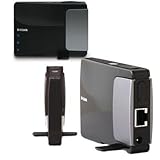
use DLink DAP-1350 ---> wireless N router

user posted image


This post has been edited by cruzzmz: Oct 22 2010, 10:11 PM

2 Pages  1 2 >Top
 

Change to:
| Lo-Fi Version
0.0226sec    0.40    5 queries    GZIP Disabled
Time is now: 8th December 2025 - 10:08 PM