
Welcome Guest ( Log In | Register )

Bump Topic Topic Closed RSS Feed
122 Pages « < 32 33 34 35 36 > » Bottom

Outline · [ Standard ] · Linear+

Unifi Official TM UniFi High Speed Broadbrand Thread V7, News: VIP20, free instalation till 31/12

views
     
joeaggas
post Sep 25 2010, 04:10 AM

Casual
***
Junior Member
363 posts

Joined: Aug 2009


hi klseet,

i am trying to configure my routerOS pppoE client to dial. but it kept disconnecting. any idea how to configure that on routerOS? thanks.

j

QUOTE(klseet @ Sep 16 2010, 03:59 PM)
What & how is your connection method when you "usually get ~400-500kb"? Is it using the standard connection from DIR-615 only?
I'm trying to figure out how do you connect the WGR614v9 prior to connect it with DIR-615 as bridging mode for you to make the comparison.

WGR614v9 is Broadcom base and I think v9 is not official confirmed by dd-wrt.
http://www.dd-wrt.com/wiki/index.php/Suppo...Devices#Netgear

You don't need to flash with dd-wrt, it should work find with your current method.
Thx Calvin for the update, also thx Riz again for making the RB250GS works to replace DIR-615 completely! notworthy.gif
Indeed, it would help many more UniFi users out there if Landasan willing to bring in .....  sweat.gif
Never too late right?! tongue.gif
Ok, guys, while we are waiting for the shipment, please go through Riz's guideline again to fully understand how to configure the RB250GS:
http://unifi.athena.my/index.php?option=co...id=55&Itemid=67

So with RB250GS, you guys can either:
1. use any of your current router, with or without dd-wrt or vlan taggin, just setup PPPoE profile will do!

2. if no extra router and don't want to spend extra again, then can consider to flash the DIR-615 with dd-wrt [see below Riz's guideline] and setup PPPoE will do!
http://unifi.athena.my/index.php?option=co...id=53&Itemid=65

3. if no extra router and still want to keep that DIR-615, then you are free to buy any router you like! tongue.gif
Cheers!  biggrin.gif
*
akerue
post Sep 25 2010, 08:50 AM

New Member
*
Junior Member
17 posts

Joined: Jul 2010
I finally got my Mikrotik RB250GS running smoothly. Apparently the culprit is a loose homeplug. I agree with klseet, the IPTV is smoother than TM-615, no more lag changing channel.
klseet
post Sep 25 2010, 08:55 AM

Getting Started
**
Junior Member
130 posts

Joined: Mar 2008
QUOTE(akerue @ Sep 25 2010, 01:58 AM)
Bro, I still have this IPTV problem. Sometimes I can get smooth Live TV but not VOD, or smooth VOD but not Live TV. And a lot of times after few try I lost the IPTV at all. It looks to me that the IPTV server kind of "sense" the non-standard equipment and block the access? Is there anything else in configuration that I did wrong? icon_question.gif
*
Strange, if sometime ok sometime not, could it be the line problem?
Also, could it be the DIR-615 or STB start to give problem already ? blink.gif

I never have any problem on IPTV, except for the minor issue on STB LED display, which was replaced with a new unit on the 3rd day nod.gif

QUOTE(joeaggas @ Sep 25 2010, 04:10 AM)
hi klseet,
i am trying to configure my routerOS pppoE client to dial. but it kept disconnecting. any idea how to configure that on routerOS? thanks.
j
*
RouterOS, are you using RB750 series?
At this moment no idea on RB750 yet, but there's plan to test RB750 very soon, stay tune ..... icon_rolleyes.gif

QUOTE(akerue @ Sep 25 2010, 08:50 AM)
I finally got my Mikrotik RB250GS running smoothly. Apparently the culprit is a loose homeplug. I agree with klseet, the IPTV is smoother than TM-615, no more lag changing channel.
*
Ooops, didn't know you are using RB250GS biggrin.gif
You bought it directly from Soliton?

Glad to hear you solved the problem already! smile.gif

This post has been edited by klseet: Sep 25 2010, 09:30 AM
billytong
post Sep 25 2010, 10:11 AM

Lord Sauron
*******
Senior Member
4,522 posts

Joined: Jan 2003
From: Mordor, Middle Earth.


QUOTE(klseet @ Sep 24 2010, 10:06 PM)
That's why I prefer PM/SMS/call among ourselves from this point onwards and I didn't post here when & where and I hope you guys will keep that among us, ok?! nod.gif

Actually I don't really need your real name, I'll SMS you guys by end of tmr for actual venue & time & verification requirement!  icon_rolleyes.gif
*

Thats why I keep a bankin slip as prove biggrin.gif
Wan
post Sep 25 2010, 11:12 AM

Glory Hunter
Group Icon
Elite
4,174 posts

Joined: Jan 2003
From: Gua


Hohoho my unifi is up and running again. Thanks to the TM guys who came! My respect to them just up a bit again.
akerue
post Sep 25 2010, 11:14 AM

New Member
*
Junior Member
17 posts

Joined: Jul 2010
QUOTE(klseet @ Sep 25 2010, 08:55 AM)
Strange, if sometime ok sometime not, could it be the line problem?
Also, could it be the DIR-615 or STB start to give problem already ? blink.gif

I never have any problem on IPTV, except for the minor issue on STB LED display, which was replaced with a new unit on the 3rd day nod.gif
RouterOS, are you using RB750 series?
At this moment no idea on RB750 yet, but there's plan to test RB750 very soon, stay tune .....  icon_rolleyes.gif
Ooops, didn't know you are using RB250GS  biggrin.gif
You bought it directly from Soliton?

Glad to hear you solved the problem already!  smile.gif
*
Yup, so happened a friend visited me last week from Singapore, so I asked him to bring one for me.
Everything is OK now, except I have very low upload speed (0.3 Mbps for VIP5), but download speed is OK at 4.7 Mbps. It can't be the RB250GS problem I believe?
shahada
post Sep 25 2010, 11:34 AM

New Member
*
Junior Member
41 posts

Joined: Sep 2006
QUOTE(Mokuton @ Sep 25 2010, 02:50 AM)
Questions;

-is the minimum contract time still 2 years?
-is there a download limit at the moment? (daily/monthly..)
*
http://www.unifi.my/unifi/index.php?option...d=51&Itemid=203

Q: What are the charges like – installation fee, hardware rental, contract duration etc?

A: During the initial promotion period, standard installation and activation charges worth RM300 will be waived. In addition, the standard package is inclusive of equipment worth RM800 that will also be given free-of-charge to customers. No deposit will be imposed. Only monthly subscription fees for UniFi packages will apply. Telephony usage charges and any purchase of value added services will be charged separately. For more details, please visit www.tm.com.my The duration of standard contracts is 24 months.

...

Q: What is the monthly download volume imposed?
A: VIP5 package comes with 60GB monthly download volume.
VIP10 package comes with 90GB monthly download volume.
VIP20 package comes with 120GB monthly download volume.
The monthly download volume will not be implemented until further notice.
There will be no volume capping for UniFi’s SME packages.

...

Hope that helps.


joeaggas
post Sep 25 2010, 11:46 AM

Casual
***
Junior Member
363 posts

Joined: Aug 2009


It's RB750G. I managed to configue the pppoE dialler but the rest of the interfaces cannot access the gateway. And the dhcp service on rb750g keeps disabling automatically, rendering my winbox connectivity timedout.

It's using Router Os lvl 4.1. Any networking specialist and shed a light on the configuration?
QUOTE(klseet @ Sep 25 2010, 08:55 AM)
Strange, if sometime ok sometime not, could it be the line problem?
Also, could it be the DIR-615 or STB start to give problem already ? blink.gif

I never have any problem on IPTV, except for the minor issue on STB LED display, which was replaced with a new unit on the 3rd day nod.gif
RouterOS, are you using RB750 series?
At this moment no idea on RB750 yet, but there's plan to test RB750 very soon, stay tune .....  icon_rolleyes.gif
Ooops, didn't know you are using RB250GS  biggrin.gif
You bought it directly from Soliton?

Glad to hear you solved the problem already!  smile.gif
*
billytong
post Sep 25 2010, 11:59 AM

Lord Sauron
*******
Senior Member
4,522 posts

Joined: Jan 2003
From: Mordor, Middle Earth.


QUOTE(joeaggas @ Sep 25 2010, 11:46 AM)
It's RB750G. I managed to configue the pppoE dialler but the rest of the interfaces cannot access the gateway. And the dhcp service on rb750g keeps disabling automatically, rendering my winbox connectivity timedout.

It's using Router Os lvl 4.1. Any networking specialist and shed a light on the configuration?
*

you need to ask those guys in Mikrotik forum. Ask them how to configure pppoe vlan 500 & vlan 600 bridge mode.(I think IPTV is in bridge mode). No many can help u here except the Mikrotik forum guys.
akerue
post Sep 25 2010, 12:11 PM

New Member
*
Junior Member
17 posts

Joined: Jul 2010
Anyone using Asus RT-N16 have upload speed problem? I noticed that when I use Asus RT-N16 with Mikrotik RB250GS, the upload speed is constrained to about 0.4 Mbps. But when I swap the RT-N16 with Aztech HW-550 I got normal 4 Mbps upload speed. Some configuration need to be done in Asus router?
jyhy
post Sep 25 2010, 12:12 PM

how i know
****
Senior Member
525 posts

Joined: Aug 2008
From: ki siao
can we use opendns for it?
akerue
post Sep 25 2010, 12:31 PM

New Member
*
Junior Member
17 posts

Joined: Jul 2010
For Asus RT-N16 users, it looks like you have to manually set the QoS uplink speed to higher than your package (I set 10,000 kbps for VIP5). If you let it detect the uplink speed, it severely constrains your upload speed (0.5 Mbps in my case).
blacktubi
post Sep 25 2010, 12:37 PM

-
Group Icon
Elite
8,401 posts

Joined: Jul 2008

Nice, TM started the Fiber Wiring in my housing area... I think I'm able to get Unifi Service in the next few weeks.
RangerKarl
post Sep 25 2010, 12:48 PM

Getting Started
**
Junior Member
230 posts

Joined: Jan 2003


Getting it installed right now. Crossing fingers oX
joeaggas
post Sep 25 2010, 01:01 PM

Casual
***
Junior Member
363 posts

Joined: Aug 2009


Ok thanks, I give it a try then, read the wiki and do trial and error. PPPoE dialer is ok now but its the DHCP services that I keeps auto disables. AFter that I will not be able to log in to the router.


QUOTE(billytong @ Sep 25 2010, 11:59 AM)
you need to ask those guys in Mikrotik forum. Ask them how to configure pppoe vlan 500 & vlan 600 bridge mode.(I think IPTV is in bridge mode). No many can help u here except the Mikrotik forum guys.
*
oreomambo
post Sep 25 2010, 02:14 PM

Enthusiast
*****
Senior Member
878 posts

Joined: Jun 2009
QUOTE(joeaggas @ Sep 25 2010, 01:01 PM)
Ok thanks, I give it a try then, read the wiki and do trial and error. PPPoE dialer is ok now but its the DHCP services that I keeps auto disables. AFter that I will not be able to log in to the router.
*
Joeaggas,

I am using Mikrotik RB750G with successful connection. You'll need to do this:

1) remove any bridge you have right now (so it won't interfere with what you are going to start with). Bridge will be needed later for IPTV setup, but get on with your PPPoE first.

2) Setup vlan with ID 500 (under interface->vlan) and attach it to Ethernet1 (assuming you are using Ethernet1 to connect to the BTU). So under winbox you'll see
Ether1
+-- vlan1.500

3) Create a PPPoE interface and have it attached to the vlan ID 500 that you've created above. Ensure that the Enable service tag is unchecked.
4) Immediately, you'll see it get connected.
5) ensure you create a NAT to masq the srcnat.

i am working out a longer set of instructions to get the pppoe + iptv setup for RB750G. Juggling between work and this...stay tuned.
klseet
post Sep 25 2010, 02:16 PM

Getting Started
**
Junior Member
130 posts

Joined: Mar 2008
RB250GS buyers (40 units), I just SMS you guys, please PM/SMS/call me if you didn't receive or cannot make it! icon_rolleyes.gif
joeaggas
post Sep 25 2010, 02:44 PM

Casual
***
Junior Member
363 posts

Joined: Aug 2009


Eh!Mambo...thanks. Yes it's working now. What about the IPTV? shud I set it up the VLAN 600 on ether2-local-master or one of the slaves?


QUOTE(oreomambo @ Sep 25 2010, 02:14 PM)
Joeaggas,

I am using Mikrotik RB750G with successful connection. You'll need to do this:

1) remove any bridge you have right now (so it won't interfere with what you are going to start with). Bridge will be needed later for IPTV setup, but get on with your PPPoE first.

2) Setup vlan with ID 500 (under interface->vlan) and attach it to Ethernet1 (assuming you are using Ethernet1 to connect to the BTU). So under winbox you'll see
    Ether1
        +-- vlan1.500

3) Create a PPPoE interface and have it attached to the vlan ID 500 that you've created above. Ensure that the Enable service tag is unchecked.
4) Immediately, you'll see it get connected.
5) ensure you create a NAT to masq the srcnat.

i am working out a longer set of instructions to get the pppoe + iptv setup for RB750G. Juggling between work and this...stay tuned.
*
oreomambo
post Sep 25 2010, 02:55 PM

Enthusiast
*****
Senior Member
878 posts

Joined: Jun 2009
QUOTE(joeaggas @ Sep 25 2010, 02:44 PM)
Eh!Mambo...thanks. Yes it's working now. What about the IPTV? shud I set it up the VLAN 600 on ether2-local-master or one of the slaves?
*
For IPTV,

1) use ether5 (my choice)
2) setup ether5 to be neither master nor slave. That means bound to "none". So this will not enable the switching function under this physical port (cos we want to bridge it)
3) setup vlan ID 600 under ether1 (yes, that wan port to btu). You probably have a vlan ID 500 under this ehter1 as well for PPPoE.
4) Create a bridge, call it bridge.iptv.
5) Put the vlan ID 600 interface created above and ether5 under this bridge->port . That mean you are bridging vlan 600 (under ether1) + ether5 physical port itself. Traffic going out via port1 will have vlan ID 600 tagged.
6) still in the bridge window, you'll see a button "bridge setup" (i think), uncheck Bridge for firwall, vlan and pppoe (yes, all 3 unchecked)
7) hook up the STB to ether5 port and power up the box. Have fun.

* as for your DHCP bit, i don't think it is the dhcp server. Disconnection here could be other stuff, check if you have mis configure any other interface with bridge. Your management port (probably ether2) should only hold dhcp and an IP address. nothing else.
joeaggas
post Sep 25 2010, 03:23 PM

Casual
***
Junior Member
363 posts

Joined: Aug 2009


Cantik la oreomambo rclxms.gif you the man /woman (just in case). Yes it works and can see the bandwidth usage of each IPTV channels. ANother question now is;
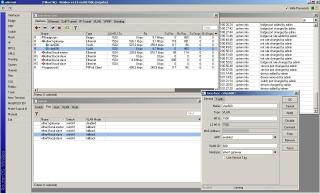
1) Would it be advisable to set the Switch(Window) VLAN mode? Just to ensure the 750G filter correct packets to destination?
2) If I use an old linksys WRT54 as a wifi accesspoint, I just need to plug that into any of the slave ports?

Here is my winbox screen cap
Attached Image


QUOTE(oreomambo @ Sep 25 2010, 02:55 PM)
For IPTV,

1) use ether5 (my choice)
2) setup ether5 to be neither master nor slave. That means bound to "none". So this will not enable the switching function under this physical port (cos we want to bridge it)
3) setup vlan ID 600 under ether1 (yes, that wan port to btu). You probably have a vlan ID 500 under this ehter1 as well for PPPoE.
4) Create a bridge, call it bridge.iptv.
5) Put the vlan ID 600 interface created above and ether5 under this bridge->port . That mean you are bridging vlan 600 (under ether1) + ether5 physical port itself. Traffic going out via port1 will have vlan ID 600 tagged.
6) still in the bridge window, you'll see a button "bridge setup" (i think), uncheck Bridge for firwall, vlan and pppoe (yes, all 3 unchecked)
7) hook up the STB to ether5 port and power up the box. Have fun.

* as for your DHCP bit, i don't think it is the dhcp server. Disconnection here could be other stuff, check if you have mis configure any other interface with bridge. Your management port (probably ether2) should only hold dhcp and an IP address. nothing else.
*

122 Pages « < 32 33 34 35 36 > » Top
Topic ClosedOptions
 

Change to:
| Lo-Fi Version
0.0440sec    0.50    7 queries    GZIP Disabled
Time is now: 2nd December 2025 - 05:30 PM

