Welcome Guest ( Log In | Register )

33 Pages « < 29 30 31 32 33 >Bottom

Outline · [ Standard ] · Linear+

 NVIDIA Graphics Card Overclocking V1, OC Your Card and Post Results Here

views
     
TSowikh84
post Oct 19 2020, 03:57 PM

i7 Clan
Group Icon
Elite
8,711 posts

Joined: Nov 2007
From: Butterworth, PG / Machang, Kelantan


QUOTE(keyo @ Oct 19 2020, 02:39 PM)
Tq bro try to update the bios check at the website have new bios
*
I'm afraid that F2 BIOS won't help in this case bro.
F1 = F2 same power limit and adjustment range.
F2 BIOS will only optimize the fan curve.

https://www.gigabyte.com/Graphics-Card/GV-N...port#support-dl

nrw
post Oct 19 2020, 04:29 PM

Casual
***
Junior Member
398 posts

Joined: Jul 2014


To be fair, the bios is 370W, that's just 5W short of the TuF (which doesn't even pull north of 360 in actual usage despite of that)

there's nothing more you can expect for 2x8 pin.

If that's not enough for you, you should not have gotten the master to start with.
TSowikh84
post Oct 21 2020, 10:21 PM

i7 Clan
Group Icon
Elite
8,711 posts

Joined: Nov 2007
From: Butterworth, PG / Machang, Kelantan


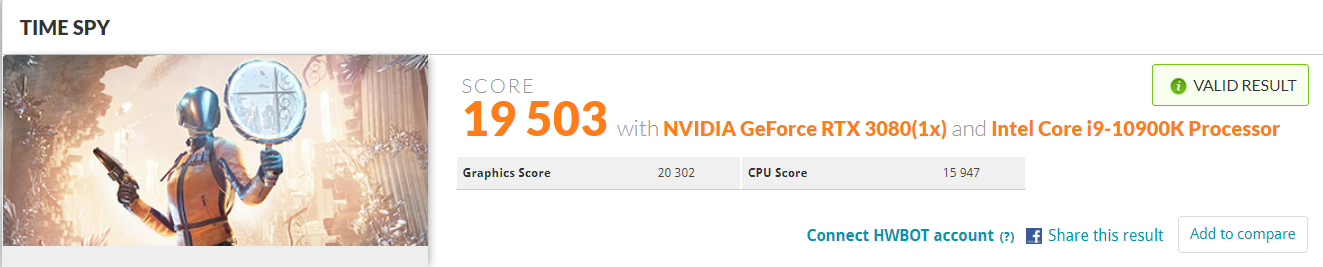
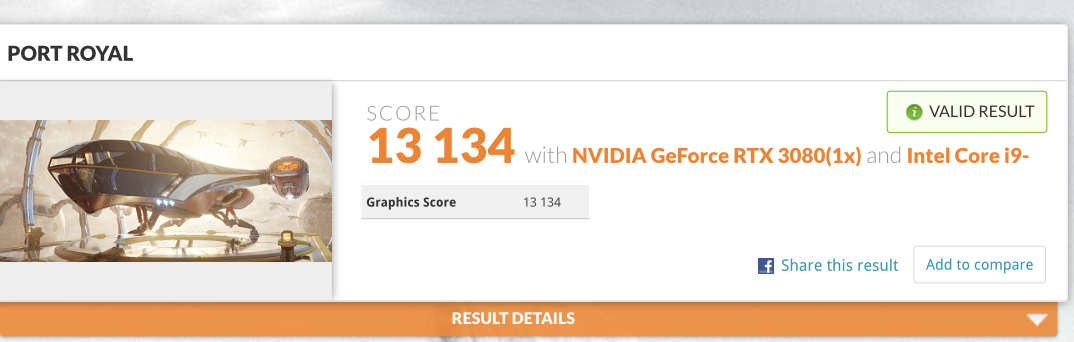
Strix RTX 3080 OC (New vBIOS) @ +180/+1100
10900K @ 5.2GHz
Maximus XII Formula (BIOS 0098)
4x8GB DDR4-4133 CL17
AX1200i
Bitspower Classic Strix GPU waterblock + backplate


Time Spy: https://www.3dmark.com/3dm/51949571
user posted image

Port Royal: https://www.3dmark.com/3dm/51949740
user posted image

This post has been edited by owikh84: Oct 21 2020, 11:30 PM
nrw
post Oct 22 2020, 08:39 AM

Casual
***
Junior Member
398 posts

Joined: Jul 2014


2147 avg. clock in TS; not bad!
TSowikh84
post Oct 22 2020, 09:31 AM

i7 Clan
Group Icon
Elite
8,711 posts

Joined: Nov 2007
From: Butterworth, PG / Machang, Kelantan


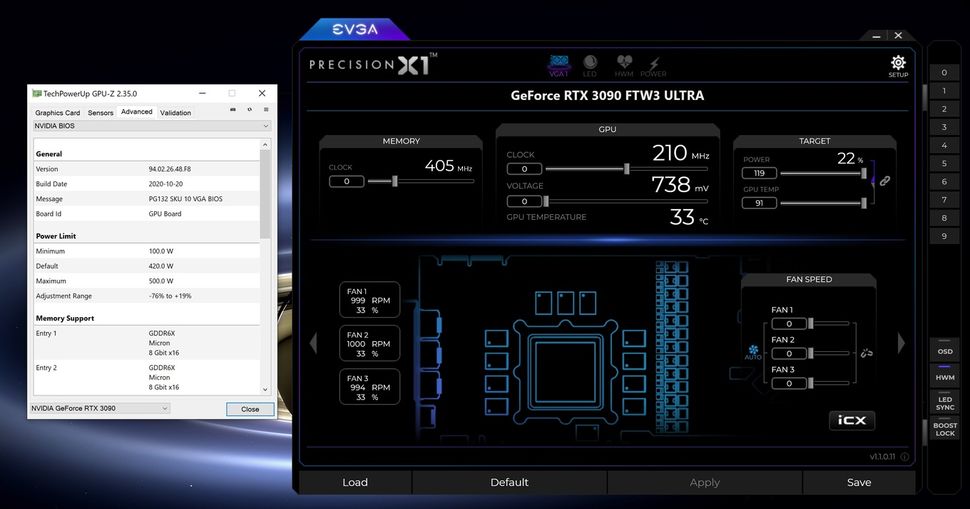
New BIOS Raises Power Limit for EVGA's RTX 3080 and 3090 Cards

QUOTE
EVGA has released a new beta BIOS that raises the power limit to 500W, for the EVGA GeForce RTX 3080 FTW and EVGA GeForce RTX 3090 FTW GPUs. Prior to this new BIOS, the limit was set to 450W. The increase in wattage will allow for greater overclocking results on EVGA's version of these two powerful GPUs, which top our list of best graphics cards and have the highest scores on GPU benchmarks hierarchy.

According to EVGA, the new BIOS is only recommended for those who are looking to perform extreme overclocking. Outside of the increased wattage, the new BIOS does not offer any other benefits. So, unless you're competing in an overclocking contest, it's safer to disregard the new beta BIOS.

Several members over at the EVGA forums have already installed the BIOS and have been impressed with the results.  A user posted a screen shot showing that they have been able to achieve a 119% power target.

user posted image

Source: https://www.tomshardware.com/news/new-bios-...-and-3090-cards

Original post: https://forums.evga.com/EVGA-GeForce-RTX-30...A-m3124192.aspx
keyo
post Oct 28 2020, 10:13 PM

Casual
***
Junior Member
345 posts

Joined: Jun 2009


what is the best software for stress test furmark still crash if play battlefild 5
TSowikh84
post Oct 29 2020, 08:27 AM

i7 Clan
Group Icon
Elite
8,711 posts

Joined: Nov 2007
From: Butterworth, PG / Machang, Kelantan


QUOTE(keyo @ Oct 28 2020, 10:13 PM)
what is the best software for stress test furmark still crash if play battlefild 5
*
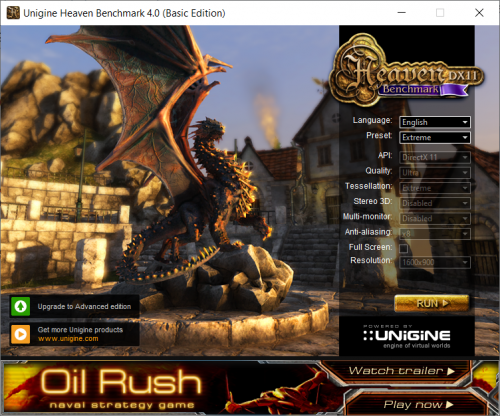
I find Unigine Heaven benchmark is a good stressing tool cos my bad OC usually failed within 10mins of run.
Choose Extreme preset and click run, let it run (no need to press F9/benchmark) for at least 30mins (longer is better of course).
When it suddenly crashed/hang or auto close means your OC is bad.

user posted image
TSowikh84
post Oct 29 2020, 04:19 PM

i7 Clan
Group Icon
Elite
8,711 posts

Joined: Nov 2007
From: Butterworth, PG / Machang, Kelantan


As we know Raytracing can hurt the frame rate in games, DLSS helps in gaining back the loss with even higher frames rates. rclxm9.gif

Watch Dogs: Legion: 3440x1440, Ultra, DX12

Strix 3080 Stock (+0/+0) Min FPS Avg FPS % Improvement over DLSS off
DLSS Off 45 76
DLSS Off + RTX Ultra 31 45 -45.79%
DLSS Ultra Perf 46 120 57.89%
DLSS Ultra Perf + 100% More Details 48 108 42.11%
DLSS Ultra Perf + RTX Ultra 47 96 26.31%
DLSS Ultra Perf + RTX Ultra + 100% More Details 42 88 15.79%

Strix 3080 OC (+150/+1000) Min FPS Avg FPS % Improvement over DLSS off
DLSS Off 45 80
DLSS Off + RTX Ultra 32 48 -40.00%
DLSS Ultra Perf 49 122 52.50%
DLSS Ultra Perf + 100% More Details 49 114 42.50%
DLSS Ultra Perf + RTX Ultra 49 102 27.50%
DLSS Ultra Perf + RTX Ultra + 100% More Details 43 93 16.25%

Screenshots:
user posted image

user posted image

This post has been edited by owikh84: Nov 4 2020, 06:44 AM
oldKyoo
post Oct 31 2020, 05:04 PM

Flashing at a street near you.
*****
Senior Member
961 posts

Joined: Jan 2011
From: Msia

[quote=owikh84,Oct 29 2020, 04:19 PM]

Can i ask what are your ambient temps?
TSowikh84
post Nov 1 2020, 12:38 AM

i7 Clan
Group Icon
Elite
8,711 posts

Joined: Nov 2007
From: Butterworth, PG / Machang, Kelantan


[quote=oldKyoo,Oct 31 2020, 05:04 PM]
[quote=owikh84,Oct 29 2020, 04:19 PM]

Can i ask what are your ambient temps?
*

[/quote]
30c, A/C off
nrw
post Nov 1 2020, 04:24 PM

Casual
***
Junior Member
398 posts

Joined: Jul 2014


Got my BS-AST3090-PA Barrow block for my 3080 TuF few days back.

Ran some benchmark runs just earlier.
Ambient temp is 30°C, water temp between 30-33°C.

This run is with core OC, just moving the slider. (+1150 GDDR6X, max power limit)
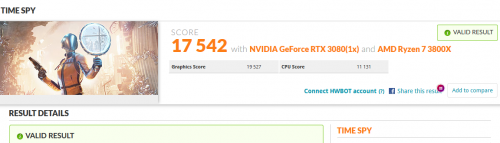
user posted image

This run is with quick curve OC, ~15mins of work. (+1150 GDDR6X, max power limit)
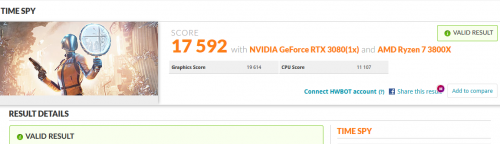
user posted image

Scores under water are pretty consistent.

As a daily stability tested setting I'm running 2010MHz@887mV which is reasonable in power draw and great in performance.

Conclusion: for 2x8PIN cards with a potent cooler, a waterblock is only worth it if you like the looks or want to be fully silent with a higher OC.
I moved from a 1905MHz@850mV (~255W) to 2010MHz@887mV (~305W) by going from air to water.
Both settings being inaudible outside casing. Gained roughly 4% in performance for a little less than RM400.
Obviously I could run it higher than that under water but after 300W the efficiency curve is flattening.

For MAX-OC (disregarding fan noise) the difference is a mere 1.5%.
And those are down to the higher allocation to core (no more fan&rgb) and lower temps and therefore higher boosts.

This post has been edited by nrw: Nov 2 2020, 02:27 PM

silvaco22
post Nov 4 2020, 06:59 AM

Getting Started
**
Junior Member
196 posts

Joined: Sep 2019
Where can I find available stock for Asus RTX 3080 Strix?
acrvr P
post Nov 9 2020, 03:05 AM

New Member
*
Probation
2 posts

Joined: Nov 2020
@owikh84 I have strix 3080 and learned so much from your posts. It seems I may just stay with stock air cooler this time. One question, did you gain anything good out of the new vbios?


TSowikh84
post Nov 9 2020, 08:43 AM

i7 Clan
Group Icon
Elite
8,711 posts

Joined: Nov 2007
From: Butterworth, PG / Machang, Kelantan


QUOTE(acrvr @ Nov 9 2020, 03:05 AM)
@owikh84 I have strix 3080 and learned so much from your posts. It seems I may just stay with stock air cooler this time. One question, did you gain anything good out of the new vbios?
*

New vBIOS gave me more OC headroom, but not by much.
Core clock is now improved by 15MHz (2160MHz game stable) and 30MHz (2175MHz synthetic benchmark stable). I think because the new vBIOS provides more stable core voltage control especially when increased to 100% (1.1v).

This post has been edited by owikh84: Nov 9 2020, 08:44 AM
acrvr P
post Nov 9 2020, 10:35 AM

New Member
*
Probation
2 posts

Joined: Nov 2020
QUOTE(owikh84 @ Nov 9 2020, 08:43 AM)
New vBIOS gave me more OC headroom, but not by much.
Core clock is now improved by 15MHz (2160MHz game stable) and 30MHz (2175MHz synthetic benchmark stable). I think because the new vBIOS provides more stable core voltage control especially when increased to 100% (1.1v).
*
Thanks I will give that a try then
cstkl1
post Nov 23 2020, 08:32 AM

Look at all my stars!!
Group Icon
Elite
6,799 posts

Joined: Jan 2003

10900k@5.3|50
4400c16@1.5v
strix 3080@+165/+1350

https://www.3dmark.com/pr/530123
user posted image
Bonchi
post Dec 3 2020, 12:02 AM

KittehPowah
******
Senior Member
1,649 posts

Joined: Sep 2008
https://www.3dmark.com/3dm/54076210

for some reason my average clocks damn low and GPU usage also not maxed... wonder what could be wrong?

57C temps is also very weird on a zotac on 80% fans... i remember these card shouldnt be running so cool.....

could it be due to pcie riser? due to only using a SFX 750w psu? Or could it be some windows powerplan settings that i need to do?

it’s behaving damn weird. I added more core clocks and the score actually got lower.

This post has been edited by Bonchi: Dec 3 2020, 01:00 AM
TSowikh84
post Dec 3 2020, 07:09 AM

i7 Clan
Group Icon
Elite
8,711 posts

Joined: Nov 2007
From: Butterworth, PG / Machang, Kelantan


QUOTE(Bonchi @ Dec 3 2020, 12:02 AM)
https://www.3dmark.com/3dm/54076210

for some reason my average clocks damn low and GPU usage also not maxed... wonder what could be wrong?

57C temps is also very weird on a zotac on 80% fans... i remember these card shouldnt be running so cool.....

could it be due to pcie riser? due to only using a SFX 750w psu? Or could it be some windows powerplan settings that i need to do?

it’s behaving damn weird. I added more core clocks and the score actually got lower.
*

Is your card running at full PCIe x16 speed? Check with GPU-Z.
To achieve highest score in Port Royal, I had to put two case fans on the backplate, blowing towards the area nears the GPU chip and power connectors. Also, 456.55 driver gave me highest scores compared to other drivers.
Bonchi
post Dec 3 2020, 09:09 AM

KittehPowah
******
Senior Member
1,649 posts

Joined: Sep 2008
QUOTE(owikh84 @ Dec 3 2020, 07:09 AM)
Is your card running at full PCIe x16 speed? Check with GPU-Z.
To achieve highest score in Port Royal, I had to put two case fans on the backplate, blowing towards the area nears the GPU chip and power connectors. Also, 456.55 driver gave me highest scores compared to other drivers.
*
ah damnnnn it is running on X8 .. guess my riser is broken.
TSowikh84
post Dec 3 2020, 09:23 AM

i7 Clan
Group Icon
Elite
8,711 posts

Joined: Nov 2007
From: Butterworth, PG / Machang, Kelantan


QUOTE(Bonchi @ Dec 3 2020, 09:09 AM)
ah damnnnn it is running on X8 .. guess my riser is broken.
*
Broken riser is possible, but first try replug the riser and your GPU. See if you can get back the full x16 speed.

33 Pages « < 29 30 31 32 33 >Top
 

Change to:
| Lo-Fi Version
0.0320sec    0.45    6 queries    GZIP Disabled
Time is now: 3rd December 2025 - 02:43 AM