

Is it possible to connect a LCD TV to a PC speaker?
WTA> Connect LCD TV to PC speaker
WTA> Connect LCD TV to PC speaker
|
|
 Aug 25 2010, 04:40 PM, updated 16y ago Aug 25 2010, 04:40 PM, updated 16y ago
Show posts by this member only | Post
#1
|
 
Senior Member
670 posts Joined: Jan 2008 From: Petaling Jaya  
|
Is it possible to connect a LCD TV to a PC speaker?
|
|
|
|
|
|
Aug 25 2010, 05:00 PM
Show posts by this member only | Post
#2
|

Junior Member
205 posts Joined: Sep 2006 From: malaysia@/home/kualalumpur
|
Yes.
|
|
|
Aug 25 2010, 07:08 PM
Show posts by this member only | Post
#3
|
|
Senior Member
670 posts Joined: Jan 2008 From: Petaling Jaya
|
QUOTE(ShaolinTiger @ Aug 25 2010, 05:00 PM) Yes. Do i need to use a Y-adapter or Just insert the left and right cable from the TV to my speakers? |
|
|
Aug 25 2010, 07:20 PM
Show posts by this member only | Post
#4
|

All Stars
10,479 posts Joined: Jan 2003 From: Sarawak
|
does your tv has a 3.5mm audio out port? if yes, just plug in your pc speaker.
if not, use a 3.5mm to RCA jack (red and white) adaptor cable. |
|
|
Aug 25 2010, 09:05 PM
Show posts by this member only | Post
#5
|
|
Senior Member
670 posts Joined: Jan 2008 From: Petaling Jaya
|
QUOTE(Skylinestar @ Aug 25 2010, 07:20 PM) does your tv has a 3.5mm audio out port? if yes, just plug in your pc speaker. The sound quality won't be affected right?if not, use a 3.5mm to RCA jack (red and white) adaptor cable. |
|
|
Aug 25 2010, 11:10 PM
Show posts by this member only | Post
#6
|

Senior Member
3,174 posts Joined: Jan 2003
|
QUOTE(zXJaMeSXz @ Aug 25 2010, 09:05 PM) The sound quality won't be affected right? to make it less technical, the answer is no. |
|
|
|
|
|
Aug 26 2010, 11:55 AM
Show posts by this member only | Post
#7
|
|
Junior Member
205 posts Joined: Sep 2006 From: malaysia@/home/kualalumpur
|
Both methods will give same quality, normal analogue out.
Unless your TV happens to have a digital optical out (SPDIF) which is rare, and your computer speakers have an optical in (even rarer). So yah just find the headphone jack out and plug it into your speakers. |
|
|
Aug 26 2010, 11:59 AM
Show posts by this member only | Post
#8
|
Senior Member
608 posts Joined: Aug 2008
|
QUOTE(zXJaMeSXz @ Aug 25 2010, 09:05 PM) The sound quality won't be affected right? It can improve sound quality actually (Altec Lansing is very good: my opinion)The pc speaker's subwoofer will boost the low frequency sound. The sound of explosion will become louder and more real. Take an example: picture below is the back connector of a TV. The pair of RCA connector (one white, one red) with a circle with arrow pointing out is the audio output. (some use direct wording label 'output') You use a RCA cable to connect it to pc speaker. 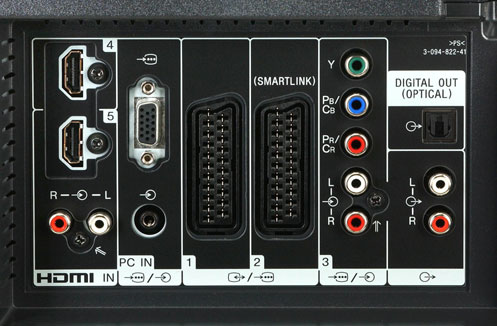 This post has been edited by tanhks: Aug 26 2010, 12:58 PM |
|
|
Aug 26 2010, 12:39 PM
Show posts by this member only | Post
#9
|

Senior Member
647 posts Joined: Jan 2010 From: Klang
|
Just another note that RCA out is pre-out, means output level will remain same even when you adjust TV volume. So, you need to adjust at your PC speaker volume, cannot use TV remote to change volume or mute.
If you use 3.5mm jack, output level is based on TV volume. You need to adjust PC speaker volume at appropriate level to prevent clipping. |
|
|
Aug 26 2010, 01:03 PM
|
|
Junior Member
205 posts Joined: Sep 2006 From: malaysia@/home/kualalumpur
|
QUOTE(eMKs @ Aug 26 2010, 12:39 PM) Just another note that RCA out is pre-out, means output level will remain same even when you adjust TV volume. So, you need to adjust at your PC speaker volume, cannot use TV remote to change volume or mute. Mute usually works from what I've seen as it also turns off all audio outputs.If you use 3.5mm jack, output level is based on TV volume. You need to adjust PC speaker volume at appropriate level to prevent clipping. |
|
|
Aug 27 2010, 01:24 AM
|

Senior Member
557 posts Joined: Oct 2008
|
My Sony Bravia 32BX300 doesn't have L/R audio output in the HDMI section. Only have PC Jack. But when I try connecting my Aego M to it, there's no sound. Tried both setting which is tv speaker setting and audio system setting. Even tried earphone also no sound. Any ideas?
|
|
|
Aug 27 2010, 09:12 AM
|
|
Senior Member
647 posts Joined: Jan 2010 From: Klang
|
QUOTE(Visualize @ Aug 27 2010, 01:24 AM) My Sony Bravia 32BX300 doesn't have L/R audio output in the HDMI section. Only have PC Jack. But when I try connecting my Aego M to it, there's no sound. Tried both setting which is tv speaker setting and audio system setting. Even tried earphone also no sound. Any ideas? That jack maybe for audio input to use with VGA in. Please check the manual. |
|
|
Aug 27 2010, 12:55 PM
|
|
Senior Member
557 posts Joined: Oct 2008
|
QUOTE(eMKs @ Aug 27 2010, 09:12 AM) That jack maybe for audio input to use with VGA in. Please check the manual. Problem solved. I mixed up the input/output settings on the LCD.  |
| Change to: |  0.0156sec 0.0156sec
 1.26 1.26
 5 queries 5 queries
 GZIP Disabled GZIP Disabled
Time is now: 21st December 2025 - 01:25 PM |
 Quote
Quote