Outline ·
[ Standard ] ·
Linear+
Intel® Core™2 Duo/Quad Overhauled Rev. 4, The journey continues...
|
UserU
|
 Jun 28 2012, 06:33 PM Jun 28 2012, 06:33 PM
|
CSONLINE2.NET - FREE COUNTER-STRIKE


|
Hey guys, do you know what's the most reasonable OC settings for the Q8200 on an ASUS P5G41T-M LX? I know its not really a good overclocker like the Q6600 but I've seen results where some can get it to operate above 3GHz  I'm still new when it comes to adjusting the voltage, so pointers are appreciated. By the way, which temperature is the main that one should monitor? Since there are 4 cores... This post has been edited by UserU: Jun 28 2012, 06:34 PM Attached thumbnail(s)
|
|
|
|
|
|
UserU
|
Jun 29 2012, 05:55 PM
|
CSONLINE2.NET - FREE COUNTER-STRIKE
|
QUOTE(saturn85 @ Jun 29 2012, 06:47 AM) try your luck with 2.8ghz first?  see got cpu temperature or not?  http://www.tomshardware.com/reviews/overcl...um,2366-12.html http://www.tomshardware.com/reviews/overcl...um,2366-12.htmlThe BIOS has it, but checking it every time can be quite a hassle. Anyway, I'll read more from that article, thanks  |
|
|
|
|
|
UserU
|
Jun 30 2012, 01:54 PM
|
CSONLINE2.NET - FREE COUNTER-STRIKE
|
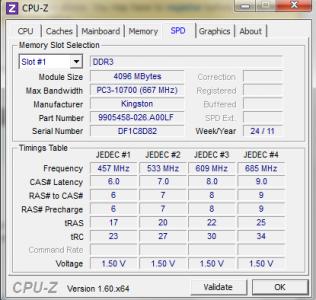
QUOTE(saturn85 @ Jun 30 2012, 05:53 AM) see whether got cpu temperature or those tmpin0, tmpin1, tmpin2... The TMPIN0 is only displayed for my graphics card. The CPU temperatures are displayed on cores#0 till 3, but core#0 seems to have the highest readings. I managed to OC it by 15%, since its on a stock cooler. Temperature hovers near 60C even on idle. On a side note, may I know how should I change the RAM timings? I have some knowledge on the speed against the clock cycles but I'm lost when it comes to tightening them. This post has been edited by UserU: Jun 30 2012, 02:17 PM Attached thumbnail(s)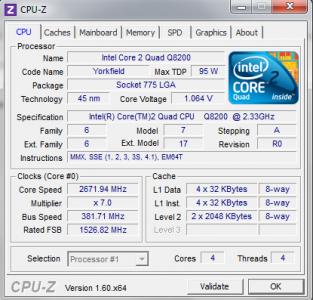
|
|
|
|
|
|
UserU
|
Sep 13 2012, 01:07 PM
|
CSONLINE2.NET - FREE COUNTER-STRIKE
|
One rule of the thumb, always make amendments to readings in small amounts. |
|
|
|
|
|
UserU
|
Aug 9 2013, 09:43 PM
|
CSONLINE2.NET - FREE COUNTER-STRIKE
|
Anyone here that owns an ASUS P5G41T-M LX motherboard? I am having difficulty in overclocking a Q8200(R0, core voltage below 1.2V during peak) as the current clock speed is still bottlenecking the system performance based on these specs: - Generic 550W PSU
- HD7750(stock)
- 4GB DDR3 RAM at 667MHz bandwidth, single channelI've enabled the overclocking profile of 15%, so the max clock speed is at 2.60GHz+. As this mobo doesn't display the VCore values in the BIOS, there were only +50mV, +100mV and +150mV. Image of the BIOS is too huge, so click on the spoiler to view it. » Click to show Spoiler - click again to hide... « I tried changing VCore to +150mV while increasing the bus speed but the system wouldn't boot so I had to revert the changes. I've seen others OCing theirs to beyond 3.0GHz but what I want is just 2.8GHz max to be on the safe side. Anyone can guide me on achieving the desired result? This post has been edited by UserU: Aug 10 2013, 01:10 AM |
|
|
|
|



 Quote
Quote


 0.0180sec
 0.75
0.75
 7 queries
 GZIP Disabled