

just update the drive, but i can't find the "Preferred graphics processor", can any one help me? now i use acer aspire 4741g, G310m, is it this can be use in this laptop???
Asus A | U | N series combined thread V2, New model coming in.....
Asus A | U | N series combined thread V2, New model coming in.....
|
|
 Sep 1 2010, 12:33 PM Sep 1 2010, 12:33 PM
Return to original view | Post
#1
|
 
Junior Member
11 posts Joined: Jun 2009 
|
just update the drive, but i can't find the "Preferred graphics processor", can any one help me? now i use acer aspire 4741g, G310m, is it this can be use in this laptop???
|
|
|
|
|
|
Sep 1 2010, 12:41 PM
Return to original view | Post
#2
|
|
Junior Member
11 posts Joined: Jun 2009
|
no, i din't delete the old driver, just install and restart...how to delete the old driver?? TQ for u help.
|
|
|
Sep 1 2010, 12:48 PM
Return to original view | Post
#3
|
|
Junior Member
11 posts Joined: Jun 2009
|
ok, i try to find the driver sweeper in google, and what is it use for?
|
|
|
Sep 1 2010, 01:21 PM
Return to original view | Post
#4
|
|
Junior Member
11 posts Joined: Jun 2009
|
just do what ever u said, uninstall, driver sweeper, f8 ...everything have try, still can't find the "Preferred graphics processor" in the Global setting, everything still in defaut mode...
|
|
|
Sep 1 2010, 11:29 PM
Return to original view | Post
#5
|
|
Junior Member
11 posts Joined: Jun 2009
|
here is the sreen shot...
 my global setting is default mode. Attached thumbnail(s) 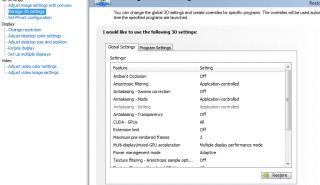
|
|
|
Sep 2 2010, 08:40 AM
Return to original view | Post
#6
|
|
Junior Member
11 posts Joined: Jun 2009
|
QUOTE(gogo2 @ Sep 2 2010, 12:33 AM) weird... found it.....only with optimus tech will have Preferred Graphics Processor... Preferred Graphics Processor is missing. GO to Help --> About NVIDIA control Panel... My version is: 3.3.532.01   Attached thumbnail(s) 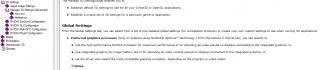
|
|
Topic ClosedOptions
|
| Change to: |  0.0388sec 0.0388sec
 0.89 0.89
 7 queries 7 queries
 GZIP Disabled GZIP Disabled
Time is now: 19th December 2025 - 08:13 PM |
 Quote
Quote