


Regret lor.

Asus A | U | N series combined thread V2, New model coming in.....
|
|
 Oct 11 2010, 12:36 PM Oct 11 2010, 12:36 PM
Return to original view | Post
#1
|
 
Senior Member
823 posts Joined: Jun 2005 From: 0:0:0:0:0:0:7f00:1 
|
Took me 3 months to realize that my A42Jv is using Seagate for the hard disk. Man, I wish I can change the hard disk without voiding the warranty.
Regret lor. |
|
|
|
|
|
Oct 11 2010, 12:47 PM
Return to original view | Post
#2
|
|
Senior Member
823 posts Joined: Jun 2005 From: 0:0:0:0:0:0:7f00:1
|
QUOTE(lee_what2004 @ Oct 11 2010, 12:44 PM) Something bad about Seagate? Urm, I got bad experience with Seagate products, mostly the 3.5" drive. 3 of my desktop Seagate hd died within 1 year period.   |
|
|
Oct 11 2010, 02:00 PM
Return to original view | Post
#3
|
|
Senior Member
823 posts Joined: Jun 2005 From: 0:0:0:0:0:0:7f00:1
|
QUOTE(gogo2 @ Oct 11 2010, 01:19 PM) actually if you read the whole thread... there's already few cases A42JV seagate hardisk got sound and some have died.... Oh my, I knew it.  And yeah, my hard disk damn hot one. One of the sign my hard disk is dying, maybe? And yeah, my hard disk damn hot one. One of the sign my hard disk is dying, maybe? eh gogo2, u also use A42Jv ka? did u OC it? o.O |
|
|
Oct 11 2010, 02:40 PM
Return to original view | Post
#4
|
|
Senior Member
823 posts Joined: Jun 2005 From: 0:0:0:0:0:0:7f00:1
|
Just installed Battery Care, notice my HD idle temp is 49C.
|
|
|
Oct 11 2010, 03:09 PM
Return to original view | Post
#5
|
|
Senior Member
823 posts Joined: Jun 2005 From: 0:0:0:0:0:0:7f00:1
|
QUOTE(lee_what2004 @ Oct 11 2010, 02:46 PM) Can give the discharge rate with Intel + power saver? Currently on power plug (i pulled out the battery). I'll let you know later.And by intel, you mean the by using the Intel HD instead of nVidia? |
|
|
Oct 11 2010, 03:14 PM
Return to original view | Post
#6
|
|
Senior Member
823 posts Joined: Jun 2005 From: 0:0:0:0:0:0:7f00:1
|
QUOTE(lee_what2004 @ Oct 11 2010, 03:10 PM) Yup, Intel HD... How do I make sure I'm using Intel HD right now? o.O |
|
|
|
|
|
Oct 11 2010, 03:31 PM
Return to original view | Post
#7
|
|
Senior Member
823 posts Joined: Jun 2005 From: 0:0:0:0:0:0:7f00:1
|
Aight, got it.
Oh yeah, can I just plug in the battery while the laptop is still on? |
|
|
Oct 11 2010, 04:16 PM
Return to original view | Post
#8
|
|
Senior Member
823 posts Joined: Jun 2005 From: 0:0:0:0:0:0:7f00:1
|
Aight, I'm not sure how to read this though. Izit good or bad? o.O
 oh yeah, how did you manage to get fast boot time? |
|
|
Oct 11 2010, 04:23 PM
Return to original view | Post
#9
|
|
Senior Member
823 posts Joined: Jun 2005 From: 0:0:0:0:0:0:7f00:1
|
QUOTE(lee_what2004 @ Oct 11 2010, 04:19 PM) Its very bad.... perhaps because i was running lots of background apps? and a 10+ tabbed browser? I'm expecting under -10.0W for Intel HD + power saver... As for boot time, its on the 1st post.... |
|
|
Oct 11 2010, 04:29 PM
Return to original view | Post
#10
|
|
Senior Member
823 posts Joined: Jun 2005 From: 0:0:0:0:0:0:7f00:1
|
QUOTE(lee_what2004 @ Oct 11 2010, 04:27 PM) Means the nVidia is running? Is this in power saver? with lowest screen brightness? wifi or cable? nvidia not running, on wifi, hurm, brightness... wait, i go check again.Because Asus decide so? EDIT : and lulz, the battery life keep climbing from 1 hours++ to 2 and a half hours. This post has been edited by CZero: Oct 11 2010, 04:30 PM |
|
|
Oct 12 2010, 08:36 AM
Return to original view | Post
#11
|
|
Senior Member
823 posts Joined: Jun 2005 From: 0:0:0:0:0:0:7f00:1
|
A few tweaking and I got this on my A42Jv.
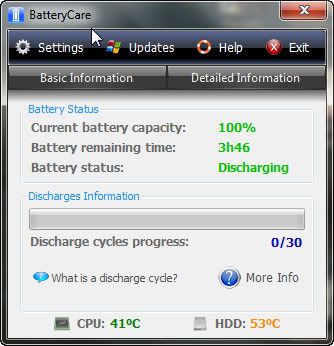 Forgot to check the discharge rate. |
|
|
Oct 12 2010, 09:24 AM
Return to original view | Post
#12
|
|
Senior Member
823 posts Joined: Jun 2005 From: 0:0:0:0:0:0:7f00:1
|
QUOTE(riku2replica @ Oct 12 2010, 08:39 AM) fulamak, kodomo beli laptop asus. ...lol, its been like, more than 3 months already. |
|
|
Oct 17 2010, 03:22 PM
Return to original view | Post
#13
|
|
Senior Member
823 posts Joined: Jun 2005 From: 0:0:0:0:0:0:7f00:1
|
This occurred to me just now. The nVidia's refused to kick in, leaving me with the Intel HD for the games.

Something to do with the driver? I'm using the beta driver ver. 260.63  |
|
|
|
|
|
Oct 17 2010, 04:17 PM
Return to original view | Post
#14
|
|
Senior Member
823 posts Joined: Jun 2005 From: 0:0:0:0:0:0:7f00:1
|
QUOTE(lee_what2004 @ Oct 17 2010, 04:01 PM) Added .exe to the nvidia control panel? yeah, done this and that. set the global setting to use hi-perf nvidia, right clicking > run with nvidia, reinstall the driver etc, but still can't. it work well yesterday though. i think i'll just reformat the laptop later. |
|
|
Oct 17 2010, 04:19 PM
Return to original view | Post
#15
|
|
Senior Member
823 posts Joined: Jun 2005 From: 0:0:0:0:0:0:7f00:1
|
QUOTE(lee_what2004 @ Oct 17 2010, 04:18 PM) downgrade the driver to 258.96 perhaps? on it, downloading the WHQL one. |
|
|
Oct 18 2010, 09:27 AM
Return to original view | Post
#16
|
|
Senior Member
823 posts Joined: Jun 2005 From: 0:0:0:0:0:0:7f00:1
|
QUOTE(lee_what2004 @ Oct 17 2010, 04:18 PM) downgrade the driver to 258.96 perhaps? Doesn't work too, so I resorted to fresh format. Now its back on rolling.  |
|
|
Oct 18 2010, 01:55 PM
Return to original view | Post
#17
|
|
Senior Member
823 posts Joined: Jun 2005 From: 0:0:0:0:0:0:7f00:1
|
lee_what, can share you Afterburner config here?
|
|
|
Oct 18 2010, 02:11 PM
Return to original view | Post
#18
|
|
Senior Member
823 posts Joined: Jun 2005 From: 0:0:0:0:0:0:7f00:1
|
yours are A42Jv too right?
|
|
|
Oct 28 2010, 09:48 AM
Return to original view | Post
#19
|
|
Senior Member
823 posts Joined: Jun 2005 From: 0:0:0:0:0:0:7f00:1
|
Say, anyone tried playing Fallout : New Vegas yet on their A42Jv?
 EDIT : copypaste from Gamers Hideout. nvm, found the fix. those who use Optimus-driven notebook like M11x or A42jv should do some minor tweak first in order to get the .dll fix to work. QUOTE Step 1: SourceDownload this .dll http://anthonydamasco.net/out/d3d9.dll Step 2: Place the .dll in your “\Documents\My Games\FalloutNV” folder and then copy the file, then paste it into your “\Steam\steamapps\common\fallout new vegas” folder. Step 3: Open your NVIDIA Control Panel and select Fallout – New Vegas from the first dropdown menu. Step 4: Select “Integrated graphics” from the second dropdown menu and click “Apply” in the lower right corner of the window. Close the NVIDIA Control Panel. Step 5: Launch Fallout: New Vegas and click Options in the launcher. Set the detail to Low and use the lowest screen resolution possible. Step 6: Now click Play, load up a save, walk to the nearest human NPC, and start a conversation. If you DO NOT notice a drop in FPS during the conversation, continue on to step 7. If you DO notice a drop in FPS during the conversation then you have followed steps 1 and 2 incorrectly. Step 7: Quit the game to desktop. Now open the launcher again and click Options. Your graphics adapter should now be listed as the NVIDIA GeForce 7900 GS. Set the detail to your desired level, readjust your Aspect Ratio and Resolution, and exit the Options pop-up. Minimize the launcher but do not exit it. Step 8: Open up your NVIDIA Control Panel again. Now select the High-performance NVIDIA processor from the second dropdown menu and click “Apply” in the bottom right corner. Close the NVIDIA Control Panel. Step 9: Restore the Fallout: New Vegas launcher and click Play. This post has been edited by CZero: Oct 28 2010, 10:00 AM |
|
Topic ClosedOptions
|
| Change to: |  0.0443sec 0.0443sec
 0.60 0.60
 7 queries 7 queries
 GZIP Disabled GZIP Disabled
Time is now: 5th December 2025 - 07:42 PM |
 Quote
Quote