

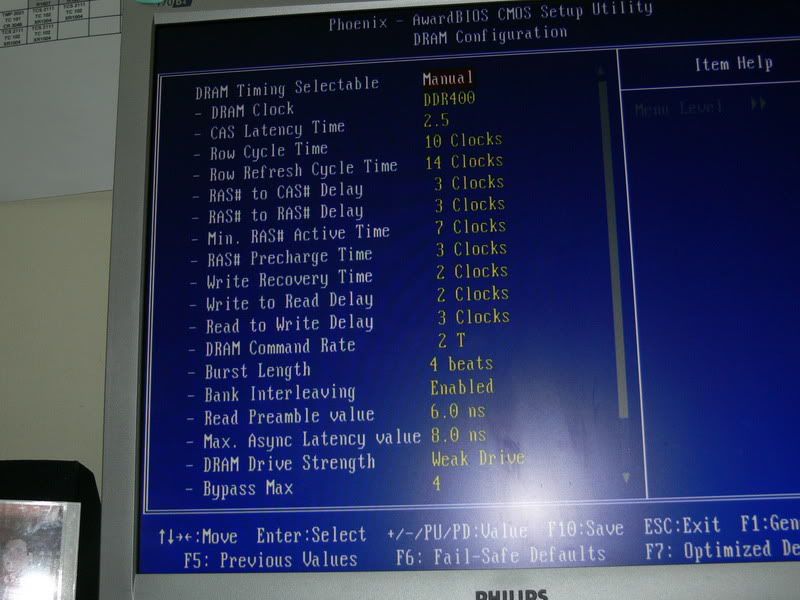
any setting errors? always getting BSOD... showing msg KMODE_EXCEPTION_NOT_HANDLED
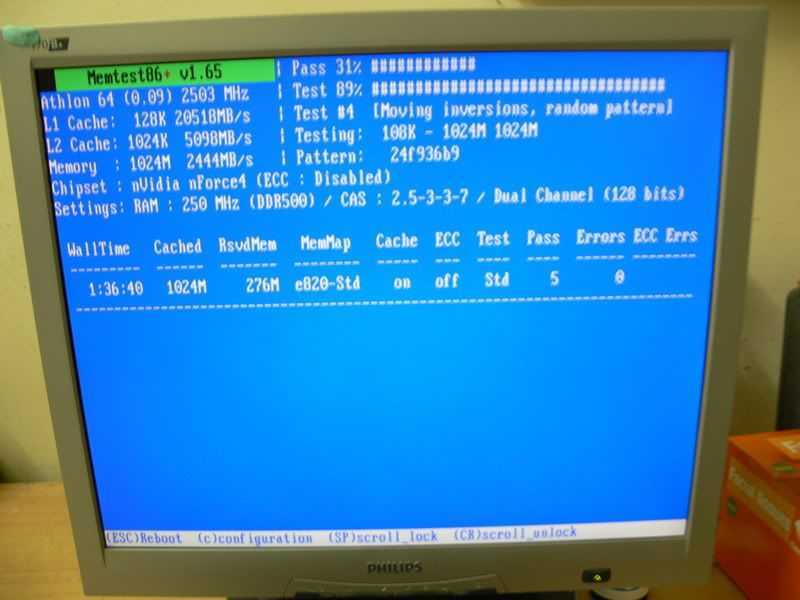
the memtest86 is i set to 1T...


abit Fatal1ty AN8 for AMD 64bit, Overclocking ability...
|
|
 Feb 17 2006, 10:44 PM Feb 17 2006, 10:44 PM
|
 
Junior Member
491 posts Joined: Jan 2003 From: Cyberjaya 
|
Irenic : here is my screenshot
any setting errors? always getting BSOD... showing msg KMODE_EXCEPTION_NOT_HANDLED the memtest86 is i set to 1T... |
|
|
|
|
|
Feb 17 2006, 10:59 PM
|
 
Elite
6,139 posts Joined: Jan 2003
|
QUOTE(jarofclay @ Feb 16 2006, 11:23 AM) Updated to bios 20, still can't support 2GB modules with 1T timing. My DIMM is UCCC. Are there any success stories from you guys? i've updated to bios20 too.. what do u mean 2GB modules?? izzit 1 x 2GB part or 2x 1GB part or 4x 512MB part? mine 2x 1GB D43 can run at DDR400, 2.6v, 1T, 2.5-3-3-7 |
|
|
Feb 18 2006, 01:14 AM
|

Senior Member
7,338 posts Joined: Jan 2003 From: Cybercity of Cyberjaya  
|
QUOTE(cyberian @ Feb 17 2006, 10:44 PM) Irenic : here is my screenshot have u try windows memtest? Dos memtest is good to check any faulty on ram but to check for windows stability, better use windows memtest..any setting errors? always getting BSOD... showing msg KMODE_EXCEPTION_NOT_HANDLED the memtest86 is i set to 1T... neway its good to see such settings in Abit board...  |
|
|
Feb 18 2006, 01:15 AM
|
|
Senior Member
7,338 posts Joined: Jan 2003 From: Cybercity of Cyberjaya
|
QUOTE(cyberloner @ Feb 17 2006, 07:58 PM) yea more ram option sorry double post.. thx for the screenshot~and the ram setting .. ras precharge set it correctly.. so i dun need to change from 2 to 3 ...  for u irenic |
|
|
Feb 18 2006, 01:39 PM
|
|
Junior Member
491 posts Joined: Jan 2003 From: Cyberjaya
|
QUOTE(cyberian @ Feb 17 2006, 10:12 PM) may i know wat happen to 1T issue on this mobo? May I know wat 1T issue? wat is the effect of it?is that Auto Shut down but the power still running? wow... 1T i got Sandra mark 6606.. while with 2T onli get 5733... so big different This post has been edited by cyberian: Feb 18 2006, 02:04 PM |
|
|
Feb 18 2006, 04:46 PM
|

Senior Member
1,471 posts Joined: Jan 2003 From: "Kap Dong" 
|
for stable + long hr useage go for asus , abit , gigabyte..
for overclocking go for DFI.... |
|
|
|
|
|
Feb 18 2006, 06:13 PM
|

Senior Member
1,560 posts Joined: May 2005 From: Penang
|
yea DFI .. oc very high....
but stable overclocking still abit.... |
|
|
Feb 19 2006, 09:34 PM
|

Senior Member
1,377 posts Joined: Jan 2003 From: Nothing special
|
helloo...
somebody help me pleaseee my mobo syddently hang cannot enter bios and the 7 segment display show 90 what are the meanings some body help me pleaseeee  This post has been edited by emilz: Feb 19 2006, 09:35 PM |
|
|
Feb 20 2006, 12:04 AM
|
|
Senior Member
1,377 posts Joined: Jan 2003 From: Nothing special
|
haluuuuuu
any body home ka 90 means (Complete uGuru initial process AWARD BIOS take over booting job) it seem that it cannot run the bios setuComplete uGuru initial process AWARD BIOS take over booting job this happen after updated bios 2.0 in abit web warrrr pening oooooooooooo |
|
|
Feb 20 2006, 01:43 AM
|
|
Senior Member
1,560 posts Joined: May 2005 From: Penang
|
remove battery a while... put back on..
try boot... if cannot change ram slot to 3-4 and try boot... if cannot change power supply... and try boot.... never update bios by using online update... This post has been edited by cyberloner: Feb 20 2006, 01:45 AM |
|
|
Feb 20 2006, 03:13 AM
|

Elite
8,103 posts Joined: Jan 2003 From: Tanah Lot @ Dungun, Terengganu.
|
QUOTE(emilz @ Feb 20 2006, 12:04 AM) haluuuuuu dats y old way of bios flashin still d best for me... windows based is kinda risky sumtimes... any body home ka 90 means (Complete uGuru initial process AWARD BIOS take over booting job) it seem that it cannot run the bios setuComplete uGuru initial process AWARD BIOS take over booting job this happen after updated bios 2.0 in abit web warrrr pening oooooooooooo  mebe dfi way of clearin cmos will help... unplug all psu connection on d board & batt, leave it for hours then try again...  |
|
|
Feb 20 2006, 03:34 PM
|

Junior Member
498 posts Joined: Jan 2003 From: Ipoh, Perak
|
Updated to BIOS 20 and not that impressed at all...
In fact my system failed to boot upon flashing BIOS 20... I was running at DDR500 (2x1GB at 1T). No issues when I used to flash from BIOS 17, 18 to 19. Need to clear CMOS and set the DRAM timing manually.. I also noticed that setting the Idle Cycle Limit in the BIOS doesn't show properly in AMD64 Tweaker, along with a few others DRAM setting in the BIOS. BIOS 19 is a bit more stable IMO.... |
|
|
Feb 20 2006, 05:07 PM
|
|
Senior Member
1,377 posts Joined: Jan 2003 From: Nothing special
|
QUOTE(cyberloner @ Feb 20 2006, 01:43 AM) remove battery a while... put back on.. already change the power supply and still no good resultstry boot... if cannot change ram slot to 3-4 and try boot... if cannot change power supply... and try boot.... never update bios by using online update... already change the ram same thing already remove the battery but still the same results when remove battery and on it, normally it will show CF but it still show 90 right now no idea |
|
|
|
|
|
Feb 20 2006, 07:19 PM
|
|
Senior Member
1,377 posts Joined: Jan 2003 From: Nothing special
|
QUOTE(ah_khoo @ Feb 20 2006, 03:13 AM) dats y old way of bios flashin still d best for me... windows based is kinda risky sumtimes... hmmmmmmm mebe dfi way of clearin cmos will help... unplug all psu connection on d board & batt, leave it for hours then try again... done unplug all the connection on d board and the cmos battery but still the same results keep on hanging at 90...... right now no idea to debug this board  for those who experience in trouble shoot mobo please help me before i sent to rma this weak |
|
|
Feb 20 2006, 08:04 PM
|

Senior Member
675 posts Joined: Jan 2005
|
izzit bios 20 hav a problem ?? new fatal1ty an8 sli here... afraid to flash the bios now...
|
|
|
Feb 20 2006, 08:55 PM
|
|
Senior Member
1,377 posts Joined: Jan 2003 From: Nothing special
|
QUOTE(wadieq @ Feb 20 2006, 08:04 PM) izzit bios 20 hav a problem ?? new fatal1ty an8 sli here... afraid to flash the bios now... don't know larrrright now oso blur because of my mobo problem totally cannot do anything liaw |
|
|
Feb 21 2006, 02:16 AM
|
|
Senior Member
1,560 posts Joined: May 2005 From: Penang
|
If you are using online update ... confirm u have downloaded a corrupted bios file and flash... (so never online update the bios or kill the mobo)
suggest... find an an8 board and borrow the bios and plug in your board to test... if can boot means your bios is corrupted... so u need to hot flash it... hotflash boot by using workable bios, and boot to a floppy that can boot into dos and have the bios of your board... take out the bios chip and put in your bad bios chip in it.. and type runme if fail to find a bios/ rma it Hope this help... |
|
|
Feb 21 2006, 02:20 AM
|
|
Junior Member
498 posts Joined: Jan 2003 From: Ipoh, Perak
|
QUOTE(emilz @ Feb 20 2006, 07:19 PM) hmmmmmmm Bro, did the BIOS flash successfully?done unplug all the connection on d board and the cmos battery but still the same results keep on hanging at 90...... right now no idea to debug this board for those who experience in trouble shoot mobo please help me before i sent to rma this weak If yes, try using a single stick of RAM instead of one pair. Else, grab another stick of RAM and try to get the system to boot. |
|
|
Feb 21 2006, 03:01 AM
|
|
Senior Member
1,377 posts Joined: Jan 2003 From: Nothing special
|
QUOTE(cyberloner @ Feb 21 2006, 02:16 AM) If you are using online update ... confirm u have downloaded a corrupted bios file and flash... (so never online update the bios or kill the mobo) in my u i'm the only one used this mobo liawsuggest... find an an8 board and borrow the bios and plug in your board to test... if can boot means your bios is corrupted... so u need to hot flash it... hotflash boot by using workable bios, and boot to a floppy that can boot into dos and have the bios of your board... take out the bios chip and put in your bad bios chip in it.. and type runme if fail to find a bios/ rma it Hope this help... right now it cannot enter the bios cannot display anything and oso can say cannot press anything what do you mean buy taking out the bios chip sound like ambulance at the speaker (borrow the bios and plug in your board to test...) cannot understand by the meaning borrow the bios (boot by using workable bios) oso cannot understand sorry i very noob and hard to understand |
|
|
Feb 21 2006, 03:04 AM
|
|
Senior Member
1,377 posts Joined: Jan 2003 From: Nothing special
|
QUOTE(pcmoddingmy @ Feb 21 2006, 02:20 AM) Bro, did the BIOS flash successfully? right now the thing is, it cannot run any bios it like hang at reading 90 at the seven segment display If yes, try using a single stick of RAM instead of one pair. Else, grab another stick of RAM and try to get the system to boot. try many thing already change psu, ram, take out the cmos (leave it around 5 Hours and now tring to leave it more than 24 hours) |
| Change to: |  0.0154sec 0.0154sec
 0.89 0.89
 6 queries 6 queries
 GZIP Disabled GZIP Disabled
Time is now: 2nd December 2025 - 04:17 PM |
 Quote
Quote