Welcome Guest ( Log In | Register )

Bump Topic Topic Closed RSS Feed
6 Pages < 1 2 3 4 > » Bottom

Outline · [ Standard ] · Linear+

 Asus G-Series Notebooks V2, Asus G73, G53 and etc . . .

views
     
Viperion
post Aug 30 2010, 03:52 AM

Getting Started
**
Junior Member
112 posts

Joined: Jan 2003
From: Hiding Under Some Rock


QUOTE(riku2replica @ Aug 29 2010, 10:46 PM)
Mobile HD6 series will be getting 256-bit bus instead of 128-bit limitation and of courseĀ  Eyefinity.
In other words, more memory bandwidth and performance. Perhaps 2 teraflops on a laptop already with Intel Sandy Bridge.

So far there's only HP Envy 17" that has HD5850m with eyefinity unlocked. There rest like alienware, clevo, sager does not have Eyefinity.

For me, eyefinity is important for my multitasking of coz the GPU performance. That depends if Asus could fix GSOD or i'll skip to HD6 series for Asus ROG G73 refresh/G74.
*
You will play the never ending waiting game. Honestly, the GSOD doesn't effect the laptop too much if you know what to do. For normal work if your TIM was pasted properly from the factory your notebook will never GSOD. Those facing GSOD during normal windows environment has really high idle temps or screwed their OS. If you are facing GSOD within games, Furmark, etc. a simple re-clock of your GPU to 705/1100 solves the problem. I never had any GSOD when I got my laptop but my unit GSOD for the first time on catalyst 10.7 after one month of ownership and on Starcraft 2 tongue.gif Two observations I made, first my idle temps were steadily increasing. I think my TIM is degrading and I need a re-paste because I GSOD when the temps gets high on stock clocks. If I overclock to 705/1100 and reach the previous temps when I GSOD on stock the GPU is stable as a rock and no GSOD. Currently I am manually changing my GPU clocks with AMDGPU tool and shortcut keys which works like a charm. If you want everything automated, flash with the many vBios versions at NBR that clocks your GPU to 705/1100 default and solves all your problems.

My advice to you is to check your requirements and see if any laptop fits your list then bite the bullet or you will never be satisfied with anything. Take a trip down to any gaming notebook brand and you will also see many problems. What matters is there is a solution from the community and there will be an official fix in the near future from the manufacturer. I'm not sure if Gary Key in NBR is the real deal from Asus but it seems the community is really pushing for a resolution into the issues. Once all of this issues are fixed I think this notebook will be, wait for it.........L-E-G-E-N-D-A-R-Y! I've been watching too much How I Met Your Mother tongue.gif laugh.gif

This post has been edited by Viperion: Aug 30 2010, 03:55 AM
Viperion
post Aug 30 2010, 08:00 AM

Getting Started
**
Junior Member
112 posts

Joined: Jan 2003
From: Hiding Under Some Rock


QUOTE(Jeffrey1987 @ Aug 30 2010, 04:03 AM)
rclxms.gif Very well said . . .  I'm a 100% satisfied Asus customer I can say . . .  not much complaint I can think of though there are some GSOD problems occured to some batch of the G73 notebook. Nevertheless, its price/performance ratio is outweigh any gaming notebooks out there. If one really does worry about the GSOD, they can aim for Sager perhaps?  laugh.gif

Anyway, why you still not sleep early in the morning?
*
I'm actually an automated machine built in the future and sent back into the past tongue.gif

Anyway I actually have some work to clear up and can't really sleep. I will be dead once everything is finished wink.gif laugh.gif
Viperion
post Aug 30 2010, 02:35 PM

Getting Started
**
Junior Member
112 posts

Joined: Jan 2003
From: Hiding Under Some Rock


QUOTE(Jeffrey1987 @ Aug 30 2010, 02:11 PM)
Please be patient dude. Usually, it will take 7 to 10 days to arrive at M'sia. Thus, just make sure that you click ferociously on the given USPS link . . .  laugh.gif
*
Please also refrain from breaking your poor fingers from pressing the refresh keys too much. Take a break ever 100th or so presses tongue.gif laugh.gif
Viperion
post Aug 31 2010, 03:26 AM

Getting Started
**
Junior Member
112 posts

Joined: Jan 2003
From: Hiding Under Some Rock


A quick update for all thread members, I've just cracked open my notebook and repasted my GPU and CPU. I am in the process of re-assembling the laptop with the help of my friend. I have taken some pictures and videos. Unfortunately the entire process is really time consuming and I could only take some parts. If any members is willing to assist me with the pictures and video editing I will really appreciate it (Jeffrey, you think you will be able to?). PM me if you can assist and I will send the entire batch of pictures+videos to be edited into a guide for the members here.

G73JH owners who are interested, I've ordered two extra tubes of IC Diamond Carat 7 imported from USA at Heatsink Factory and I will sell it soon in the garage sale. I really want to sell it to the members/owners in this thread first so if you are interested PM me before I complete the thread in a few days time. I would prefer C.O.D in K.L but I can make arrangement for postage on a first come first serve basis.

I will post some reports later if my notebook ever starts up tongue.gif

Update:
My notebook fired up without any major issues rclxms.gif

We were confused on the orientation of the keyboard light cable and found out we actually inserted it upside down the first time so I lost my KB lights. On the first start up, I notice my temps idling at 52~54 C and peaking at 55~56C. I took note on my temperatures before the re-paste and I was idling at 66~68C before the re-paste job. I dropped about 10~12C at the offset thumbup.gif I still need time for the TIM to set so I will report later on my results.

After opening up the notebook for the second time to flip the keyboard light cable, we are now testing my rig with Starcraft 2 on ultra settings. It's hovering around 70~74C compared to my previous 90~96C. I used to get GSOD within 5 minutes of play in SC2 and now my friend has been playing SC2 for the past 45 minutes without any issues on stock clocks rclxm9.gif

Here is some additional information:

1.) Stock vBios

2.) ATI Catalyst 10.8

3.) Stock clocks at 700/1000mhz

More updates in a day or two so stay tuned wink.gif

This post has been edited by Viperion: Aug 31 2010, 06:09 AM
Viperion
post Aug 31 2010, 06:03 AM

Getting Started
**
Junior Member
112 posts

Joined: Jan 2003
From: Hiding Under Some Rock


Further Update:

IC Diamond takes about 2 hours to set in on max stress at 50 psi pressure to fully cure. I am currently running Furmark on the current settings:

1.) Stability Test

2.) Extreme Burning Mode

3.) 1920X1080 resolution

4.) 8x MSAA

5.) Full Screen Mode

Furmark has been running for 25 minutes now at stock clocks and the max temp reported is: 81c Max rclxms.gif rclxm9.gif thumbup.gif

I will be running Furmark for the next 1 hour 35 minutes to make sure the GPU is stressed to the max for at least two hours in order to let the TIM to cure properly. After that I will do the CPU stress test wink.gif

Update:

Furmark hanged at the 45 minutes mark on my test. I did not get a GSOD as i could still see my windows mouse pointer moving about but I couldn't force Furmark to shutdown and return to windows. After further research on other forums, Furmark is having some issues with Catalyst 10.8 if the reports are not false. I will investigate further into this issue but for the time being I have yet to see a single GSOD after the re-paste. I might probably run games to stress both the CPU and GPU to allow a more realistic curing time then trying to forcefully cure the TIM. I should get the proper results after a week. Max Furmark temp readings are so far 81c whistling.gif rclxm9.gif thumbup.gif


This post has been edited by Viperion: Aug 31 2010, 06:59 AM
Viperion
post Aug 31 2010, 10:15 AM

Getting Started
**
Junior Member
112 posts

Joined: Jan 2003
From: Hiding Under Some Rock


QUOTE(Eugene91 @ Aug 31 2010, 09:54 AM)
Catalyst 10.8 has issues with almost everything.. lol.. that's why Im still using TwL Modded Catalyst(based on 10.7a) for my desktop HD5770.. smile.gif
*
Yeah that's the reports I'm reading so far on Catalyst 10.8. Further update on my Furmark situation:

I'm running an OC of 705/1100 with the same max settings in Furmark and I've reached the one hour mark with max temp 92c reported. I'm going to give it another hour and if the GPU survives that long I will terminate the test and hopefully that will cure my TIM a little faster wink.gif
Viperion
post Aug 31 2010, 07:39 PM

Getting Started
**
Junior Member
112 posts

Joined: Jan 2003
From: Hiding Under Some Rock


Well here is the result of my re-paste and I think the IC Diamond 7 has cured after this:

Attached Image

I was supposed to run this for 2 hours but I fell asleep and it ran more than 7 hours whistling.gif tongue.gif laugh.gif
Viperion
post Aug 31 2010, 10:15 PM

Getting Started
**
Junior Member
112 posts

Joined: Jan 2003
From: Hiding Under Some Rock


QUOTE(riku2replica @ Aug 31 2010, 10:03 PM)
hmm... i see several G73jh users are urging asus to fix the HD5870m vBios on asus facebook. sweat.gif
*
Yeah, they are having a rally on NBR to spam Asus Facebook page tongue.gif laugh.gif
Viperion
post Aug 31 2010, 10:16 PM

Getting Started
**
Junior Member
112 posts

Joined: Jan 2003
From: Hiding Under Some Rock


QUOTE(limlim78 @ Aug 31 2010, 10:14 PM)
Can i know all G73JH user have this GSOD Problem? I planning to buy one so need to know.
*
GSOD is random. Some users are affected by it and some are not. It really depends on the QC of the notebook when it leaves the factory.

This post has been edited by Viperion: Aug 31 2010, 10:16 PM
Viperion
post Sep 1 2010, 04:21 PM

Getting Started
**
Junior Member
112 posts

Joined: Jan 2003
From: Hiding Under Some Rock


QUOTE(ineser @ Sep 1 2010, 08:22 AM)
Just wondering, if you ask GenTech or xoticpc to do IC thermal pasting, is it worth it? Anyone of you ask GenTech or xoticpc to do IC thermal paste on your G73?
*
I have read on some forums that a few owners got it done by their retailers. I can't really vouch for them because for TIM it's nearly impossible for you to check if they actually re-pasted for you. Even if you were to remove the notebook yourself and check the TIM used by ASUS is practically the same color with IC TIM. The only way to tell is to monitor your temperatures and compare with users like me who have re-pasted with the same TIM as your unit.


QUOTE(voleman @ Sep 1 2010, 08:38 AM)
To cheesenium and limlim78, I just received my unit from GentechPC (manufactured July 2010) last Saturday, and have been playing SC2 with all on ultra. No GSODs whatsoever. I am running stock Bios 209 and stock Catalyst drivers. I suppose I should run furmark to really test it, but I figure as long as it works OK to do the stuff I need it do, why bother... (opinions differ on this hehe)
My GPU temps max at 91-92 degrees C with stock thermal paste.
*
Nice temperatures, I used to get temps like those when I first got my unit. Keep track of your temperatures and it it rises after a month please do let us know. After a month of running my laptop, SC2 was maxing out my GPU temps at 95~100 degrees C with stock thermal paste. After IC Diamond re-paste I'm maxing out at around 70~74 degrees C tongue.gif

This post has been edited by Viperion: Sep 1 2010, 04:35 PM
Viperion
post Sep 1 2010, 04:39 PM

Getting Started
**
Junior Member
112 posts

Joined: Jan 2003
From: Hiding Under Some Rock


QUOTE(voleman @ Sep 1 2010, 04:30 PM)
Will do! icon_rolleyes.gif
By the way, what do you guys think of the Power4Gear utility. Seems useful, but some people recommend removing it. Does it really hurt performance?
*
P4G is just another option to control the power saving features of the notebook. The built in Windows power saving is sufficient enough for some users. Personally I kept P4G as it gave a little more options under battery mode and if I get the settings just right I can squeeze in about 2H+ on batteries tongue.gif
Viperion
post Sep 1 2010, 04:51 PM

Getting Started
**
Junior Member
112 posts

Joined: Jan 2003
From: Hiding Under Some Rock


QUOTE(Dimiberbs @ Sep 1 2010, 04:42 PM)
@Jeffrey1987 Thanks Mate !

@Viperion Did you use your cooler when you're getting max temps of 95-100 degrees before applying the IC Diamond ? Either way, IC Diamond seems too good to leave out !
*
Yes I was using my cooler for both the test. I don't like leaving my notebook flat on a surface and prefer it elevated for proper cooling.
Viperion
post Sep 1 2010, 04:54 PM

Getting Started
**
Junior Member
112 posts

Joined: Jan 2003
From: Hiding Under Some Rock


QUOTE(riku2replica @ Sep 1 2010, 04:32 PM)
Yup, seems like asus didn't lie about putting gts360m into G53 and gtx460m for g73jw. sweat.gif
In air cond room or normal room temp?
*
Normal room temperature. The stock TIM got so bad at one time I couldn't run any games in normal room temps without GSODing. Now I can run anything without any worries of GSOD. Just ran another short Furmark max test and it's peaking my GPU temps at around 92c.

On a side note, my room here in Sunway is exceptionally hot compared to my main hall. I'm reporting the temps from my room in normal room temperatures and a ceiling fan running.

This post has been edited by Viperion: Sep 1 2010, 04:59 PM
Viperion
post Sep 1 2010, 05:02 PM

Getting Started
**
Junior Member
112 posts

Joined: Jan 2003
From: Hiding Under Some Rock


QUOTE(riku2replica @ Sep 1 2010, 04:56 PM)
Seems like ur spreading ICD7 TIM work out well and heat is dissipating properly. Perhaps u could start provide charged service for repasting ROFL.
*
I have two tubes of IC Diamond 7 for sale at RM 55 each. I bought the extras just in case I screwed up too much. However I re-pasted my GPU 2 times & CPU twice too for a total of 4 times and I still have half a tube left!! First re-paste was to make sure the amount was right and could cover the entire chip tongue.gif

For charges, I completed this project with a friend of mine and he is an E&E person by profession. He will be doing the charging if he decides to open anyone's notebook for re-pasting tongue.gif

Also you need to take note on curing times. I ran Furmark accidentally for 7 hours ++ to stress test he GPU and to cure the ICD7 TIM. ICD7 needs a 2 hours stress test to properly cure and I guess I overdid it tongue.gif However I'm reading Chastity from NBR reporting her temperatures dropping further after a 1~2 weeks period so I think realistically it takes about 1~4 weeks for the TIM to properly set down & cure.

This post has been edited by Viperion: Sep 1 2010, 05:07 PM
Viperion
post Sep 1 2010, 06:57 PM

Getting Started
**
Junior Member
112 posts

Joined: Jan 2003
From: Hiding Under Some Rock


QUOTE(Dimiberbs @ Sep 1 2010, 05:25 PM)
I might need one of those IC7s soon if I manage to get the stealth bomber from SG next week. Do you know where else I can get the IC7 and also mind sharing with us how do you paste it ? A video perhaps ?

Cheers
*
I have two tubes for sale so if you want one grab it fast. I'm selling RM 55 for each tube and will give it on a first come first serve basis. PM me if you are interested. I took some pictures and videos on some of the work I did and will pass it to Jeffery for editing. He will post a guide up once we sort it out.

For those owners who are interested, PM me or call/SMS me on 012-3036755. I am posting here first to benefit the owners in this thread and if I don't get any confirmation this week I will post in the garage sale. There is another seller in the garage sale selling it at the same price. I'm not sure where his stocks comes from but I'm suspecting his stock is from Singapore as he is located in Johor Bharu. My ICD7 is imported from USA from a reputable online store selling cooling solutions. So if you want authentic ICD7 from USA at a reasonable grab them from me quick tongue.gif laugh.gif

This post has been edited by Viperion: Sep 1 2010, 11:36 PM
Viperion
post Sep 2 2010, 02:33 AM

Getting Started
**
Junior Member
112 posts

Joined: Jan 2003
From: Hiding Under Some Rock


QUOTE(Kaizoku @ Sep 2 2010, 12:33 AM)
I just carried out Furmark stability test on my G73... the gpu temp rises and rises to 103 degC till i put my laptop on a cooling pad, and temp drop and maintain at 97/98degC... current GPU idling temp is at 58~63degC(on top of cooling pad)
*
I think the threshold is 115~120 before the laptop shutdowns due to the thermal protection. I was idling at 66~68c on my cooler pad after a month of running the laptop. It used to be around 50~54 idle temps but I think this month is hotter compared to the previous month. However a spike of 10~12 degrees is impossible due to ambient temperatures and should be caused by the degradation of the stock TIM. Well after 7 hours of Furmark on ICD7 and my max temp is reported as 93C degrees at room temperature I'm extremely happy with the results rclxm9.gif If you check the picture I posted earlier, I was running an overclock of 705/1100 and the temps were hovering around 90~94C rclxms.gif
Viperion
post Sep 2 2010, 03:27 AM

Getting Started
**
Junior Member
112 posts

Joined: Jan 2003
From: Hiding Under Some Rock


QUOTE(Kaizoku @ Sep 2 2010, 02:35 AM)
cooler master Notepal X2


Added on September 2, 2010, 2:38 am

yup saw that... that's why i'm thinking of applying the Diamond paste (if you are still selling it) hehehe...
But I really dun have any experience on dismantling a laptop...a desktop is easy..but laptop?? huhuhuhu...
I hope jeffry can make a very good "How To" instructions based on the pictures and info you gave him... I hope he can make it as a PDF format..easier.. can just print it out and follow instructions.hehehehe

btw Viperion, u got pm
*
Yup, still have two tubes left. If you grab from me then I have one more to go tongue.gif UGPM too wink.gif
Viperion
post Sep 2 2010, 03:43 AM

Getting Started
**
Junior Member
112 posts

Joined: Jan 2003
From: Hiding Under Some Rock


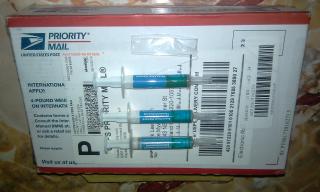
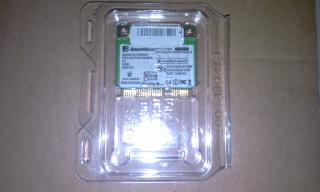
Below are some pictures of my latest shipment for my notebook:

Attached Image

Attached Image

Attached Image

Attached Image

Attached Image

Attached Image
Viperion
post Sep 2 2010, 03:57 AM

Getting Started
**
Junior Member
112 posts

Joined: Jan 2003
From: Hiding Under Some Rock


Part 2:

Attached Image

Attached Image

Attached Image

Attached Image

Attached Image

Attached Image

Attached Image


Viperion
post Sep 2 2010, 03:57 AM

Getting Started
**
Junior Member
112 posts

Joined: Jan 2003
From: Hiding Under Some Rock


I will post some pictures of my re-paste as a teaser in a few tongue.gif

This post has been edited by Viperion: Sep 2 2010, 04:00 AM

6 Pages < 1 2 3 4 > » Top
Topic ClosedOptions
 

Change to:
| Lo-Fi Version
0.0413sec    0.36    7 queries    GZIP Disabled
Time is now: 2nd December 2025 - 05:27 PM