

Guys, may I ask how do I close an application on HTC Desire?
HTC Desire Official Thread V5, FAQs on First Page (Froyo OTA for SEA!)
HTC Desire Official Thread V5, FAQs on First Page (Froyo OTA for SEA!)
|
|
 Aug 23 2010, 09:56 PM Aug 23 2010, 09:56 PM
|
 
Senior Member
1,109 posts Joined: Mar 2007 
|
Guys, may I ask how do I close an application on HTC Desire?
|
|
|
|
|
|
Aug 23 2010, 09:57 PM
|

All Stars
12,505 posts Joined: May 2007 From: Triumph in the Skies Status:In LoV3 Again
|
QUOTE(coconutzz @ Aug 23 2010, 09:56 PM) Guys, may I ask how do I close an application on HTC Desire? If the apps come with it, you can close. eg : Tweetdeck come with Quit at menu. Else, I think Android will help you to close it off once you don't use for some time. |
|
|
Aug 23 2010, 09:58 PM
|
|
Senior Member
1,109 posts Joined: Mar 2007
|
QUOTE(KTCY @ Aug 23 2010, 09:57 PM) If the apps come with it, you can close. eg : Tweetdeck come with Quit at menu. Thanks Bro!Else, I think Android will help you to close it off once you don't use for some time. |
|
|
Aug 23 2010, 09:58 PM
|

Junior Member
145 posts Joined: Oct 2009
|
Hi guys,
I rooted to Nextsense 6.0 with AP2SD+ installed. I have done the Sd card partition to ext2,3 and 4. But when i installed an application to the phone, the internal storage still decrease, any idea how the AP2SD+ working? I downloaded the Quick System info and check whether my AP2SD+ is installed properly or not, yes, it's show my AP2SD is installed. |
|
|
Aug 23 2010, 10:11 PM
|

Senior Member
3,771 posts Joined: Apr 2010 From: Kota Bharu 
|
QUOTE(LuffyPSP @ Aug 23 2010, 08:16 PM) ok i've bump charged my battery. Now, 80% on 7 hours. yes! Anyone on this?and btw anyone here use wavesecure? i love the trial but the price is kinda expensive. and any apps that can track our calling time/cost? at least, i can estimate/track my calls information. and i need 16 GB even if its class 2. 8GB is too small to me. my 2TB HDD also fills up quickly so that goes the same for my phone. Got 3GB left on my 16GB. |
|
|
Aug 23 2010, 10:14 PM
|
|
All Stars
12,505 posts Joined: May 2007 From: Triumph in the Skies Status:In LoV3 Again
|
QUOTE(LuffyPSP @ Aug 23 2010, 10:11 PM) Anyone on this? What you fill in your card actually ? and i need 16 GB even if its class 2. 8GB is too small to me. my 2TB HDD also fills up quickly so that goes the same for my phone. Got 3GB left on my 16GB.  |
|
|
|
|
|
Aug 23 2010, 10:18 PM
|

Senior Member
5,362 posts Joined: Jan 2003 From: Johor Bahru
|
hi, bro KTCY, can we make the ext2/3/4 bigger than 512MB to install more apps?
 btw, is the following steps correct for upgrading my current 2G SD card to 8GB, and at the same time upgrade ROM to nextsense 6.0? 1. Backup all apps+data with Titanium Backup. 2. Go Recovery >> Nandroid >> Backup 3. Copy all the files in 2GB SD card to computer then remove it from phone. 4. Insert new 8GB card and copy new Nextsense ROM into it. 5. Wipe Data/Factory Reset. 6. Flash the ROM. 7. Reboot. 8. Install Clockworkmod to make ext partition. 9. Copy back all the files from computer - the 2GB card files. 10. Install Titanium Backup. 11. Restore the backup. 12. Done. |
|
|
Aug 23 2010, 10:21 PM
|
|
All Stars
12,505 posts Joined: May 2007 From: Triumph in the Skies Status:In LoV3 Again
|
QUOTE(Cynox @ Aug 23 2010, 10:18 PM) hi, bro KTCY, can we make the ext2/3/4 bigger than 512MB to install more apps? You can. Using Amon_RA recovery. btw, is the following steps correct for upgrading my current 2G SD card to 8GB, and at the same time upgrade ROM to nextsense 6.0? 1. Backup all apps+data with Titanium Backup. 2. Go Recovery >> Nandroid >> Backup 3. Copy all the files in 2GB SD card to computer then remove it from phone. 4. Insert new 8GB card and copy new Nextsense ROM into it. 5. Wipe Data/Factory Reset. 6. Flash the ROM. 7. Reboot. 8. Install Clockworkmod to make ext partition. 9. Copy back all the files from computer - the 2GB card files. 10. Install Titanium Backup. 11. Restore the backup. 12. Done. btw, latest OpenDesire 3.5.1 quadrant. 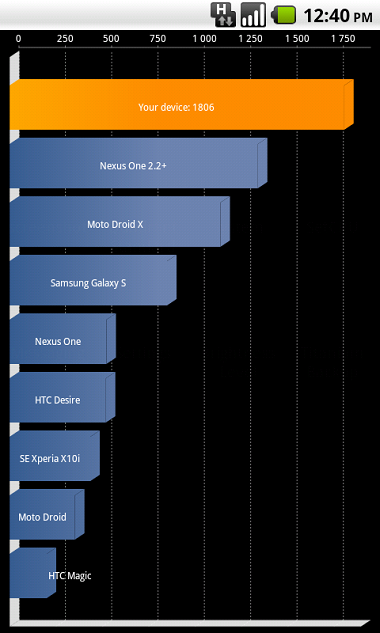  |
|
|
Aug 23 2010, 10:40 PM
|
|
Senior Member
3,771 posts Joined: Apr 2010 From: Kota Bharu
|
QUOTE(KTCY @ Aug 23 2010, 10:14 PM) What you fill in your card actually ? Standar stuffs - Photos(lots of them), musics(pretty much a lot), documents, and movies(about 6 of them, all HD 720p/1080p converted). music video clips, backup stuffs and some ROMs(hehe just in case)...Its pretty much a basic multimedia stuffs, and the movies and music video clips are the one that takes up the space. otherwise i'll have enough. |
|
|
Aug 23 2010, 11:19 PM
|

Senior Member
514 posts Joined: May 2005
|
QUOTE(jonjon87 @ Aug 22 2010, 08:57 PM) oh man i keep getting stuck using unrevoked, It got stuck with Unrevoked saying "waiting for 5 seconds because Windows sucks" righh after it auto reboots my phone and my phone stops at the HTC logo No one can help?? I get stuck whenever its trying to reboot to recovery i think. Should i try amonra recovery? |
|
|
Aug 23 2010, 11:27 PM
|
|
All Stars
12,505 posts Joined: May 2007 From: Triumph in the Skies Status:In LoV3 Again
|
QUOTE(jonjon87 @ Aug 23 2010, 11:19 PM) No one can help?? I get stuck whenever its trying to reboot to recovery i think. Should i try amonra recovery? How long you wait for it to reboot ?And do you check your HBOOT version ? |
|
|
Aug 23 2010, 11:29 PM
|
|
Senior Member
514 posts Joined: May 2005
|
QUOTE(KTCY @ Aug 23 2010, 11:27 PM) How long you wait for it to reboot ? well i've checked 0.83.On the unrevoked on my pc it hangs at the loading screen "waiting for 5 seconds because windows suck" And do you check your HBOOT version ? for my phone i think its at the 2nd reboot, then it hands at the htc logo with a black bar on top. |
|
|
Aug 23 2010, 11:32 PM
|
|
All Stars
12,505 posts Joined: May 2007 From: Triumph in the Skies Status:In LoV3 Again
|
QUOTE(jonjon87 @ Aug 23 2010, 11:29 PM) well i've checked 0.83.On the unrevoked on my pc it hangs at the loading screen "waiting for 5 seconds because windows suck" Your set is SLCD set I assume ?for my phone i think its at the 2nd reboot, then it hands at the htc logo with a black bar on top. |
|
|
|
|
|
Aug 23 2010, 11:33 PM
|
|
Senior Member
514 posts Joined: May 2005
|
QUOTE(KTCY @ Aug 23 2010, 11:32 PM) Your set is SLCD set I assume ? yea correct. I followed the steps correctly i presume, Installed htc sync, then uninstall it but kept the driver. Was following instructions from here http://rootmydroid.co.uk/guides/desire/how...our-htc-desire/, given by a lyner. What is amonra? should i try it? but i'm not sure what to do with it lol |
|
|
Aug 23 2010, 11:36 PM
|
|
All Stars
12,505 posts Joined: May 2007 From: Triumph in the Skies Status:In LoV3 Again
|
QUOTE(jonjon87 @ Aug 23 2010, 11:33 PM) yea correct. I followed the steps correctly i presume, Installed htc sync, then uninstall it but kept the driver. Was following instructions from here http://rootmydroid.co.uk/guides/desire/how...our-htc-desire/, given by a lyner. What is amonra? should i try it? but i'm not sure what to do with it lol That's for AMOLED set.Use guide below for SLCD set. QUOTE For HBOOT 0.83: Download: UnrEVOked: http://downloads.unrevoked.com/recov...sh_package.exe ClockworkMod Recovery v2.5.0.1 SLCD: http://crop.floodbit.org/~defer/reco...bravo-slcd.img 1. Run the reflash_package.exe you downloaded and extract the files to a suitable location. 2. Follow the instructions in the .html file to install the HBOOT driver. 3. If you have it, uninstall HTC Sync (leave HTC Driver Installer) 4. Reboot your PC. 5. With Desire go to Settings > Connect to PC > Default connection type > Disk drive then Untick ‘Ask Me’ 6. Then go to Settings > Applications > Development > Make sure USB Debugging is ticked. 7. Go back to Applications and make sure Unknown Sources is ticked. 8. Start the reflash.exe in Admin mode (Right Click > Run as Admin (Only required for Windows Vista + 7) 9. Go to File > Custom Recovery and select the ClockworkMod v2.5.0.1 SLCD recovery image. 10. Connect your Desire. 11. Wait (it should take about 1-2 minutes) 12. Then, your Desire should be in recovery mode! Hit reboot. I will be here till 6am as working. Report back should you need help  |
|
|
Aug 23 2010, 11:40 PM
|
|
Senior Member
514 posts Joined: May 2005
|
i guess the difference is that, I have the wrong clockworkmod??
Will try it. If it works. I belanja u drink weh hahaha dun mind cheap cheap abit, just started working not long ago lol. |
|
|
Aug 23 2010, 11:42 PM
|
|
All Stars
12,505 posts Joined: May 2007 From: Triumph in the Skies Status:In LoV3 Again
|
Just try and report back
|
|
|
Aug 23 2010, 11:44 PM
|
|
Senior Member
514 posts Joined: May 2005
|
Opps the two links doesn't work. I think i could use back the same unrevoked right? how bout the clockworkmod? I'll try to look in xda
|
|
|
Aug 23 2010, 11:46 PM
|

Senior Member
1,501 posts Joined: Mar 2010
|
Is there any screen shot app non-rooted desire can use? I tried dling an app called screen shot but cannot use wan..Any suggestions please?
|
|
|
Aug 23 2010, 11:49 PM
|
|
All Stars
12,505 posts Joined: May 2007 From: Triumph in the Skies Status:In LoV3 Again
|
QUOTE(jonjon87 @ Aug 23 2010, 11:44 PM) Opps the two links doesn't work. I think i could use back the same unrevoked right? how bout the clockworkmod? I'll try to look in xda How about this ?QUOTE Steps for Rooting: 1. Goto http://unrevoked.com and download the software 2. Get the needed recovery image from here http://crop.floodbit.org/~defer/reco...bravo-slcd.img ***DO NOT plug you Desire into your computer yet*** 3. Start unrevoked and goto File>Custom Recovery and point it to the recovery image that you downloaded earlier 4. Enable USB debugging on your Desire Settings>Applications>Developement 5. Plug Desire into your computer, unrevoked should start its goodness 6. Once you are left at the recovery boot and unrevoked says "Done!", disconnect your Desire and click the Trackpad to select "reboot system now", phone should reboot into normal mode 7. Check for Superuser Permissions app, if you see it you're good if not retry QUOTE(nick67 @ Aug 23 2010, 11:46 PM) Is there any screen shot app non-rooted desire can use? I tried dling an app called screen shot but cannot use wan..Any suggestions please? I don't think so. Most need to root. |
|
Topic ClosedOptions
|
| Change to: |  0.0286sec 0.0286sec
 0.15 0.15
 6 queries 6 queries
 GZIP Disabled GZIP Disabled
Time is now: 7th December 2025 - 11:30 AM |
 Quote
Quote