

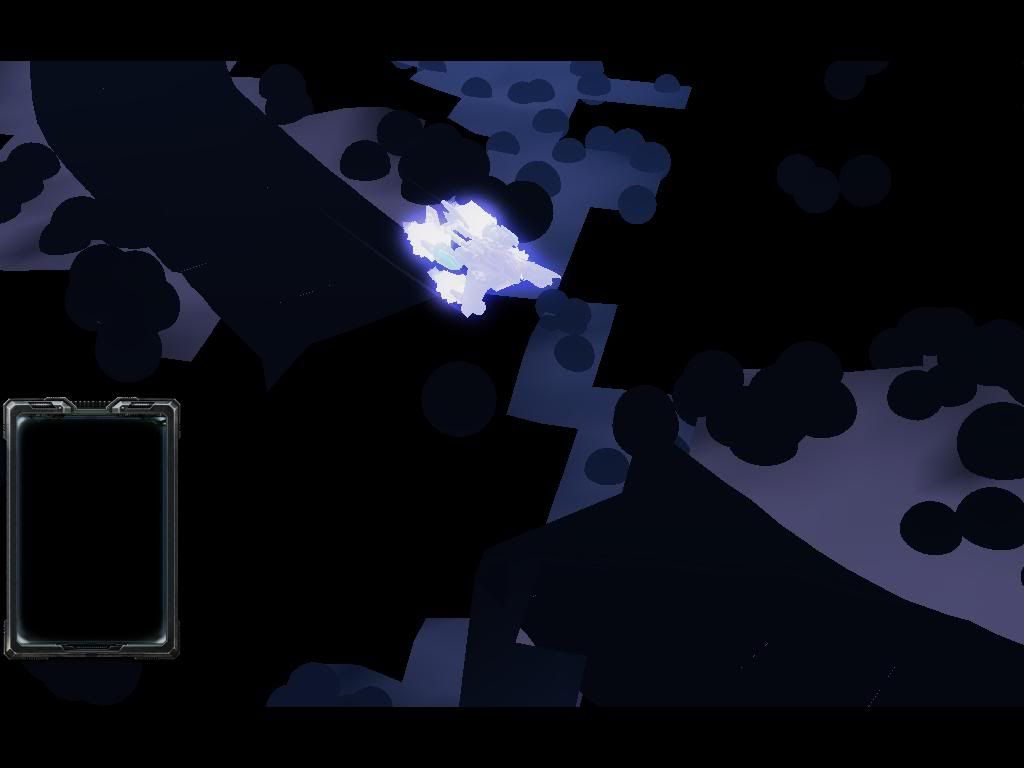
this shit i get after i install starcraft 2?
anyway to fix it? wats the actual problem?
SC2 Graphic problem
|
|
 Aug 8 2010, 01:38 AM, updated 16y ago Aug 8 2010, 01:38 AM, updated 16y ago
Return to original view | Post
#1
|
 
Junior Member
590 posts Joined: Jun 2008 
|
this shit i get after i install starcraft 2? anyway to fix it? wats the actual problem? |
|
|
|
|
|
Aug 8 2010, 02:18 PM
Return to original view | Post
#2
|
|
Junior Member
590 posts Joined: Jun 2008
|
QUOTE(Aeon_Clock @ Aug 8 2010, 01:54 PM) looks like the first mission...lol no, no shit no matter how i set the video option the outcome is the same. yes its the first mission. f*** man how to play?did the game prompt u to update your graphics card?  |
|
|
Aug 8 2010, 06:54 PM
Return to original view | Post
#3
|
|
Junior Member
590 posts Joined: Jun 2008
|
QUOTE(wilsonphua @ Aug 8 2010, 03:22 PM) http://eu.blizzard.com/support/article.xml...categoryId=7049 thanks bro, will try it out.Blizzard Support....got few methods to fix. And if you're using Nvidia, then go to Nvidia website and download your latest graphic card drivers. Added on August 8, 2010, 9:54 pmi update my direct X to version 11. still the same shit. i am using Nvidia Geforce 8400M GS, wats the problem? -.- This post has been edited by FLampard: Aug 8 2010, 09:54 PM |
|
|
Aug 11 2010, 10:05 AM
Return to original view | Post
#4
|
|
Junior Member
590 posts Joined: Jun 2008
|
QUOTE(kianweic @ Aug 9 2010, 07:31 PM) Did that solve your problem? wait....im a bit busy...8400M GS is an entry level card and only supports Direct X10 and not Direct X11. Furthermore, Starcraft 2 only utilize DirectX 9.1. i installed http://www.nvidia.com/object/notebook-win7...hql-driver.html will try it after class. Added on August 11, 2010, 1:34 pmnope it doesnt work even after i installed http://www.nvidia.com/object/notebook-win7...hql-driver.html This post has been edited by FLampard: Aug 11 2010, 01:34 PM |
|
|
Aug 19 2010, 12:41 PM
Return to original view | Post
#5
|
|
Junior Member
590 posts Joined: Jun 2008
|
QUOTE(ate @ Aug 19 2010, 10:01 AM) i also get this problem. Im using 9800gt for those who wonder where i went, this problem still exist, im having exams, after exam only i see how. |
|
|
Aug 20 2010, 04:01 PM
Return to original view | Post
#6
|
|
Junior Member
590 posts Joined: Jun 2008
|
QUOTE(ate @ Aug 20 2010, 09:08 AM) ok i think i got this figured out, old graphic or nvidia graphics dont support windows 7 directx11 , nvidia onyl supports up to dx10 which it will revert to when it can handle dx11 which i think is the problem, maybe we should downgrade to windows vista or move on to radeon? fark.... i using windows vista... |
|
|
Aug 24 2010, 12:24 AM
Return to original view | Post
#7
|
|
Junior Member
590 posts Joined: Jun 2008
|
QUOTE(ate @ Aug 23 2010, 08:25 AM) All my problems solved by deleting and installing back again. The 1st time i installed it i noticed that i was cramming my pc with too much program, thats why the installion didnt go well. So now i can view everything perfectly, mission,movies everything is running smoothly. will try reinstall and see , hope problem doesnt persist,byt after exam first k, i focus on exam first. |
| Change to: |  0.0179sec 0.0179sec
 0.44 0.44
 6 queries 6 queries
 GZIP Disabled GZIP Disabled
Time is now: 2nd December 2025 - 08:45 AM |
 Quote
Quote