

» Click to show Spoiler - click again to hide... «
If my laptop mobo is only SATA 2, using SATA 3 (Crucial M4) is wasted?
This post has been edited by ywkwy: Sep 22 2011, 11:25 PM
The Solid State Storage Thread
|
|
 Sep 22 2011, 09:54 PM Sep 22 2011, 09:54 PM
Return to original view | Post
#1
|
 
Senior Member
868 posts Joined: Dec 2005 
|
» Click to show Spoiler - click again to hide... « If my laptop mobo is only SATA 2, using SATA 3 (Crucial M4) is wasted? This post has been edited by ywkwy: Sep 22 2011, 11:25 PM |
|
|
|
|
|
Sep 23 2011, 09:01 AM
Return to original view | Post
#2
|
|
Senior Member
868 posts Joined: Dec 2005
|
OK, I've confirm my laptop mobo support SATA 3 and Im going to get the Crucial M4 128GB SSD from bhphotovideo.. Anyone want to share the shipping cost?
|
|
|
Sep 23 2011, 05:15 PM
Return to original view | Post
#3
|
|
Senior Member
868 posts Joined: Dec 2005
|
I've open a bulk order thread..
 [Non-Profit Bulk!]Crucial M4 128GB/64GB SSD (bulk close: 27/9/11) [Non-Profit Bulk!]Crucial M4 128GB/64GB SSD (bulk close: 27/9/11)Added on September 24, 2011, 12:37 pmThose who wanna buy the crucial SSD be hurry, the promotion ends at 30/9/2011.. This post has been edited by ywkwy: Sep 24 2011, 12:37 PM |
|
|
Sep 28 2011, 10:20 AM
Return to original view | Post
#4
|
|
Senior Member
868 posts Joined: Dec 2005
|
QUOTE(AlamakLor @ Sep 28 2011, 01:25 AM) Most people are still very skeptical with SF. It's just like when the P67 sata issues just came out. Z68 was sort of an attempt/reason to get out of that "P67" phobia even though P67 B3 resolved all the issues. agree.. reputation takes long build but can be easily spoilt once make mistake..Another history lesson was Seagate's barracuda...they were so bad at one point that everybody went WD and Samsung. Reception was still negative even though they sort of fixed the issue. I have almost 20hdds at home and I only buy WD and Samsung. For as long as SF's name is tainted, it's gonna take a lot more effort to rebuild the reputation. Regaining trust is not easy but OTOH people seem to forgive Toyota Camry's pedal issue rather quickly  I have both SF (32nm vertex 2 x 2) and Marvell drives. None gave me any issues. But I didn't bother taking my chances with my latest purchase. After extensive research it was between: - Intel 510 (Marvell, sata 3) - Crucial M4 (Marvell, sata 3) - Intel 320 (Intel, sata 2) I didn't want another sata 2...why bother when my mobo supports sata 3? So it was between Intel and Crucial. I then realized that 510 and M4's innards are almost the same, but Crucial seems to be a little more active in updating and following up with its firmware (although less so with the C300) than Intel. You have any clue how long Intel took to admit and amend fault on the 320? Sadly Crucial is not easily available here  Although some of us managed to get a few in hehe Although some of us managed to get a few in hehe Im also getting crucial M4 from overseas instead of the local sandforce based SSD.. Intel SATA3 SSD is so f***in expensive in local market >< |
|
|
Oct 1 2011, 12:27 AM
Return to original view | Post
#5
|
|
Senior Member
868 posts Joined: Dec 2005
|
AFAIK, BSOD issue still unsolved but some user have it some didn't, seems like depends on ur luck.. better choose non sf controller like intel or crucial to playsafe..
|
|
|
Oct 10 2011, 10:04 PM
Return to original view | Post
#6
|
|
Senior Member
868 posts Joined: Dec 2005
|
My crucial M4 just arrived and I installed windows 7 on it. May I know how to make the boot time even faster? I've already tried the optimisation from
CODE http://thessdreview.com/ssd-guides/optimization-guides/the-ssd-optimization-guide-2/ http://www.tomshardware.com/reviews/ssd-performance-tweak,2911.html http://forums.extremeoverclocking.com/showthread.php?t=340129 it does improve a bit but still not satisfy.. I saw some people at youtube using crucial M4 can boot faster even the boot animation still spinning and not complete and it go to windows already.. may i know how it can be done? BTW my laptop spec as below: CODE i7 2670QM 2.2ghz ram 8gb 1333mhz nvidia 540M crucial M4 128gb |
|
|
|
|
|
Oct 20 2011, 12:43 AM
Return to original view | Post
#7
|
|
Senior Member
868 posts Joined: Dec 2005
|

may I know whats the different between 4k and 4k64thrd? Added on October 20, 2011, 12:47 am QUOTE(iaknesnah @ Oct 10 2011, 10:07 PM) what is your boot time? my boot time is about 17 - 18 seconds exclude the bios loading time till load into windows..This post has been edited by ywkwy: Oct 20 2011, 12:47 AM |
|
|
Oct 20 2011, 02:25 AM
Return to original view | Post
#8
|
|
Senior Member
868 posts Joined: Dec 2005
|
QUOTE(iaknesnah @ Oct 20 2011, 01:44 AM) thats fast already. what software u using to time your boot time? I use my phone stop watch.. Lol..This post has been edited by ywkwy: Oct 20 2011, 02:25 AM |
|
|
Oct 20 2011, 12:58 PM
Return to original view | Post
#9
|
|
Senior Member
868 posts Joined: Dec 2005
|
QUOTE(iaknesnah @ Oct 20 2011, 05:20 AM) try using bootracer BootRacer shows 18 secs..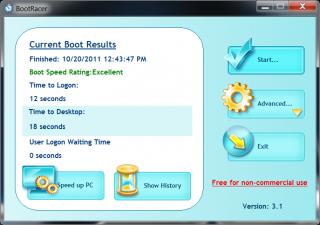
Added on October 20, 2011, 12:59 pm QUOTE(DrBlueBox @ Oct 20 2011, 06:25 AM) This post has been edited by ywkwy: Oct 20 2011, 12:59 PM |
|
|
Oct 20 2011, 03:37 PM
Return to original view | Post
#10
|
|
Senior Member
868 posts Joined: Dec 2005
|
QUOTE(everling @ Oct 20 2011, 02:41 PM) Maybe he is asking how to skip the password login? I already set the autologon in the registry.. what I mean is skip the entire welcome screen like DrBlueBox.. |
|
|
Oct 20 2011, 08:38 PM
Return to original view | Post
#11
|
|
Senior Member
868 posts Joined: Dec 2005
|
QUOTE(iaknesnah @ Oct 20 2011, 04:20 PM) do u mean when it is in bios(black screen) or after the windows logo loaded(blue screen) this screen.. Added on October 20, 2011, 8:39 pm QUOTE(jchong @ Oct 20 2011, 04:26 PM) Are you running antivirus on your system. ya, Im using kaspersky internet security 2012..Using bootracer, my time to desktop is 22 sec (w/o antivirus). With antivirus it is 26 sec. This is tested on my Dell laptop, running WinXP with Intel X25M 34nm 80GB SSD. This post has been edited by ywkwy: Oct 20 2011, 08:39 PM |
|
|
Oct 21 2011, 01:06 AM
Return to original view | Post
#12
|
|
Senior Member
868 posts Joined: Dec 2005
|
QUOTE(-oc-gassa @ Oct 20 2011, 10:47 PM) [attachmentid=2495552] ur rig what spec? |
|
|
Oct 21 2011, 06:28 PM
Return to original view | Post
#13
|
|
Senior Member
868 posts Joined: Dec 2005
|
QUOTE(-oc-gassa @ Oct 21 2011, 05:48 AM) i3 -2100 My ram 8gb but only 1333.. cpu is i7..Z68 Asrock mobo 4gb 1600mhz ram os 7 32 bit Cosair force 3 60gb May I know does ram speed matter in the booting time? If yes den I cant upgrade already, my laptop max support 1333 only.. |
|
|
|
|
|
Oct 23 2011, 10:50 PM
Return to original view | Post
#14
|
|
Senior Member
868 posts Joined: Dec 2005
|
May I know does partitioning a SSD into 2 partition will have any negative effects on it? coz I plan to dual boot 2 OS in my system..
|
|
|
Nov 3 2011, 04:22 PM
Return to original view | Post
#15
|
|
Senior Member
868 posts Joined: Dec 2005
|
I got laggy scroll on chrome and firefox on my laptop and struggle me for some times.. and finally solved by setting the power option from balanced to high performance..
|
|
|
Jan 6 2012, 09:22 PM
Return to original view | Post
#16
|
|
Senior Member
868 posts Joined: Dec 2005
|
QUOTE(mizi28 @ Jan 6 2012, 06:39 PM) now crucial M4 oso got bug =.= what bug?thinking of selling mine and try samsung 830 I'm using crucial M4 128gb haven't encounter anything yet.. |
|
|
Jan 7 2012, 10:20 AM
Return to original view | Post
#17
|
|
Senior Member
868 posts Joined: Dec 2005
|
QUOTE(Oyaji @ Jan 7 2012, 07:47 AM) Hi, I'm thinking of getting an intel 320 40gb as my first ssd since its one of the cheapest (viewnet still have them listed) & reliable but I'm not sure whether its a good buy or not since its small capacity & some say its slower than others. How slow is it? I'm planning of using it for boot drive only and I want something faster than normal HDD. I'm not sure whether u can have enough space or not, for me I just install some regular software like office, some movie streaming software and other small small software, no adobe photoshop etc etc big software, already used 32GB.. |
|
Topic ClosedOptions
|
| Change to: |  0.0467sec 0.0467sec
 0.46 0.46
 7 queries 7 queries
 GZIP Disabled GZIP Disabled
Time is now: 9th December 2025 - 03:50 PM |
 Quote
Quote