Welcome Guest ( Log In | Register )

Bump Topic Topic Closed RSS Feed

Outline · [ Standard ] · Linear+

 The Solid State Storage Thread

views
     
selfdz87
post Jan 17 2011, 11:23 AM

~5Ghz+ Club~
*****
Senior Member
932 posts

Joined: Dec 2008
From: Paris With Love


hi guys...im still very new in using SSD...
is this normal for SSD??


» Click to show Spoiler - click again to hide... «


» Click to show Spoiler - click again to hide... «


btw im using corsair F60 oni...no money to buy bigger 1....sweat.gif
thanks for ur help guys notworthy.gif

This post has been edited by selfdz87: Jan 17 2011, 11:46 AM
selfdz87
post Jan 17 2011, 05:56 PM

~5Ghz+ Club~
*****
Senior Member
932 posts

Joined: Dec 2008
From: Paris With Love


QUOTE(0168257061 @ Jan 17 2011, 01:14 PM)
285 MB/s sequential read — 275 MB/s sequential write

Are those rated spec really reachable ?

I only know Intel one is reachable, 250Mb/s read, 70/100MB/s write.
*
yeah..it says on their website F60 sequential read/write is 285/275MBs
but it no where near that when i test it... hmm.gif

need to update firmware or what?? hmm.gif
selfdz87
post Jul 20 2011, 12:23 AM

~5Ghz+ Club~
*****
Senior Member
932 posts

Joined: Dec 2008
From: Paris With Love


testing vertex 3 just now...

SS:

user posted image

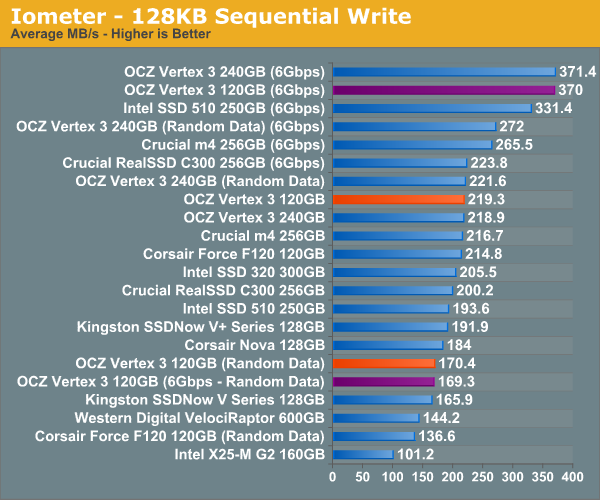
why write speed less than 200MB/s??

i tot it should be around 500MB/s as advertise....

This post has been edited by selfdz87: Jul 20 2011, 12:27 AM
selfdz87
post Jul 20 2011, 12:55 AM

~5Ghz+ Club~
*****
Senior Member
932 posts

Joined: Dec 2008
From: Paris With Love


QUOTE(iaknesnah @ Jul 20 2011, 12:29 AM)
can we set raid when ahci is enabled for boot drive?


Added on July 20, 2011, 12:31 am
have u tried using atto. i believe thats what they used
*
already try thanks...
and i got a mix result.... rclxub.gif

» Click to show Spoiler - click again to hide... «

selfdz87
post Jul 20 2011, 01:01 AM

~5Ghz+ Club~
*****
Senior Member
932 posts

Joined: Dec 2008
From: Paris With Love


no raid bro,just a single vertex 3 only....
it seems ATTO give the best result...
selfdz87
post Jul 20 2011, 01:07 AM

~5Ghz+ Club~
*****
Senior Member
932 posts

Joined: Dec 2008
From: Paris With Love


QUOTE(iaknesnah @ Jul 20 2011, 01:03 AM)
i read somewhere thats what ocz used to get the read and write spec.. u set it to ahci or not bro?
*
yup bro,AHCI is set by default in my bios...TRIM also enable...
any other idea bro?

selfdz87
post Jul 20 2011, 01:14 AM

~5Ghz+ Club~
*****
Senior Member
932 posts

Joined: Dec 2008
From: Paris With Love


QUOTE(iaknesnah @ Jul 20 2011, 01:09 AM)
i think in your case already reached maximum. but i was looking for answer whether can u set raid on boot drive when ahci is enabled. do u have any idea?
*
i think cannot bro...
you want to do 2xSSD(raid0)+1 hdd(ACHI) right?
but lets wait for other sifu's to answer it....

selfdz87
post Jul 20 2011, 01:29 AM

~5Ghz+ Club~
*****
Senior Member
932 posts

Joined: Dec 2008
From: Paris With Love


QUOTE(iaknesnah @ Jul 20 2011, 01:21 AM)
i am confused what is the benefit of ahci?
*
i think this link might give u some idea blush.gif

http://expertester.wordpress.com/2008/07/2...mark-advantage/

have a look....
selfdz87
post Jul 20 2011, 01:54 PM

~5Ghz+ Club~
*****
Senior Member
932 posts

Joined: Dec 2008
From: Paris With Love


QUOTE(everling @ Jul 20 2011, 04:56 AM)
You might want to check if CrystalDiskMark is writing incompressible data (random data) or compressible data.
» Click to show Spoiler - click again to hide... «

*
already try CrystalDiskMark for several time now....the write result is less than 170MB/s no matter what i do....

QUOTE(owikh84 @ Jul 20 2011, 06:56 AM)
try to relax ur dram to default settings.
i smell a bad OC.
*
default non-OC settings also produce same result bro...
izit the SSD got problem?

This post has been edited by selfdz87: Jul 20 2011, 01:54 PM
selfdz87
post Jul 20 2011, 03:21 PM

~5Ghz+ Club~
*****
Senior Member
932 posts

Joined: Dec 2008
From: Paris With Love


QUOTE(iaknesnah @ Jul 20 2011, 02:53 PM)
i dont think got any problem. coz your ssd specs is rated using atto as u can see writen on the box iinm.
*
My Pc got random hangs several times already....never happen b4 this if im using normal HDD....
try install a clean windows 2 times already...still same problem...random hangs...
selfdz87
post Jul 20 2011, 07:29 PM

~5Ghz+ Club~
*****
Senior Member
932 posts

Joined: Dec 2008
From: Paris With Love


QUOTE(iaknesnah @ Jul 20 2011, 04:59 PM)
got bsod or not? i got a few
*
i got 1 time BSOD!!!
n i think i found the culprit...its the firmware issue.... v2.06,same version with my SSD...

http://www.overclock.net/ssd/1033926-updat...3-firmware.html

my SSD got same problem,it become unresponsive for several time...oh my...what i need to do now??

This post has been edited by selfdz87: Jul 20 2011, 07:29 PM
selfdz87
post Jul 20 2011, 07:41 PM

~5Ghz+ Club~
*****
Senior Member
932 posts

Joined: Dec 2008
From: Paris With Love


QUOTE(iaknesnah @ Jul 20 2011, 07:34 PM)
firmware??? aisey.. i think i need to find for firmware updates laaa... btw is it available?
*
u using vertex 3 too bro?if yes try check the firmware version 1st....
yup the updates is available at OCZ website...
but i think im gonna exchange to new one,coz i just buy it yesterday...
selfdz87
post Jul 21 2011, 01:11 PM

~5Ghz+ Club~
*****
Senior Member
932 posts

Joined: Dec 2008
From: Paris With Love


QUOTE(iaknesnah @ Jul 21 2011, 01:01 AM)
damn pc just hang then straight bsod. then hang at bios.. stuck there for quite some time. had to manually turn off the pc, yeah i know its bad for ssd but cudnt just let it hang for so long.. this is headache man
no bro i use agility 3. but sata 3 also same firmware i think. so u wanna rma that ssd is it?
*
i ask the SSD seller that i wanna change the SSD,but no stock atm...
so he tell me to update the firmware myself...older version firmware is v2.06...
successfully update to v2.09...so far no BSOD or hang.... thumbup.gif
u should try update the firmware 1st bro :

u using agility 3 bro?if yes the firmware is same with me,

here's the link :

http://www.ocztechnology.com/ssd_tools/OCZ...nd_RevoDrive_3/

download the toolbox n user guide...its very easy bro...

QUOTE(iaknesnah @ Jul 21 2011, 05:35 AM)
just found this. your results is correct according to the sheet

http://www.ocztechnology.com/res/manuals/O...oduct_sheet.pdf
*
thanks for the link bro.... icon_rolleyes.gif

selfdz87
post Jul 21 2011, 02:40 PM

~5Ghz+ Club~
*****
Senior Member
932 posts

Joined: Dec 2008
From: Paris With Love


QUOTE(iaknesnah @ Jul 21 2011, 02:31 PM)
i already tried updating but not successful. it said update complete but when i check again still 2.06. tried secure erase too but still no luck


*
when u update the SSD,izit use as primary with installed OS?
ur ISRT is what version bro?

This post has been edited by selfdz87: Jul 21 2011, 02:41 PM
selfdz87
post Jul 21 2011, 04:11 PM

~5Ghz+ Club~
*****
Senior Member
932 posts

Joined: Dec 2008
From: Paris With Love


QUOTE(iaknesnah @ Jul 21 2011, 03:26 PM)
i update as secondary. if update as primary the toolbox cannot detect ssd at all. what is ISRT?
*
sorry bro my bad...
should be Intel Rapid Storage Technology(RST) it says that v10.1.X.XXXX will not recognize OCZ tool box...
seems thats it not ur problem now... sweat.gif
quite weird ur case...mine so easy...hehe

» Click to show Spoiler - click again to hide... «


This post has been edited by selfdz87: Jul 21 2011, 04:17 PM
selfdz87
post Jul 22 2011, 12:48 PM

~5Ghz+ Club~
*****
Senior Member
932 posts

Joined: Dec 2008
From: Paris With Love


try use ATTO to bench ur SSD

Topic ClosedOptions
 

Change to:
| Lo-Fi Version
0.0212sec    0.33    7 queries    GZIP Disabled
Time is now: 10th December 2025 - 12:20 AM