QUOTE(zsnipes @ Oct 5 2010, 12:50 AM)
U can boot Win7 DVD & format there also can, once in Win7 detect ur HDD, if 1st it can see, then no need GSATAII Drivers,
if cannot see, then select load drivers & point to the Flash Drive with GSATAII drivers in there, once loaded, Win7 Setup sure can see.
Usually I will load the latest drivers Gigabyte provide no matter Win7 setup see it or not, cause I want newer drivers.
For about U can't format in current Win7. Actually you can format it too, u just need load the same drivers within windows 7.
Once the Drivers is loaded, Win7 can see the Unallocated Space from the Disk Management. U know how access Disk Management right ?
In case not, right click My Computer, select MANAGE, then left side select "Disk Management".
If I not wrong, the Gigabyte SATAII Drivers is using JMICRON J36x Chipset, usually I go straight to JMICRON websites download it latest drivers one.
Sometimes gigabyte also didn't update it.
Let us know results okay ?
Thanks guys!
You all have been a ton of help!
I booted the Win7 DVD and installed everything in.
Now the SSD drive is running like a charm.
Super fast boots and programs load like they were already running.
Tested out Starcraft2 too.
Although I m not sure, but it does seem to have boosted my games performance.
Haven't tried updating the SSD's firmware although I've already downloaded it.
Updating it means I have to format it again?

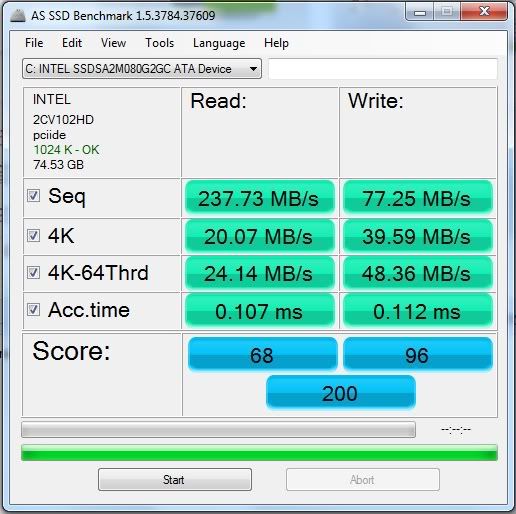
Added on October 5, 2010, 2:21 amHow come my scores only 200?!

 This post has been edited by PCHo: Oct 5 2010, 02:21 AM

 Sep 29 2010, 05:30 PM


 Quote
Quote

 0.0353sec
 0.33
0.33
 7 queries
 GZIP Disabled