Outline ·
[ Standard ] ·
Linear+
The Solid State Storage Thread
|
iaknesnah
|
 Dec 22 2011, 11:04 PM Dec 22 2011, 11:04 PM
|

|
QUOTE(owikh84 @ Dec 22 2011, 10:47 AM) something wrong with ur speeds read sequence should yield ~ 1000 on fw 009 u're using marvel SATA3 ports? i faced this thing before.. old marvel controller kinda sucks. dunno about the new ones |
|
|
|
|
|
TT lim
|
Dec 22 2011, 11:48 PM
|
Getting Started

|
i use the sata 3 from intel chipset,the read sequence kinda low,but how about the 4k?
|
|
|
|
|
|
owikh84
|
Dec 23 2011, 12:41 AM
|
i7 Clan

|
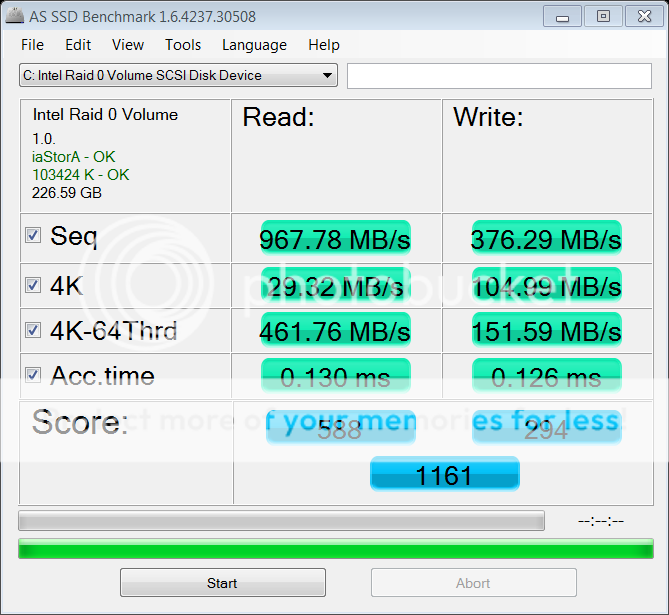
QUOTE(TT lim @ Dec 22 2011, 04:13 AM) My SSD 2 M4 256GB @ Raid 0 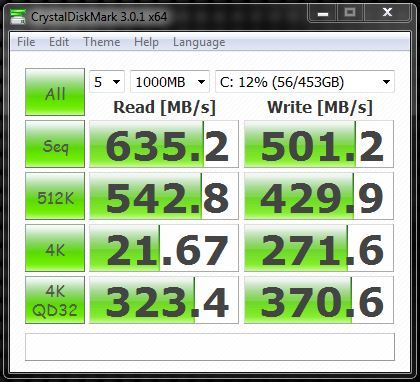 QUOTE(TT lim @ Dec 22 2011, 11:48 PM) i use the sata 3 from intel chipset,the read sequence kinda low,but how about the 4k? u can compare with my M4 128GB's on raid0 with firmware 009  |
|
|
|
|
|
TT lim
|
Dec 23 2011, 04:03 AM
|
Getting Started
|
QUOTE(owikh84 @ Dec 23 2011, 12:41 AM) u can compare with my M4 128GB's on raid0 with firmware 009 bro pls help why your as ssd using iaStor and my system using iaStorA. as ssd show 103424k OK and my system only 1024k OKTQ  |
|
|
|
|
|
wtm0325
|
Dec 23 2011, 06:17 AM
|
|
|
Cheng cheng cheng! Reporting in with super slow tortoise result of mai Intel X18-M 160gb OEM  Spec Intel i5 2400, 8gb ram, intel DH67BL mobo, ati hd 5670  This post has been edited by wtm0325: Dec 23 2011, 06:21 AM This post has been edited by wtm0325: Dec 23 2011, 06:21 AM |
|
|
|
|
|
owikh84
|
Dec 23 2011, 06:41 AM
|
i7 Clan
|
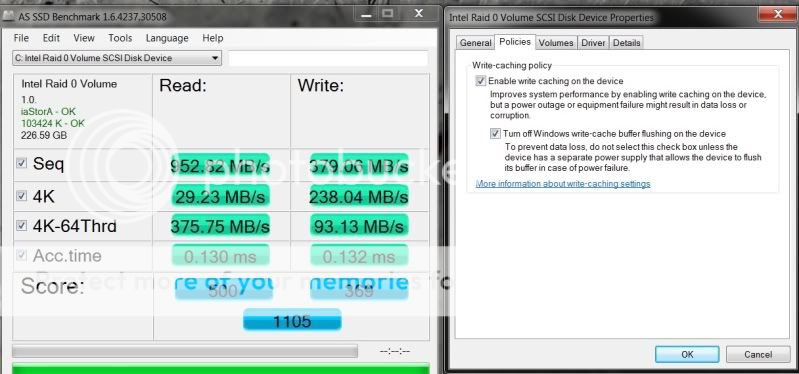
QUOTE(TT lim @ Dec 23 2011, 04:03 AM) bro pls help why your as ssd using iaStor and my system using iaStorA. as ssd show 103424k OK and my system only 1024k OKTQ that was on SB Z68 platform alright i've rerun the AS on SB-E X79 (iaStorA) it shows some differences especially on the 4K writes being cut to half.  » Click to show Spoiler - click again to hide... « disabled write-caching buffer flushing but this will hurt the multithreaded 4K » Click to show Spoiler - click again to hide... « i would seek for advice from Asus & Intel later.. This post has been edited by owikh84: Dec 23 2011, 07:07 AM |
|
|
|
|
|
wKkaY
|
Dec 26 2011, 05:35 AM
|
misutā supākoru

|
On SSD endurance - the way I use my SSDs, there's really no worries to have about endurance. X25-M 80GB bought in late 2009 - 8TB written, 95% media wearout indicator (higher is better) Intel 320 160GB bought in Jun 2011 - 15TB written, 98% wearout Happy with them so far. They've saved me and my staff much time  |
|
|
|
|
|
Demon_Eyes_Kyo
|
Dec 26 2011, 12:49 PM
|
|
|
Hi guys, my ssd had blue screen earlier (windows drive), unable to detect the drive after that. I reinstalled windows on a old hdd lying around, to check the intel ssd tool, drive can be detected again but seems like the disk space became 8mb. Is it pretty much gone case? Using intel x-18 btw.
This post has been edited by Demon_Eyes_Kyo: Dec 26 2011, 12:51 PM
|
|
|
|
|
|
owikh84
|
Dec 26 2011, 03:32 PM
|
i7 Clan
|
QUOTE(Demon_Eyes_Kyo @ Dec 26 2011, 12:49 PM) Hi guys, my ssd had blue screen earlier (windows drive), unable to detect the drive after that. I reinstalled windows on a old hdd lying around, to check the intel ssd tool, drive can be detected again but seems like the disk space became 8mb. Is it pretty much gone case? Using intel x-18 btw. It's the infamous 8MB bug due to improper shutdown etc. Pls flash ur SSD to the latest firmware. |
|
|
|
|
|
iaknesnah
|
Dec 26 2011, 05:35 PM
|
|
|
QUOTE(Demon_Eyes_Kyo @ Dec 26 2011, 12:49 PM) Hi guys, my ssd had blue screen earlier (windows drive), unable to detect the drive after that. I reinstalled windows on a old hdd lying around, to check the intel ssd tool, drive can be detected again but seems like the disk space became 8mb. Is it pretty much gone case? Using intel x-18 btw. do a secure erase then update the firmware |
|
|
|
|
|
ckchew666
|
Dec 26 2011, 08:36 PM
|
|
|
Hi guys, I'm planning to upgrade my DELL D630 notebook with SSD Vertex 3 120GB, I'm currently using Intel X25-M, i can feel the difference compare to conventional 7200 rpm hdd. My concern is does it have significant effects in terms of speed of using Vertex 3 compare to Intel X25-M in such an old laptop? I don't the SATA for DELL D630 is SATA-2 or SATA-3 or other type, i can't google much info on the port type. If anyone knows, please advise me. I do not want to over spend on it. Vertex 3 is 50% more expensive than Intel X25-M.  |
|
|
|
|
|
Demon_Eyes_Kyo
|
Dec 26 2011, 08:45 PM
|
|
|
Seems to be drive password protected when I tried to update the firmware. No such option in my bios though. The ssd tool says unable to communicate with the device eventhough the ssd is detected.
Tried using hdderase 3.3 but did not work due to the password thingy.
This post has been edited by Demon_Eyes_Kyo: Dec 26 2011, 08:48 PM
|
|
|
|
|
|
ahbenchai
|
Dec 26 2011, 09:43 PM
|
|
|
do ppl buy ssd to install their windows at so they can boot faster
any other advantage?
|
|
|
|
|
|
sai86
|
Dec 26 2011, 10:03 PM
|
|
|
QUOTE(ahbenchai @ Dec 26 2011, 09:43 PM) do ppl buy ssd to install their windows at so they can boot faster any other advantage? ^apart from boot faster, launching program is also faster as well as doing video/picture/editing/conversion which has an significant increase. at least for me. |
|
|
|
|
|
Cyclonechuah
|
Dec 26 2011, 10:10 PM
|
|
|
QUOTE(ahbenchai @ Dec 26 2011, 09:43 PM) do ppl buy ssd to install their windows at so they can boot faster any other advantage? Most people use it for Windows as well as applications such as Adobe Photoshop. SSD Benefits alot in performance. so don't use SSD for data storage, because it's a watse. =X |
|
|
|
|
|
ahbenchai
|
Dec 26 2011, 10:12 PM
|
|
|
oh forget about program like photoshop and video conversion ssd is cool now |
|
|
|
|
|
iaknesnah
|
Dec 27 2011, 12:15 AM
|
|
|
QUOTE(Demon_Eyes_Kyo @ Dec 26 2011, 08:45 PM) Seems to be drive password protected when I tried to update the firmware. No such option in my bios though. The ssd tool says unable to communicate with the device eventhough the ssd is detected. Tried using hdderase 3.3 but did not work due to the password thingy. have u tried the latest toolbox 3.0.1 |
|
|
|
|
|
Demon_Eyes_Kyo
|
Dec 27 2011, 07:14 AM
|
|
|
Tried the latest which is 3.02 I think.
|
|
|
|
|
|
iaknesnah
|
Dec 27 2011, 07:31 AM
|
|
|
QUOTE(Demon_Eyes_Kyo @ Dec 27 2011, 07:14 AM) Tried the latest which is 3.02 I think. weird.. that shud have worked. did u try seeking help from the intel ssd forum? |
|
|
|
|
|
Demon_Eyes_Kyo
|
Dec 27 2011, 07:48 AM
|
|
|
They suggested wiping using hdderase or parted magic but does not have any pointers regarding the password protected thing. Power cycle does not disable the password.
This post has been edited by Demon_Eyes_Kyo: Dec 27 2011, 07:50 AM
|
|
|
|
|



 Quote
Quote





 0.0190sec
 0.56
0.56
 6 queries
 GZIP Disabled