Welcome Guest ( Log In | Register )

Bump Topic Topic Closed RSS Feed
119 Pages « < 104 105 106 107 108 > » Bottom

Outline · [ Standard ] · Linear+

 The Solid State Storage Thread

views
     
rudolfjie
post Nov 11 2011, 10:29 AM

Casual
***
Junior Member
350 posts

Joined: Oct 2006


Hi there, new to this thread
Currently i'm using OCZ Agility 3, no problem so far until this morning
I use Autoclick last night(overnight) & when i turn on my monitor this morning, a BSOD with 000007a is showing, i try to restart and it say my boot drive is missing
Then i go to my BIOS and check, there's only my HDD n optical drive, SSD Gone?!?! shocking.gif

I turn off everything and unplug the SSD, then plug in and try again, it works fine..no problem after running some bench (cine,prime..)

Anyone know what's wrong with the BSOD? do i have to update my firmware?
Please please icon_question.gif
notworthy.gif thanks in advance


Added on November 11, 2011, 10:41 am
QUOTE(owikh84 @ Nov 2 2011, 05:30 PM)
I think u put the SSD on SATA2 port, supposed to install it on SATA3 to get the max speeds.
*
It's on SATA3 port, but the speed looks like SATA2..hmm hmm.gif

This post has been edited by rudolfjie: Nov 11 2011, 10:41 AM
iaknesnah
post Nov 11 2011, 11:17 AM

just passing by
******
Senior Member
1,376 posts

Joined: Nov 2010
From: Klaatu barada nikto
QUOTE(mizi28 @ Nov 11 2011, 09:19 AM)
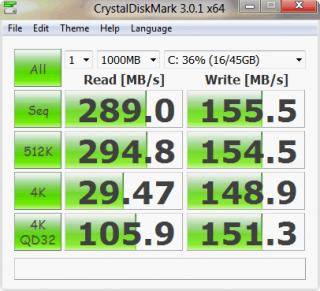
user posted image

my previous benchmark was on IDE MODE,this one is running on AHCI mode,got significant boost  smile.gif
*
but still u havent update your firmware..
QUOTE(rudolfjie @ Nov 11 2011, 10:29 AM)
Hi there, new to this thread
Currently i'm using OCZ Agility 3, no problem so far until this morning
I use Autoclick last night(overnight) & when i turn on my monitor this morning, a BSOD with 000007a is showing, i try to restart and it say my boot drive is missing
Then i go to my BIOS and check, there's only my HDD n optical drive, SSD Gone?!?! shocking.gif

I turn off everything and unplug the SSD, then plug in and try again, it works fine..no problem after running some bench (cine,prime..)

Anyone know what's wrong with the BSOD? do i have to update my firmware?
Please please icon_question.gif
notworthy.gif thanks in advance


Added on November 11, 2011, 10:41 am
It's on SATA3 port, but the speed looks like SATA2..hmm hmm.gif
*
yes u need to update the firmware. thats the problem with sandforce...
QUOTE(rudolfjie @ Nov 2 2011, 05:23 PM)
Hi everyone, new to this threat, nice discussion  around here

Just get an OCZ Agility 3 64GB, so far quite happy with the performance....until now when i bench with AS SSD, what my results are 190m/s read & 98m/s write.. all sifu sifu here know why? is'it normal?

or should i use others benchmarking software?

Thanks in advance
*
acording to this spec sheet your speed is above average... thats good laa.. if u want to see correct speed use ATTO coz OCZ using ATTO to get the highest spec speed
http://www.ocztechnology.com/res/manuals/O...oduct_sheet.pdf
Auraguy
post Nov 11 2011, 11:32 AM

Getting Started
**
Junior Member
297 posts

Joined: Nov 2006


QUOTE(rudolfjie @ Nov 11 2011, 10:29 AM)
Hi there, new to this thread
Currently i'm using OCZ Agility 3, no problem so far until this morning
I use Autoclick last night(overnight) & when i turn on my monitor this morning, a BSOD with 000007a is showing, i try to restart and it say my boot drive is missing
Then i go to my BIOS and check, there's only my HDD n optical drive, SSD Gone?!?! shocking.gif

I turn off everything and unplug the SSD, then plug in and try again, it works fine..no problem after running some bench (cine,prime..)

Anyone know what's wrong with the BSOD? do i have to update my firmware?
Please please icon_question.gif
notworthy.gif thanks in advance


Added on November 11, 2011, 10:41 am
It's on SATA3 port, but the speed looks like SATA2..hmm hmm.gif
*
Update to FW v2.15
-slight degrade in performance but they claim to fix random bsod problem.

I using it, until now i dont face any bsod. I just bought few days ago tho.
rudolfjie
post Nov 11 2011, 11:36 AM

Casual
***
Junior Member
350 posts

Joined: Oct 2006


yes u need to update the firmware. thats the problem with sandforce...

Thanks, btw is'it gonna be rocket science to update it?
Do i have to back up everything? (use for OS and program, how to back up?)


Added on November 11, 2011, 11:38 am
QUOTE(Auraguy @ Nov 11 2011, 11:32 AM)
Update to FW v2.15
-slight degrade in performance but they claim to fix random bsod problem.

I using it, until now i dont face any bsod. I just bought few days ago tho.
*
Thanks, did you back-up your SSD b4 update? OCZ website state there "Please do not update firmware unless absolutely necessary. Firmware updates may result in loss of user data and we recommend you back up your data before updating the firmware."

How i'm gonna back up my OS n program?


This post has been edited by rudolfjie: Nov 11 2011, 11:38 AM
iaknesnah
post Nov 11 2011, 11:42 AM

just passing by
******
Senior Member
1,376 posts

Joined: Nov 2010
From: Klaatu barada nikto
QUOTE(rudolfjie @ Nov 11 2011, 11:36 AM)
yes u need to update the firmware. thats the problem with sandforce...

Thanks, btw is'it gonna be rocket science to update it?
Do i have to back up everything? (use for OS and program, how to back up?)


Added on November 11, 2011, 11:38 am

Thanks, did you back-up your SSD b4 update? OCZ website state there "Please do not update firmware unless absolutely necessary. Firmware updates may result in loss of user data and we recommend you back up your data before updating the firmware."

How i'm gonna back up my OS n program?
*
it is better to do a clean install for sandforce..
Auraguy
post Nov 11 2011, 11:53 AM

Getting Started
**
Junior Member
297 posts

Joined: Nov 2006


QUOTE(rudolfjie @ Nov 11 2011, 11:36 AM)
yes u need to update the firmware. thats the problem with sandforce...

Thanks, btw is'it gonna be rocket science to update it?
Do i have to back up everything? (use for OS and program, how to back up?)


Added on November 11, 2011, 11:38 am

Thanks, did you back-up your SSD b4 update? OCZ website state there "Please do not update firmware unless absolutely necessary. Firmware updates may result in loss of user data and we recommend you back up your data before updating the firmware."

How i'm gonna back up my OS n program?
*
I updated mine without losing any data. But still its better for u to backup no matter what.
It supposed to be easy with "OCZ Toolbox" , but it doesnt work for me.
I used this manual way. Link
rudolfjie
post Nov 11 2011, 12:06 PM

Casual
***
Junior Member
350 posts

Joined: Oct 2006


QUOTE(Auraguy @ Nov 11 2011, 11:53 AM)
I updated mine without losing any data. But still its better for u to backup no matter what.
It supposed to be easy with "OCZ Toolbox" , but it doesnt work for me.
I used this manual way. Link
*
Thanks for the link, very detail.. will try out tonight
mizi28
post Nov 11 2011, 02:56 PM

Casual
***
Junior Member
423 posts

Joined: Mar 2007
From: Seoul
firmware updated

user posted image

AHCI fw0002


user posted image

AHCI fw0009


slight improvement again but slower at seq and 512k??? rclxub.gif rclxub.gif

This post has been edited by mizi28: Nov 11 2011, 02:57 PM
iaknesnah
post Nov 11 2011, 03:26 PM

just passing by
******
Senior Member
1,376 posts

Joined: Nov 2010
From: Klaatu barada nikto
QUOTE(mizi28 @ Nov 11 2011, 02:56 PM)
firmware updated
» Click to show Spoiler - click again to hide... «
*
much better. dont look at 512k. whats important is 4k.

This post has been edited by iaknesnah: Nov 11 2011, 03:26 PM
owikh84
post Nov 11 2011, 03:42 PM

i7 Clan
Group Icon
Elite
8,711 posts

Joined: Nov 2007
From: Butterworth, PG / Machang, Kelantan


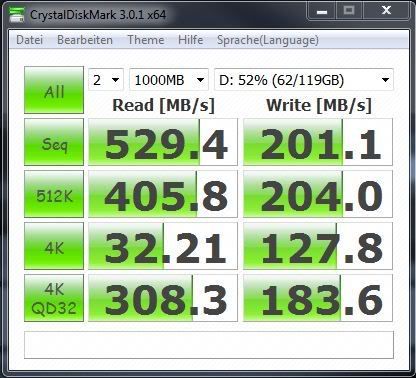
I believe u need to do some windows tweaking to get results like this:

user posted image
mizi28
post Nov 11 2011, 03:47 PM

Casual
***
Junior Member
423 posts

Joined: Mar 2007
From: Seoul
QUOTE(owikh84 @ Nov 11 2011, 03:42 PM)
I believe u need to do some windows tweaking to get results like this:

» Click to show Spoiler - click again to hide... «

*
user posted image

latest result after installing m/b driver

what kind of tweaking should i do?


owikh84
post Nov 11 2011, 03:53 PM

i7 Clan
Group Icon
Elite
8,711 posts

Joined: Nov 2007
From: Butterworth, PG / Machang, Kelantan


QUOTE(mizi28 @ Nov 11 2011, 03:47 PM)
latest result after installing m/b driver

what kind of tweaking should i do?
*
Impressive! now those are the correct speeds

SSD Optimization

kelvin_hata
post Nov 11 2011, 04:42 PM

V.S.O.P
*******
Senior Member
2,696 posts

Joined: Jan 2003
From: Butterworth,Penang Status: Available

M4 is the faster speed in 4k smile.gif

too bad.. my sponsor is not crucial sad.gif
owikh84
post Nov 11 2011, 05:03 PM

i7 Clan
Group Icon
Elite
8,711 posts

Joined: Nov 2007
From: Butterworth, PG / Machang, Kelantan


QUOTE(kelvin_hata @ Nov 11 2011, 04:42 PM)
M4 is the faster speed in 4k smile.gif

too bad.. my sponsor is not crucial sad.gif
*
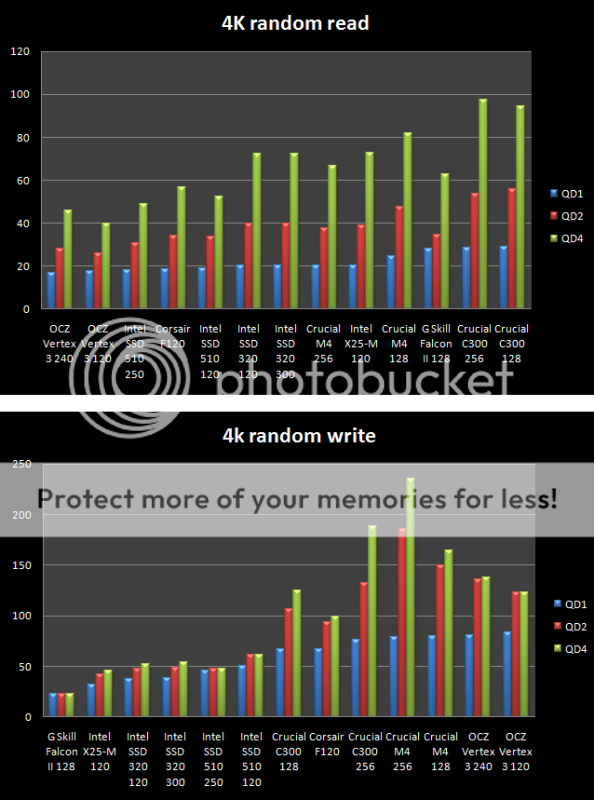
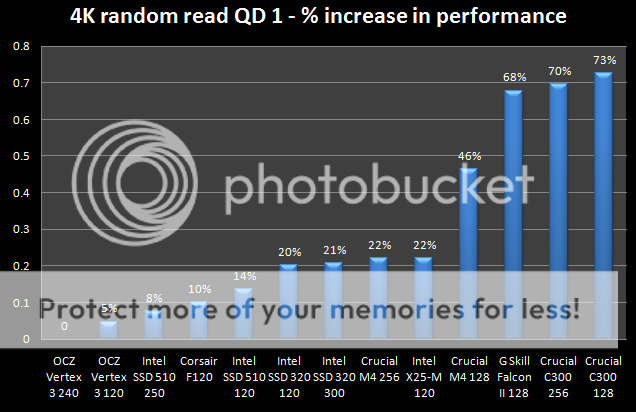
in fact Crucial owns any SSD in 4K
4K Random Read, primarily Q1 is the most important thing for 97% of users.

user posted imageuser posted image

This post has been edited by owikh84: Nov 11 2011, 05:04 PM
ainuddin
post Nov 11 2011, 10:07 PM

September 11th, 2001
******
Senior Member
1,957 posts

Joined: Jul 2008
fuh, everyone on sata3 ssd edi. me poorfag still using vertex2. cry.gif
Zibel
post Nov 13 2011, 05:46 PM

Getting Started
**
Junior Member
59 posts

Joined: Sep 2008
QUOTE(B u B u @ Nov 10 2011, 08:57 PM)
Currently what is the most value for money SSD in the market? OCZ Vertex Plus?
*

I bought 2x 60GB Agility 3 and use in RAID0, cheaper than one crucial M4 128GB by USD50. Maybe M4 is more reliable.

Hard to judge performance as Agility 3 uses compression.

Compressed data
Attached Image

Compressible data
Attached Image

I guess average performance will be somewhere in between.
iaknesnah
post Nov 13 2011, 10:47 PM

just passing by
******
Senior Member
1,376 posts

Joined: Nov 2010
From: Klaatu barada nikto
QUOTE(Zibel @ Nov 13 2011, 05:46 PM)
I bought 2x 60GB Agility 3 and use in RAID0, cheaper than one crucial M4 128GB by USD50. Maybe M4 is more reliable.

Hard to judge performance as Agility 3 uses compression.

» Click to show Spoiler - click again to hide... «


I guess average performance will be somewhere in between.
*
guys for sandforce u need to use ATTO benchmark, please....

This post has been edited by iaknesnah: Nov 13 2011, 10:48 PM
Zibel
post Nov 14 2011, 12:05 AM

Getting Started
**
Junior Member
59 posts

Joined: Sep 2008
QUOTE(iaknesnah @ Nov 13 2011, 10:47 PM)
guys for sandforce u need to use ATTO benchmark, please....
*

What's the point in using atto it's so unrealistic as it just writes zero's to the drive. Who buys a drive just to write zero's to it?


FWIW, not a lot IMO as you'll not get these speeds in real life.

Attached Image

This post has been edited by Zibel: Nov 14 2011, 12:17 AM
Ulysses
post Nov 14 2011, 01:51 AM

尤利西斯
*******
Senior Member
2,822 posts

Joined: Sep 2010
From: Georgetown, Penang


regardless of thailand flood, wnt to ask..whats the best SSD now for money? (i mean, the same as F3 for HDD)

AzaelTheKid
post Nov 14 2011, 08:20 AM

On my way
****
Senior Member
641 posts

Joined: May 2011
From: Malaysia - Penang


Hi guys,
I am thinking of buying a SSD. Am not sure which to choose. I got two option. Either the AData S511 or the Corsair Force 3 GT 120 or 160GB. Which one do you guys recommend? Any one using before this or any friend of yours is using? Would like some suggestions and opinions. Thanks

119 Pages « < 104 105 106 107 108 > » Top
Topic ClosedOptions
 

Change to:
| Lo-Fi Version
0.0322sec    0.62    6 queries    GZIP Disabled
Time is now: 8th December 2025 - 02:04 AM