

QUOTE(welwitchia @ Nov 1 2010, 11:55 AM)
Haha.. thx. Now that I have the iPhone 4, iPad, iMac, and now MBA, my next purchase should be an iPod Nano. LOL.. I need a new WATCH!!

ipod nano? wrong la.... next purchase should be mac pro 
Hardware The New MacBook/MacBook Pro/Air Users Thread v6, Share your joy and hopefully no pain :)
|
|
 Nov 1 2010, 12:27 PM Nov 1 2010, 12:27 PM
|
 
Senior Member
7,916 posts Joined: Jul 2005 From: Kuala Lumpur  
|
QUOTE(welwitchia @ Nov 1 2010, 11:55 AM) Haha.. thx. Now that I have the iPhone 4, iPad, iMac, and now MBA, my next purchase should be an iPod Nano. LOL.. I need a new WATCH!! ipod nano? wrong la.... next purchase should be mac pro |
|
|
|
|
|
Nov 1 2010, 12:35 PM
|

Senior Member
1,219 posts Joined: Jan 2003
|
No la. MBP is too heavy for me. I don't need a powerhouse for my mobile computing needs. Only using it for surfing the net.
|
|
|
Nov 1 2010, 12:53 PM
|

Senior Member
2,664 posts Joined: Apr 2008 From: Here and There
|
QUOTE(welwitchia @ Nov 1 2010, 12:35 PM) No la. MBP is too heavy for me. I don't need a powerhouse for my mobile computing needs. Only using it for surfing the net. no i dont think you get what he meant a mac pro is not a macbook pro but its this beast here ->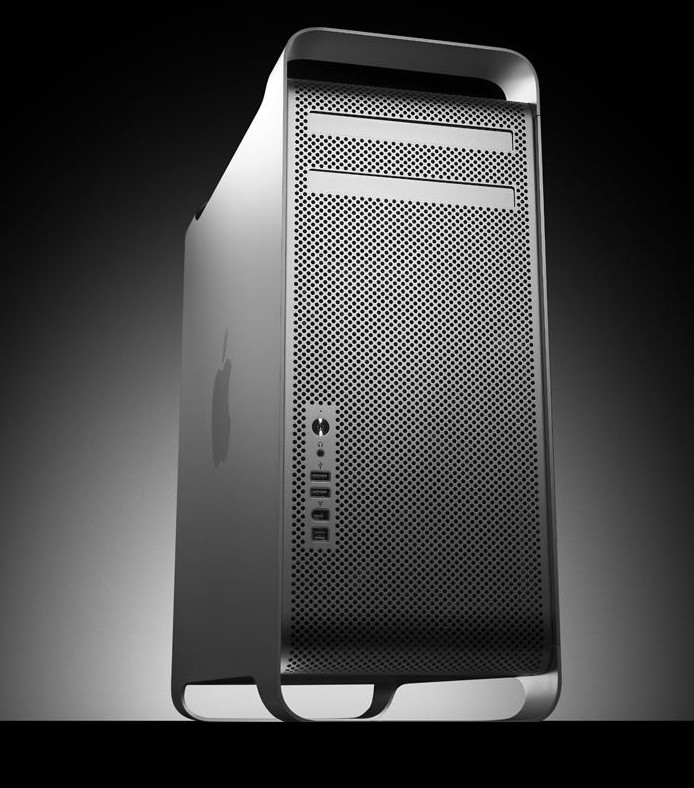 |
|
|
Nov 1 2010, 01:44 PM
|

Junior Member
64 posts Joined: Jun 2005
|
hey guys i gotten myself MBA 13", 128gb, 2gb ram
my 1st time using mac OSx, quite pain in the ass, just one question, can MBA runs win7 using boot camp with only 2gb ram? or i should just stick with win xp thanks |
|
|
Nov 1 2010, 01:49 PM
|
|
Senior Member
3,488 posts Joined: Dec 2004 From: Petaling Jaya
|
@bzbody : that's a new one. what specifically do you find a PITA?
according to the official system requirements Windows 7 should run fine on MacBook Air 2010. Don't forget to read thru the Boot Camp guide before doing anything. |
|
|
Nov 1 2010, 01:49 PM
|

Senior Member
1,134 posts Joined: Jan 2003
|
QUOTE(bzbody @ Nov 1 2010, 01:44 PM) hey guys i gotten myself MBA 13", 128gb, 2gb ram Your "pain" will go away after a week.... my 1st time using mac OSx, quite pain in the ass, just one question, can MBA runs win7 using boot camp with only 2gb ram? or i should just stick with win xp thanks  Such an expensive MBA...why turn back to the dark side...?  |
|
|
|
|
|
Nov 1 2010, 01:53 PM
|
|
Junior Member
64 posts Joined: Jun 2005
|
@xaw5126: basically everything, im totally new to mac os, aside from lauching apps, i cant find where is my storage drive, i plug in superdrive there are no icon coming out, etc.... it take alot time to adapt, i dont even know WTF is command, option keys
 i cant coz some of my office application required me to use IE and windows based os This post has been edited by bzbody: Nov 1 2010, 01:58 PM |
|
|
Nov 1 2010, 02:13 PM
|

Senior Member
513 posts Joined: Dec 2006 From: Cheras, Kuala Lumpur
|
QUOTE(welwitchia @ Nov 1 2010, 11:33 AM) @SoulReaver : KL. Jalan Raja Chulan. Gave dem a call again, this lady said I will most probably get it by tomorrow.... Basically different staff telling different things... LOL... The initial one told me its stuck at customs... and he is not sure when will it be cleared.Running around in circles already. |
|
|
Nov 1 2010, 02:14 PM
|
|
Senior Member
7,916 posts Joined: Jul 2005 From: Kuala Lumpur
|
QUOTE(bzbody @ Nov 1 2010, 01:53 PM) @xaw5126: basically everything, im totally new to mac os, aside from lauching apps, i cant find where is my storage drive, i plug in superdrive there are no icon coming out, etc.... it take alot time to adapt, i dont even know WTF is command, option keys find some time to watch the videos n read some guides here: http://www.apple.com/findouthow/mac/ i cant coz some of my office application required me to use IE and windows based os i recommend this to all new mac users. it's a very good start  'command' and 'option' keys...uh, look at your keyboard, on both sides of the spacebar |
|
|
Nov 1 2010, 02:20 PM
|
|
Junior Member
64 posts Joined: Jun 2005
|
QUOTE(dvlzplayground @ Nov 1 2010, 02:14 PM) find some time to watch the videos n read some guides here: http://www.apple.com/findouthow/mac/ thanks for the videosi recommend this to all new mac users. it's a very good start 'command' and 'option' keys...uh, look at your keyboard, on both sides of the spacebar what i meant for the command and option where i dunno wat is the function of it |
|
|
Nov 1 2010, 02:33 PM
|
|
Senior Member
7,916 posts Joined: Jul 2005 From: Kuala Lumpur
|
QUOTE(bzbody @ Nov 1 2010, 02:20 PM) thanks for the videos oh i see. they are modifier keys, like ctrl. u know how in windows it's ctrl+c n ctrl+v for copy n paste? in osx it's command+c and command+v. ctrl, option, shift n command are all modifier keys, and what it does depends on what app are you running. u can configure the shortcuts in System Preferences > Keyboard > Keyboard shortcutswhat i meant for the command and option where i dunno wat is the function of it to discover what does what in an app, open any app n look through the menu bar at the top. look at the symbols beside the menu item. u might wanna have a look at this http://www.osxkeyboardshortcuts.com/key-de...ifier-keys.html |
|
|
Nov 1 2010, 03:28 PM
|
|
Senior Member
1,134 posts Joined: Jan 2003
|
QUOTE(bzbody @ Nov 1 2010, 01:53 PM) @xaw5126: basically everything, im totally new to mac os, aside from lauching apps, i cant find where is my storage drive, i plug in superdrive there are no icon coming out, etc.... it take alot time to adapt, i dont even know WTF is command, option keys No icon? Maybe you did not enable the icon display... i cant coz some of my office application required me to use IE and windows based os |
|
|
Nov 1 2010, 03:34 PM
|
|
Senior Member
3,488 posts Joined: Dec 2004 From: Petaling Jaya
|
@bzbody : www.apple.com/findouthow ... your keyboard is labeled, you know. command n option keys are on your bottom row.
HDD, CDROM n other external media will appear on the desktop when correctly connected. you can also click the Finder (first icon on the Dock) to view your drives (network drives as well) |
|
|
|
|
|
Nov 1 2010, 04:19 PM
|
|
Junior Member
64 posts Joined: Jun 2005
|
Hi, what option do i choose when i install win7 in my MBA?
upgrade or Custom? doesnt want to screw up the whole thing Sorry!! found the solution already This post has been edited by bzbody: Nov 1 2010, 04:23 PM |
|
|
Nov 1 2010, 05:18 PM
|
|
Senior Member
3,488 posts Joined: Dec 2004 From: Petaling Jaya
|
@bzbody : how to upgrade? you don't have any existing installation, right?
Custom lor... |
|
|
Nov 1 2010, 05:27 PM
|
|
Junior Member
28 posts Joined: Aug 2010
|
Hello,
I would like to know the performance difference between the core i7 2.66 and the core i7 2.8. I would like to know whether the upgrade is worth it or not. Btw, I mainly use final cut pro, after effects. Thanks in advance. Alwin |
|
|
Nov 1 2010, 05:31 PM
|
|
Junior Member
64 posts Joined: Jun 2005
|
QUOTE(xaw5126 @ Nov 1 2010, 05:18 PM) @bzbody : how to upgrade? you don't have any existing installation, right? i was searching high and low for online tutorial, all didnt mention on itCustom lor... lucky found one that have step by step guide i have to be careful ler, common sense should be custom, but i just want to make sure i didnt screw up nia  This post has been edited by bzbody: Nov 1 2010, 05:35 PM |
|
|
Nov 1 2010, 05:39 PM
|
|
Senior Member
1,219 posts Joined: Jan 2003
|
DHL sucks! Now they don't even know where my order is and they can't give me an exact delivery date.
|
|
|
Nov 1 2010, 09:12 PM
|
|
Junior Member
279 posts Joined: Oct 2005
|
why do you call it ultimate ?, it isn't laptop based pc.
Ex: HP HDX 16t Premium laptop |
|
|
Nov 1 2010, 09:14 PM
|

Senior Member
3,657 posts Joined: May 2005
|
They called it "Ultimate" because it's been maxed out on the upgrade option as in you can't get any higher than that. Not the ultimate of all laptop.
|
|
Topic ClosedOptions
|
| Change to: |  0.0374sec 0.0374sec
 0.56 0.56
 6 queries 6 queries
 GZIP Disabled GZIP Disabled
Time is now: 3rd December 2025 - 12:13 AM |
 Quote
Quote