Welcome Guest ( Log In | Register )

Bump Topic Topic Closed RSS Feed

Outline · [ Standard ] · Linear+

 HTC Desire Official Thread V4, FAQs on First Page [Froyo 2.2 is Here!]

views
     
winterwish
post Aug 15 2010, 12:34 AM

Getting Started
**
Junior Member
141 posts

Joined: Jan 2003


QUOTE(Pennywise @ Aug 15 2010, 12:29 AM)
[U]Change Log in 5.2
[/U

Wifi N Fixed (should test)
Superuser 2.3.1 updated -thanks to ChainsDD
Added Home Switcher & ClearDefaultHome).
Added ADW Launcher. (TriLauncher, now you can choose Sense-Launcher2-ADW) (You can change to default with ClearDefaultHome, and HomeSwitcher to temporaly)
Added CPUfrec interactive & powersave (default interactive, powersave with SetCPU) Thanks to FloHimself
Update VoiceSearch, Googlesearch, Facebook.
Added Google Maps brute Stockified version, thanks to Squrl
Added CIFS. (you have to configure it: http://forum.xda-developers.com/showthread.php?t=751296 ..... .thanks to Myshkinbob)
Now Original Sense + Transparent Lockscreen, & NexTSense Default versions.
Tweak kernel & virtual memory values
Zipalign
Enable CFQ Scheduler.
Added 13 new Wallpapers
Removed FroYo default lockscreen, to enable in recovery:

Somehow, I'm missing out on the CPUfrec. I dont see any app by this name. How do I make use of it? I'm hoping to switch to powersave mode to save batt some times. Wonder if it works.
Thanks for the recommendation. I was looking for this as well! smile.gif
Looks complicated to me, dont have the confident to get it right.
*
You're welcome, and I think you need to use "SetCPU" app to change the it? I never really bothered with that. Haha.

winterwish
post Aug 15 2010, 12:52 AM

Getting Started
**
Junior Member
141 posts

Joined: Jan 2003


QUOTE(Pennywise @ Aug 15 2010, 12:49 AM)
Problem is I dont see any SetCPU app in NextSense 5.2, do you?
*
Nope, because it's not free?.. huhu. I never underclock/overclock my desire, so I'm not sure as well.
winterwish
post Aug 15 2010, 01:01 AM

Getting Started
**
Junior Member
141 posts

Joined: Jan 2003


QUOTE(yeokeeyie @ Aug 15 2010, 12:54 AM)
still cant move to SD card .. any solution ? or mayb redownload the file ?
*
You don't need to 'Move to SD', all apps automatically installed to SD card inside the EXT partition. The 'Move to SD' is for the Froyo native (original) app2sd, it's different from the one used by NextSense.

Correct me if I'm wrong.

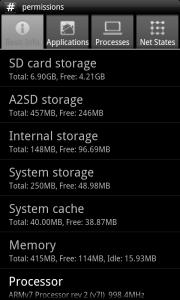
Try and install Quick System Info. Run the app, see if the APP2SD storage got or not.

See mine below

Attached Image


Added on August 15, 2010, 1:02 am
QUOTE(Pennywise @ Aug 15 2010, 12:55 AM)
I see I see... I wasnt reading properly. Thanks for the guidance.

Did anyone else face this problem with NextSense 5.2? I want to update some app from Market and downloaded them but it wont install properly. Just showing "Installing..." for 1/2 hour. This happened with Handcent SMS update???
*
No worries.

I got error several times as well for updates, I think maybe the app is still in use? Try restart the phone and update again since it works for me.

This post has been edited by winterwish: Aug 15 2010, 01:02 AM
winterwish
post Aug 15 2010, 01:06 AM

Getting Started
**
Junior Member
141 posts

Joined: Jan 2003


QUOTE(hao @ Aug 15 2010, 01:04 AM)
My current homescreen wink.gif

user posted image

Off to bed *yawn*
*
Very clean, I love it. Perhaps you should post this to the Post and share your screen shoots thread

Anyway, how you change the bottom bar?

winterwish
post Aug 15 2010, 01:10 AM

Getting Started
**
Junior Member
141 posts

Joined: Jan 2003


QUOTE(Pennywise @ Aug 15 2010, 01:06 AM)
I was getting worried since my system free is about ~50mb until I saw yours is the same too.
I dont think my software update problem has gotta do with the rom but rather the radio. Ever since I moved over to NextSense 5.1 from LeeDroid 1.6, my phone's been detecting poor data transfer rate. So poor that it get stuck for a moment. I think even if i revert back to LeeDroid 1.8b now, it probably uses the same radio. I hope they will release a new radio soon.
*
What's System Storage anyway? I was always 40-50 for any roms I use so I never bothered with it. Perhaps those app that got installed in the /system partition?

Yea, even if you revert back your radio will still be the same. Which radio version did you use?

QUOTE(yeokeeyie @ Aug 15 2010, 01:07 AM)
system not available T_T
*
The APP2SD storage say system not available? You have EXT partition or not? Huhu

winterwish
post Aug 15 2010, 01:41 PM

Getting Started
**
Junior Member
141 posts

Joined: Jan 2003


QUOTE(yeokeeyie @ Aug 15 2010, 04:01 AM)
-Partition ext2, 3 or 4 wiped (for APP2SD)
how to do this?


Added on August 15, 2010, 4:02 ami think this step make me cant put my file to a2sd


Added on August 15, 2010, 4:03 amafter i open partition no it show alot of things .. errm format sd ,format .. blablabla .. which should i choose ?
*
What you use to partition? Use ROM manager like a lot of people suggest here. It's the easiest.. and BACKUP all your data first to your PC


QUOTE(yeokeeyie @ Aug 15 2010, 06:51 AM)
omg .. my desire got problem d .. verified signature failed ? wat is tat ?
*
From the recovery screen, I think you can turn off Signiture verification if you go to 'Advance' menu. So try that before you flash again.


QUOTE(Pennywise @ Aug 15 2010, 11:23 AM)
winterwish, samuraii1337 and ktcy has become Desire rooting helpdesk analyst... hahahaha... Someone should compose a guide of everything you guys have shared here. Thank you for all your help!
*
No, just helping out. Haha. Still have a lot to learn myself.
winterwish
post Aug 15 2010, 02:18 PM

Getting Started
**
Junior Member
141 posts

Joined: Jan 2003


QUOTE(ksh9394 @ Aug 15 2010, 01:49 PM)
Can some1 jus put up the whole process from root, backup and flash rom under 1 post? Moderator mayb? (instead of i open almost 3-4 pages to refer)
*
1. Root your Desire
2. Backup
3. Install custom rom

That's the method I use. Good luck

Topic ClosedOptions
 

Change to:
| Lo-Fi Version
0.0388sec    0.32    7 queries    GZIP Disabled
Time is now: 3rd December 2025 - 09:43 AM