Welcome Guest ( Log In | Register )

Outline · [ Standard ] · Linear+

Home Networking N Router By Asus RTN-66U / Asus RTN-16 / RT-N56U, Asus RT-N Series Supported Unifi

views
     
dimenxion
post Feb 5 2013, 08:31 AM

Getting Started
**
Junior Member
289 posts

Joined: Jan 2003
From: Shah Alam


Hello Guys,

I am quite new to Asus N Series. i am having RT-N12 C1 router and using it with unifi. Everything going well with the config. but i am a little unsure about the QoS. My goal is to set several devices in my network to have full speed and high priority. and i want it to be done by IP, not by port. i understand this model unable to set bandwidth limiter based on ip addressing. so i figured that I can at least work on the QoS itself.

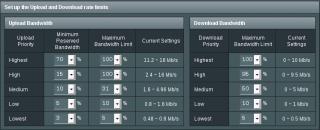
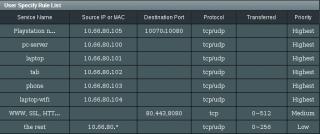
this is how i setup currently but somehow i felt probably the entry can be simplified. see below for my current config.


Attached Image


the 2 field that in question are Source ip address and destination port. in my case i wanted to prioritize based on IP, so can i just simply fill up the source ip and leave out the destination port blank? anyone can confirm?
dimenxion
post Feb 6 2013, 06:13 AM

Getting Started
**
Junior Member
289 posts

Joined: Jan 2003
From: Shah Alam


thanks for the clarification smile.gif
dimenxion
post Feb 6 2013, 12:52 PM

Getting Started
**
Junior Member
289 posts

Joined: Jan 2003
From: Shah Alam


QUOTE(ASUSmy @ Feb 6 2013, 12:40 PM)
Hi dimenxion,

If you would like to have a try on our beta firmware for this model? It will change your GUI to our new GUI ASUSWRT.

Here is the link to download the firmware.

https://www.asuswebstorage.com/navigate/s/2...4A95EB2BF52C95Y

You are require to do a factory reset before and after you update the firmware. And to update you will require to follow the step on the youtube.

http://www.youtube.com/watch?v=HIoQ5Qd11pU

Here is non video guide for your reference.

http://support.asus.com/Search/KDetail.asp...648FE6C1D6D&t=2

Thank you
*
Hi asusmy,

i am interested to try this new firmware. but is it necessary to use the rescue mode or i can flash the firmware directly via the GUI as well?
dimenxion
post Feb 6 2013, 01:58 PM

Getting Started
**
Junior Member
289 posts

Joined: Jan 2003
From: Shah Alam


QUOTE(ASUSmy @ Feb 6 2013, 01:47 PM)
Hi dimenxion, ya you need to use rescue mode. If not you will not be able to flash the firmware.

Thank you
*
alright... will try this beta tonight smile.gif
dimenxion
post Feb 7 2013, 08:57 AM

Getting Started
**
Junior Member
289 posts

Joined: Jan 2003
From: Shah Alam


Hello..

ASUSmy I had flashed the new beta firmware for RT-N12 and really like the new asuswrt gui. For unknown reason i can't get the VPN Server to work. not sure if it's suppose to be working or not yet since it's in beta.

I also played around with QoS which have much better options and customization. Would like to get some opinion from you guys if my QoS configuration is correct. FYI my unifi is 10Mbps

My goal for the QoS is as follow:

1. 6 device in my network will have full speed and highest priority (10.66.80.100-105)
2. HTTP/HTTPS/8080 will be on medium priority which i limit them to only consume up to 5Mbps (in/out) so everyone other than the first six can do web stuffs up to 5Mbps speed
3. All other different protocol/devices will be on low priority (1Mbps in/out)

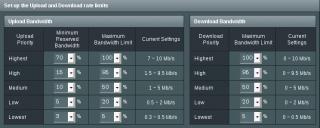
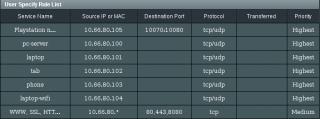
Below is the screenshot of my rules. kindly suggest me if there are rules that incorrect based on my goal above:

Attached Image

Attached Image


Config above was done based on my logic and experience with different vendor equipment. But it may be wrong for asus equipment, thus need some clarification if i did it correctly.

Thanks smile.gif
dimenxion
post Feb 7 2013, 03:46 PM

Getting Started
**
Junior Member
289 posts

Joined: Jan 2003
From: Shah Alam


Hi ASUSmy

I had modified the qos and now it looks like below

Attached Image Attached Image


I had now set both downstream and upstream to max 10Mbps. and i also matched the maximum bandwidth limit for both direction to the same amount. i also took out the low priority rules and remove the transferred limit in medium priority. So based on this new configuration my understanding is:

1. for medium priority, the packet will stay at medium priority all the time but will limit up to 5Mbps for both direction.
2. Any other protocol/device that are not mentioned in the rules will stay at low priority.
3. Low priority is now max 2Mbps both direction for those unmatched packet/device.
dimenxion
post Feb 7 2013, 04:04 PM

Getting Started
**
Junior Member
289 posts

Joined: Jan 2003
From: Shah Alam


oh yeah.. for VPN. i had configured all the settings in the router and created the pptp users as well. when i tested to connect, it gave me error 800: Unable to establish the VPN connection. had tested this on my android phone connected to 3G and another pc. i had checked the pptp passthrough and all enabled. not sure if i miss something else.

any thought?
dimenxion
post Apr 7 2015, 09:53 AM

Getting Started
**
Junior Member
289 posts

Joined: Jan 2003
From: Shah Alam


Hi Guys,

I recently switched from Unifi to maxis fiber with iptv. all are great except the iptv part. I can live without the phone, but the astro somehow in need by my family.

if i configure vlan manually

internet: 621
ipphone: 821/822
iptv: 823/824

phone does not work. and even if iptv work it became very laggy. I have read thru this topic (most of them) and tried most of the solutions. but i can't test it fully because my pvr box seems to have software issue.

just to check out if there is a specific solution so far using RT-N56U for maxis fiber and iptv at least to work.


ADD

Or any RT-N56U users that able to use iptv with openwrt?

This post has been edited by dimenxion: Apr 7 2015, 10:52 AM


Change to:
| Lo-Fi Version
0.0513sec    0.51    7 queries    GZIP Disabled
Time is now: 3rd December 2025 - 12:09 AM