

QUOTE(vergas @ May 6 2012, 11:02 PM)
Still the same.

the black layout for N16 & 66U rite?Home Networking N Router By Asus RTN-66U / Asus RTN-16 / RT-N56U, Asus RT-N Series Supported Unifi
|
|
 May 7 2012, 11:49 AM May 7 2012, 11:49 AM
|
 
Junior Member
365 posts Joined: Jan 2003   
|
QUOTE(vergas @ May 6 2012, 11:02 PM) Still the same. the black layout for N16 & 66U rite? |
|
|
|
|
|
May 9 2012, 11:52 AM
|

Senior Member
842 posts Joined: May 2009
|
QUOTE(isMEheNG @ May 5 2012, 11:47 AM) Many thanks for your comment Its a darn powerful CPU with tons of memory. Its overpowered actually with too much memory since I dont do alternative firmware that uses those memories. Using only a single USB port. I only suspect power problem but not sure coz it might be the firmware as well. You can try N56U since it has advantage of dual bands 2.4Ghz and 5Ghz for future proof. It looks much cooler too and more compact in size. The price still in between N16 and N66. Abt RM100 more than N16 tho... Since u suspect the hang was caused by lack of power of usb, were u plug ur WD passport o both USB ports? Maybe it hang just because the cpu and ram cant handle to torrenting. Any other N16 owner here? Before that my 1st choice is N16 for its price/performance then 2nd choice is N66 but it is too pricey and low avaibility  If only I have an external powered HDD, that can try to see if it REALLY is USB powered problem or not. Overall transmission performance of wireless of N56 is higher than N16, so you pay the price for it. This post has been edited by Cavino: May 9 2012, 11:53 AM |
|
|
May 9 2012, 02:24 PM
|

Junior Member
247 posts Joined: Jan 2003 From: Sri Serdang
|
right now my RT-N56U running with latest padavan firmware. i like the transmission compare to download master
|
|
|
May 10 2012, 10:34 AM
|

Junior Member
98 posts Joined: Jul 2007
|
After consideration, I get myself a N16. Now I have several problem hope all the sifus here can share me the solutions
 1.) The asuscomm DDNS I use for my CCTV DVR, won't update to the lastest WAN IP, even I manually click the update button, It still stuck at the old WAN IP. 2.) The usb port on the higher side won't detect any usb drive but it can detect my printer. The usb on lower side can detect both usb drive and printer. Is it the higher side usb faulty already? 3.) I failed to get my Canon LBP 3050 to work on N16, is the N16 can support most of the printer? |
|
|
May 10 2012, 01:02 PM
|

Junior Member
17 posts Joined: May 2012
|
hi guys...recently i have bought this asus router http://my.asus.com/Networks/ADSL_Modem_Routers/DSLN12U/
according to his website it does not show any information on supporting IPTV things. after going in the modem and look at the setting i saw there is IPTV setting smth and can choose which LAN port for iptv run. i wonder is it possible that this device can replace the TM router? without sacrifice the IPTV  |
|
|
May 10 2012, 03:03 PM
|

Senior Member
1,488 posts Joined: Oct 2004
|
QUOTE(isMEheNG @ May 3 2012, 01:54 PM) I'm a heavy BT downloader, so that I prefer to choose asus router to donwload BT without turn on my pc. Is N16 able to done the job well or I should pick N66U which has more powerful cpu and more ram? Was looking around at klseet website for new stuff, and found this, I think this one can be use to BT without turning your PC properly. Not Asus though... check out the last line of the page > Setup as standalone Transmission download device (old post)Any other brand has the BT download feature? http://klseet.com/index.php?option=com_con...id=98&Itemid=92 This post has been edited by vergas: May 10 2012, 03:04 PM |
|
|
|
|
|
May 10 2012, 03:10 PM
|

Senior Member
503 posts Joined: Jan 2003 From: P.J.
|
Couldn't help myself in buying the n66. very nice looking.. (but if standing up wires will be showing)
Hopefully after setting up will be even better than the netgear 3700... 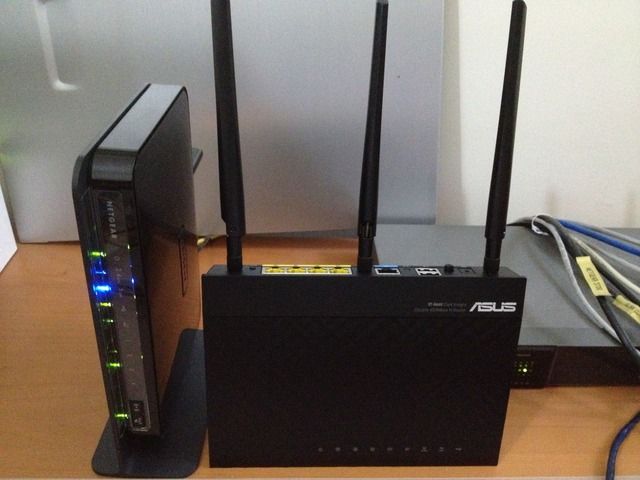 |
|
|
May 10 2012, 03:14 PM
|

Senior Member
1,473 posts Joined: Oct 2006 From: Jupiter
|
QUOTE(andyz @ May 10 2012, 03:10 PM) Couldn't help myself in buying the n66. very nice looking.. (but if standing up wires will be showing) i'll definitely get this if unifi available in my place Hopefully after setting up will be even better than the netgear 3700...  does it have qos? usable ? |
|
|
May 10 2012, 04:25 PM
|
|
Senior Member
1,026 posts Joined: Jan 2003 From: Kuala Lumpur, Malaysia
|
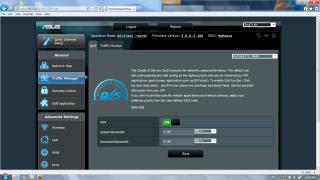
squall0833, n66 have auto QoS / Manual Qos. Support Streamyx & Unifi
This post has been edited by ldragon: May 10 2012, 04:26 PM |
|
|
May 11 2012, 04:43 AM
|
|
Senior Member
1,473 posts Joined: Oct 2006 From: Jupiter
|
QUOTE(ldragon @ May 10 2012, 04:25 PM) squall0833, n66 have auto QoS / Manual Qos. Support Streamyx & Unifi looks good, my next product will be asus XD
|
|
|
May 13 2012, 08:18 PM
|
|
Junior Member
38 posts Joined: Mar 2005
|
my USB drive was not able to detected. Any idea whats happen?
Added on May 13, 2012, 8:19 pmi am using n13u model....the usb device is not able to detected eventhough i plug in Pendrive Added on May 14, 2012, 12:20 pmFinally the USB HDD able to detect after i format it to ext3 format. But encounter another problem after that. 1. The whole device become lagging, not stable 2. Download manager unable to find the device but from web console i can view the device Any idea what is going on? This post has been edited by Lex99: May 14 2012, 12:20 PM |
|
|
May 14 2012, 07:57 PM
|
|
Junior Member
398 posts Joined: Nov 2007 From: Land below the wind
|
hi all, after reading the review on RT-N16
i'm interested to get 1 currently using innacomm w3100 with streamyx feel like want to replace it as it will disconnect and hang itself after constant on for a few days my questions: RT-N16 only act as router only right? instead of DSL modem as it only have WAN/LAN port if so, could you all recommend me a modem for this router(want to replace the innacomm)? sorry for noob questions Thanks This post has been edited by ivan92: May 14 2012, 08:09 PM |
|
|
May 17 2012, 04:54 PM
|

Junior Member
376 posts Joined: Jun 2006
|
Need help. When connect my ZTE white VDSL2 modem to my new RT-N13U with settings for unifi-biz..it will state:
You have set the wrong dynamic or static IP address for your RT-N13U Any idea? IP for my asus router set to 192.168.0.1 but no idea why it keep prompt me this error. |
|
|
|
|
|
May 17 2012, 05:35 PM
|
|
Senior Member
719 posts Joined: Dec 2006
|
Hi,
I am trying to replace my office Dlink DIR615, we are on a Unifi 10MB Business Fix IP. We have a mail server on our LAN and the Dlink every now and then need to be reset. Which model support Unifi 10MB with a fix ip. jackdon |
|
|
May 18 2012, 03:52 PM
|
|
Senior Member
842 posts Joined: May 2009
|
QUOTE(jackdon @ May 17 2012, 05:35 PM) Hi, All the current routers from Asus from N12 to N66 can support UNIFI with whatever bandwidth you subscribed to. Fixed IP configuration can be set within any of the routers.I am trying to replace my office Dlink DIR615, we are on a Unifi 10MB Business Fix IP. We have a mail server on our LAN and the Dlink every now and then need to be reset. Which model support Unifi 10MB with a fix ip. jackdon |
|
|
May 20 2012, 05:10 PM
|

Newbie
3 posts Joined: May 2010
|
Hi, I got problem with RT-N13U Ver B1.. Using RT-N13U.RB_2.0.2.5g.trx the Unifi PPOE disconnected after few hours. The IPTV, VOIP is ok. Only it disconnected and i need to manually login and reconnect. It happen many time. Never tried RT-N13U.RB_2.0.2.5F.trx yet.. any comment
|
|
|
May 21 2012, 07:25 PM
|
|
Junior Member
235 posts Joined: Jan 2005
|
I using 2.0.2.5F.trx latest firmware. It works fine with my connection!!!!
 |
|
|
May 22 2012, 03:39 AM
|

Junior Member
214 posts Joined: Aug 2008 From: I am where the wind blows...
|
Hello All,
Recently just got Asus RT-N66U. Really great router if anyone is doubting. Streaming on youtube is very smooth, no staggering or doesn't hang halfway when loading videos. Download master works as stated with latest firmware. Although a little tricky to understand setup steps and what's going on. Overall very stable with solid performance, provides a very strong signal throughout the house (2.5 Storey). I was wondering however, if anyone has the step by step guide to configure this router in order to replace the dreaded orange DLINK Unifi one? If someone can point me to it, appreciate it. Can't wait to get rid of that sore orange thing. Many thanks in advance. |
|
|
May 22 2012, 09:49 AM
|
|
Newbie
0 posts Joined: Jun 2006
|
I do not understand why Asus official released the N13U.RB_2.0.2.5F that not does works. Previous Beta release we have encountered end issues such as frequent hang. Instead of resolving the frequent hanging, this official release is worse than the beta firmware with connection that hardly last 36 hours.
Whoever intends to buy N13 should defer from buying it for Unifi use. Asus should stop selling N13 to the public until they are very sure on the product works without hang out. I have tested endless beta firmware release with same problem. For months the N13 having problem of hanging, why can’t Asus resolve it? Could it be the programmers sleep on the job or either Asus having employed a half cook programmers. Please do NOT CONSIDER BUYING N13 until Asus have official declare the product will work without hanging during normal operation. If Asus could not resolve this troublesome router, it should consider to END OF LIFE on N13. As a trustable corporation, Asus should urgently resolve it and if any further delay Asus should consider replacing the N13 to other models for whomever customers facing problems on the products. * I have 5 Units of N13 since last year, currently using two units with latest firmware. Three have retired for others brand due to critical operations (Other brand working perfectly) |
|
|
May 22 2012, 10:05 AM
|
|
Senior Member
1,488 posts Joined: Oct 2004
|
QUOTE(ipvoice @ May 22 2012, 09:49 AM) I do not understand why Asus official released the N13U.RB_2.0.2.5F that not does works. Previous Beta release we have encountered end issues such as frequent hang. Instead of resolving the frequent hanging, this official release is worse than the beta firmware with connection that hardly last 36 hours. I have to say I am quite frustrated with all the new betas as well and I too do not dare to recommend people to buy N13.Whoever intends to buy N13 should defer from buying it for Unifi use. Asus should stop selling N13 to the public until they are very sure on the product works without hang out. I have tested endless beta firmware release with same problem. For months the N13 having problem of hanging, why can’t Asus resolve it? Could it be the programmers sleep on the job or either Asus having employed a half cook programmers. Please do NOT CONSIDER BUYING N13 until Asus have official declare the product will work without hanging during normal operation. If Asus could not resolve this troublesome router, it should consider to END OF LIFE on N13. As a trustable corporation, Asus should urgently resolve it and if any further delay Asus should consider replacing the N13 to other models for whomever customers facing problems on the products. * I have 5 Units of N13 since last year, currently using two units with latest firmware. Three have retired for others brand due to critical operations (Other brand working perfectly) However, for those who already bought it, I have no problem running it using the oldest firmware in klseet website, see my previous post. http://forum.lowyat.net/index.php?showtopi...&#entry47984696 Alternatively, peter's tedious method which I am not willing to try.. http://forum.lowyat.net/index.php?showtopi...post&p=47992698 I am still however hoping that Asus will fixed this anyway and have transmission build to it, or dd-wrt able to do the IPTV.... Added on May 22, 2012, 10:08 am QUOTE(kenneth686 @ May 21 2012, 07:25 PM) I using 2.0.2.5F.trx latest firmware. It works fine with my connection!!!! How long has this been, did you manage to reach more than 1 week?This post has been edited by vergas: May 22 2012, 10:08 AM |
| Change to: |  0.0230sec 0.0230sec
 0.81 0.81
 6 queries 6 queries
 GZIP Disabled GZIP Disabled
Time is now: 2nd December 2025 - 09:54 AM |
 Quote
Quote