Welcome Guest ( Log In | Register )

113 Pages « < 60 61 62 63 64 > » Bottom

Outline · [ Standard ] · Linear+

Home Networking N Router By Asus RTN-66U / Asus RTN-16 / RT-N56U, Asus RT-N Series Supported Unifi

views
     
dimenxion
post Feb 7 2013, 08:57 AM

Getting Started
**
Junior Member
289 posts

Joined: Jan 2003
From: Shah Alam


Hello..

ASUSmy I had flashed the new beta firmware for RT-N12 and really like the new asuswrt gui. For unknown reason i can't get the VPN Server to work. not sure if it's suppose to be working or not yet since it's in beta.

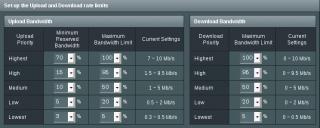
I also played around with QoS which have much better options and customization. Would like to get some opinion from you guys if my QoS configuration is correct. FYI my unifi is 10Mbps

My goal for the QoS is as follow:

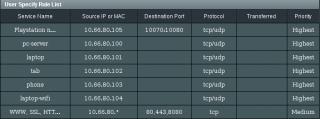
1. 6 device in my network will have full speed and highest priority (10.66.80.100-105)
2. HTTP/HTTPS/8080 will be on medium priority which i limit them to only consume up to 5Mbps (in/out) so everyone other than the first six can do web stuffs up to 5Mbps speed
3. All other different protocol/devices will be on low priority (1Mbps in/out)

Below is the screenshot of my rules. kindly suggest me if there are rules that incorrect based on my goal above:
Attached Image

Attached Image


Config above was done based on my logic and experience with different vendor equipment. But it may be wrong for asus equipment, thus need some clarification if i did it correctly.

Thanks smile.gif
ASUSmy
post Feb 7 2013, 11:49 AM

Look at all my stars!!
*******
Senior Member
2,319 posts

Joined: Mar 2010
QUOTE(dimenxion @ Feb 7 2013, 08:57 AM)
Hello..

ASUSmy I had flashed the new beta firmware for RT-N12 and really like the new asuswrt gui. For unknown reason i can't get the VPN Server to work. not sure if it's suppose to be working or not yet since it's in beta.

I also played around with QoS which have much better options and customization. Would like to get some opinion from you guys if my QoS configuration is correct. FYI my unifi is 10Mbps

My goal for the QoS is as follow:

1. 6 device in my network will have full speed and highest priority (10.66.80.100-105)
2. HTTP/HTTPS/8080 will be on medium priority which i limit them to only consume up to 5Mbps (in/out) so everyone other than the first six can do web stuffs up to 5Mbps speed
3. All other different protocol/devices will be on low priority (1Mbps in/out)

Below is the screenshot of my rules. kindly suggest me if there are rules that incorrect based on my goal above:

Attached Image

Attached Image
Config above was done based on my logic and experience with different vendor equipment. But it may be wrong for asus equipment, thus need some clarification if i did it correctly.

Thanks  smile.gif
*
Hi dimenxion,

In your setting, it’s right. Can I ask why your download seems lower than upload? It’s weird. Maybe can make download bandwidth larger.(depends on user)

1. The first six devices will follow “Highest”(upload : 11.2~16M), all of them will share the upload bandwidth, not download bandwidth.
Download bandwidth depends on upload bandwidth, and we share the bandwidth of “highest” priority(totally : 16M), the six devices will compete each other to get higher bandwidth.

2. Transferred : if you set 0~512, it means when recorded packets is inside the range, they will follow priority “medium”,
but if out of range, it will follow “Low”(it’s default setting for other packet, they are not marked by any rule).

3. If point 2 and 3, you want to let “80,443,8080” to get up to 5M and the rest to get up to 2M(in user’s setting, it seems to 2M, not 1M),
you should modify “user-defined priority” to suit the right bandwidth.

And if the rest want to use “Low”, they also don’t need to build any rule, because default is “LOW”. It means if no match any rule as user defines, packets will follow priority “LOW”.

As for the VPN, what error mesagge you get or which part that cannot worK?

Thank you


Attached thumbnail(s)
Attached Image Attached Image
dimenxion
post Feb 7 2013, 03:46 PM

Getting Started
**
Junior Member
289 posts

Joined: Jan 2003
From: Shah Alam


Hi ASUSmy

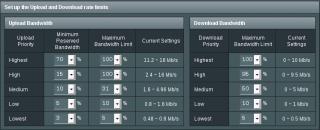
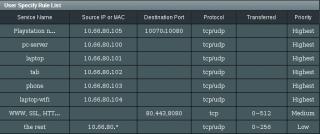
I had modified the qos and now it looks like below

Attached Image Attached Image


I had now set both downstream and upstream to max 10Mbps. and i also matched the maximum bandwidth limit for both direction to the same amount. i also took out the low priority rules and remove the transferred limit in medium priority. So based on this new configuration my understanding is:

1. for medium priority, the packet will stay at medium priority all the time but will limit up to 5Mbps for both direction.
2. Any other protocol/device that are not mentioned in the rules will stay at low priority.
3. Low priority is now max 2Mbps both direction for those unmatched packet/device.
ASUSmy
post Feb 7 2013, 03:56 PM

Look at all my stars!!
*******
Senior Member
2,319 posts

Joined: Mar 2010
QUOTE(dimenxion @ Feb 7 2013, 03:46 PM)
Hi ASUSmy

I had modified the qos and now it looks like below

Attached Image Attached Image
I had now set both downstream and upstream to max 10Mbps. and i also matched the maximum bandwidth limit for both direction to the same amount. i also took out the low priority rules and remove the transferred limit in medium priority. So based on this new configuration my understanding is:

1. for medium priority, the packet will stay at medium priority all the time but will limit up to 5Mbps for both direction.
2. Any other protocol/device that are not mentioned in the rules will stay at low priority.
3. Low priority is now max 2Mbps both direction for those unmatched packet/device.
*
Hi dimenxion,

Great, you can have a test on this setting see it serve you correctly. What about the VPN server, can you configure it?

Thank you
dimenxion
post Feb 7 2013, 04:04 PM

Getting Started
**
Junior Member
289 posts

Joined: Jan 2003
From: Shah Alam


oh yeah.. for VPN. i had configured all the settings in the router and created the pptp users as well. when i tested to connect, it gave me error 800: Unable to establish the VPN connection. had tested this on my android phone connected to 3G and another pc. i had checked the pptp passthrough and all enabled. not sure if i miss something else.

any thought?
ASUSmy
post Feb 7 2013, 04:21 PM

Look at all my stars!!
*******
Senior Member
2,319 posts

Joined: Mar 2010
QUOTE(dimenxion @ Feb 7 2013, 04:04 PM)
oh yeah.. for VPN. i had configured all the settings in the router and created the pptp users as well. when i tested to connect, it gave me error 800: Unable to establish the VPN connection. had tested this on my android phone connected to 3G and another pc. i had checked the pptp passthrough and all enabled. not sure if i miss something else.

any thought?
*
Hi dimenxion, if you don't mind, can you e-mail me the log files, configuration file and image of the error?

I will pm you my e-mail. And will pass the information to our RD to check.

Thank you
JosephChen
post Feb 8 2013, 12:08 AM

Getting Started
**
Junior Member
79 posts

Joined: Jan 2008
Hi ASUSmy

Modem - RT-N56U
Firmware Version:3.0.0.4.334

i'm facing wireless disconnect about 1min, around 12am everyday. This is due to DHCP leases time? Because when i check DHCP leases is 23:5X:XX


ASUSmy
post Feb 8 2013, 10:49 AM

Look at all my stars!!
*******
Senior Member
2,319 posts

Joined: Mar 2010
QUOTE(JosephChen @ Feb 8 2013, 12:08 AM)
Hi ASUSmy

Modem - RT-N56U
Firmware Version:3.0.0.4.334

i'm facing wireless disconnect about 1min, around 12am everyday. This is due to DHCP leases time? Because when i check DHCP leases is 23:5X:XX
*
Hi JosephCHen,

Has you try factory reset the device after the firmware upgrade? If yes, you can try setting the lease time to see the problem still persist or not.

Thank You
rayfoo
post Feb 9 2013, 04:38 PM

Look at all my stars!!
*******
Senior Member
2,562 posts

Joined: Jan 2003


try updating latest firmware

Version 3.0.0.4.342 Copy Link


Description

ASUS RT-N56U Firmware Version 3.0.0.4.342
Fixed
- Potential security issue from UPnP overflow
- Some wireless time control and parental control issues.

Add
- 3G/4G USB modem card setting in quick internet setup wizard

AiCloud
- Add delete button in upload file page.
- Fixed share link management bugs.
- Fixed file and folder rename bugs.


File Size

7,59 MBytesupdate 2013.02.08


QUOTE(JosephChen @ Feb 8 2013, 12:08 AM)
Hi ASUSmy

Modem - RT-N56U
Firmware Version:3.0.0.4.334

i'm facing wireless disconnect about 1min, around 12am everyday. This is due to DHCP leases time? Because when i check DHCP leases is 23:5X:XX
*
nyunyu
post Feb 10 2013, 07:40 PM

His Royal Highness
******
Senior Member
1,393 posts

Joined: Aug 2006
From: Sungai Petani


Asusmy, is there any option for DHCPv6 on N56U?
I'm trying to configure my network to use ipv6.
kengsim
post Feb 15 2013, 02:54 PM

Casual
***
Senior Member
417 posts

Joined: Jan 2003
From: Middle Earth (aka Selangor)


Can anyone confirm if YES4G Go USB dongle works on the RT-N56U with the 3.0.0.4.342 firmware? The Huddle works, so I just want to confirm that the Go also works before I get it.
ldragon
post Feb 15 2013, 04:31 PM

Regular
******
Senior Member
1,026 posts

Joined: Jan 2003
From: Kuala Lumpur, Malaysia
» Click to show Spoiler - click again to hide... «


The PPTP vpn will not work over Maxis 3G mobile connection. Only OpenVPN works.

Dixon93
post Feb 16 2013, 01:08 PM

huh what?
*****
Senior Member
921 posts

Joined: Apr 2008
From: KL


Hi guys~ I recently got myself a RT-N66U router to hook up to my fibre.
I flashed to TomatoUSB 1.28 MIPSR2-102 firmware as I required some features that not available in stock firmware.

However, I got something really concerns me, when I'm on wireless my maximum speed only 30mbps, while if LAN would get max speed.
Signal strength is excellence and around -40 dBm.
I wonder any setting I can change to improve it?

It's running on N mode (2.4) only and my laptop a year old ASUS A53SV.

On wireless
user posted image

On LAN
user posted image

Thanks in advance!
p/s dont jelly my speed~hehe

silencer
post Feb 18 2013, 01:52 AM

AnyThiN GoEs
******
Senior Member
1,846 posts

Joined: Jan 2003
From: City^of^Anggerik


When is the PCE-AC66 and USB-AC53 802.11ac Adapters will be released here. Any specific place where I can get it!
ASUSmy
post Feb 18 2013, 01:31 PM

Look at all my stars!!
*******
Senior Member
2,319 posts

Joined: Mar 2010
QUOTE(kengsim @ Feb 15 2013, 02:54 PM)
Can anyone confirm if YES4G Go USB dongle works on the RT-N56U with the 3.0.0.4.342 firmware? The Huddle works, so I just want to confirm that the Go also works before I get it.
*
Hi kengsim,

Currently we only have RT-N66U and RT-AC66U that can support YES. We are testing the other model and hopefully can finish it soon.

Once finish testing we will upload it on the web.

Thank you
rootlinux
post Feb 18 2013, 01:44 PM

Enthusiast
*****
Senior Member
898 posts

Joined: Jan 2003
From: ph/sbj/slgr
QUOTE(ASUSmy @ Feb 18 2013, 01:31 PM)
Hi kengsim,

Currently we only have RT-N66U and RT-AC66U that can support YES. We are testing the other model and hopefully can finish it soon.

Once finish testing we will upload it on the web.

Thank you
*
Good to hear that rclxms.gif
ASUSmy
post Feb 18 2013, 02:38 PM

Look at all my stars!!
*******
Senior Member
2,319 posts

Joined: Mar 2010
QUOTE(silencer @ Feb 18 2013, 01:52 AM)
When is the PCE-AC66 and USB-AC53 802.11ac Adapters will be released here. Any specific place where I can get it!
*
The PCE-AC66 will be release at early March while USB-AC53 at mid of March 2013. If you are around KL, you can always visit Low Yat. Or do you mind provide me your location so that i can direct you to the nearest one?

Thank you
ASUSmy
post Feb 18 2013, 04:27 PM

Look at all my stars!!
*******
Senior Member
2,319 posts

Joined: Mar 2010
QUOTE(nyunyu @ Feb 10 2013, 07:40 PM)
Asusmy, is there any option for DHCPv6 on N56U?
I'm trying to configure my network to use ipv6.
*
Hi nyunyu, nope we don't have option for DHCPv6 on our router, all IPv6 WAN/LAN prefixes are assigned by ISP directly when connection type is set as Natvie with DHCP-PD. For manual IPv6 WAN/LAN prefix assginment, please set connection type as Static IPv6.

Below is the link where you can refer when doing the setting.

http://support.asus.com/Search/KDetail.asp...7B61ABE1D7D&t=2

Thank you

This post has been edited by ASUSmy: Feb 18 2013, 06:18 PM
silencer
post Feb 20 2013, 02:06 AM

AnyThiN GoEs
******
Senior Member
1,846 posts

Joined: Jan 2003
From: City^of^Anggerik


QUOTE(ASUSmy @ Feb 18 2013, 02:38 PM)
The PCE-AC66 will be release at early March while USB-AC53 at mid of March 2013. If you are around KL, you can always visit Low Yat. Or do you mind provide me your location so that i can direct you to the nearest one?

Thank you
*
I'm at Shah Alam with office at Cyberjaya and just upgraded my router to RT-AC66U
Scotland007
post Feb 23 2013, 09:23 AM

New Member
*
Junior Member
41 posts

Joined: Aug 2012
Asus, is there anyway to set up Strong VPN or HidemyAss VPN settings onto the Asus N56?


113 Pages « < 60 61 62 63 64 > » Top
 

Change to:
| Lo-Fi Version
0.0318sec    0.70    6 queries    GZIP Disabled
Time is now: 7th December 2025 - 11:23 PM