Outline ·
[ Standard ] ·
Linear+
Yes YTL WIMAX - Yes 4G
|
terrible
|
 Nov 26 2010, 12:09 AM Nov 26 2010, 12:09 AM
|
New Member


|
Has anyone encouter this? The YTL simply sent your password to you by email and than you can't login to YES id to change password? Does any Bank did this before? simply send you password by email and after that you can't change the password? This show that YTL don't know about what "Security" means !  This post has been edited by terrible: Nov 26 2010, 01:12 AM This post has been edited by terrible: Nov 26 2010, 01:12 AM |
|
|
|
|
|
terrible
|
Nov 26 2010, 11:59 AM
|
New Member
|
QUOTE(tyhuang @ Nov 26 2010, 07:58 AM) U need few hours for them to get activated the yes portal but once u receive the email, u re good to go. Enjoy. I manage to login now but not much info.no worries.gv them some time to breath Yesterday i can't logni to My Account but today i can login, but it a simple page only showing status: active only. I want to change logon password but it doesn't has [Change Password] button to let me change password. Login to mail.yes.my the webmail, there is a [change password] button, click on it and a new page open http://www.yes.my/myAccount/loginAssistantKeyin my YES ID but it replied Please enter your correct information in the highlighted fields belowPersona Id not foundAnyone knows how to change logon password? Thanks.  |
|
|
|
|
|
terrible
|
Nov 27 2010, 02:06 PM
|
New Member
|
Utill now i still couldn't change the YES ID login password.
Sent email to yescare@yes.my yesterday ask them but no reply.
anyone please tell me how to change the login password?
This post has been edited by terrible: Nov 27 2010, 02:07 PM
|
|
|
|
|
|
terrible
|
Nov 28 2010, 02:09 PM
|
New Member
|
I try to download videos from Youtube, each video size ranging fro 10MB to 200MB. example http://www.youtube.com/watch?v=b6n1RboeWL8&feature=channelAt the begining no problem But now after downloaded nearly 8GB videos, the download process always stop at the middle unable to complete the download. If i reached the 10GB complementary (free) data already, they should direct me to reload page right? but i stiil able to normal surfing - means i haven't reach 10GB yet. but why it can't complete the video download? This post has been edited by terrible: Nov 28 2010, 02:10 PM |
|
|
|
|
|
terrible
|
Nov 29 2010, 04:02 AM
|
New Member
|
Just wondering, is it possible to use 2 YES USB dongle on 2 different laptop to login with same YES ID password at the same time?  |
|
|
|
|
|
terrible
|
Nov 29 2010, 04:41 PM
|
New Member
|
QUOTE(gotdamsg @ Nov 29 2010, 12:24 PM) i am still unable to run Yes Life  I am still unable to change YES ID password |
|
|
|
|
|
terrible
|
Nov 30 2010, 12:47 PM
|
New Member
|
Big News
I already downloaded more than 10GB but still able to continue download and sufing! It will not direct me to a reload page.
I am a pre-registered user so far i have paid RM99 for the USB dongle only.
This post has been edited by terrible: Nov 30 2010, 12:49 PM
|
|
|
|
|
|
terrible
|
Dec 2 2010, 04:43 PM
|
New Member
|
a pre-registered user here, am only paid RM99 for the dongle and than can start surfing/download.
I downloaded more than 12GB (Youtube video+Adobe software) already and still able to continue download and surfing.
Just now login my YESID check balance.
It stated balance is -RM50. -ve means i am in debt?
Just wondering is this -RM50 is the registration/activation fee or is it because i exceeded the 10GB complemental data.
This post has been edited by terrible: Dec 2 2010, 04:44 PM
|
|
|
|
|
|
terrible
|
Dec 2 2010, 08:02 PM
|
New Member
|
QUOTE(cy97 @ Dec 2 2010, 06:40 PM) you own Yes RM50 lo. R u prepaid or postpaid user? I guess YES user can be a prepaid and a postpaid user. If you reload your balance became +ve than you are a prepaid user. If you don't reload, your balance become -ve than you are a postpaid user but make sure end of the month must reload at leaast until your balance become 0 or bigger than 0. |
|
|
|
|
|
terrible
|
Dec 5 2010, 01:22 PM
|
New Member
|
QUOTE ~U MOBILE First to Deploy 42 Mbps Mobile Broadband Network~
Kuala Lumpur, 25 October 2010 – U Mobile today announced that they are taking the first steps to deploy their 42Mbps Mobile Broadband network. Capable of delivering online connection speeds of up to 42 Mb per second, this is deemed the fastest broadband to date in Malaysia and U Mobile is the first to deploy it.
The Minister of Information, Communication and Culture, YB Dato’ Seri Utama Dr. Rais Yatim, together with YBhg Tan Sri Dato’ Seri Vincent Tan Chee Yioun, Chairman of U Mobile Sdn Bhd and Dr Kaizad Heerjee, Chief Executive Officer of U Mobile Sdn Bhd were present to celebrate this milestone.
U Mobile will begin to deploy Dual-Cell HSPA+ (High-Speed Packet Access) connections that allow the network to send and receive wireless data using two channels simultaneously to achieve download speeds of up to 42Mbps. The first setup point will be in Berjaya Times Square. This will be followed by the commercial deployment of the service within Klang Valley starting with Subang Jaya and Sunway area and followed by Penang and Johor by end of the year. Wow if U mobile able to provide higher speed and unlimited data (although FUP = 5GB) than we definitely will choose U mobile since we already purchase an expensive smartphone and can continue use the broadband on our smartphone. |
|
|
|
|
|
terrible
|
Dec 10 2010, 06:13 AM
|
New Member
|
Finally found a way to share YES dongle by using a dsl router !  The router has 4 LAN ports, LAN1 taken by 1st PC so can connect three more PC to the router. The router also can provide wifi hotspot. 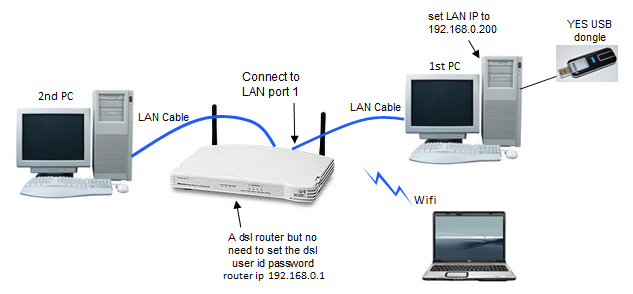 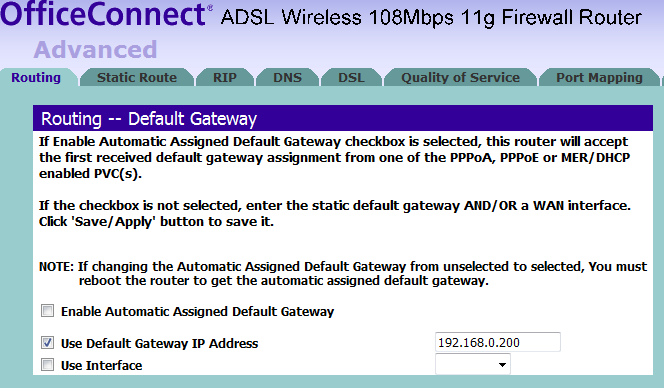 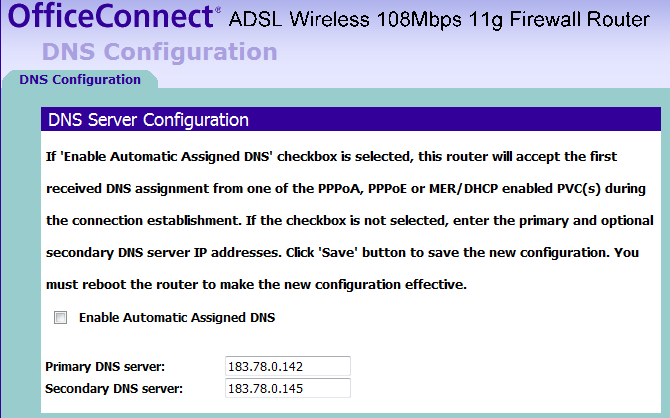 On 1st PC need to enable sharing for the YES connection 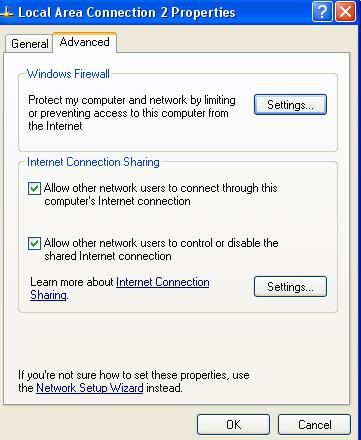 This post has been edited by terrible: Dec 10 2010, 06:34 AM This post has been edited by terrible: Dec 10 2010, 06:34 AM |
|
|
|
|
|
terrible
|
Dec 13 2010, 03:49 AM
|
New Member
|
saw this in ebay Cradlepoint MBR1000 3G/4G WiMax router Click this to see product in ebay pageIt listed out many type of USB 3G and Wimax modem that compatible with this router. But we don't know what brand/model of modem YES GO is. so we are not sure whether YES GO dongle compatible with this Cradlepoint router. Anyone know the brand/model of YES GO dongle? |
|
|
|
|
|
terrible
|
Dec 14 2010, 03:10 AM
|
New Member
|
QUOTE(totally_skint @ Dec 10 2010, 01:02 PM) QUOTE(terrible @ Dec 10 2010, 06:13 AM) Finally found a way to share YES dongle by using a dsl router ! The router has 4 LAN ports, LAN1 taken by 1st PC so can connect three more PC to the router. The router also can provide wifi hotspot. On 1st PC need to enable sharing for the YES connection Just imagine the latency on this setup. ok, i did some speedtest. The speed just as good as if you plug the dongle directly to the laptop/pc. KL  Seri Kembangan  Singapore  New York  Taipei  This post has been edited by terrible: Dec 14 2010, 03:14 AM This post has been edited by terrible: Dec 14 2010, 03:14 AM |
|
|
|
|
|
terrible
|
Dec 15 2010, 02:52 AM
|
New Member
|
QUOTE(iipohbee @ Dec 14 2010, 08:20 PM) I'm having a good time with my Yes service. I usually keep my comments fair and would give credit where its' due. Only complain is the weak signals indoor(even in landed homes) and it's still not there yet for true mobility in moving vehicles. As for my speedtest with just moderate/weak signal I could get this kind of speed:  Very happy for the first time such speed is achievable on wireless internet and it even beats my Streamyx fixed line connection. weak signal indoor....my solution is locate the GO dongle near window and i can get 4 bars near the window. I don't know whether you can use a USB cable to extend it to window...last time try it on 3G HSPDA modem and it couldn't work. What i did is cut the USB cable (there are 4 tiny wire inside) and use 4 parallel coaxial cable, did a bit soldering and this replace that 4 tiny wire. This way i can have a longer USB extension cable and it works perfectly well.  This post has been edited by terrible: Dec 15 2010, 04:04 AM This post has been edited by terrible: Dec 15 2010, 04:04 AM |
|
|
|
|



 Quote
Quote

 0.0605sec
 0.36
0.36
 7 queries
 GZIP Disabled