Welcome Guest ( Log In | Register )

Bump Topic Topic Closed RSS Feed

Outline · [ Standard ] · Linear+

Yes YTL WIMAX - Yes 4G

views
     
tanhks
post Oct 14 2010, 01:46 AM

On my way
****
Senior Member
608 posts

Joined: Aug 2008
I especially like this.
QUOTE(ronn77 @ Oct 12 2010, 08:41 AM)
The service will immediate cover 65% of populated areas from 1,000 base
stations

Access internet everywhere with a mobile internet wireless modem!
rclxms.gif rclxms.gif rclxms.gif

This post has been edited by tanhks: Oct 14 2010, 01:47 AM
tanhks
post Nov 20 2010, 02:38 AM

On my way
****
Senior Member
608 posts

Joined: Aug 2008
QUOTE(gilabola @ Nov 19 2010, 11:40 PM)
I still cannot access their website. Is the response that overwhelming?
*
I am able to access
http://coverage.yes.my/ to check coverage area

tanhks
post Nov 24 2010, 03:58 AM

On my way
****
Senior Member
608 posts

Joined: Aug 2008

Added on November 24, 2010, 4:21 am
QUOTE(Prissy Elf @ Nov 22 2010, 04:24 PM)
ehh... how to register for a number? Nothing on their website points to registration
*
before the launch (19 Nov) they have a 'pre-registration' page.
after the launch they already removed the 'pre-registration' page.
now, i guess you need to click the "By Yes online now" or go to any IT store that sale YES device.
and i heard that for those who 'pre-registration' before the launch, they got RM50 registration fee waiver. (correct me of i am wrong)


This post has been edited by tanhks: Nov 24 2010, 04:25 AM
tanhks
post Nov 24 2010, 02:19 PM

On my way
****
Senior Member
608 posts

Joined: Aug 2008
QUOTE(faizalmzain @ Nov 23 2010, 10:03 PM)
i have no idea how the min RM30 will work either.
i just assume, we're only need to have min RM30 credit in order for the account to be active?
when i bought  the dongle, i don't top up at all and i still can use it, only last night it redirect me to reload page. i have no idea why, so i assume my RM10 preloaded already ran out.
for the time being it's a guessing game for YES users since we're still can't login into the portal to check our account usage etc. laugh.gif
*
Today YES website http://www.yes.my/ytlc-common/yes/message-wing.html

For all Yes customers registered before Dec 19th 2010:

* We offer you complimentary data services, up to 10GB per Yes ID on our network, from the launch day until Dec 19th 2010. Data billing will begin on Dec 20th 2010. However, charges still apply for our Yes 018 telephony services (voice and SMS).


For all pre-registered customers only:

* We will also extend the activation deadline until Dec 12th 2010. Those activated Yes IDs will be entitled to enjoy complimentary data services until Dec 19th 2010 as well.
tanhks
post Dec 7 2010, 04:08 AM

On my way
****
Senior Member
608 posts

Joined: Aug 2008
If use usb dongle...it doen't has a built-in hardware firewall..
You rely on Windows software firewall only...not very safe.
Hacker/attacker will be able to send malware/trojan to your pc/laptop and take over your pc/laptop and do what ever he like.
(Microsoft's article: http://www.microsoft.com/security/pc-security/botnet.aspx )

This post has been edited by tanhks: Feb 14 2011, 04:41 AM
tanhks
post Dec 7 2010, 04:22 AM

On my way
****
Senior Member
608 posts

Joined: Aug 2008
QUOTE(jeremy05 @ Dec 7 2010, 04:16 AM)
agree that, even 3g usb modem, or wifi, also have this problems... tongue.gif
*
For 3G USB modem, you can use a 3G router and connect to a hardware firewall.
This can imporove security. But i don't see is there a way to connect the Wimax dongle to a hardware firewall.

Example of a good firewall:
» Click to show Spoiler - click again to hide... «

tanhks
post Dec 7 2010, 11:17 AM

On my way
****
Senior Member
608 posts

Joined: Aug 2008
QUOTE(jeremy05 @ Dec 7 2010, 04:26 AM)
you are right, currently really no such device can plug in 4g usb modem, but this is not the important part of security, is your data over air, capture by others, it is very dangerous, they can get your credit card info and other important data, so far i didnt see any security in wireless(3g,wifi,4g,wimax)...
*
omg...you miss-understand what i am talking about.
the data send/receive using https:// are secure even over the air.

What i means are those Malware/Trojan infection comming to your pc/laptop easily if your laptop/pc is not protected by a hardware firewall.
"Trojans have the same right on the system as does the logged in user. In other words, if the user can, the Trojan can. This includes deleting or modifying files, installing other software, uninstalling software, or sending sensitive password and login information to a remote attacker."
copied from: http://antivirus.about.com/od/whatisavirus/a/zombiepc.htm

Microsoft's article: http://www.microsoft.com/security/pc-security/botnet.aspx

This post has been edited by tanhks: Feb 14 2011, 04:44 AM
tanhks
post Dec 8 2010, 02:24 AM

On my way
****
Senior Member
608 posts

Joined: Aug 2008
QUOTE(faizalmzain @ Dec 7 2010, 01:02 PM)
i think i need to sell my YES GO usb dongle.
it's too unstable around my house, frequent disconnection sometimes.
PM me if you're interested to buy.
*
I was using GO dongle on my WinXP since a week ago, it was fine until 2 days ago. (It was on 24hrs everyday)
Two days ago some weird thing happen.

1st of all i have already updated the laptop with latest security update and than let my laptop idle
But than i notice that the connection icon keep on blinking showing data transfer activity.
I suspect it was caused by some kind of malware activity.
So i iimmediately disconnect it and never use the dongle again.
(i don't want to take the risk of getting malware/Trojan)
Wait until i find a way to put in a hardware firewall.

Think about this: Why big organisation/corporation spend thousands of ringgit on hardware firewall? and they need to hire IT personal to configure/maintain the hardware firewall also.
Not just big organisation/corporation need strong network security, nowaday home user also need strong network security!

This post has been edited by tanhks: Dec 8 2010, 02:54 AM
tanhks
post Dec 8 2010, 01:33 PM

On my way
****
Senior Member
608 posts

Joined: Aug 2008
QUOTE(jeremy05 @ Dec 7 2010, 02:52 PM)
ya, im understanding your point, malware/trojan is everwhere on the net. i also agree hardware firewall, it really work on it! But it seem like many people think, my pc got anti-virus software, why i can infected by virus, is it anti-virus installed pc is immune from the virus???

malware/trojan, i can sure tell you, most is from usb(pen drive)/hard disk drive, but not from internet!
copied from http://en.wikipedia.org/wiki/Trojan_horse_%28computing%29
Trojan horses can be installed through the following methods:
* Software downloads
* Bundling (e.g. a Trojan horse included as part of a software application downloaded from a file sharing network)
* Email attachments
* Websites containing executable content (e.g., a Trojan horse in the form of an ActiveX control)[4]
* Application exploits (e.g., flaws in a Web browser, media player, instant-messaging client, or other software that can be exploited to allow installation of a Trojan horse)

I don't think antivirus or Internet security suites(software) is 100% effective against all type of malware out there.
"Malware includes computer viruses, worms, trojan horses, spyware, dishonest adware, scareware, crimeware, most rootkits, and other malicious and unwanted software or program" - copied from http://en.wikipedia.org/wiki/Malware

This post has been edited by tanhks: Dec 8 2010, 01:48 PM

tanhks
post Dec 8 2010, 02:40 PM

On my way
****
Senior Member
608 posts

Joined: Aug 2008
QUOTE(elblink @ Dec 8 2010, 01:57 PM)
Is your XP SP3? It doesn't work with SP2 or below.
*
Yes my win XP is SP3 and has the latest security update, everything is latest updateed.

This post has been edited by tanhks: Dec 8 2010, 02:57 PM
tanhks
post Dec 10 2010, 01:05 PM

On my way
****
Senior Member
608 posts

Joined: Aug 2008
QUOTE(BasicCX @ Dec 10 2010, 08:15 AM)
This configuration, is for sharing using PC/Laptop. I'm currently experimenting to convert the Yes GO to fully become portable hotspot Wifi, only lack some stuff to complete.
*
Wait untill the Zoom router is available – the 4G WiFi router come with LAN ports......and you can put in a strong hardware firewall.
In the pass, the cyber hacker/attacker keep on sending malware/Trojan to my laptop and made my laptop into a "bot"
(Microsoft's article about bots: http://www.microsoft.com/security/pc-security/botnet.aspx )
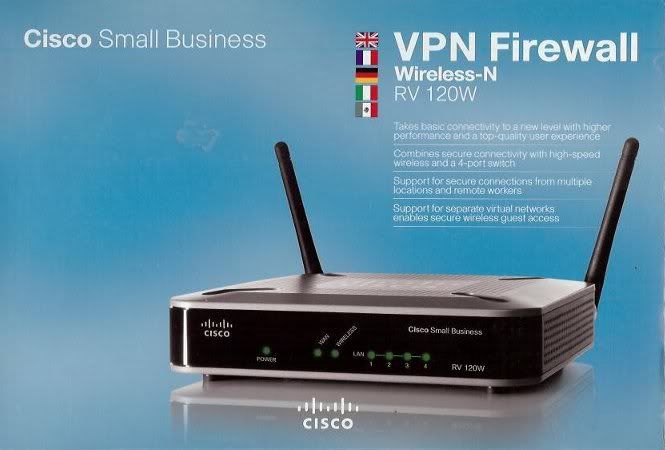
Now after re-format harddisk reinstall Windows, and put in a Cisco Hardware firewall, the cyber hacker/attacker have no way to send malware/Trojan to my laptop anymore.

This post has been edited by tanhks: Feb 14 2011, 04:33 AM
tanhks
post Dec 15 2010, 04:24 AM

On my way
****
Senior Member
608 posts

Joined: Aug 2008
I will not use YES until there are wimax router available at a reasonable price.
Because with a router, i can put in a hardware firewall.

Without a hardware firewall between the modem and Windows operating system, my computer could infected with Malware/Trojan anytime and become a bot anytime.
Microsoft's article about bots:
http://www.microsoft.com/security/pc-security/botnet.aspx

This post has been edited by tanhks: Feb 14 2011, 04:17 AM
tanhks
post Dec 19 2010, 04:05 AM

On my way
****
Senior Member
608 posts

Joined: Aug 2008
QUOTE(jeremy05 @ Dec 15 2010, 04:52 PM)

Added on December 15, 2010, 4:55 pm

bro, without hardware firewall, u dunwan online?
*
hmm.... without hardware firewall, i use Linux Fedora 12.
But than need to re-format harddisk re-install Fedora once very few days! (lucky it is very easy to re-install Fedora)
I am very paranoid about malware and Trojan and bots nowaday!
Microsoft's safety and security center - an article about bots.
http://www.microsoft.com/security/resource...net-whatis.aspx

This post has been edited by tanhks: Feb 14 2011, 04:05 AM

Topic ClosedOptions
 

Change to:
| Lo-Fi Version
0.0253sec    0.43    7 queries    GZIP Disabled
Time is now: 9th December 2025 - 12:42 AM