Welcome Guest ( Log In | Register )

Bump Topic Topic Closed RSS Feed

Outline · [ Standard ] · Linear+

Routers [WTS] Debricking & Router Mod Services, JTAG Cable, firmware flash and other custom services

views
     
TSAlpha Wolf
post Jul 21 2010, 11:46 PM, updated 11y ago

Getting Started
**
Junior Member
263 posts

Joined: Mar 2008
From: SS2, Petaling Jaya


Router/Network Device Debricking Service
Service price upon successful debreak: RM 30

So, you have a bricked router lying around because you flashed the wrong custom firmware?
Instead of buying the cable and going through all the trouble of debreaking, let me do it for you with qualified tools and experience.
I debrick Asus, TP-Link, Linksys, Buffalo, and more. Please specify your model number and hardware version upon request.
Debricking can be done within the same day with prior arrangement.
All debricks thus far have been conducted successfully in less than a day.
I perform a multi-level approach which includes Serial and JTAG to secure successful debricks.


Router Custom Firmware Flashing Service
Service price: RM 30

Want to add a whole lot more powerful software and configuration features to your router but afraid that you might brick your router? Let me do it for you.
I flash DD-WRT (BS main builds, Kong HighMem builds), Tomato (Shibby, Toastman, Merlin, TomatoUSB), OpenWRT firmwares onto Asus, TP-Link, Linksys, Buffalo routers, and more.
Please specify your model number and hardware version upon request.
We can discuss over the features you want and decide upon the best custom firmware for you.


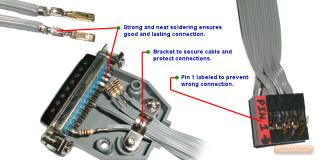
Custom Made JTAG Cable for Debricking Router
Price: RM 25

So, you have a bricked router lying around because you can't find a JTAG cable? Or simply just too lazy to make one? Then this is for you! It's time to get your bricked router working again. tongue.gif
After using it, you can re-sell it to others. Just don't sell back to me, k? laugh.gif


» Click to show Spoiler - click again to hide... «


Location: SS2, Petaling Jaya
COD: SS2 Mall, in front of Hometown Hainan Coffee (Google Maps: https://goo.gl/maps/48gFe)
Postage: Add RM10 (RM20 for services which involve sending and returning)
Contact: post here, PM or 011-3988-two-210 (Whatsapp available)


Also providing RAM upgrade, USB ports/MMC/SD Card modifications for routers and selling serial connector for serial console access/serial RS232 to TTL level converter, for more info please request.

[WTB] Bricked Routers. If you plan to trash your bricked device, don't! Let me know.

More to add: A guide for de-bricking perhaps? hmm.gif Request for more details and other custom hacking services.


Thread Thumbnail: https://forum.lowyat.net/uploads/thumbs/81/...pg?v=1400418827

This post has been edited by Alpha Wolf: Nov 9 2014, 09:59 PM
TSAlpha Wolf
post Jul 26 2010, 07:14 AM

Getting Started
**
Junior Member
263 posts

Joined: Mar 2008
From: SS2, Petaling Jaya


QUOTE(goolias @ Jul 25 2010, 09:12 PM)
HI,

Interested on this.
Please let me know the price include shipment to JB.
Do you do serial console for Dlink DNS323?
*
Price and postage with bubble wrap for one unit is RM30.

Yes, I can make a serial console for D-Link DNS323. However, it will cost slightly more as it requires a level shifter, but I'll give you a special price if you take both.

Do you want the serial port of the serial console to be a male socket Click Here for Pic [so that you can install it at the back of your D-Link DNS323 unit Click Here for Pic , but you'll need a serial cable to connect it to the computer. Or do you want it to be a female socket Click Here for Pic so that you can connect it directly to the computer?
TSAlpha Wolf
post Jul 27 2010, 07:50 AM

Getting Started
**
Junior Member
263 posts

Joined: Mar 2008
From: SS2, Petaling Jaya


Hi goolias,

There is a cheaper alternative using transistors for a level shifter but the transfer rate is lower and it support less devices. For your application since you want to maximize compatibility with other devices for reuse, I shall use a MAX232 (my version is compatible with 3.3V).

You can use this Max232 level shifter for both your D-Link 2640T and DNS323, so you only need one serial console. For this serial console, I will use a pin header for connection to TTL devices and a Female RS232 9pin serial connector to connect to a PC's serial port, like what you requested.

What type of pin header do you want? Will a 4-pin in-a-row (3.3V TX RX GND) header do?

Do you need a cable to connect the serial console's 4-pin header to your DNS323 board?

Price quote:
JTAG Cable = 25
Serial Console (universal, supports 3v-5v TTL devices) = 58
Discount for both = -5
If you need the 4-pin-header-to-DNS323-board connector = +6
TSAlpha Wolf
post Jul 27 2010, 01:29 PM

Getting Started
**
Junior Member
263 posts

Joined: Mar 2008
From: SS2, Petaling Jaya


TTL specs is 3.3V TX RX GND, they are exactly what is need and will be enough for both D-Link 2640T and DNS323. Yes I will be using a PCB for the serial console and it'll be just like the picture you provided earlier, with the addition of a 4-pin header. So it's not exactly a cable but it's a block of PCB, a console or adapter.

Sorry, I can't give you a cheaper price due to parts and workmanship. Prices are very reasonable. But I'm willing to refund you in full if it does not work for you. Such is my assurance that my goods are reliable. (Buyer still has to pay the postage cost however). One week warranty.

EDIT: Just to make sure, what revision is your DNS323? Apparently Revision C1 does not come with an on-board header for serial and you'll have to solder it yourself. Picture for Revision C1: http://denny-schierz.de/temp/revision_c1.jpg If you want to be 100% sure, you can take a picture of your board's serial out and post it here.

This post has been edited by Alpha Wolf: Jul 27 2010, 02:17 PM
TSAlpha Wolf
post Jul 27 2010, 05:43 PM

Getting Started
**
Junior Member
263 posts

Joined: Mar 2008
From: SS2, Petaling Jaya


Hi goolias,

Firstly, let's get the male/female naming convention correct. I think you have mixed them up. When looking at serial sockets, we look at the smaller individual 9-pins for male/female identification. Please look at my Post #3 as I've already linked pictures for the serial sockets.

Since you will also need a serial cable for connecting the serial console to the PC, how about I directly wire the cable to the serial console and with a FEMALE serial socket (serial socket on PC is MALE)? Cable will be 1.5 meter. Price stays the same.

On a side note: For best performance, it's a general practice to keep the cables as sort as possible to avoid any interference. However, this is not critical, 1.5 meter is still fine. Just thought you might want to know.

Btw, thanks for answering my question for kakarocht. smile.gif


QUOTE(kakarocht @ Jul 27 2010, 02:25 PM)
bro do u have jtag cable for linksys wrt54g? please let me know.
*
Hi bro, this JTAG cable works fine for Linksys WRT54G, like goolias mentioned, it's a standard. However, you might want to double check to see if you have a JTAG header on your board so that you can connect this cable. Although, to my knowledge all versions of WRT54G come with a JTAG header. If it doesn't you'll have to solder one on.
TSAlpha Wolf
post Jul 27 2010, 10:42 PM

Getting Started
**
Junior Member
263 posts

Joined: Mar 2008
From: SS2, Petaling Jaya


QUOTE(kakarocht @ Jul 27 2010, 09:23 PM)
my version 5 both of it actually. if not mistaken one of it need to solder it. but i'm not good in soldering actually. btw, ur jtag is using wat type of pin? 9 pin ka?
*
Both Version 5 and Version 5.1 have a JTAG header on-board.
My JTAG uses the 25-pin Parallel Port on the computer. Like what most standard JTAG cable uses.
TSAlpha Wolf
post Jul 27 2010, 11:14 PM

Getting Started
**
Junior Member
263 posts

Joined: Mar 2008
From: SS2, Petaling Jaya


QUOTE(ajepyatt @ Jul 27 2010, 10:08 PM)
can teach me how to de-brick using this jtag bro
*
Hey bro, it's been a while, thanks for selling me your router. smile.gif
You still got bricked router ke? hehe

Yup goolias, it's called the HairyDairyMaid Debrick Utility.
You can download it here: Direct Link Click Here

Inside the zip folder, you'll find a PDF guide on how to run it in Windows.
Using Command Prompt, navigate to the folder where "wrt54g.exe" is using the "cd" command.
Once you have it running you can issue these options:
wrt54g [option]
List of options:
-backup:cfe
-backup:nvram
-backup:kernel
-backup:wholeflash
-erase:cfe
-erase:nvram
-erase:kernel
-erase:wholeflash
-flash:cfe
-flash:nvram
-flash:kernel
-flash:wholeflash

You can read more about using this utility here: Click Here

Note that this utility is not only for WRT54G. It works for up to 5352 CPU types. Newer devices with a 5354 CPU will require TJTAG.

QUOTE(kakarocht @ Jul 27 2010, 11:06 PM)
yes..it's standard actually. but mine other unit need to solder the header actually. sweat.gif
*
Then you'll need a 12-pin header. sweat.gif

QUOTE(goolias @ Jul 27 2010, 10:52 PM)
Hi there,

I dun quite get what you mean. But anyway, as long the serial console is like the one as my attached image should be OK, and the cable should be free to detach and able to connect to PC 9 pin serial port, as for female or male I'll leave to you to decide as long I can use it in typical PC desktop.
*
Why do you need the serial cable to be free to detach from the serial console? After all, you're only going to use it with a typical desktop PC.

EDIT: BTW, I just tested a spare MAX232 chip I have. It even works with a pair of AA batteries giving out only 3V!
Attached Image

This post has been edited by Alpha Wolf: Jul 27 2010, 11:30 PM
TSAlpha Wolf
post Jul 27 2010, 11:49 PM

Getting Started
**
Junior Member
263 posts

Joined: Mar 2008
From: SS2, Petaling Jaya


Here is what I was trying to suggest:

Attached Image
TSAlpha Wolf
post Jul 28 2010, 12:14 AM

Getting Started
**
Junior Member
263 posts

Joined: Mar 2008
From: SS2, Petaling Jaya


QUOTE(goolias @ Jul 28 2010, 12:01 AM)
The fixed part to PC, what cable you use, ribbon? Is the connection/soldering reliable, becos it tends to get twisting and bending as my PC is not on the desk furthermore the 9pin serial port is at the back of PC. As the cable is 1.5M length, the cable is definitely be rolled when not in use. I dun felt comfortable that the soldering can last.
I still prefer a soldered 9 pin female socket, or unless it is a pin header type.
*
Sorry for the poor illustration of the 1.5 meter cable. No, it's not a ribbon cable. I'll be using a shielded cable to protect against signal noise. The soldered points will be reinforced with hot glue and part of the cable bind down to the PBC board. Don't worry about flimsy connection as I emphasize quality. Is this ok or would you still prefer otherwise?


Added on July 28, 2010, 12:24 am
QUOTE(goolias @ Jul 28 2010, 12:01 AM)
BTW, the 4 pin TTL to the devices, prefer the cable to be loose i.e. 4 cables are standalone by itself rather than fixed as the serial port layout of the modem/router tend to be varied by brands even versions. see my attachment
[attachmentid=1697012]
*
So what do you want at the device end of those 4 TTL cables? Just bare wires? Single pin header connectors may not be compatible with your D-Link 4-pin socket.

This post has been edited by Alpha Wolf: Jul 28 2010, 12:24 AM
TSAlpha Wolf
post Jul 28 2010, 12:57 PM

Getting Started
**
Junior Member
263 posts

Joined: Mar 2008
From: SS2, Petaling Jaya


Well, I'm using a fixed serial cable to make it more affordable for you. I don't have spare null modem cable to FOC for you. I'm using all new components. After all, I don't see a need for you to detach the serial cable. Instead, the connect-to-device end must be detachable with a header to allow it to interface with different devices.

Regarding the Xbox 360 hacking prevention, hot glue can easily be removed with a hot air gun. tongue.gif

Alright I'll leave bare wires and a pin header.
The price of the serial console still stays the same, RM 58. I'm not charging you for the cables. It's mainly the serial console. Plus one JTAG cable (RM 25) and postage (RM 5) with RM 5 discount for taking both, total is RM 83.
TSAlpha Wolf
post Jul 28 2010, 04:12 PM

Getting Started
**
Junior Member
263 posts

Joined: Mar 2008
From: SS2, Petaling Jaya


QUOTE(kakarocht @ Jul 28 2010, 03:36 PM)
http://www.rwhitby.net/projects/wrt54gs

if you refer to this link instruction no 2 (image) is similar like mine but other unit need to solder on it actually.  laugh.gif is your JTAG cable is similar like the link i posted here.  brows.gif
*
user posted image

Oh dear, that thing on the left is a Serial Port, not a JTAG Port. Looks like they've really cut cost of manufacturing by omitting these in later batches. To identify ports:

Serial Port: 10-pins, 2 rows, 5-pins per row.
JTAG Port: 12-pins, 2 rows, 6-pins per row.

The one on the right IS a JTAG Port without the header.

Check again to make sure whether yours have or do not have a 12-pin header for JTAG.
In the event that you don't have a header and you're alright with medium soldering, I can supply you a 12-pin header.
TSAlpha Wolf
post Jul 28 2010, 04:31 PM

Getting Started
**
Junior Member
263 posts

Joined: Mar 2008
From: SS2, Petaling Jaya


QUOTE(goolias @ Jul 28 2010, 01:29 PM)
U seems to know alot in serial console and JTAG stuff huh?
R u a frequent hardware firmware hacker, do you undertake any services on
firmware hacking on game console or network devices, or willing to share with me?
PM me payment detail.
*
You seem capable of using JTAG and serial console, you know quite a bit yourself. tongue.gif
Well, I just have great interest in electronics/computers and these sorta stuff.
My knowledge has a limit too, but I'm willing to share what I know. What are you interested in? XBox 360? biggrin.gif


Added on July 28, 2010, 4:36 pm
QUOTE(goolias @ Jul 28 2010, 04:31 PM)
payment down via M2U,pls check ur MBB acct
*
Payment successfully received, please PM me your postage details. Expect a day or two for assembly and another day for postage.

This post has been edited by Alpha Wolf: Jul 28 2010, 04:36 PM
TSAlpha Wolf
post Jul 28 2010, 06:48 PM

Getting Started
**
Junior Member
263 posts

Joined: Mar 2008
From: SS2, Petaling Jaya


QUOTE(kakarocht @ Jul 28 2010, 06:08 PM)
both have the JTAG also but need to solder it actually.  doh.gif  or you can do it for me ka?  blush.gif
*
If you can bring over and collect again at SS2, no problem. But you'll need to pay for the 12-pin header, only RM 1 each.
TSAlpha Wolf
post Jul 29 2010, 07:54 PM

Getting Started
**
Junior Member
263 posts

Joined: Mar 2008
From: SS2, Petaling Jaya


Here are some pictures I took while assembling the Serial RS-232 to TTL Level Shifter cable:
Attached Image Attached Image

Packed for postage:
Attached Image
Posted at 5:14PM today.
PosLaju Tracking Number: EN 296781981 MY

goolias, instead of using hot glue, I use metal wires to bind the cable to the board. It provides a much stronger support.
TSAlpha Wolf
post Sep 30 2010, 07:12 PM

Getting Started
**
Junior Member
263 posts

Joined: Mar 2008
From: SS2, Petaling Jaya


QUOTE(mysattv @ Sep 6 2010, 06:05 PM)
hi bro.
do u have max232 ic for sale??
i hv been looking for it for quite some time but cantt get any.
*
Sorry for the late reply, somehow LowYat stop email-notifying me about new post in this thread.
Yes I have Max232 for sale if you're still interested.
Purchasing a single unit will cost slightly more.


Added on September 30, 2010, 7:19 pm
QUOTE(miezie06 @ Sep 15 2010, 08:22 PM)
hi...i need help to un brick my wrt54gl...
*
First you have to determine whether your WRT54GL is really bricked.

You can follow these guidelines:
http://www.dd-wrt.com/wiki/index.php/Recov...rom_a_Bad_Flash

Or start a new thread asking for help in the Technical Support or BroadbandUser-2-User section.


Added on September 30, 2010, 7:21 pm
QUOTE(blacktubi @ Sep 20 2010, 10:42 PM)
usually it take how long to debrick
*
If your router is truly bricked and can be recovered via JTAG cable. It takes less then a few hours.
But to determine whether your router is really bricked but still recoverable can take much more time.


Added on October 4, 2010, 2:59 pm
QUOTE(himurashinta @ Sep 29 2010, 01:48 PM)
Hi,

Im interested in a serial cable that can be used to debrick a TP Link WR941ND. Image of the connection below:

http://www.dd-wrt.com/wiki/index.php/Seria...L-WR941ND_ver.3

Also interested if you have pins for the connection on the board?

Im also would like to know if the serial cable can be used with a usb to serial adapter?

Could you PM me the price?

Thanks!
*
You will need a serial connector with a level shifter/connector.
Yes I have the header pins. You will require 4-pin in a row.
Yes the serial connector works fine with a usb to serial adapter.

Do you need the 1.5 meter serial cable connected to the level shifter?
Or you have your own serial extention cable and would you like it to be something like this:
user posted image


This post has been edited by Alpha Wolf: Oct 4 2010, 02:59 PM
TSAlpha Wolf
post Nov 27 2014, 10:47 AM

Getting Started
**
Junior Member
263 posts

Joined: Mar 2008
From: SS2, Petaling Jaya


QUOTE(xcrave @ Nov 11 2014, 01:14 PM)
got  RS232 to usb ? to unbrick Skybox F5
*
Sorry for the late reply, the forum unsubscribed me from this topic for some reason.
Yes, I can modify a RS232 to usb cable for Skybox if you are still interested.

Topic ClosedOptions
 

Change to:
| Lo-Fi Version
0.0268sec    0.74    7 queries    GZIP Disabled
Time is now: 1st December 2025 - 09:21 PM