QUOTE(abundai @ Jan 11 2011, 09:42 PM)
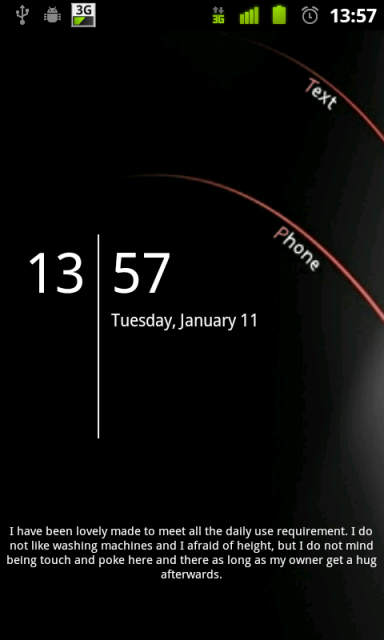
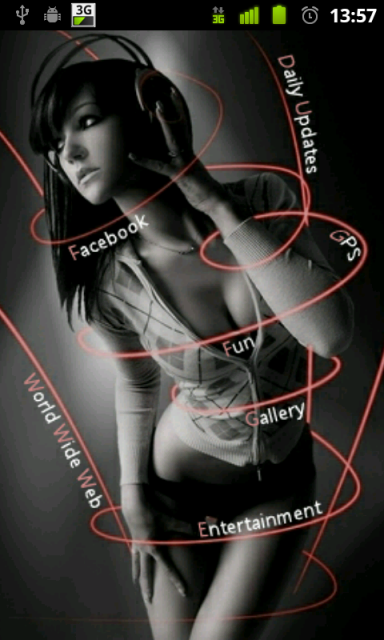
what tool do u use to place those wording as a shortcut??

QUOTE(khalpowers @ Jan 11 2011, 10:09 PM)
desktop visualiser... 
i am not using that 
Post your Homescreen, Pimp your Droid
|
|
 Jan 11 2011, 10:13 PM Jan 11 2011, 10:13 PM
|
 
Senior Member
1,240 posts Joined: Nov 2008 From: | P e n a n G |  
|
QUOTE(abundai @ Jan 11 2011, 09:42 PM) what tool do u use to place those wording as a shortcut?? QUOTE(khalpowers @ Jan 11 2011, 10:09 PM) desktop visualiser... i am not using that |
|
|
|
|
|
Jan 11 2011, 10:31 PM
|

Senior Member
717 posts Joined: Feb 2007 From: Penang
|
QUOTE(abundai @ Jan 11 2011, 09:42 PM) what tool do u use to place those wording as a shortcut?? If u asking |kee| she using some others method if u asking mine, i using Minimalistic text..  |
|
|
Jan 11 2011, 10:51 PM
|

Senior Member
986 posts Joined: Aug 2007
|
i was asking keel, cos the wording is like handwritten and can set to follow the curve lines.. although not my kinda of style of customising, im just curious.. hehe...
nvm.. i can check launcherpro forum for more info... |
|
|
Jan 11 2011, 11:14 PM
|
|
Senior Member
717 posts Joined: Feb 2007 From: Penang
|
QUOTE(abundai @ Jan 11 2011, 10:51 PM) i was asking keel, cos the wording is like handwritten and can set to follow the curve lines.. although not my kinda of style of customising, im just curious.. hehe... haha u better wait for her reply.. nvm.. i can check launcherpro forum for more info... i duwan bocor her rasiah ..  |
|
|
Jan 11 2011, 11:18 PM
|
|
Senior Member
1,240 posts Joined: Nov 2008 From: | P e n a n G |
|
QUOTE(abundai @ Jan 11 2011, 10:51 PM) i was asking keel, cos the wording is like handwritten and can set to follow the curve lines.. although not my kinda of style of customising, im just curious.. hehe... nvm.. i can check launcherpro forum for more info... QUOTE(cyruz13 @ Jan 11 2011, 11:14 PM) haha u better wait for her reply.. haha .... i duwan bocor her rasiah .. i edited the wallpaper using photoshop .... added those word according to the curve lines ... then create shortcut on top of those words .... put my own created transparent icon on it .... settle  This post has been edited by | K e e |: Jan 11 2011, 11:19 PM |
|
|
Jan 11 2011, 11:19 PM
|

Senior Member
4,282 posts Joined: Apr 2008
|
QUOTE(| K e e | @ Jan 11 2011, 11:18 PM) haha .... brillianti edited the wallpaper using photoshop .... addde those word according to the curve line ... then create shortcut on top of those words .... put my own created transparent icon on it .... settle |
|
|
|
|
|
Jan 11 2011, 11:23 PM
|

Senior Member
1,736 posts Joined: Jan 2010 From: 初音島
|
QUOTE(| K e e | @ Jan 11 2011, 11:18 PM) haha .... The power of photoshop i edited the wallpaper using photoshop .... added those word according to the curve lines ... then create shortcut on top of those words .... put my own created transparent icon on it .... settle Hmm... maybe I'll post mine soon |
|
|
Jan 11 2011, 11:27 PM
|
|
Senior Member
1,240 posts Joined: Nov 2008 From: | P e n a n G |
|
QUOTE(phantomash @ Jan 11 2011, 11:19 PM) brilliant thanks |
|
|
Jan 11 2011, 11:27 PM
|
|
Senior Member
717 posts Joined: Feb 2007 From: Penang
|
QUOTE(Calex @ Jan 11 2011, 11:23 PM) The power of photoshop post post haha Hmm... maybe I'll post mine soon |
|
|
Jan 12 2011, 12:13 AM
|

Senior Member
1,227 posts Joined: Sep 2004
|
All these are very nice, but doesn't it drains battery? Curious.
|
|
|
Jan 12 2011, 12:14 AM
|
|
Senior Member
986 posts Joined: Aug 2007
|
but the question is, how to use invisible icons?
i had the same idea, but desktop visualiser doesnt allow it.. or i just dont know how to... Added on January 12, 2011, 12:15 am QUOTE(Quinn @ Jan 12 2011, 12:13 AM) All these are very nice, but doesn't it drains battery? Curious. only live wallpaper drains more battery when switched on... desktop visualiser method wont... This post has been edited by abundai: Jan 12 2011, 12:15 AM |
|
|
Jan 12 2011, 12:18 PM
|
|
Senior Member
4,282 posts Joined: Apr 2008
|
just flashed to MIUI, played around with it a little
         |
|
|
Jan 17 2011, 11:45 AM
|

Senior Member
686 posts Joined: Mar 2005
|
 btw guys. miui-dev manage to release a preview version of meizu m9 theme! |
|
|
|
|
|
Jan 17 2011, 11:59 AM
|

Senior Member
2,114 posts Joined: Aug 2010 From: Edge Of D. World
|
Nice.
|
|
|
Jan 17 2011, 01:42 PM
|

Junior Member
160 posts Joined: Aug 2010 From: KEDAH AND BANGI SELANGOR
|
hi there i am kinda noob here...can anyone kindly enough explain to me how to tweak the dock and icon for my phone
p/s currently using garmin asus a50 (2.1 eclair) help me sifu.. |
|
|
Jan 17 2011, 01:50 PM
|
|
Senior Member
686 posts Joined: Mar 2005
|
here's the MIUI meizu m9 theme together with GingerSuave icons
    More things will be added this weekend.. follow @thom_house for updates  This post has been edited by r47z: Jan 17 2011, 01:52 PM |
|
|
Jan 17 2011, 06:28 PM
|
|
Senior Member
4,282 posts Joined: Apr 2008
|
QUOTE(pakku_azrie @ Jan 17 2011, 01:42 PM) hi there i am kinda noob here...can anyone kindly enough explain to me how to tweak the dock and icon for my phone try to read through this thread, I think there are quite a lot of answers already,p/s currently using garmin asus a50 (2.1 eclair) help me sifu.. basically you can start by playing around with LauncherPro first |
|
|
Jan 19 2011, 02:27 AM
|
|
Junior Member
466 posts Joined: Aug 2005
|
QUOTE(| K e e | @ Jan 11 2011, 08:08 PM) copy idea from cyruz13 .. here's mine Oh my..lovely..» Click to show Spoiler - click again to hide... « This post has been edited by bonanno: Jan 19 2011, 03:04 AM |
|
|
Jan 19 2011, 05:57 PM
|
|
Senior Member
1,736 posts Joined: Jan 2010 From: 初音島
|
My simple homescreen, finally managed to post
 |
|
|
Jan 19 2011, 06:36 PM
|
|
Senior Member
717 posts Joined: Feb 2007 From: Penang
|
QUOTE(Calex @ Jan 19 2011, 05:57 PM) » Click to show Spoiler - click again to hide... «  |
| Change to: |  0.0274sec 0.0274sec
 0.34 0.34
 6 queries 6 queries
 GZIP Disabled GZIP Disabled
Time is now: 6th December 2025 - 03:41 PM |
 Quote
Quote