Welcome Guest ( Log In | Register )

Bump Topic Topic Closed RSS Feed
109 Pages « < 36 37 38 39 40 > » Bottom

Outline · [ Standard ] · Linear+

 AMD Radeon™ Discussion V3, Prepare Red! Green has attacked!

views
     
riku2replica
post Aug 17 2010, 11:13 AM

Mugi-chan!! 可愛い!!
*******
Senior Member
3,304 posts

Joined: Mar 2006
From: Chicago(Port25)
QUOTE(DarkSilver @ Aug 17 2010, 07:16 AM)
For a Radeon HD5870, Stock Voltage can OC until 934-935MHz for the Core and 1278-1280MHz for Memory.

Increase Voltage can do higher OCing. That's only true for the Core MHz, while the Memory MHz is hard to increase even if you have very high voltage.
*
Memory will mostly depends what kind of memory chip ur HD5870 comes with. Better memory, u can overclock better. But that depends on manufacturer and their supplier.
ronaldlee007
post Aug 17 2010, 11:16 AM

LYN SGN Flasher
******
Senior Member
1,337 posts

Joined: Apr 2010


» Click to show Spoiler - click again to hide... «


Hi Bro, I am using 5850. please share with me the oc'ed ability for stock voltage.
Thank you.
Clem1982
post Aug 17 2010, 12:16 PM

Just Helping Out ^^
*******
Senior Member
8,746 posts

Joined: Jul 2010
From: S.A.B.A.H


QUOTE(Eugene91 @ Aug 17 2010, 06:17 AM)
Well it was at 1.2v stock.. lol.. i undervolted it back to 5770 original stock voltage which supposedly is 1.125v..

Tried MSI AfterBurner?
*
Sry dude, haven't get to spend time on my PC last nite, will try the afterburner later biggrin.gif
what temp do u recommend for the 5770?
and what settings should I set the test at? full screen (1600x900)? what abt the AA? fan speed?
freakmusicdevice
post Aug 17 2010, 12:54 PM

New Member
*
Junior Member
40 posts

Joined: Jan 2007


hello guys i'm using 5770 vapor x

want to know is it possible for me to use eyefinity?
ronaldlee007
post Aug 17 2010, 01:32 PM

LYN SGN Flasher
******
Senior Member
1,337 posts

Joined: Apr 2010


For 3 LCD set up, one of your LCD must have display port.
joellim
post Aug 17 2010, 02:18 PM

Getting Started
**
Junior Member
188 posts

Joined: Nov 2007
From: Bukit Jambul, Penang (Hometown: Georgetown)


i would like to ask,

if i get 2 5770 crossfire for eyefinity, do i still need one monitor that supports displayport?

because if i am using 2 x 5770's there will be 4 DVI outputs from two cards right?

i'm asking this because monitors that support Displayport are quite expensive and I already have 2 x 22" monitors so I would like to just add another cheap 22" TN screen for eyefinity.
riku2replica
post Aug 17 2010, 02:30 PM

Mugi-chan!! 可愛い!!
*******
Senior Member
3,304 posts

Joined: Mar 2006
From: Chicago(Port25)
QUOTE(joellim @ Aug 17 2010, 02:18 PM)
i would like to ask,

if i get 2 5770 crossfire for eyefinity, do i still need one monitor that supports displayport?

because if i am using 2 x 5770's there will be 4 DVI outputs from two cards right?

i'm asking this because monitors that support Displayport are quite expensive and I already have 2 x 22" monitors so I would like to just add another cheap 22" TN screen for eyefinity.
*
I'm not sure of that but, most prolly u need a DP to DVI converter to make it work.
I haven't reference to amd eyefinity with crossfire yet. But single card eyefinity, u need to use dvi, hdmi and the DP port.
JoBigShow
post Aug 17 2010, 02:33 PM

Ω Ξ Ψ Σ Д Ӫ Ж Π ✿
*****
Senior Member
969 posts

Joined: Jul 2009
From: ɹndɯnן ɐןɐnʞ


QUOTE(ronaldlee007 @ Aug 17 2010, 11:16 AM)
» Click to show Spoiler - click again to hide... «


Hi Bro, I am using 5850. please share with me the oc'ed ability for stock voltage.
Thank you.
*
For non gaming days, I undervolt the 5850 from 1.087v to 1.000v, but still running stable if I were to play games when running on stock clocks, 725/1000.

Best OC I achieved with stock voltage (1.087v) is 900/1160, this is a pretty good result with a trendous increase of 175mhz from default clocks, it was tricky at first, but I manage to stabilize it when I decrease the memory clock...still, I could decrease it more..

For an OC to make the 5850 to be on par with the 5870, you need to bump up the voltage (optional) to 1.15v (same as 5870's stock voltage) and the clocks around 925/1200.
Although this estimate clock is only used as a general guideline, on 3DMark Vantage an overclock 5850 with 900/1200@1.15v scores similar to the 5870, and estimately the same with other benchies

I only dare to push up to 955/1200 @ 1.15v for benchmarking my card because the temp starts to increase significantly, so need aftermarket cooler to OC above that sweat.gif
Well, with lets say, Accelero Twin Turbo Pro, I believe I can reach the sacred 1ghz mark, a lot of users has reached that point with better cooling solution. nod.gif
joellim
post Aug 17 2010, 02:57 PM

Getting Started
**
Junior Member
188 posts

Joined: Nov 2007
From: Bukit Jambul, Penang (Hometown: Georgetown)


i see. because i heard that the latest Catalyst drivers will support eyefinity even with crossfire configurations.

however, i would like to know if it is still necessary to use 2 x dvi and 1 x DP to run eyefinity.

there are graphics card out there that have 2 x dvi ports so i am planning to install 2 x 5770s and therefore have 4 x dvi outputs in the back. will eyefinity work in this configuration?
Lacus
post Aug 17 2010, 03:10 PM

Lacus Sama No Tameni!
Group Icon
Staff
5,250 posts

Joined: Nov 2004
it depends. Eyefinity=3 display per card *for 5770* (CF turned off) if you're running just 4 displays, just use both card's DVI slot then smile.gif
Reano
post Aug 17 2010, 04:30 PM

New Member
*
Junior Member
18 posts

Joined: Dec 2008
QUOTE(JoBigShow @ Aug 17 2010, 02:07 AM)
Although I don't own this card, I read enough amount of reviews and your LOAD temps is about right I suppose, with the LOAD temp floating within the region of 80C > x < 85C.
If a bit than 85C is just the temp differentials of day/night because the day and night temp in M'sia varies a handful.
When it reaches the 90c mark is when you are to pay attention.

Your IDLE temps, does both of your GPUs idle at 157mhz/300mhz?  hmm.gif
Probably it's just this country...but as you know, you got 2 GPU's is a single card! and the stock copper block cooler although bigger than the single gpu cards, it still not enough...I guess this is were the heat issue spawns.
Other variables could be the airflow of your scout sniper, etc.

Anyways, as you know, different cards are uniquely different to one another, do not judge too critically of your card's temp...by the temp readings of your card, I think it's in the premise of being okay/acceptable, but of course you can, however, improve your temp with bumping up the fan speed on a level which is audibly bearable.

Unlike other graphic card overclocking software (including Asus's Smart Doctor), with MSI Afterburner you can set the percentage of the fan accordingly to temp instead of one absolute fan percentage ,because you don't want a high percentage fan speed that was initially set for your LOAD temp to be used for your IDLE temp, it would be tedious to change the fan % preset every time.
Below is how I set my "dynamic" fan preset according to the temp change:

» Click to show Spoiler - click again to hide... «


My curvature start to steepen up immensely after 60c because I try to force the temps to not to go higher than 68c, plus this is the 'profile' I use for moderate-high overclocking. 
*
For some reason load temp seems to varies depends on the task i do. For example , SC2. Most 5970 without overclock nor any modification runs at 70 Celsius+++ and mine run on 80+++ till it BSOD or freezes and crashes so I don't really know what's the peak temperature for 5970 when in load . Too bad I have only one monitor to not be able to monitor the temperature and game simultaneously. I have to ALT + Esc to gpu-z and click the game again and vice versa to monitor the temp of my 5970 corresponding to the setting of the game. Despite medium or high or ultra , the temp does not really shows any significant changes.

Yeah, it goes down to 157mhz/300mhz when it is idle. and my case should have a nice air flow as im using storm sniper not scout which has a better airflow compared to high tower case cosmos S according to overclockersclub review of comparison of storm sniper vs cosmos s.

I knew what you mean by uniquely different. But as far as I can see my 5970 is seriously not performing as it should . Even if every single one of them is unique as i can see from various review their idle temp still falls in 50-55 Celsius, 60-70+ Celsius with 157mhz/300mhz just don't justify it.

Thanks for the suggestion of the software i already have the sapphire oc tool and i still can't accept the fact that i have to use more % of fan speed in order to get the temp same or similar to other temp. For example i need to use 40% + fan speed to get 50Celsius idle temp while others use 30% to get 50 Celsius idle temp the ratio just isn't right.
Regardless, I didn't notice this issue due to the fact that i have A - level examination till i am free to test some games and knowing this problem and can't finish a single game as in 30 min battle game without bsod or crashes or freezes.

Despite, Thank you for replying really appreciate it .
wyyam
post Aug 17 2010, 06:40 PM

Getting Started
**
Junior Member
226 posts

Joined: Sep 2007
From: Malacca


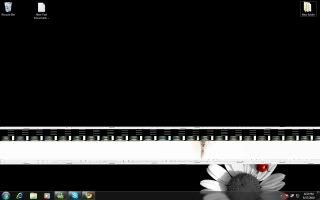
Bros, wat happen to my screen?

Is it my GC?

plz help.. icon_question.gif

» Click to show Spoiler - click again to hide... «


Oh ya.. i m using 5850 .. CCC 10.7

This post has been edited by wyyam: Aug 17 2010, 06:41 PM
JoBigShow
post Aug 17 2010, 07:26 PM

Ω Ξ Ψ Σ Д Ӫ Ж Π ✿
*****
Senior Member
969 posts

Joined: Jul 2009
From: ɹndɯnן ɐןɐnʞ


» Click to show Spoiler - click again to hide... «

QUOTE(wyyam @ Aug 17 2010, 06:40 PM)
Bros, wat happen to my screen?

Is it my GC?

plz help..  icon_question.gif
[
Oh ya.. i m using 5850 .. CCC 10.7
*
It seems you are sustaining this issue since you posted on 1/8/10, I think you should try to 'clean install' the whole drivers by cleaning the drivers and WMD's completely with either Drive Sweeper or Driver Cleaner Pro in SAFE MODE and re-install fresh Catalyst 10.7 upon reboot.
The hotfix is optional...
wyyam
post Aug 17 2010, 07:34 PM

Getting Started
**
Junior Member
226 posts

Joined: Sep 2007
From: Malacca


QUOTE(JoBigShow @ Aug 17 2010, 07:26 PM)
» Click to show Spoiler - click again to hide... «


It seems you are sustaining this issue since you posted on 1/8/10, I think you should try to 'clean install' the whole drivers by cleaning the drivers and WMD's completely with either Drive Sweeper or Driver Cleaner Pro in SAFE MODE and re-install fresh Catalyst 10.7 upon reboot.
The hotfix is optional...
*
Ok Tq, btw .. how to go into safe mode?
JoBigShow
post Aug 17 2010, 08:02 PM

Ω Ξ Ψ Σ Д Ӫ Ж Π ✿
*****
Senior Member
969 posts

Joined: Jul 2009
From: ɹndɯnן ɐןɐnʞ


QUOTE(wyyam @ Aug 17 2010, 07:34 PM)
Ok Tq, btw .. how to go into safe mode?
*
I think you need to press F8 when starting up the comp, forgot...
Let me briefly tell you the steps:
->unsintall normally with Catalyst uninstaller. Then restart.
->Go to SAFE MODE, use the software Driver Sweeper or Driver Cleaner Pro and make sure all ATi related stuff are cleaned out. Restart.
->Start Windows normally. At this point, the resolution should be at the lowest one (if you did cleaned the ATi WMD files), do a normal installation on Catalyst.
->See if problem still occurs.
Volt
post Aug 17 2010, 08:03 PM

Battery Low
****
Senior Member
671 posts

Joined: Jul 2007
press F8 while window loading
if im not mistaken
Clem1982
post Aug 17 2010, 09:18 PM

Just Helping Out ^^
*******
Senior Member
8,746 posts

Joined: Jul 2010
From: S.A.B.A.H


Ok downloaded MSI Afterburner
I'm at 900core 1300mem clocks on my 5770 and at 1600x900 resolution its stable with heat max at 74C fan spd 70% Gonna up the OC lil by lil

Question: Do I have to keep MSI Afterburner on all the time for the setting to stick? and I'm benching without the AA turned on so if I play the game on Full spec it'll overheat as well?

This post has been edited by Clem1982: Aug 17 2010, 10:55 PM
wyyam
post Aug 17 2010, 11:24 PM

Getting Started
**
Junior Member
226 posts

Joined: Sep 2007
From: Malacca


QUOTE(JoBigShow @ Aug 17 2010, 08:02 PM)
I think you need to press F8 when starting up the comp, forgot...
Let me briefly tell you the steps:
->unsintall normally with Catalyst uninstaller. Then restart.
->Go to SAFE MODE, use the software Driver Sweeper or Driver Cleaner Pro and make sure all ATi related stuff are cleaned out. Restart.
->Start Windows normally. At this point, the resolution should be at the lowest one (if you did cleaned the ATi WMD files), do a normal installation on Catalyst.
->See if problem still occurs.
*
QUOTE(Volt @ Aug 17 2010, 08:03 PM)
press F8 while window loading
if im not mistaken
*
Really appreciate ur help bro ..
tqvm ^^
JoBigShow
post Aug 18 2010, 12:58 AM

Ω Ξ Ψ Σ Д Ӫ Ж Π ✿
*****
Senior Member
969 posts

Joined: Jul 2009
From: ɹndɯnן ɐןɐnʞ


QUOTE(Clem1982 @ Aug 17 2010, 09:18 PM)
Ok downloaded MSI Afterburner
I'm at 900core 1300mem clocks on my 5770 and at 1600x900 resolution its stable with heat max at 74C fan spd 70% Gonna up the OC lil by lil

Question: Do I have to keep MSI Afterburner on all the time for the setting to stick? and I'm benching without the AA turned on so if I play the game on Full spec it'll overheat as well?
*
What are you using for testing stability? Furmark? Furmark's load temps can be quite high compared to gaming, meaning you might not need to bump up the fan speed up to70% in games, too noisy laugh.gif


Here's the thing, completely stop using Catalyst Overdrive and use MSI AB as your main interface for your 5770's overclocking arsenal.
You should go to the Settings in AB and set it to 'start up' with Windows...no need to close AB when you set your OC preset, just minimize it. (although the setting will stick when you close AB)

The package, should come with MSI On Screen display server (RTSS), very useful to monitor the fps while gaming.

Next thing, go to Settings > Monitoring
Enable the GPU temp in OSD by ticking the box. Very important to see your temps while playing games.
I always have both the fps and temps in the OSD. Very useful stuff.
(I also tick the box where you can monitor your GPU temps on your taskbar, this is useful to see your IDLE temps while not in games)
Clem1982
post Aug 18 2010, 09:05 AM

Just Helping Out ^^
*******
Senior Member
8,746 posts

Joined: Jul 2010
From: S.A.B.A.H


Thx JoBigShow, I'm using the bundled bench software with the AB to test the stability, any difference from using Furmark? & dun wry abt the fan speed, adjusted the auto setting and it only reached 60% to cool to 65C while gaming wink.gif

Oh and I still wanna know abt the settings I do the stability test on.. Do I let it remain on no AA or I should be able to go 4xAA setting at least?

I had the idea of using the AB as a main, was goin to ask if its safe to use it rather than the CCC utility lol now I stopped at 950core withe the mem still at 1300.. gotta sleep lol

109 Pages « < 36 37 38 39 40 > » Top
Topic ClosedOptions
 

Change to:
| Lo-Fi Version
0.0266sec    0.39    6 queries    GZIP Disabled
Time is now: 7th December 2025 - 06:28 PM