Outline ·
[ Standard ] ·
Linear+
wta oc q6600 go with m2f, please help me
|
TStopazzatale
|
 Jul 7 2010, 04:04 AM, updated 16y ago Jul 7 2010, 04:04 AM, updated 16y ago
|

|
i need u sifu2 here to help me. how do i get stable oc to 3.4? got bsod in less than 6 hours when stress test. im stuck at 3.2. my system is same as my signiture.
below are the setting that im using that im copying from the internet. please do help me. thanks
Extreme Tweaker
Ai Overclock Tuner : Manual
OC From CPU Level Up : AUTO
CPU Ratio Control : Manual
- Ratio CMOS Setting : 8.0
FSB Frequency : 400
CPU Clock Skew : Normal
North Bridge Clock Skew : Normal
FSB Strap to North Bridge : AUTO
DRAM Frequency: DDR2-1066
Dram Clock Skew CH1 A1 : Normal
DRAM Clock Skew CH1 A2 : Normal
Dram Clock Skew CH1 B1 : Normal
Dram Clock Skew CH1 B2 : Normal
DRAM Timing Control: Manual
CAS# Latency : 5
RAS# to CAS# Delay : 5
RAS# Precharge : 5
RAS# ActivateTime : 15
RAS# to RAS# Delay : 3
Row Refresh Cycle Time : 55
Write Recovery Time : 6
Read to Precharge Time : 3
Read to Write Delay (S/D) : 8
Write to Read Delay (S) : 3
Write to Read Delay (D) : 5
Read to Read Delay (S) : 4
Read to Read Delay (D) : 6
Write to Write Delay (S) : 4
Write to Write Delay (D) : 6
Write to PRE Delay : 14
Read to PRE Delay : 5
PRE to PRE Delay : 1
ALL PRE to ACT Delay : 5
ALL PRE to REF Delay : 5
DRAM Static Read Control: Enabled
Dram Read Training : Enabled
MEM OC Charger : Disabled
Ai Clock Twister : Stronger
Transaction Booster : Manual
Common Performance Level [10]
Pull-In of CHA PH1 Disabled
Pull-In of CHA PH2 Disabled
Pull-In of CHA PH3 Disabled
Pull-In of CHA PH4 Disabled
Pull-In of CHA PH5 Disabled
Pull-In of CHB PH1 Disabled
Pull-In of CHB PH2 Disabled
Pull-In of CHB PH3 Disabled
Pull-In of CHB PH4 Disabled
Pull-In of CHB PH5 Disabled
PCIE Frequency : 100
CPU Voltage : 1..425
CPU PLL Voltage : 1.60
FSBT : 1.33850
DRAM Voltage : 2.12
North Bridge Voltage : 1.39150 ( 4 sticks migh need more)
South Bridge Voltage 1.5 : 1.5
South Bridge Voltage 1.1 : 1.1
CPU GTL Reference 0 : +20mv
CPU GTL Reference 1 : +10mv
CPU GTL Reference 2 : +10mv
CPU GTL Reference 3 : +20mv
North Bridge GTL Reference : AUTO
DDR2 Channel A REF Voltage : AUTO
DDR2 Channel B REF Voltage : AUTO
North Bridge DDR Reference : AUTO
Load Line Calabration : Enabled
CPU Sread Spectrum : Disabled
PCIE Spread Spectrum : Disabled
This post has been edited by topazzatale: Jul 7 2010, 04:09 AM
|
|
|
|
|
|
monsh
|
Jul 7 2010, 04:31 AM
|
|
|
what do u mean stuck at 3.2 ?
means its stable at 3.2 ?
if yes then try to increase vCore for more multiplier
|
|
|
|
|
|
sotong168
|
Jul 7 2010, 10:08 AM
|
|
|
for your reference (same mobo) but he is with wc |
|
|
|
|
|
TStopazzatale
|
 Jul 7 2010, 01:37 PM Jul 7 2010, 01:37 PM
|
|
|
QUOTE(monsh @ Jul 7 2010, 04:31 AM) what do u mean stuck at 3.2 ? means its stable at 3.2 ? if yes then try to increase vCore for more multiplier yup stable at 3.2. how much u suggest the vcore to increase the multiplier?
Added on July 7, 2010, 1:44 pmQUOTE(sotong168 @ Jul 7 2010, 10:08 AM) for your reference (same mobo) but he is with wc is it ok to oc to 3.6 without watercooling? btw thanks for the information bro This post has been edited by topazzatale: Jul 7 2010, 01:44 PM |
|
|
|
|
|
monsh
|
Jul 7 2010, 05:50 PM
|
|
|
based on the temperature dude .
65nm should be able to withstand more heat iinm .
try to stay below 90C that's all .
|
|
|
|
|
|
TStopazzatale
|
Jul 8 2010, 07:28 AM
|
|
|
damn, rupa2 nya aku punya ram tak stable utk 1066 ke atas. 1066 below stable, but my ram definitely 1066mhz. ni pn aku tau sbb aku buat default setting pn tak stable lepas 4 jam running. is it ram prob or my setting goes wrong?
This post has been edited by topazzatale: Jul 8 2010, 07:30 AM
|
|
|
|
|
|
saturn85
|
Jul 9 2010, 12:14 AM
|
|
|
QUOTE(topazzatale @ Jul 8 2010, 07:28 AM) damn, rupa2 nya aku punya ram tak stable utk 1066 ke atas. 1066 below stable, but my ram definitely 1066mhz. ni pn aku tau sbb aku buat default setting pn tak stable lepas 4 jam running. is it ram prob or my setting goes wrong? can post your overclock setting with cpuz screen shoot? cpu, memory and spd tab.  |
|
|
|
|
|
elfee_L
|
Jul 11 2010, 11:07 PM
|
New Member

|
hmm.how can i get stable 3.2 @400 fsb only 1.28 vcore?
i use q6600,maximus formula x38,2x2 ocz sli run 1066 5-5-4-13 1.20v
did my bios fools me?
|
|
|
|
|
|
saturn85
|
Jul 11 2010, 11:47 PM
|
|
|
QUOTE(elfee_L @ Jul 11 2010, 11:07 PM) hmm.how can i get stable 3.2 @400 fsb only 1.28 vcore? i use q6600,maximus formula x38,2x2 ocz sli run 1066 5-5-4-13 1.20v did my bios fools me? can post cpuz screen shoot? but why the ram work at 1.20v? |
|
|
|
|
|
elfee_L
|
Jul 11 2010, 11:58 PM
|
New Member
|
ok. currenly tgh torture cpu.not finish yet.
Added on July 12, 2010, 12:08 amopsss ram work at 2.1v  salah type  This post has been edited by elfee_L: Jul 12 2010, 12:08 AM Attached thumbnail(s) This post has been edited by elfee_L: Jul 12 2010, 12:08 AM Attached thumbnail(s)
|
|
|
|
|
|
TStopazzatale
|
Jul 12 2010, 06:44 AM
|
|
|
sorry for late rep. forgot to check this thread. btw this is the screen shot for spd memory and cpu.
[attachmentid=1671947][attachmentid=1671948][attachmentid=1671949]
This post has been edited by topazzatale: Jul 12 2010, 06:46 AM
|
|
|
|
|
|
saturn85
|
Jul 12 2010, 08:04 AM
|
|
|
QUOTE(topazzatale @ Jul 12 2010, 06:44 AM) sorry for late rep. forgot to check this thread. btw this is the screen shot for spd memory and cpu. the ram shouldn't be a problem to run at DDR2 1066, you got apply enough voltage on it? |
|
|
|
|
|
TStopazzatale
|
Jul 12 2010, 06:48 PM
|
|
|
i put 2.1v to run for 1066. isnt it enuf? or should i put 2.2?
|
|
|
|
|
|
elfee_L
|
Jul 12 2010, 06:57 PM
|
New Member
|
i thnk 2.1 enuf?but ask sifu.im newbie..  |
|
|
|
|
|
nidzamputra
|
Jul 12 2010, 09:36 PM
|
|
|
i used 2.18v for 4 sticks ram to run 1032mhz...but with Q9550 la...for me it's quite ok because i'm using active cooling to cool down my ram
|
|
|
|
|
|
elfee_L
|
Jul 15 2010, 07:37 PM
|
New Member
|
hmm.im newbie. i wanna ask some question. why my rams can do only single channel? when i put on the left side of mobo.it wont boot? is that because i flash maximus bios to rampage bios? why ah? 
Added on July 15, 2010, 7:37 pmhmm.im newbie. i wanna ask some question. why my rams can do only single channel? when i put on the left side of mobo.it wont boot? is that because i flash maximus bios to rampage bios? why ah? This post has been edited by elfee_L: Jul 15 2010, 07:37 PM |
|
|
|
|
|
tech3910
|
Jul 16 2010, 12:09 PM
|
|
|
wat u plan to do wit ur rig?
running 24/7 high load server? F@H 24/7? or anything equivalent?
if gaming is ur is ur purpose, forget about hours of stress test, 10 minutes of prime95 is all the stability u need.
my rig, i've been set it 3.4GHz (425*8) wit just 1.28v during intense gaming.
& during light gaming & normal usage, i set it to 2.4GHz (400*6) wit just 1.0vcore.
all tested wit 10 minutes of prime95.
i've nvr experience hang b4.
|
|
|
|
|
|
saturn85
|
Jul 16 2010, 03:58 PM
|
|
|
QUOTE(elfee_L @ Jul 15 2010, 07:37 PM) hmm.im newbie. i wanna ask some question. why my rams can do only single channel? when i put on the left side of mobo.it wont boot? is that because i flash maximus bios to rampage bios? why ah? why you flash to different bios? and can the board use different bios?  |
|
|
|
|
|
elfee_L
|
Jul 16 2010, 10:01 PM
|
New Member
|
mosst people do it for beter bandwith. but i cant redo it. from rampage bios 2 maximus. i have try many way as u can see here http://www.xtremesystems.org/forums/showthread.php?t=179580 Attached thumbnail(s)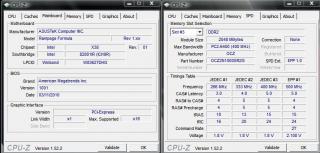
|
|
|
|
|
|
saturn85
|
Jul 17 2010, 01:55 AM
|
|
|
QUOTE(elfee_L @ Jul 16 2010, 10:01 PM) mosst people do it for beter bandwith. but i cant redo it. from rampage bios 2 maximus. i have try many way as u can see here http://www.xtremesystems.org/forums/showthread.php?t=179580 the pcie graphic card link width become x1 already? This post has been edited by saturn85: Jul 17 2010, 01:57 AM |
|
|
|
|



 Quote
Quote


 0.0239sec
 0.50
0.50
 6 queries
 GZIP Disabled