
Welcome Guest ( Log In | Register )

Bump Topic Topic Closed RSS Feed

Outline · [ Standard ] · Linear+

 -[ My first overclocking Quest ]-, Sifus please step inside and lecture :D

views
     
TSGameFr3ak
post Jul 5 2010, 12:28 PM, updated 16y ago

Look at all my stars!!
*******
Senior Member
3,849 posts

Joined: Oct 2006
From: Your Location


My spec : -

i5 750 Lynn
P55 GD65

UPDATES
QUOTE
guys, I managed to isolate the BCLK, multiplier and Vcore. So now I'm heading towards the RAM section.

Current progress

BCLK = 200MHz
CPU multiplier = 19
Turbo Boost disabled
EIST disabled
C1E disabled
DRAM timings = AUTO (9-9-9-24)
DRAM ratio = 4
QPI ratio = Auto
Load Line Calibration disabled
CPU voltage = 1.376V
DRAM voltage = 1.565V ----------------------> FAILS IBT
CPU VTT = 1.25V --------------------------------> FAILS IBT

CPU PLL voltage = Auto
PCH voltage = AUTO (1.05V)

So now I'm stuck at isolating the above pointed out bold...do you have any method to quickly isolate these? Currently I'm slowly increasing the DRAM Voltage 1 step at a time...

Any clues?


Attached CPU Tweaker & CPU-Z

This post has been edited by GameFr3ak: Jul 7 2010, 10:43 PM


Attached thumbnail(s)
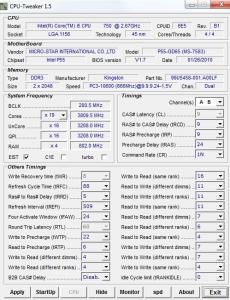
Attached Image
TSGameFr3ak
post Jul 5 2010, 03:10 PM

Look at all my stars!!
*******
Senior Member
3,849 posts

Joined: Oct 2006
From: Your Location


QUOTE(Mr_47 @ Jul 5 2010, 01:17 PM)
you need to test it yourself for the multiplier
+ you also need to play with the vcore of the proc
*
Ok I'll be playing around with the Multiplier next.

QUOTE(yeehow86 @ Jul 5 2010, 01:27 PM)
what is your ram multiplyer/divider? suggest u put vcore 1.3 other remain default , divider max (20?) and play with the bclk
*
my ram multiplier is the lowest (3) I believe. Coz according to the mentioned guide, I need to set everything to its lowest in order to isolate the limit wall. Since I don't have any other guides

QUOTE(monsh @ Jul 5 2010, 01:31 PM)
maybe it reached the BCLK wall already .
try increase PCI-E frequency see if it helps u increase d BCLK .
anyway, it doesnt mean u have to stay at x12 multiplier .
its just used to find the max BCLK .
normally, after finding the good BCLK spot, increase back the multiplier .

its already good if u reach 200BCLK .
ur getting 50% OC on a cheap board .
good enough for me i think .
*
So from ur entry, I should be happy and start messing around my multiplier. I'll give it a try biggrin.gif Thanks man


QUOTE(yeehow86 @ Jul 5 2010, 01:37 PM)
woah your on 1.44+ v ?! lol what a noob me didt know that bclk got it own limitation, i never go beyond 200 for it.
*
I'm not sure as well, but after some reading I think there are limitation on bclk and maybe I found mine...


QUOTE(sjn hassan @ Jul 5 2010, 01:42 PM)
Bro..Just play with the FSB 1st..increase the FSB won't effect the speed as much as multiplier..never play with the voltage untill needed
*
hey guys thanks for all ur inputs. From what I salvaged from you guys, seems like 200 bclk might be the limit wall. So now I should be focusing on the multiplier instead of vtt.

and further questions :-

FSB = bclk?
Vcore = VTT?
any other good guides ? biggrin.gif by good i mean noob-friendly
TSGameFr3ak
post Jul 6 2010, 01:21 AM

Look at all my stars!!
*******
Senior Member
3,849 posts

Joined: Oct 2006
From: Your Location


QUOTE(monsh @ Jul 5 2010, 07:10 PM)
no
FSB = BCLK
QPQ/DRAM = VTT

ur uncore should be double ur ram frequency .
*
Alrite I'll check on that tomorrow biggrin.gif

QUOTE(sup3rfly @ Jul 5 2010, 09:03 PM)
hey there, the purpose of lowering the multiplier to x12 is to find the max blck, as u found ur max bclk, for ur case, its should be 200, next thing u can try is lower down the max blck, say 180 then start playing with the multiplier and the vcore, to find the max cpu freq, cpu freq = bclk x multiplier... if u just want to find the max freq, u shd lower down ur mem multiplier to x8 to avoid instability caused by the ram speed... btw the guide u are reading is a very good guide....  thumbup.gif

as mention in the guide,

VTT = the voltage supply to the IMC (internal memory controller)
vcore = cpu voltage that used to stabilise the cpu frequency

all mobo manufacturer using diff naming for the voltages... hope this helps =)
*
Pretty good and in-depth guide but some of the contents are alien language for me rclxub.gif

But nonetheless I found a sifu (OC4/3) who's guiding me via msn laugh.gif

Tonight managed to get 3.8 ghz OC out of 200 x 19 multiplier and 1.38+ Vcore. Ran IBT for 20 loops finally found this wall limit. Tried to get 4Ghz but my cooler(CM 212+) is not competent enough for the job. Getting 90-95 celcius at IBT. sweat.gif

Tomorrow will be memory tuning.. hope if the sifu is available and willing to help me sweat.gif


TSGameFr3ak
post Jul 7 2010, 01:02 AM

Look at all my stars!!
*******
Senior Member
3,849 posts

Joined: Oct 2006
From: Your Location


guys, I managed to isolate the BCLK, multiplier and Vcore. So now I'm heading towards the RAM section.

Current progress

BCLK = 200MHz
CPU multiplier = 19
Turbo Boost disabled
EIST disabled
C1E disabled
DRAM timings = AUTO (9-9-9-24)
DRAM ratio = 4
QPI ratio = Auto
Load Line Calibration disabled
CPU voltage = 1.376V
DRAM voltage = 1.565V ----------------------> FAILS IBT
CPU VTT = 1.25V --------------------------------> FAILS IBT

CPU PLL voltage = Auto
PCH voltage = AUTO (1.05V)

So now I'm stuck at isolating the above pointed out bold...do you have any method to quickly isolate these? Currently I'm slowly increasing the DRAM Voltage 1 step at a time...

Any clues? icon_question.gif
TSGameFr3ak
post Jul 7 2010, 02:02 AM

Look at all my stars!!
*******
Senior Member
3,849 posts

Joined: Oct 2006
From: Your Location


QUOTE(monsh @ Jul 7 2010, 01:45 AM)
enable LLC .
wat's d ram timing for now ?
*
hmm I don't have LLC but instead I got Vdroop, which is set to High Vdroop. Tested low Vdroop it fails. DRAM timing hmm.gif I think it's

9-9-9-24 = 1T
tRFC to 85
others all auto
DRAM ratio = 4


TSGameFr3ak
post Jul 7 2010, 10:54 PM

Look at all my stars!!
*******
Senior Member
3,849 posts

Joined: Oct 2006
From: Your Location


attached CPUZ and CPU Tweaker @ First post
TSGameFr3ak
post Jul 13 2010, 11:06 AM

Look at all my stars!!
*******
Senior Member
3,849 posts

Joined: Oct 2006
From: Your Location


Alright. Closing this thread down since this is getting aged. Thanks again to all sifus that assisted smile.gif Kudos..

Topic ClosedOptions
 

Change to:
| Lo-Fi Version
0.0266sec    0.42    7 queries    GZIP Disabled
Time is now: 8th December 2025 - 02:12 PM