
Welcome Guest ( Log In | Register )

Bump Topic Topic Closed RSS Feed

Outline · [ Standard ] · Linear+

 -[ My first overclocking Quest ]-, Sifus please step inside and lecture :D

views
     
TSGameFr3ak
post Jul 5 2010, 12:28 PM, updated 16y ago

Look at all my stars!!
*******
Senior Member
3,849 posts

Joined: Oct 2006
From: Your Location


My spec : -

i5 750 Lynn
P55 GD65

UPDATES
QUOTE
guys, I managed to isolate the BCLK, multiplier and Vcore. So now I'm heading towards the RAM section.

Current progress

BCLK = 200MHz
CPU multiplier = 19
Turbo Boost disabled
EIST disabled
C1E disabled
DRAM timings = AUTO (9-9-9-24)
DRAM ratio = 4
QPI ratio = Auto
Load Line Calibration disabled
CPU voltage = 1.376V
DRAM voltage = 1.565V ----------------------> FAILS IBT
CPU VTT = 1.25V --------------------------------> FAILS IBT

CPU PLL voltage = Auto
PCH voltage = AUTO (1.05V)

So now I'm stuck at isolating the above pointed out bold...do you have any method to quickly isolate these? Currently I'm slowly increasing the DRAM Voltage 1 step at a time...

Any clues?


Attached CPU Tweaker & CPU-Z

This post has been edited by GameFr3ak: Jul 7 2010, 10:43 PM


Attached thumbnail(s)
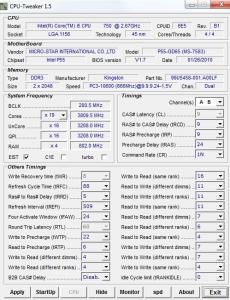
Attached Image
Mr_47
post Jul 5 2010, 01:17 PM

***NOT MODERATOR *** Post : +10,000,000,00 Warn: 100%
*******
Senior Member
4,338 posts

Joined: Jan 2003
From: Bora-bora u jelly? Special: Age of multi-monitor


you need to test it yourself for the multiplier


+ you also need to play with the vcore of the proc
yeehow86
post Jul 5 2010, 01:27 PM

New Member
*
Junior Member
32 posts

Joined: Jun 2009
From: Malaysia


what is your ram multiplyer/divider? suggest u put vcore 1.3 other remain default , divider max (20?) and play with the bclk
monsh
post Jul 5 2010, 01:31 PM

Let's Change The World !
*******
Senior Member
4,196 posts

Joined: Oct 2007


maybe it reached the BCLK wall already .
try increase PCI-E frequency see if it helps u increase d BCLK .
anyway, it doesnt mean u have to stay at x12 multiplier .
its just used to find the max BCLK .
normally, after finding the good BCLK spot, increase back the multiplier .

its already good if u reach 200BCLK .
ur getting 50% OC on a cheap board .
good enough for me i think .
yeehow86
post Jul 5 2010, 01:37 PM

New Member
*
Junior Member
32 posts

Joined: Jun 2009
From: Malaysia


QUOTE(monsh @ Jul 5 2010, 01:31 PM)
maybe it reached the BCLK wall already .
try increase PCI-E frequency see if it helps u increase d BCLK .
anyway, it doesnt mean u have to stay at x12 multiplier .
its just used to find the max BCLK .
normally, after finding the good BCLK spot, increase back the multiplier .

its already good if u reach 200BCLK .
ur getting 50% OC on a cheap board .
good enough for me i think .
*
woah your on 1.44+ v ?! lol what a noob me didt know that bclk got it own limitation, i never go beyond 200 for it.
sjn hassan
post Jul 5 2010, 01:42 PM

Member's of MAKAN MEGGI club
*******
Senior Member
3,544 posts

Joined: Jan 2003
From: United States of Cybertron


QUOTE(GameFr3ak @ Jul 5 2010, 12:28 PM)
My spec : -

i5 750 Lynn
P55 GD65

Hey guys, I tried some overclocking based on this guide. Note: this is the first time for me to overclock, so please forgive my noobness smile.gif

So as I tried yesterday, I changed my multiplier to x12 and gradually increasing my bclk to isolate my highest bclk. But apparently the only stable bclk I can reach is only 200 x 12 = 2400 MHZ which is lower than the stock spec...

When I tried increasing the bclk beyond 200 it fails to boot with the "Overclocking Failed! message". I then tried increasing the VTT with a small amount and still it failed. I tried gradually increasing both bclk and VTT but still fails. However, there are occasions of me successfully booting in to windows, but as I initiate stress test (prim95) the whole system hangs in less than 5 secs. No BSOD, just freezes.

So now I'm clueless of the multiplier, as mentioned in the above guide the multiplier is set to 12 to isolate the highest reachable bclk. But no mention of other multiplier. So my question to you guys is, can I use other multiplier? I did some googling and found out the stability offered by x20 multiplier is rubbish ?
notworthy.gif

added note : my VTT is 1.2 (+/-)
*
Bro..Just play with the FSB 1st..increase the FSB won't effect the speed as much as multiplier..never play with the voltage untill needed


This post has been edited by sjn hassan: Jul 5 2010, 01:46 PM
TSGameFr3ak
post Jul 5 2010, 03:10 PM

Look at all my stars!!
*******
Senior Member
3,849 posts

Joined: Oct 2006
From: Your Location


QUOTE(Mr_47 @ Jul 5 2010, 01:17 PM)
you need to test it yourself for the multiplier
+ you also need to play with the vcore of the proc
*
Ok I'll be playing around with the Multiplier next.

QUOTE(yeehow86 @ Jul 5 2010, 01:27 PM)
what is your ram multiplyer/divider? suggest u put vcore 1.3 other remain default , divider max (20?) and play with the bclk
*
my ram multiplier is the lowest (3) I believe. Coz according to the mentioned guide, I need to set everything to its lowest in order to isolate the limit wall. Since I don't have any other guides

QUOTE(monsh @ Jul 5 2010, 01:31 PM)
maybe it reached the BCLK wall already .
try increase PCI-E frequency see if it helps u increase d BCLK .
anyway, it doesnt mean u have to stay at x12 multiplier .
its just used to find the max BCLK .
normally, after finding the good BCLK spot, increase back the multiplier .

its already good if u reach 200BCLK .
ur getting 50% OC on a cheap board .
good enough for me i think .
*
So from ur entry, I should be happy and start messing around my multiplier. I'll give it a try biggrin.gif Thanks man


QUOTE(yeehow86 @ Jul 5 2010, 01:37 PM)
woah your on 1.44+ v ?! lol what a noob me didt know that bclk got it own limitation, i never go beyond 200 for it.
*
I'm not sure as well, but after some reading I think there are limitation on bclk and maybe I found mine...


QUOTE(sjn hassan @ Jul 5 2010, 01:42 PM)
Bro..Just play with the FSB 1st..increase the FSB won't effect the speed as much as multiplier..never play with the voltage untill needed
*
hey guys thanks for all ur inputs. From what I salvaged from you guys, seems like 200 bclk might be the limit wall. So now I should be focusing on the multiplier instead of vtt.

and further questions :-

FSB = bclk?
Vcore = VTT?
any other good guides ? biggrin.gif by good i mean noob-friendly
monsh
post Jul 5 2010, 07:10 PM

Let's Change The World !
*******
Senior Member
4,196 posts

Joined: Oct 2007


no
FSB = BCLK
QPQ/DRAM = VTT

ur uncore should be double ur ram frequency .
sup3rfly
post Jul 5 2010, 09:03 PM

Techno Slave
******
Senior Member
1,561 posts

Joined: Jan 2003
From: 秋葉原電気街


QUOTE(GameFr3ak @ Jul 5 2010, 12:28 PM)
My spec : -

i5 750 Lynn
P55 GD65

Hey guys, I tried some overclocking based on this guide. Note: this is the first time for me to overclock, so please forgive my noobness smile.gif

So as I tried yesterday, I changed my multiplier to x12 and gradually increasing my bclk to isolate my highest bclk. But apparently the only stable bclk I can reach is only 200 x 12 = 2400 MHZ which is lower than the stock spec...

When I tried increasing the bclk beyond 200 it fails to boot with the "Overclocking Failed! message". I then tried increasing the VTT with a small amount and still it failed. I tried gradually increasing both bclk and VTT but still fails. However, there are occasions of me successfully booting in to windows, but as I initiate stress test (prim95) the whole system hangs in less than 5 secs. No BSOD, just freezes.

So now I'm clueless of the multiplier, as mentioned in the above guide the multiplier is set to 12 to isolate the highest reachable bclk. But no mention of other multiplier. So my question to you guys is, can I use other multiplier? I did some googling and found out the stability offered by x20 multiplier is rubbish ?
notworthy.gif

added note : my VTT is 1.2 (+/-)
*
hey there, the purpose of lowering the multiplier to x12 is to find the max blck, as u found ur max bclk, for ur case, its should be 200, next thing u can try is lower down the max blck, say 180 then start playing with the multiplier and the vcore, to find the max cpu freq, cpu freq = bclk x multiplier... if u just want to find the max freq, u shd lower down ur mem multiplier to x8 to avoid instability caused by the ram speed... btw the guide u are reading is a very good guide.... thumbup.gif

as mention in the guide,

VTT = the voltage supply to the IMC (internal memory controller)
vcore = cpu voltage that used to stabilise the cpu frequency

all mobo manufacturer using diff naming for the voltages... hope this helps =)

This post has been edited by sup3rfly: Jul 5 2010, 09:08 PM
TSGameFr3ak
post Jul 6 2010, 01:21 AM

Look at all my stars!!
*******
Senior Member
3,849 posts

Joined: Oct 2006
From: Your Location


QUOTE(monsh @ Jul 5 2010, 07:10 PM)
no
FSB = BCLK
QPQ/DRAM = VTT

ur uncore should be double ur ram frequency .
*
Alrite I'll check on that tomorrow biggrin.gif

QUOTE(sup3rfly @ Jul 5 2010, 09:03 PM)
hey there, the purpose of lowering the multiplier to x12 is to find the max blck, as u found ur max bclk, for ur case, its should be 200, next thing u can try is lower down the max blck, say 180 then start playing with the multiplier and the vcore, to find the max cpu freq, cpu freq = bclk x multiplier... if u just want to find the max freq, u shd lower down ur mem multiplier to x8 to avoid instability caused by the ram speed... btw the guide u are reading is a very good guide....  thumbup.gif

as mention in the guide,

VTT = the voltage supply to the IMC (internal memory controller)
vcore = cpu voltage that used to stabilise the cpu frequency

all mobo manufacturer using diff naming for the voltages... hope this helps =)
*
Pretty good and in-depth guide but some of the contents are alien language for me rclxub.gif

But nonetheless I found a sifu (OC4/3) who's guiding me via msn laugh.gif

Tonight managed to get 3.8 ghz OC out of 200 x 19 multiplier and 1.38+ Vcore. Ran IBT for 20 loops finally found this wall limit. Tried to get 4Ghz but my cooler(CM 212+) is not competent enough for the job. Getting 90-95 celcius at IBT. sweat.gif

Tomorrow will be memory tuning.. hope if the sifu is available and willing to help me sweat.gif


TSGameFr3ak
post Jul 7 2010, 01:02 AM

Look at all my stars!!
*******
Senior Member
3,849 posts

Joined: Oct 2006
From: Your Location


guys, I managed to isolate the BCLK, multiplier and Vcore. So now I'm heading towards the RAM section.

Current progress

BCLK = 200MHz
CPU multiplier = 19
Turbo Boost disabled
EIST disabled
C1E disabled
DRAM timings = AUTO (9-9-9-24)
DRAM ratio = 4
QPI ratio = Auto
Load Line Calibration disabled
CPU voltage = 1.376V
DRAM voltage = 1.565V ----------------------> FAILS IBT
CPU VTT = 1.25V --------------------------------> FAILS IBT

CPU PLL voltage = Auto
PCH voltage = AUTO (1.05V)

So now I'm stuck at isolating the above pointed out bold...do you have any method to quickly isolate these? Currently I'm slowly increasing the DRAM Voltage 1 step at a time...

Any clues? icon_question.gif
monsh
post Jul 7 2010, 01:45 AM

Let's Change The World !
*******
Senior Member
4,196 posts

Joined: Oct 2007


enable LLC .
wat's d ram timing for now ?
TSGameFr3ak
post Jul 7 2010, 02:02 AM

Look at all my stars!!
*******
Senior Member
3,849 posts

Joined: Oct 2006
From: Your Location


QUOTE(monsh @ Jul 7 2010, 01:45 AM)
enable LLC .
wat's d ram timing for now ?
*
hmm I don't have LLC but instead I got Vdroop, which is set to High Vdroop. Tested low Vdroop it fails. DRAM timing hmm.gif I think it's

9-9-9-24 = 1T
tRFC to 85
others all auto
DRAM ratio = 4


TSGameFr3ak
post Jul 7 2010, 10:54 PM

Look at all my stars!!
*******
Senior Member
3,849 posts

Joined: Oct 2006
From: Your Location


attached CPUZ and CPU Tweaker @ First post
cent88
post Jul 11 2010, 02:58 PM

Getting Started
**
Junior Member
277 posts

Joined: Jul 2009
From: Pearl of Orient

try lower your vcore.. 1.3-1.35v should be ok.
enable LLC.
increase PLL voltage 1.8-1.9v stabilize higher BCLK.
vtt 1.15-1.35v.

what is your ram frequency now? if your kingston using the same ram chip as mine then will be easier to oc but don't exceed 1600MHz.

u can try to play with your RAM multiplier.

I can get 1333Mhz 6-7-6-18-74 1T 1.56v with default multiplier, forgot the ratio already.

This post has been edited by cent88: Jul 11 2010, 03:01 PM
TSGameFr3ak
post Jul 13 2010, 11:06 AM

Look at all my stars!!
*******
Senior Member
3,849 posts

Joined: Oct 2006
From: Your Location


Alright. Closing this thread down since this is getting aged. Thanks again to all sifus that assisted smile.gif Kudos..

Topic ClosedOptions
 

Change to:
| Lo-Fi Version
0.0206sec    0.24    6 queries    GZIP Disabled
Time is now: 8th December 2025 - 03:52 AM