

 May 7 2012, 12:22 PM


QUOTE(petlu28 @ May 7 2012, 11:08 AM)
Until now AC Ryan team not yet reply my message. I facing some video setup. I using crt 29" but when i on the display i can't see whole screen display. Left & right side already miss out like enlarge already. Anyone can help................

What's your AC Ryan model? Firmware version?You can set "aspect ratio" under "video setting" (in setup menu). There are 2 types of ratio for standard 4:3 TV:-
1) Pan Scan 4:3
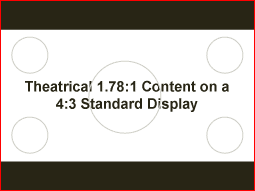
2) Letter Box 4:3
If you set to "Pan Scan 4:3", when play widescreen movie, it will cropping the image and result in a loss of at least 30% of the original image (refer photo below).
If you set to "Letter Box 4:3", when play widescreen movie, it will presence black bars at top and bottom of the movie.
Another setting is "TV System", should set to "PAL".
This post has been edited by pc-ox: May 7 2012, 02:29 PM
Attached image(s)

 Quote
Quote





 0.0297sec
 0.29
0.29
 6 queries
 GZIP Disabled