Outline ·
[ Standard ] ·
Linear+
[WTA] How to get audio from XBOX360-Pioneer HTZ787
|
TSincubus_skj
|
 Jul 1 2010, 01:20 AM, updated 16y ago Jul 1 2010, 01:20 AM, updated 16y ago
|

|
Hi mates, First off, I'm not really good with AV systems so bear with me  OK, so I have this Samsung LA40C530 LCD TV connected to the Pioneer HTZ787 via HDMI port, and I also connected my XBOX360 to the TV using HDMI. Unfortunately I can't get any sound from my Pioneer set, only the TV is able to emit the audio from my XBOX360. What's the best way of getting the Pioneer system to transmit the best audio quality with my XBOX360? The only options I can think of now is either using an audio cable or digital optical audio input/output between the TV and Pioneer set. As I've never had experience with digital optical audio before, I don't know if the audio would come out great... Advice? Thanks in advance!! |
|
|
|
|
|
azxel
|
Jul 1 2010, 09:54 AM
|
moological mooster

|
use the digital optical port... you'd get Dolby Digital and DTS sound...
|
|
|
|
|
|
SUSMatrix
|
Jul 1 2010, 10:32 AM
|
|
|
Azxel is right. Because most TV only transmit 2.0 channels out (or maybe none). Best is to use optical straight to ur AV. Alternatively if ur AV support HDMI in, u can connect ur XBOX ur AV, so the AV will transmit video to TV with audio on the AV.
This post has been edited by Matrix: Jul 1 2010, 10:33 AM
|
|
|
|
|
|
TSincubus_skj
|
Jul 1 2010, 05:07 PM
|
|
|
Thanks for the advice.. I got a digital optical audio cable and plugged it into the TV and AV, then plugged the XBOX HDMI to the AV.. This time, nothing comes out on both the TV and AV.. ^^;
Am I missing something?
This post has been edited by incubus_skj: Jul 1 2010, 05:23 PM
|
|
|
|
|
|
temppei
|
Jul 1 2010, 06:37 PM
|
Getting Started

|
erm, ur pioneer avr only have 1 hdmi input? i dont think xbox360 has optical out. only hdmi and their proprietry cable out to component or vga. if your pioneer accepts more than one hdmi, then plug ur xbox360 hdmi to the pioneer avr and output to the tv. sure surround  or u can get this : http://cdn1.gamepro.com/article_img/gamepro/110489-9.jpgwonder the output will be surround tho. |
|
|
|
|
|
maskedchan
|
Jul 1 2010, 06:44 PM
|
|
|
QUOTE(temppei @ Jul 1 2010, 06:37 PM) erm, ur pioneer avr only have 1 hdmi input? i dont think xbox360 has optical out. only hdmi and their proprietry cable out to component or vga. if your pioneer accepts more than one hdmi, then plug ur xbox360 hdmi to the pioneer avr and output to the tv. sure surround or u can get this : http://cdn1.gamepro.com/article_img/gamepro/110489-9.jpgwonder the output will be surround tho. xbox360 do have optical out.. should plug in from xbox to HT system via optical for 5.1channel This post has been edited by maskedchan: Jul 1 2010, 06:48 PM |
|
|
|
|
|
TSincubus_skj
|
Jul 2 2010, 02:10 AM
|
|
|
temppei... yeah the Pioneer only have 1 HDMI input  QUOTE(maskedchan @ Jul 1 2010, 06:44 PM) xbox360 do have optical out.. should plug in from xbox to HT system via optical for 5.1channel So you mean my setup will be like this? : XBOX360 - HDMI - TV XBOX360 - optical audio - AV TV - HDMI - AV Will try that out again tomorrow and hope it works!!! Thanks again for the suggestions, all!!  This post has been edited by incubus_skj: Jul 2 2010, 02:12 AM This post has been edited by incubus_skj: Jul 2 2010, 02:12 AM |
|
|
|
|
|
temppei
|
Jul 2 2010, 09:25 AM
|
Getting Started
|
mine doesnt have just hdmi and the proprietry ones. prolly mine is the older version |
|
|
|
|
|
TSincubus_skj
|
Jul 2 2010, 02:10 PM
|
|
|
It finally worked in surround!! Actually the optical audio port is located at the component input head.. So I had to forego the HDMI cable from my XBOX to the TV, instead plugging the component cables (green/blue/red) to the TV, and optical audio from the XBOX to the AV..
This post has been edited by incubus_skj: Jul 2 2010, 02:11 PM
|
|
|
|
|
|
azxel
|
Jul 2 2010, 03:35 PM
|
moological mooster
|
Huh?
I'm pretty sure you can plug the HDMI into the TV and still use the Optical to your HTZ787...
|
|
|
|
|
|
TSincubus_skj
|
Jul 2 2010, 04:06 PM
|
|
|
Because the optical input is located on the component plug (the end that needs to be plugged into the XBOX), when plugged in, the plug totally blocks the XBOX's HDMI port.. So I can't connect my HDMI there...
=(
So now my current settings are:
XBOX - component cables (green/red/blue) - TV
XBOX - optical audio - AV
AV - HDMI - TV
This post has been edited by incubus_skj: Jul 2 2010, 04:07 PM
|
|
|
|
|
|
azxel
|
Jul 2 2010, 06:55 PM
|
moological mooster
|
that's so weird... could it be an XBox design flaw? On the PS3, I can use a mixture of HDMI for Video + RCA for Audio HDMI for Video + Optical for Audio After Googling, I see what you mean... 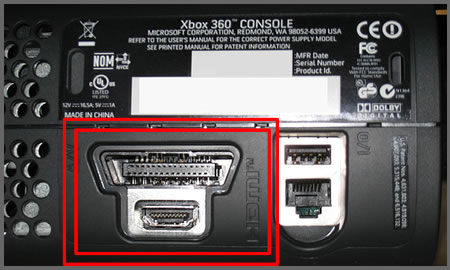 It looks like there's no Optical Out from your XBox... is this right? |
|
|
|
|
|
minimize
|
Jul 2 2010, 07:22 PM
|
|
|
PS3 is the best.. |
|
|
|
|
|
TSincubus_skj
|
Jul 2 2010, 09:09 PM
|
|
|
Precisely.. That dang component plug is in the way.. » Click to show Spoiler - click again to hide... « I checked the back of my PS2slim and even found an optical audio slot there, no HDMI though heheh, so yeah, XBOX sucks =p This post has been edited by incubus_skj: Jul 3 2010, 02:15 AM |
|
|
|
|
|
9878
|
Jul 12 2010, 05:17 PM
|
New Member
|
Btw, how's the performance of your HTZ787? Am planning to get a unit too... Thanks
|
|
|
|
|
|
TSincubus_skj
|
Jul 12 2010, 07:43 PM
|
|
|
It's ok.. But I was expecting its volume to be higher. The maximum it can go up to is 60, but usually I'm already pushing it to 50-plus when I'm watching movies or playing games.. And the room isn't really big, mind you
|
|
|
|
|



 Quote
Quote


.jpg)


 0.0213sec
 0.30
0.30
 5 queries
 GZIP Disabled