


All About Harddisk Thread V3, Discussion for Good Harddisk
All About Harddisk Thread V3, Discussion for Good Harddisk
|
|
 Nov 22 2011, 08:49 PM Nov 22 2011, 08:49 PM
Return to original view | Post
#121
|
 
Senior Member
3,591 posts Joined: Feb 2008 
|
Me? No. I managed to acquire a 2TB HDD before the price increased like crazy. It remains unused at the moment.
|
|
|
|
|
|
Dec 21 2011, 06:12 PM
Return to original view | Post
#122
|
|
Senior Member
3,591 posts Joined: Feb 2008
|
QUOTE(scyap @ Dec 18 2011, 04:35 PM) But thats only like 10% speed... It isn't 10% of the speed. Its like subscribing to Unifi 5Mbps and getting 10% speed only (64 KBps) or buying a Ferrari which claims it can do 300 KM/h but can only hit a top speed of 30 KM/h !!!   SATA 3.0 Gbps uses 8b/10b encoding, leaving only 80% for the actual data transfer. So, 80% x 3 Gbps = 2.4 Gbps 2.4 Gbps = 300 MBps Or at least that is the theoretical number. Real world tests on SATA 3.0 Gbps with SATA 6.0 Gbps SSDs has revealed that the practical maximum speed is about 265 MBps. 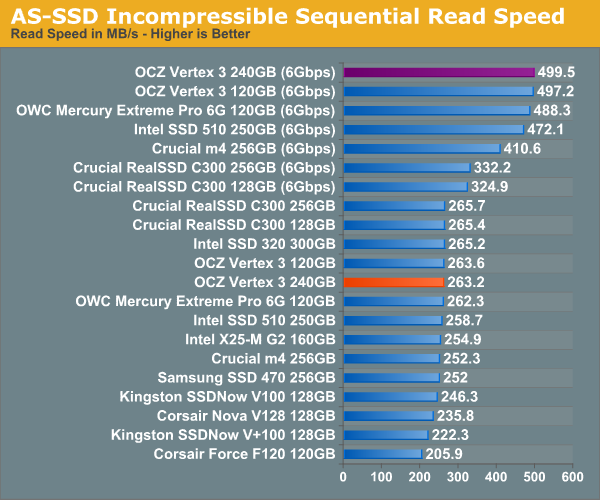 And your HDD test is flawed because it is like driving your Ferrari from A to B to A in t time and then claim it takes t time to drive from A to B, which is what you actually did in your HDD test. The more appropriate test would be for your CPU to write to the HDD, which has seen numbers up to 150MB/s in typical HDD benchmark tests. The moral of the story here, is unless you know what you are doing (like being intentionally misleading), use proper benchmarking software to benchmark. tl;dr: It is 56.6% (practical) or 50% (theoretical) and not 10%. |
|
|
Dec 27 2011, 09:50 AM
Return to original view | Post
#123
|
|
Senior Member
3,591 posts Joined: Feb 2008
|
QUOTE(em0ti0n @ Dec 26 2011, 09:04 PM) i see.. thanks for infos.. You can estimate the time it will take to clone the HDD by "total capacity / average speed". For a 2TB HDD with an average read/write speed of 100MB/s, it will take 5 to 6 hours. |
|
|
Dec 27 2011, 10:18 AM
Return to original view | Post
#124
|
|
Senior Member
3,591 posts Joined: Feb 2008
|
QUOTE(rurushu @ Dec 27 2011, 12:55 AM) erm.. guys, have a question here... You can test the file integrity with a DOS command line tool like 'md5sum' or 'sha1sum'. i have 2 desktop computers, let's just label them A and B. I downloaded videos on comp A and i can watch it with no problem, but when i copy it using USB thumbdrive and put in my comp B, the video somehow got some problem with its color something like corrupted or what.... is it that indication that my comp A's hdd is nearing its end? The md5sum tool in particular will generate a 32 character hash of any given file(s). So you can run the tool on the file in both computers and then compare the resulting hashes. If the hashes match, then the files are identical and your colour problem is likely the result of some other problem. Here are some md5sum download links: http://fossies.org/windows/misc/md5sum-w32.zip/ <- I like this one best http://etree.org/md5com.html <- An alternate option http://www.pc-tools.net/win32/md5sums/ <- Has a 'pretty' output. I don't like it, but you might. |
|
|
Dec 30 2011, 11:09 PM
Return to original view | Post
#125
|
|
Senior Member
3,591 posts Joined: Feb 2008
|
QUOTE(loser.ultimate @ Dec 30 2011, 12:06 PM) Ooh,refurbished drives........some user prefer them over the new retail ones. Why is that? |
|
|
Jan 19 2012, 10:10 AM
Return to original view | Post
#126
|
|
Senior Member
3,591 posts Joined: Feb 2008
|
QUOTE(temptation1314 @ Jan 19 2012, 09:58 AM) I'm wondering if my HDD also having the same problem. You could try unplugging all the devices that you don't need, leaving only the 1TB to test and a DVD drive to install Windows with. That may test for both power and motherboard problem. If Windows is successfully installed, then it is likely to be a power problem. If it still can't be recognised, then it is likely to be a motherboard problem. Also try testing with different cables, as some of them may be faulty or clogged with dust.I'm having : 1 X 40GB IDE 1 X 160GB 1 X 500GB 1 X 1TB My 1TB can't be formatted and I don't know why lol. Already RMA once and still having same problem. Could it be my motherboard couldn't support that much hard disk or it's power problem? This post has been edited by everling: Jan 19 2012, 10:11 AM |
|
|
|
|
|
Jan 19 2012, 04:05 PM
Return to original view | Post
#127
|
|
Senior Member
3,591 posts Joined: Feb 2008
|
QUOTE(prescott2006 @ Jan 19 2012, 03:55 PM) Do you know what is the price for 3TB external before flood? WD Elements 3TB = RM499 WD Essential 3TB = RM569 Viewnet price list from 25 October 2011 This post has been edited by everling: Jan 19 2012, 04:06 PM |
|
|
Jan 19 2012, 04:11 PM
Return to original view | Post
#128
|
|
Senior Member
3,591 posts Joined: Feb 2008
|
QUOTE(prescott2006 @ Jan 19 2012, 04:07 PM) This price is before flood? If so, seem like the price is not much higher. Merely RM40. Yes, that was about the price. Here's the pricing from before that:25 July 2011 WD Elements 3TB = RM529 WD Essential 3TB = RM549 1 August 2011 WD Elements 3TB = RM499 WD Essential 3TB = RM549 The prices were about this range until it started rising significantly in November. 1 November 2011 WD Elements 3TB = RM549 WD Essential 3TB = RM599 All taken from Viewnet price lists. This post has been edited by everling: Jan 19 2012, 04:30 PM |
|
|
Jan 20 2012, 10:00 AM
Return to original view | Post
#129
|
|
Senior Member
3,591 posts Joined: Feb 2008
|
QUOTE(SnoWFisH @ Jan 19 2012, 04:13 PM) Whooops...sorry I was quoting Internal HDD Prices....not external... When the Samsung 2TB was at RM249, the WD Green 3TB was at RM439. From Viewnet price list on 16 October 2011. |
|
Topic ClosedOptions
|
| Change to: |  0.0412sec 0.0412sec
 0.47 0.47
 7 queries 7 queries
 GZIP Disabled GZIP Disabled
Time is now: 2nd December 2025 - 09:20 PM |
 Quote
Quote