Welcome Guest ( Log In | Register )

Bump Topic Topic Closed RSS Feed

Outline · [ Standard ] · Linear+

 DELL Studio XPS™ 13 & 16 Notebooks [V4], powered by Intel C2D, Core i5 n Core i7

views
     
Pennywise
post Aug 2 2010, 03:20 AM

Look at all my stars!!
*******
Senior Member
5,796 posts

Joined: Jan 2003
QUOTE(daisuke @ Aug 1 2010, 11:50 PM)
wat u mean factory settings?
if u install drivers from the cds they giv,it would b factory settings,but i highly recommend u sreach for all the drivers in dell's website i think better laugh.gif


Added on August 1, 2010, 11:52 pm

garage sales search for laptop coolers,lots of selection there
i'm using zalman NC2000 now and very happy with it.....can see the difference,if u into gaming i think better buy 1
*
Hello, thank you for your advise but what are the 'better ones'?
Pennywise
post Aug 3 2010, 08:35 PM

Look at all my stars!!
*******
Senior Member
5,796 posts

Joined: Jan 2003
Guys, dont mind asking, besides the Zalman 2000, any other laptop cooler to recommend? How much is the zalman and where can I find it?
Pennywise
post Aug 5 2010, 03:14 PM

Look at all my stars!!
*******
Senior Member
5,796 posts

Joined: Jan 2003
Initially, the sales agent informed that my order will arrive on 17th Aug. Now, on the website it says before 13th Aug. Ooooo, the anticipation... Almost behtahan!
Pennywise
post Aug 5 2010, 04:31 PM

Look at all my stars!!
*******
Senior Member
5,796 posts

Joined: Jan 2003
Great! Then I have something to look forward to. I also want it to come soon so I got time to play with it and install all the app and data into it.

Now, my only computer is the one downstairs in the hall shared by everyone at home. Very inconvenient.
Pennywise
post Aug 6 2010, 10:57 AM

Look at all my stars!!
*******
Senior Member
5,796 posts

Joined: Jan 2003
Guys,

I received a sms saying that my XPs will arrive tomorrow? Does it mean that it will really arrive tomorrow? Sorry ya, first time ordering from Dell.
Pennywise
post Aug 7 2010, 12:26 PM

Look at all my stars!!
*******
Senior Member
5,796 posts

Joined: Jan 2003
After contemplating on the 'right' time to buy the XPS16, my i7 unit finally arrived today. I dealt with the same Sales Rep as Kevin813 did (Kevin, thank you for your recommendation) and received a decent discount

RM5200 for 3 years warranty with completecover + Targus backpack. No regrets and the unit with lit keyboard is very nice in dark room.
Pennywise
post Aug 7 2010, 12:43 PM

Look at all my stars!!
*******
Senior Member
5,796 posts

Joined: Jan 2003
Some questions about prolonging the battery life.

I just received the unit about an hour ago. It came fully charged.

1. I intend to charge it for another 8 hours or should I not?

2. Most of the time, I will be using it with power plugged into the wall socket, should I remove my battery? Skeptical about this, worry loss of data when there's no electricity but at the same time worry battery life span shorten due to constantly being connected.

3. One more thing, since they do not provide OS disc for OEM these days, should I have created my disk before I installed anything or how? I already updated Windows, installed Chrome and updated Java, enabled McAfee too. So, if I were to create a OS disk now, means Chrome will be bundled?

What's your advise, all XPS sifu?

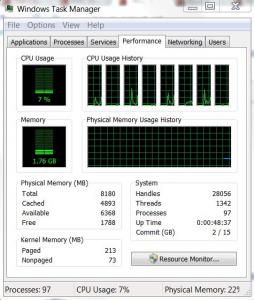
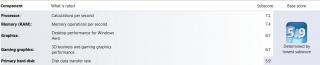
Additionally, here are some screenshots and since I dont have a camera right now, my unit is Alpine White.

Attached Image

Attached Image

Attached Image

This post has been edited by Pennywise: Aug 7 2010, 12:44 PM
Pennywise
post Aug 7 2010, 01:18 PM

Look at all my stars!!
*******
Senior Member
5,796 posts

Joined: Jan 2003
Recovery partition? I only got C drive wor. I dont see any other partition.
Pennywise
post Aug 7 2010, 05:04 PM

Look at all my stars!!
*******
Senior Member
5,796 posts

Joined: Jan 2003
Windows Experience Index benchmark everything fine except the HDD. Just curious, in the event, can we change the HDD to better ones later in future? Will it void warranty and can we change it back to the original one when want to call for warranty?
Pennywise
post Aug 7 2010, 07:06 PM

Look at all my stars!!
*******
Senior Member
5,796 posts

Joined: Jan 2003
Question.

Has anyone successfully configure their xps unit to output display to 2 or more screens? If yes, please share how.
Pennywise
post Aug 7 2010, 07:40 PM

Look at all my stars!!
*******
Senior Member
5,796 posts

Joined: Jan 2003
QUOTE(kheechun @ Aug 7 2010, 07:14 PM)
You mean the laptop screen + another screen? Connect the VGA cable to another screen, then open the ATi Catalyst, from there you can select how you want the 2 screens to show.
*
How about connecting it to 2 LCDs and then shut the laptop lid (screen), is that possible?


Added on August 7, 2010, 7:48 pmCurious question as I have never used 64 bit machine before.

If i download VLC player or K-Lite Mega Codec pack, do I download the 32-bit version or the 64-bit version?

This post has been edited by Pennywise: Aug 7 2010, 07:48 PM
Pennywise
post Aug 7 2010, 10:57 PM

Look at all my stars!!
*******
Senior Member
5,796 posts

Joined: Jan 2003
I placed my order on Aug 1, 2010. smile.gif Now, I'm going online with tethering from HTC Desire. Indeed, the best combo! I'm happy with my unit! I hope yours come soon!

This post has been edited by Pennywise: Aug 7 2010, 10:58 PM
Pennywise
post Aug 8 2010, 10:26 PM

Look at all my stars!!
*******
Senior Member
5,796 posts

Joined: Jan 2003
How do I turn off McAfee if I have to because it is detecting some of my keygens as virus.

On top of that, just want to ask if it has been activated, does it mean from the day it activate till 15 mths later, I cannot deactivate it or anything like that?
Pennywise
post Aug 8 2010, 10:44 PM

Look at all my stars!!
*******
Senior Member
5,796 posts

Joined: Jan 2003
If you uninstalled McAfee, the 15 months bundled then how? Wasted? What other alternative antivirus application did you use? There's also a antivirus from Microsoft yes, what's it called?
Pennywise
post Aug 8 2010, 11:02 PM

Look at all my stars!!
*******
Senior Member
5,796 posts

Joined: Jan 2003
So you guys basically left the 15 months McAfee to waste? I feel so sayang...
Pennywise
post Aug 9 2010, 09:01 AM

Look at all my stars!!
*******
Senior Member
5,796 posts

Joined: Jan 2003
QUOTE(ivan92 @ Aug 9 2010, 12:14 AM)
mine one is 36 months  sweat.gif
*
Wah, and you uninstalled it too?
Pennywise
post Aug 9 2010, 04:20 PM

Look at all my stars!!
*******
Senior Member
5,796 posts

Joined: Jan 2003
So Avast it is! smile.gif Thanks for all your suggestions.
Pennywise
post Aug 9 2010, 09:44 PM

Look at all my stars!!
*******
Senior Member
5,796 posts

Joined: Jan 2003
Guys, I turned off the notification to burn a recovery disc. How do I do it now? I've burnt one but I think that is the Repair for Win 7 disc. How do I burn an OS disc?
Pennywise
post Aug 10 2010, 11:31 AM

Look at all my stars!!
*******
Senior Member
5,796 posts

Joined: Jan 2003
Let me understand something. Since the OS that comes with our XPS16 is OEM, we dont get the OS disk. Therefore, we need to create a recovery disk, yes?

However, we cannot use REcovery disk if we were to re-format our machine because the Windows OS installation files are not in there.

How do we create a Windows OS disk for installation in the event of us formatting our machines?
Pennywise
post Aug 10 2010, 11:49 AM

Look at all my stars!!
*******
Senior Member
5,796 posts

Joined: Jan 2003
Which means, I can never format my machine?

3 Pages < 1 2 3 >Top
Topic ClosedOptions
 

Change to:
| Lo-Fi Version
0.0487sec    0.43    7 queries    GZIP Disabled
Time is now: 12th December 2025 - 11:41 PM