Welcome Guest ( Log In | Register )

Outline · [ Standard ] · Linear+

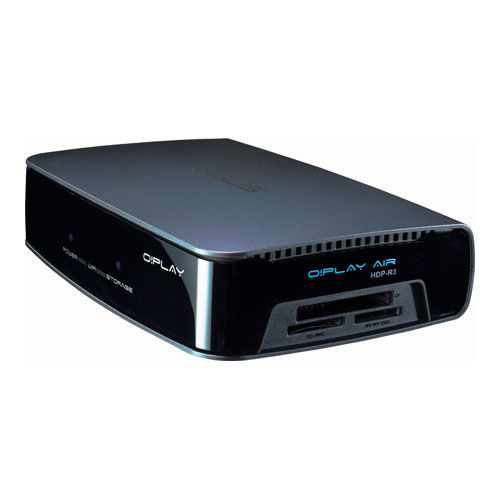
 ASUS O!Play Air HDP-R3 HD Media Player With Wi-Fi, Asus O!play users

views
     
enJiNer
post Apr 8 2011, 07:57 AM

Getting Started
**
Junior Member
126 posts

Joined: Jan 2003
From: 0630 hrs


since i havent found any thread about this device, (except for the Oplay HDP-R1), i think i can start a new thread about this

from the offical website

user posted image

http://www.asus.com/product.aspx?P_ID=aLsLIiFYl0Jw0H9Q

» Click to show Spoiler - click again to hide... «


A bit of user review (from my personal opinion)
Well, I've been with the player since June last year and i'm happy with it at first to replace my cap ayam 720p player... I upgraded my TV to full HD for this..

What made me really happy is the ability of this player to play all type of file i threw into the HDD... from wmv, mkv ogm you name it sume boley...

The downside is it abit pricey and since i'm not going to use the wifi feature, this is a bit rugi la paying for the price

after using it for several months and got 2 time of firmware upgrades, then i found the users forum from asus offical forum...
lots of people were complaining about the lag of remote control response when wifi is turn on.. asus rep replied and told the device will give priority to wifi then to the remote control... which made sume org marah.. and asus never fix this thing even after 3 new firmware released...
i tried using wifi and it's true...u got 1-2 sec lag from the remote...
asus keep on denying to fix the problem

then second problem i encounter, the player wont automatically load subtitle (be it external or internal) for all MKVs formatted movie. Somebody managed to find the solution from the remote control.
I did wrote to ASUS and they said will fix it in the next firwmare upgrade... but after 3 fw upgrade, asus still tak fix this thing... make it even worst

NAS support pon takde...
Youtube pon takde etc

and after do a lot of thinking, i decided to flash the player with a 3rd party fw... luckily they made one for PAL system... the modded fw is superb..
now i can watch youtube, picasa, even FB from my TV....

NAs support pon sudah ade... remote problem takde issue etc...

so now i'm a happy man...

any of Oplay Air user here?? Share la experience...


ps: Mod, if sudah ada, merge aja la ok...


enJiNer
post Apr 8 2011, 07:10 PM

Getting Started
**
Junior Member
126 posts

Joined: Jan 2003
From: 0630 hrs


zeese, when i bought it in June 2010, it cost RM550...cost like a bomb....

one thing i like is the remote control unit... so simple..less button.. unlike Ac Ryan remote looks like my LCD TV punyer remote.... pening

I'm surprise that takde org pakai this thing


and i got lesson learn that cap ayam player can damage your LCD Tv... not so sure it's a fact or what... but a friend of mine bought the el cheapo made in china player (RMVB player in 2010) and after 2 months, his LCD TV kong....
enJiNer
post Apr 9 2011, 12:25 AM

Getting Started
**
Junior Member
126 posts

Joined: Jan 2003
From: 0630 hrs


QUOTE(DarkNite @ Apr 8 2011, 07:17 PM)
sweat.gif  sweat.gif  sweat.gif  sweat.gif  so expensive!
Thanks goodness I got a WDTV live@RM290 instead!
*
wah..so cheap...where do u get it...

i tried WD Live TV but it wont played some of the H.24 codec smoothly... sangkut2

that's why i bought this one... been happy about the number of format it can played

anyway, takde ke org lain yang pakai this one??


asus player is not popular ehh?? nak beli pon susah mau carik
enJiNer
post Apr 9 2011, 11:14 AM

Getting Started
**
Junior Member
126 posts

Joined: Jan 2003
From: 0630 hrs


sorry typo. should be H264 codec la... i didnt have direct experience based according to my friend who is using the WD Live TV, she said some of the full HD movie ada sangkut2... she said the avi with H.264 1080p movie ade sangkut sikit2....

wahh..u got 40GB avatar ehh?? mine 1080p baru 24GB....

last month at pc expo the price dropped that much ehh?? lucky u... i didnt see any asus o!play in any pc fair.. too bad

last week, i bought for my friend ac ryan mini2 and tested it on my system.. looks good so far


am i the only malaysian that used O!play air?? takde org beli ke??

anway, just wanna share some info

if u are using HDP-R3 with the stupid original asus FW, u may (i repeat may) flash it with 3rd party FW (just like i did)

i flashed my unit to HD2 fw for PAL system

first you need to upgrade to bootcode
to check your current bootcode do this:
QUOTE
You can check your bootcode version by pressing stop then  play on the remote while on the home screen.


read how to it here

then get the required FW..several version are offerred.. CLICK HERE

i choose the blue screen lite version .. for less advance user


with the new fw, i can :
1. watch youtube from my tv (not available on original asus fw)
2. using NAS feature
3. picasa, webtv, livetv, live radio, FB etc
4. improve wifi feature
5. better handling on MKV compression header

details of the changes can be read on the link i put above

basically, the new fw really rocks! since ASUS denied or refused to fix it, i really fedap so i change the FW

beware, changing the FW void the warranty and it's one way process...u cannot change back to the original asus fw after flashed it.... [i wont be held responsible if u bricked ur unit trying to flash it).. Should you decide to flash your unit, read the instructions on that link carefully... kalau salah buat, boleh rosak maaaaa

that's all for now

i would love to see if there is asus o!play users here


Added on April 9, 2011, 12:09 pmtakde gak ke pengguna o!play

one thing about this unit, it offer

USB 2.0 connection
eSATA
SD card slot

i love the eSATA port.... when i first came, i bought the cable for rm15... speed is fast..


anyway, for output, unfortunately this device offer 2 type of output
1. composite output
2. HDMI output

no componets output (unlike ac ryan and many other china cap ayam brand)

but using a full HD media player, all other connection doesnt not matter coz HDMI is the only option to go with any LCD/LED/Plasma TV....


This post has been edited by enJiNer: Apr 9 2011, 12:09 PM
enJiNer
post Apr 10 2011, 10:41 AM

Getting Started
**
Junior Member
126 posts

Joined: Jan 2003
From: 0630 hrs


QUOTE(DarkNite @ Apr 10 2011, 10:33 AM)
Wat is consider as full HD movie? hmm.gif
So far my WDTV live has no sangkut and I just bought 3 more for my friends. Wat is the version of her WDTV Live's firmware?

For me the most important is LAN port, better if base>100, as the media player is connected to a server, save the headache 0f the need to transfer. laugh.gif
BTW there is a user ASUS O!Play Air HDP-R3 HD Media Player With Wi-Fi, Asus O!play users thread
*
i dont know which version she is using..... but the movie that she said sangkut2 was then tested on my asus, it's work just great...maybe her player or setup i dont know... i wish i could go inside her house and checked my self.. huhuh


I dont used LAN.. kinda rugi paying for the feature but i dont used it... i only used it to play movies.... sometimes i watch youtube...


i see the thread was dated back in JUne 2010...and got no replies.... i think at that time i just bought my device....

maybe mod can merge this thread with that ...

hope to see more users turn out....
enJiNer
post Apr 10 2011, 04:50 PM

Getting Started
**
Junior Member
126 posts

Joined: Jan 2003
From: 0630 hrs


QUOTE(DarkNite @ Apr 10 2011, 11:42 AM)
watching youtube on 42" panel banyak potong stim! laugh.gif  icon_rolleyes.gif
*
not really potong stim if u're connected to streamyx 4MBps plan... huhuh.... sometime it went smooth as silk

thanks mod merging the thread
enJiNer
post Apr 10 2011, 11:15 PM

Getting Started
**
Junior Member
126 posts

Joined: Jan 2003
From: 0630 hrs


QUOTE(DarkNite @ Apr 10 2011, 10:58 PM)
sorry I not explain. youtube not low definition? You can get 720p resolution on youtube?
*
not so sure...but i heard there are 720p FLVS on youtube.... cant find any of them... even with no 720p, i watch some of the good quality flvs without sangkut2 also.... unfortunately in my area takde unifi... kalau ada lagi syok maaaa

anyway darknite, are u using WD LIve TV??


enJiNer
post Apr 12 2011, 07:21 AM

Getting Started
**
Junior Member
126 posts

Joined: Jan 2003
From: 0630 hrs


wow...6 of them....

so far i got only one using WD Live TV
one for ac ryan...
the rest all cap ayam including the new modeo


Added on April 13, 2011, 9:09 amso i see this device is not popular la.... hahaha

and i knew why..maybe the ASUS costumer service sucks!


This post has been edited by enJiNer: Apr 15 2011, 03:00 PM
enJiNer
post Apr 15 2011, 03:01 PM

Getting Started
**
Junior Member
126 posts

Joined: Jan 2003
From: 0630 hrs


yesterday, i got plenty of time and got bored at home...

so i think i may try the youtube feature on my asus with HD2 firmware

so, the oplay connected wirelessly onto my linksys WAG gateway with streamyx 4MBps speed. Gateway located about 5-6 meters away from the o!play.

i watch about 30 clips on the youtube and to my surprise non of them got stuck... i even watch some hi quality clips on youtube and they all went smoothly....

amazing sungguh!!!
enJiNer
post Apr 15 2011, 03:21 PM

Getting Started
**
Junior Member
126 posts

Joined: Jan 2003
From: 0630 hrs


ye la..but when the same clips were played on my laptop, ade buffering jugak.. only on o!play takde stuck....

kesian la seller if all wanna throw back the player onto his face...i oso forgot who the seller was...haha
enJiNer
post Apr 16 2011, 09:55 AM

Getting Started
**
Junior Member
126 posts

Joined: Jan 2003
From: 0630 hrs


QUOTE(bysquashy @ Apr 16 2011, 08:29 AM)
What's a good firmware to update the unit to have NAS feature?
*
did u mean the 3rd party FW ke?? refer to page one... i put some links for HD2 fw... currently i'm using it and happy with it
enJiNer
post Apr 17 2011, 05:14 PM

Getting Started
**
Junior Member
126 posts

Joined: Jan 2003
From: 0630 hrs


latest 3rd party firmware HD2 by moservices for Asus O!Play

Firmware HD2 1.12.06rev4 with built in R3 123 PAL (4 in 1)

QUOTE
Thus, the long-awaited new version of the firmware with 2 skins from HD2 - blue and brown, embedded firmware from R3_123, also with two color schemes - Standard and Spring (thanks to Abdicator). Chose the firmware using the moS module - Skin selector on the TV screen or in a web interface and thats all! You have a player with the firmware from the HD2, or R3 with your preferred color scheme. Switch can be any time, firs start from 1.12.06_blue;). moS pre-installed, no additional patches are required. Compared with version 3.2 fixes some bugs, optimized resources. Added support of the Wi-Fi devices on Ralink chips - rt2570, rt2870, rt3070, rt3572, rt73. Work as an always-collective.


please click and read it here.. download link is in the thread


i'm downloading it...will update and let u all know the outcome...

This post has been edited by enJiNer: Apr 17 2011, 05:14 PM
enJiNer
post Apr 17 2011, 07:33 PM

Getting Started
**
Junior Member
126 posts

Joined: Jan 2003
From: 0630 hrs


ok...

just updated the new FW.... so far so good...

quick way to update is to download the img files and copy it into an empty USB drive... (FAT32 or ext2)...
insert the USB drive into the port of the Oplay.... with a pin, press and hold the reset button on the side panel. While holding the reset button, unplug the power supply. Wait for a few seconds (5 sec) and then turn back the power then release the reset button.

you will get this screen
Attached Image
then after a few secs...this screen appeared
Attached Image Attached Image

after about 5 minutes, update is completed

and the device will reboot itself

the original asus logo during boot
Attached Image

here's how the new fw looks like..nothing much different with previous version except for the new menu title (moservices)
Attached Image Attached Image

inside mos menu u can see skin selector and 4 prebuild skins are to be selected...
Attached Image

testing with the leaf skin
Attached Image

the online media somehow being revamped from previous version
Attached Image Attached Image

the X Live Menu..i tested some of the channel but so far nothing are available
Attached Image

the only thing i dont like is the adult channel is displayed in the menu.... should be blocked or hidden....


well, i will put some more inputs with the new FW

so far i'm very pleased

thumbup.gif thumbup.gif thumbup.gif


Added on April 18, 2011, 12:38 amto read more about moservices : click here --> https://sites.google.com/site/farvoice/about_en


This post has been edited by enJiNer: Apr 18 2011, 12:38 AM
enJiNer
post Apr 20 2011, 10:47 PM

Getting Started
**
Junior Member
126 posts

Joined: Jan 2003
From: 0630 hrs


QUOTE(rockccf @ Apr 20 2011, 02:59 PM)
Hi,

I'm using Asus O!Play Air R3 also.

I've just updated the firmware to 1.23N version.
Does that version support NAS? I got a little bit confused about what NAS is, is it something like sharing the storage over the network which is connected to the media player?

***Is the third party firmware better than the original firmware?

BTW, I've some problems browsing my pc contents via UPNP, sometimes you have to refresh a few times to see the content.

I noticed that's a problem with viewing the mkv files from my pc (windows 7), you have to install a codec pack or tv media server or something on your pc, only then windows 7 media streaming will allow you to share mkv files over the network. However, it's not stable.

Bro enjiner, do you have problems while browsing your pc content?

Thanks.
*
are u supposed to installed 1.23P for PAL version... unless u're not in malaysia...malaysia used PAL system

all of the asus original fw sucks....the latest still lack of NAS ...

the HD2 firmware is much better than original asus.... so far i havent tried UPNP feature.... i just plug onto mu ext hd and go...

the asus orinal firmware got problem with mkv files...i read lotso people complaint when playing mkv files... even mkv subtitle pon tak auto play.. so best solution is to flash with the HD2.... now i can watch youtube

enJiNer
post Apr 21 2011, 09:25 AM

Getting Started
**
Junior Member
126 posts

Joined: Jan 2003
From: 0630 hrs


NTSC?? i pressume u are not in malaysia then??

NAS= i think u knew already what it's/// network attached storage... u have to install the script asus include in the cd..then configure ur pc and network

unfortunately, there are lotso bugs in oplay fw which asus didnt want to fix. If u have the time, u can read it over on asus official forum click here
u can see lot of user complaining about NAS and other stuff and asus simply denied them.... this is what happening and why most of them changed to HD2.. yup HD2 is the 3rd party fw.... the feature of hd2 can be read in the link i gave....


enJiNer
post Apr 21 2011, 11:28 PM

Getting Started
**
Junior Member
126 posts

Joined: Jan 2003
From: 0630 hrs


dont be scared bro.. but me to was scared back then... but i just read somewhere that u can restore the original fw the same way... just couldnt find it now... but it's the moservice forum

the only risk is while upgrading it, there is a power failure and then u might brick the device...

anyway, not forcing you to flash it....just read all the link i put and give it a deep thought... and dont go and wallap me if something happen k... hehe


enJiNer
post Apr 22 2011, 12:33 PM

Getting Started
**
Junior Member
126 posts

Joined: Jan 2003
From: 0630 hrs


like i told ya, i havent fully tried using NAS.... try asking at the moservice forum perhaps they can help..
anyway, congrats bro.... now u see the different from crap asus fw..


enJiNer
post May 9 2011, 03:35 PM

Getting Started
**
Junior Member
126 posts

Joined: Jan 2003
From: 0630 hrs


i think, u may ask the moservice forum about your problem..they are the expert and i believed they can solve ur problem...

sorry to hear about that


Change to:
| Lo-Fi Version
0.0238sec    1.00    7 queries    GZIP Disabled
Time is now: 19th December 2025 - 06:28 AM