


Coolermaster League V10, feel the extreme cooling of V10!
Coolermaster League V10, feel the extreme cooling of V10!
|
|
 Nov 10 2011, 06:37 PM Nov 10 2011, 06:37 PM
Return to original view | Post
#1
|
 
Junior Member
243 posts Joined: Aug 2010   
|
guys, i want to ask, lately my rig is very noisy. as i place the rig on the desk, it is very annoying. what do i need to change? i guess its the fan problem
|
|
|
|
|
|
Nov 10 2011, 07:07 PM
Return to original view | Post
#2
|
|
Junior Member
243 posts Joined: Aug 2010
|
QUOTE(Jayi @ Nov 10 2011, 06:53 PM) Take off the side panel and identify the sources of noise. Do comfirm which hardware is making problem before u make any unnecessary changes i just took off the side panel and checked for the source of noise., the noise is coming from the 'cooler fan' installed on top of my AMD processor. |
|
|
Nov 10 2011, 07:44 PM
Return to original view | Post
#3
|
|
Junior Member
243 posts Joined: Aug 2010
|
QUOTE(GeForceX @ Nov 10 2011, 07:11 PM) stock cooler?? very high load? not really that high...normal surfing(dual monitor) and play dota XD |
|
|
Nov 10 2011, 08:56 PM
Return to original view | Post
#4
|
|
Junior Member
243 posts Joined: Aug 2010
|
QUOTE(cmgan72 @ Nov 10 2011, 08:09 PM) r u using the amd stock cooler ? if yes then most probably your stock cooler fan is running at high speed. u try to download speedfan software to control it. ya i think its amd stock cooler bro. it comes together with the processor one ( if im not mistaken). sure i'll give it a try thx here's the link SpeedFan 4.45  Added on November 10, 2011, 9:00 pm 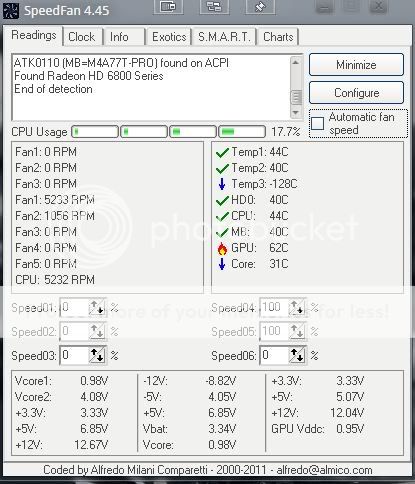 this is the reading it shows. so which fan reading should i change/alter? advise pls. thx  This post has been edited by affirmative90: Nov 10 2011, 09:00 PM |
|
|
Nov 10 2011, 09:55 PM
Return to original view | Post
#5
|
|
Junior Member
243 posts Joined: Aug 2010
|
QUOTE(Jayi @ Nov 10 2011, 09:40 PM) I guess you need chg the stock amd cpu cooler. According to the speedfan reading ur stock cooler running at 5k rpm and tats definitely making loud noise exactly...its very noisy! btw, how about my GPU? it shows 62 degree C. is it normal?  |
|
|
Nov 11 2011, 01:48 PM
Return to original view | Post
#6
|
|
Junior Member
243 posts Joined: Aug 2010
|
QUOTE(Jayi @ Nov 10 2011, 11:43 PM) Isnt the comp is under normal usage when u record the temp ? If so then the temp looks perfectly fine. yes it is recorded under normal usage. XDQUOTE(cmgan72 @ Nov 10 2011, 11:48 PM) indeed, in the meanwhile, u could just adjust the fan speed to like 30-40%. amd stock cooler always has this kind of problem. the best solution is change to a better cooler. gonna change a better cooler soon bro. thx QUOTE(Jayi @ Nov 11 2011, 12:21 AM) But from the speedfan temp for cpu, its looks quite low. Perhaps go into bios and double check the fan control for cpu ? I always set mine to silent operation which will maintain low rpm unless there is load will check it out later. how much should i set the rpm? thx |
|
Topic ClosedOptions
|
| Change to: |  0.0456sec 0.0456sec
 0.65 0.65
 7 queries 7 queries
 GZIP Disabled GZIP Disabled
Time is now: 11th December 2025 - 02:32 PM |
 Quote
Quote