QUOTE(Clem1982 @ Jun 16 2012, 09:15 AM)
Huh??

the 311+ is a very good chassis compared to its predecessor 310, not only on the ventilation part but also on the cable management so.. there is actually no need to replace the chassis itself actually IMO
GPU heat buildup could be caused by dust buildup as well, clean your GPU and see if there is a difference but at 80C its normal in load for GPU
if the noise is bothering you so much then get the
Artic Acellero 7970for the tripple fan setup or the Passive-cooling Accelero S1 like kherel77 mentioned
I'm not exactly sure about ventilation but because someone pointed out that using a GPU cooler like the Accelero Extreme Plus II on a casing with bad ventilation would be pointless.
I just got my dekstop like almost a week ago, so I don't think dust is quite an issue.
The passive cooling, I don't quite understand actually. Pasang onto the GPU itself? I understand that it's passive cooling though..
QUOTE(kherel77 @ Jun 16 2012, 03:38 PM)
^+1
First thing first, to avoid unnecessary cost.
1. Clean up GPU heat-sink & fan
2. Re-applied new & good thermal paste
3.
Add additional fan toward your GPU, for Elite 311 i think can fit the fan at
HDD cage (whether using screw or cable tight, need to mod a bit)
If still not satisfy you, then its up to you to change the better airflow casing...as good active/passive third party cooler also cost a bomb...IMHO.
Added on June 16, 2012, 3:40 pmFor step 3, better open all unused PCI slot cover for better airflow...
HDD Cage, you mean just below the DVD writer area...the black area there, unused dvd write slot? Here can put extra fan?

And also another thing, I noticed my front fan is blowing at the "brackets" near the HDD there. The brackets are restricting air flow into the main casing compartment at all! How do you suggest I modify?
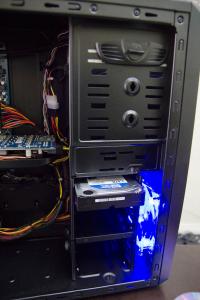 This post has been edited by -kytz-: Jun 16 2012, 04:13 PM

 Jun 7 2012, 04:14 AM


 Quote
Quote


 )
)


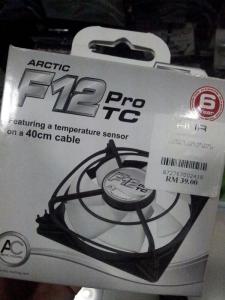

 I kennot install the arctic f12pwm port at all. It doesn't fit
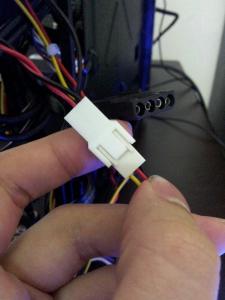

 0.1290sec
 0.55
0.55
 7 queries
 GZIP Disabled