Welcome Guest ( Log In | Register )

Bump Topic Topic Closed RSS Feed

Outline · [ Standard ] · Linear+

 BenQ JoyBook Park Ver XXIV, Lookin' Great

views
     
miahahaha
post Jun 20 2010, 01:35 PM

Beru
*******
Senior Member
7,558 posts

Joined: Mar 2008
From: HornBill Borneo


Ok, this is the 2nd part of my officially 2nd post nod.gif..dun want to mess things in 2nd post, so this post i dedicated for :

BenQ S42 Dissecting

Read step by step, and do it on your own risk (warranty is VOIDED when you do this nod.gif)

1. Remove 2 screws on RAM module cover; take out rams, disconnect the 3 pins of wireless LAN antenna (remember the order which is black white grey from top to bottom), remove 2 screws that secure the wireless lan card and take the card out,

2. Remove 2 screws on HDD (one of which is covered with a seal in my case) bay cover and remove the HDD bay cover, remove 2 screws that secure the HDD and take out HDD

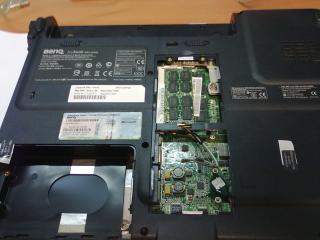
3. Remove 1 screw that secures the optical drive and take out the optical drive, you'll see this :
Attached Image


4. Remove all the remaining screws on the bottom, 12 if I didn't count wrong, remove the battery, remove another 2 ordinary screws and 3 flat screws under battery,

5. Remove 4 screws on the back of the laptop (2 on each side of the screen hinges),

6. Put the laptop in normal position, open the lid all the way to the back. Now uncover the hinge cover from the right end (the long piece with power button), use some steady force if needed, after which you'll see this:

Attached Image


7. Lift keyboard from top, under the keyboard unplug the keyboard cable, remove the keyboard; disconnect the LCD cable (top left), pull out the wireless LAN card antenna cables (black/white/gray) unplug the touchpad cable and another cable (the two in the middle with blue plastic cover) :

Attached Image


8. You can remove the 4 screws that secures the lid to the main chassis but that's not necessary; now remove the 3 screws under the keyboard, turn the back of the laptop towards you, then you can lift up the top cover of the main chassis (remove the lid may make this step a little easier) to reveal the mainboard, disconnect the plug near the touchpad which shall be the speaker cable,

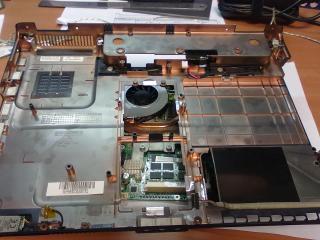
9. Turn the opened main chassis in normal position, with the mainboard on the left half of the chassis, disconnect the bluetooth cable on bottom left, USB cable near HDD bay, and power cable on top left corner, remove 2 screws on top and bottom of the mainboard then you can take out the mainboard (remove the lower part where the audio jack is first, then slide it out from left), The empty bottom chassis looks like this:
Attached Image


10. The mainboard looks like the picture below. to remove the cooling system, unscrew the 4 screws on CPU/chipset heatsink, and 2 screws on GPU heatsink. These 6 screws are fixed on heatsink so don't force to take them out. then remove 1 last screw on top of fan. Now the cooling assembly can be take out from mainboard.


11. Clean the vent on the bottom of main chassis; clean the fan and vent with vacuum or compressed air if there are dusts.

Attached Image Attached Image


12. I forgot to take picture when I first opened up the laptop. So what you see from the final picture is after I remove the thermal pad on GPU. I put a small aluminum pad in between GPU and heatsink (the shining silver pad shown on the heatsink) with thermal paste (OCZ freeze) on both sides.

Remark: when I fist open up the heatsink assembly, the two yellowish plastic bands near the top VRAM chips actually covers the chip and the thermal pad is not in direct contact with the chips. That's what make me think that the VRAM chip may not have a big heat issue, so I didn't replace those thermal pads with metal pads.

Attached Image


~~credits to mangos47 @NBR

This post has been edited by miahahaha: Jun 28 2010, 08:50 AM
TSastria
post Jun 20 2010, 01:35 PM

an apple a day keeps the doctor away
*********
Senior Member
22,158 posts

Joined: Aug 2008
From: Singapore


can't get the thumbnail back... sad.gif
miahahaha
post Jun 20 2010, 01:37 PM

Beru
*******
Senior Member
7,558 posts

Joined: Mar 2008
From: HornBill Borneo


wonder i see the thumbnail look kinda weird sad.gif...

@astria
Maybe you can delete the part for Price..as the units are kinda rare as for now nod.gif..and also the [/b] part under the benchmark title nod.gif
jakuraz
post Jun 20 2010, 01:43 PM

need more stars. i luv em
****
Senior Member
582 posts

Joined: May 2007
From: 3°08′N 101°42′E


for S42 P8600, the official nvidia driver(from nvidia website) is better or Dox 185.85?
or is there any other better drivers?
miahahaha
post Jun 20 2010, 01:45 PM

Beru
*******
Senior Member
7,558 posts

Joined: Mar 2008
From: HornBill Borneo


QUOTE(jakuraz @ Jun 20 2010, 01:43 PM)
for S42 P8600, the official nvidia driver(from nvidia website) is better or Dox 185.85?
or is there any other better drivers?
*
Well, for less hassle while installing, the official one is better while Dox can provide you the best temp while playing games (at most max out 96C, well for some S42 that is)....you can try out Nautis driver (please check 2nd post), but temp wise Dox is still better...

Dox 185.85 is still the best (for me that is) when comes to temp nod.gif...


Added on June 20, 2010, 1:46 pmWait, you cannot use the official driver from nVidia, from BenQ website then can be use...nVidia neglected Hybrid GC, there are no official one from nVidia as we speak now nod.gif

This post has been edited by miahahaha: Jun 20 2010, 01:46 PM
jakuraz
post Jun 20 2010, 01:46 PM

need more stars. i luv em
****
Senior Member
582 posts

Joined: May 2007
From: 3°08′N 101°42′E


QUOTE(miahahaha @ Jun 20 2010, 01:45 PM)
Well, for less hassle while installing, the official one is better while Dox can provide you the best temp while playing games (at most max out 96C, well for some S42 that is)....you can try out Nautis driver (please check 2nd post), but temp wise Dox is still better...

Dox 185.85 is still the best (for me that is) when comes to temp nod.gif...
*
thnx biggrin.gif
but i have problem installing dox 185.85 in win 7 32-bit..
after restarting laptop, the screen goes blank all the way
miahahaha
post Jun 20 2010, 01:48 PM

Beru
*******
Senior Member
7,558 posts

Joined: Mar 2008
From: HornBill Borneo


Just wait, i linked to the official one from BenQ nod.gif


Added on June 20, 2010, 1:50 pm@Jakuraz
Maybe you can try out Dox 195.62 nod.gif..usually its easier to install the 32-bit version rather than 64-bit one nod.gif

This post has been edited by miahahaha: Jun 20 2010, 01:50 PM
TSastria
post Jun 20 2010, 01:51 PM

an apple a day keeps the doctor away
*********
Senior Member
22,158 posts

Joined: Aug 2008
From: Singapore


here u go...

Attached Image

Attached Image

Attached Image

Attached Image
miahahaha
post Jun 20 2010, 01:53 PM

Beru
*******
Senior Member
7,558 posts

Joined: Mar 2008
From: HornBill Borneo


No wonder astria is missing for a moment there..busy taking pictures laugh.gif..
Dackson
post Jun 20 2010, 01:59 PM

Decide to start hunting
*******
Senior Member
6,439 posts

Joined: Oct 2008
From: Mlc to PP ?


congrate new v ~


Added on June 20, 2010, 2:02 pmwhat astria doing ??
if not mistaken that unit is n81vp ? bcoz blue board may be is PM45 gua~
harddisc is hitachi one ... not very nice la ~
i saw the wiring not welly done !

This post has been edited by Dackson: Jun 20 2010, 02:02 PM
miahahaha
post Jun 20 2010, 02:06 PM

Beru
*******
Senior Member
7,558 posts

Joined: Mar 2008
From: HornBill Borneo


@Dackson
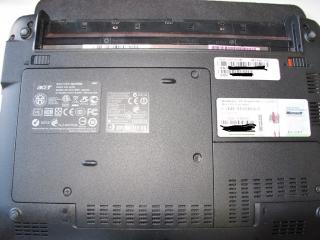
Look closely..its not even a 14" sweat.gif..that one is Acer Aspire One nod.gif


Added on June 20, 2010, 2:07 pmMaybe you can open up your Mini can compare with astria brows.gif..see, which mobo HP Mini use laugh.gif


Added on June 20, 2010, 2:09 pmJust found out...where did all lee siggy gone?? Delete himself or got nuked?? hmm.gif..that Dell coupon is useful info smile.gif

This post has been edited by miahahaha: Jun 20 2010, 02:09 PM
evolution120
post Jun 20 2010, 02:15 PM

In nickel we trust.
*******
Senior Member
4,306 posts

Joined: Oct 2006

QUOTE(miahahaha @ Jun 20 2010, 02:06 PM)
@Dackson
Look closely..its not even a 14" sweat.gif..that one is Acer Aspire One nod.gif


Added on June 20, 2010, 2:07 pmMaybe you can open up your Mini can compare with astria brows.gif..see, which mobo HP Mini use laugh.gif


Added on June 20, 2010, 2:09 pmJust found out...where did all lee siggy gone?? Delete himself or got nuked?? hmm.gif..that Dell coupon is useful info smile.gif
*
i guess is nuked..

going lowyat plaza~ bye guys! catch up u guys later~!
TSastria
post Jun 20 2010, 02:22 PM

an apple a day keeps the doctor away
*********
Senior Member
22,158 posts

Joined: Aug 2008
From: Singapore


man.. i got poisoned deep deep by the Aspire One 521... drool.gif

self poisoned... wat the hell... sweat.gif

This post has been edited by astria: Jun 20 2010, 02:22 PM
miahahaha
post Jun 20 2010, 02:33 PM

Beru
*******
Senior Member
7,558 posts

Joined: Mar 2008
From: HornBill Borneo


How come you poisoned yourself with your own netbook sweat.gif...
TSastria
post Jun 20 2010, 02:33 PM

an apple a day keeps the doctor away
*********
Senior Member
22,158 posts

Joined: Aug 2008
From: Singapore


QUOTE(miahahaha @ Jun 20 2010, 02:33 PM)
How come you poisoned yourself with your own netbook sweat.gif...
*
the new one with Athlon II Neo wor...
miahahaha
post Jun 20 2010, 02:34 PM

Beru
*******
Senior Member
7,558 posts

Joined: Mar 2008
From: HornBill Borneo


Just noticed something, my laptop is running cooler with Win7 hmm.gif..now idle for CPU is 49C~51C, when on Vista its 53C~55C hmm.gif..
lee_what2004
post Jun 20 2010, 02:34 PM

*stare* ji--------
Group Icon
Elite
14,813 posts

Joined: Nov 2006


QUOTE(miahahaha @ Jun 20 2010, 02:06 PM)

Added on June 20, 2010, 2:09 pmJust found out...where did all lee siggy gone?? Delete himself or got nuked?? hmm.gif..that Dell coupon is useful info smile.gif
*
QUOTE(evolution120 @ Jun 20 2010, 02:15 PM)
i guess is nuked..

going lowyat plaza~ bye guys! catch up u guys later~!
*
Nah, undergoing renovation liposuction tongue.gif
miahahaha
post Jun 20 2010, 02:35 PM

Beru
*******
Senior Member
7,558 posts

Joined: Mar 2008
From: HornBill Borneo


Yup, i saw that one also, you posted over the AMD K10 thread, me also got poisoned drool.gif..


Added on June 20, 2010, 2:36 pmlee siggy now looks more clean nod.gif

This post has been edited by miahahaha: Jun 20 2010, 02:36 PM
TSastria
post Jun 20 2010, 02:36 PM

an apple a day keeps the doctor away
*********
Senior Member
22,158 posts

Joined: Aug 2008
From: Singapore


QUOTE(miahahaha @ Jun 20 2010, 02:35 PM)
Yup, i saw that one also, you posted over the AMD K10 thread, me also got poisoned drool.gif..
*
HD movie test...

http://www.youtube.com/watch?v=UoTEcMidlio

the tested one is using V105 instead though (single core, 1.2GHz, 512KB L2, 2000MHz HT, 9W)

edit: i ve no idea y the youtube tag dun work... hmm.gif

This post has been edited by astria: Jun 20 2010, 02:38 PM
miahahaha
post Jun 20 2010, 02:38 PM

Beru
*******
Senior Member
7,558 posts

Joined: Mar 2008
From: HornBill Borneo


Is it only me or the vid the astria posted just came out as white screen hmm.gif


Added on June 20, 2010, 2:39 pmok, seems like the tag not working?? laugh.gif


Added on June 20, 2010, 2:40 pmOk, i up the vid icon_rolleyes.gif

This post has been edited by miahahaha: Jun 20 2010, 02:40 PM

126 Pages < 1 2 3 > » Top
Topic ClosedOptions
 

Change to:
| Lo-Fi Version
0.0296sec    0.47    6 queries    GZIP Disabled
Time is now: 10th December 2025 - 04:22 AM