Outline ·
[ Standard ] ·
Linear+
E5300 CANT BOOT HELP!, HELP!! HELP!!
|
TSCollin8900
|
 Jun 11 2010, 12:37 PM, updated 16y ago Jun 11 2010, 12:37 PM, updated 16y ago
|
New Member


|
hi, i want to overclock my cpu but dono how to start. i search around google but some part still hard to understand, can some1 give me a simply and safe guide? core2 duo E5300 2.6 (CoolerMaster Hyper 212 Plus CPU Cooler H.D.T Technology Dual Fan) Kingston 2GB DDR2 667 and 2GB DDR 2 800 = 4GB DDR2 zzz Sapphire HD5770 1GB P5KPL-AM Mainboard http://my.asus.com/product.aspx?P_ID=xs6ii...ontent=downloadXIGMATEK 500W 80Plus Power Supply High Efficiency @ 85% True Power or anyone have a guide that come with "picture"? xD 
 This post has been edited by Collin8900: Jun 14 2010, 11:18 AM
 |
|
|
|
|
|
TSCollin8900
|
Jun 11 2010, 12:57 PM
|
New Member
|
QUOTE(711726 @ Jun 11 2010, 12:50 PM) set multiplier at 12.set fsb at 333MHz.for cpu vcore,try to boot at 1.4625V first.after successful boot,try lowering down the voltage to find the best operational voltage. other settings set to auto except for ram speed. make sure u set your ram to run at 667MHz speed.do not overclock the ram.once you have successfully oc the cpu,then only oc the ram. Dont understand xD never OC b4  go bios set it? use what software ect. >.< |
|
|
|
|
|
TSCollin8900
|
Jun 11 2010, 01:25 PM
|
New Member
|
QUOTE(711726 @ Jun 11 2010, 12:50 PM) set multiplier at 12.set fsb at 333MHz.for cpu vcore,try to boot at 1.4625V first.after successful boot,try lowering down the voltage to find the best operational voltage. other settings set to auto except for ram speed. make sure u set your ram to run at 667MHz speed.do not overclock the ram.once you have successfully oc the cpu,then only oc the ram. safe? need use OCCT software or others software test it? |
|
|
|
|
|
TSCollin8900
|
Jun 11 2010, 09:39 PM
|
New Member
|
if temperature go high then reset bios? how to lowering down the voltage to find the best operational voltage? dun understand this 1 >.< voltage how much = over pump?
This post has been edited by Collin8900: Jun 11 2010, 09:45 PM
|
|
|
|
|
|
TSCollin8900
|
Jun 12 2010, 08:39 AM
|
New Member
|
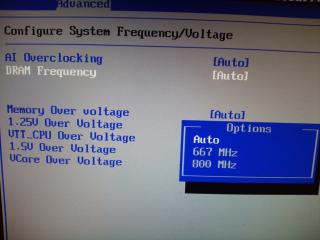
QUOTE(xiong1984 @ Jun 12 2010, 04:25 AM) Collin , after u overclock . let say u overclock to 3.1 GHZ and now the CPU voltage is 1.425 V and run prime95 with no error . The CPU maybe no need so much voltage , so you can lower down the voltage litter by litter .... until ur CPU not STABLE. So now u get the voltage CPU Not stable , u add back litter " 0.025V" to make ur CPU Stable. IMPORTANT : Add Voltage , CPU TEMP will increase. Dont over heat. OH!! now i understand. and adjust voltage in bios rite?  overclock to 3.x GHZ is random rite? hi, i added picture but "set multiplier at 12"<<< how to set this? This post has been edited by Collin8900: Jun 12 2010, 09:33 AM |
|
|
|
|
|
TSCollin8900
|
Jun 12 2010, 11:05 AM
|
New Member
|
QUOTE(711726 @ Jun 12 2010, 10:21 AM) set ai overclocking to manual.then only u can see the cpu fsb settings+cpu multiplier.then change it to 12.you can go for 13 as that's the max supported by E5300.if u find your 212 plus can't cope with 4.0ghz,lower the speed then. hi, 711726 i set ai overclocking to manual i only see "200" (see picture 4) i press enter nothing happen i cant change it. what should i do? Edit: yaya, i can changed it by hitting "+/-" Key, after change it to 333 i dint see any option "cpu multiplier" setting. This post has been edited by Collin8900: Jun 12 2010, 05:46 PM |
|
|
|
|
|
TSCollin8900
|
Jun 13 2010, 11:26 AM
|
New Member
|
i found it, it's called "Cpu Ratio Setting"
how to add vcore voltage? i search whole bios only saw "Vcore Over Voltage" is this one? i press enter it only got this 4 option:
Auto
+50Mv
+100Mv
+150Mv
i set multiplier at 12. set fsb at 333MHz, tried all +50mv, +100mv, +150mv cant boot!!! HELP
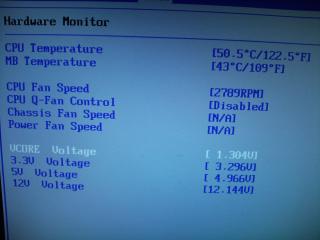
Edit: i set at 3.3Ghz 1st (253Mhz x 13) Ram stay 667, 100% load Max Temperature 52c, i dint add any vcore voltage. test with prime already 20min. should i stay 3.3 or try higher?
Edit2: i set at 3.4Ghz (260Mhz x 13) Ran 667, 100% Load Max temp 52c, i dint add any voltage. should i stay 3.4 or go higher?
Edit3: set 270Mhz x 13 windows freeze when run prime, any suggestion? add vcore voltage?
This post has been edited by Collin8900: Jun 14 2010, 02:47 PM
|
|
|
|
|
|
TSCollin8900
|
Jun 14 2010, 05:41 PM
|
New Member
|
QUOTE(711726 @ Jun 14 2010, 03:35 PM) which means 3.4ghz is your maximum limit without feeding extra voltage onto the cpu. you need to know that overclocking is limited and it depends on your luck.your E5300 is not the same as others in terms of overclock ability.some can go as high as 4+ GHz some will only go to 3.5GHz ++ even with a great mothetrboard/ram/cooling. if you have a weak motherboard,your cpu won't be able to do huge overclock. now try pumping extra voltage onto the cpu.like i said,the combination determines whether the system can do huge oc or not. i'm suggesting for you to ditch the G31,and move to P45/X38 to do some crazy oc. thx for helping me i think i stay at 3.4Ghz at the moment untill i get better motherboard with i7 CPU. btw, can intro me a good brand motherboard with budget around RM400? This post has been edited by Collin8900: Jun 14 2010, 05:46 PM |
|
|
|
|



 Quote
Quote

 0.0189sec
 0.63
0.63
 7 queries
 GZIP Disabled