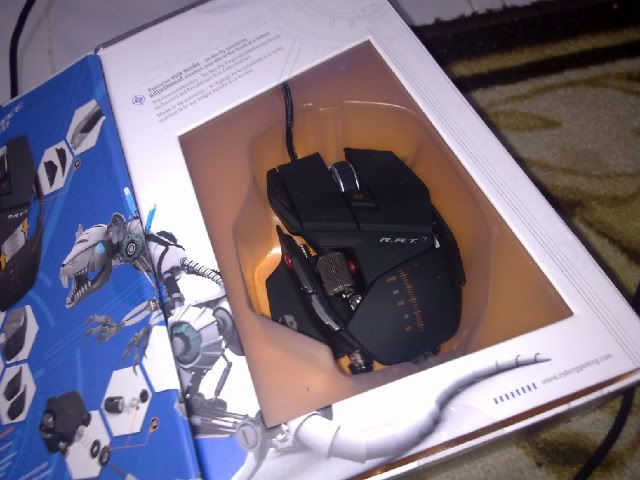
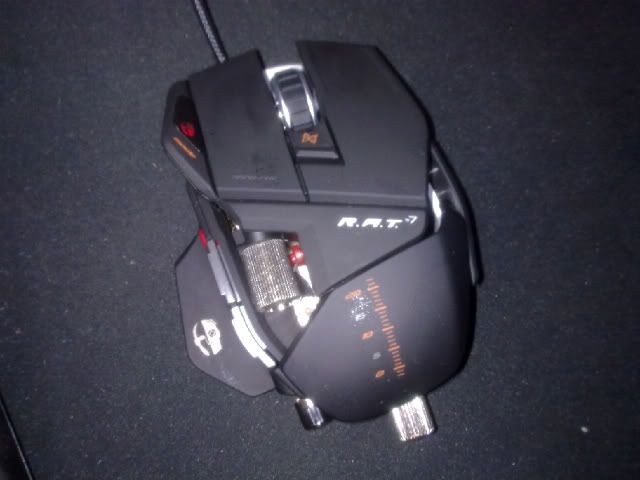
using this: (rapoo v2 3200dpi)

with Goliathus mousepad
This post has been edited by ashburn98: Feb 12 2011, 11:16 AM
Gaming Mouse V4, Click Click Click !
|
|
 Feb 12 2011, 11:14 AM Feb 12 2011, 11:14 AM
Return to original view | Post
#1
|
 
Senior Member
1,570 posts Joined: Nov 2005 
|
Poor gamer here
using this: (rapoo v2 3200dpi) with Goliathus mousepad This post has been edited by ashburn98: Feb 12 2011, 11:16 AM |
|
|
|
|
|
Feb 12 2011, 01:26 PM
Return to original view | Post
#2
|
|
Senior Member
1,570 posts Joined: Nov 2005
|
it's laser.
took a gamble with the brand (rm69). the 1600dpi king, logitech mx518, is still over rm80. |
|
|
Feb 12 2011, 05:07 PM
Return to original view | Post
#3
|
|
Senior Member
1,570 posts Joined: Nov 2005
|
It's RM69 from LYP HyperIT.
The specs is quite standard for gaming - 1000mhz polling rate - onboard memory chip (profile storage) - 7 programmable buttons (but buttons placement is  ) )- on-the-fly DPI switch and profile switch button - 6 million click buttons Bang-for-buck factor wise, I feel it is very good for gaming mouse beginners. I have no idea how it ranks up with the RM150-200 range mice though. For me, I find 3200dpi for my gaming is not enough. I'm already using 2400dpi for windows. |
|
|
Feb 13 2011, 02:00 PM
Return to original view | Post
#4
|
|
Senior Member
1,570 posts Joined: Nov 2005
|
Since you don't need extra buttons, Razer DeathAdder sounds like something that fits you.
I don't think you need, or any gaming mouse can, help you get better at last hitting in dota. If you only play dota and want some gaming gear regardlessly, get a good mousepad for starters. Even optical 800dpi on a good (by that I mean really excellent) mousepad you'll feel the difference. |
|
|
Feb 14 2011, 03:02 PM
Return to original view | Post
#5
|
|
Senior Member
1,570 posts Joined: Nov 2005
|
QUOTE(hantarkatsini2 @ Feb 13 2011, 10:07 PM) Finally got my hands on this. How much it cost you to get it all the way from US?MadCatz R.A.T 7 » Click to show Spoiler - click again to hide... «  On the side, if anyone have logitech g500 to let go, let me know. want to really see if 5600dpi makes the difference in my FPS game. |
|
|
Feb 15 2011, 08:16 AM
Return to original view | Post
#6
|
|
Senior Member
1,570 posts Joined: Nov 2005
|
QUOTE(GetaBlue @ Feb 14 2011, 11:53 PM) Hi, looking for a gaming mouse. but if wireless lagi best. ...budget is rm 150.. Good branded Wireless gaming mouse is not possible at RM150.even the rapoo v9 (wireless and upgrade version of my v2) retails at over RM200no need many buttons, my hand quite big... i hear the RAT 7 has a wireless ver, RAT 9...anyone using? depending on what games and screen resolution you are playing, for the mouse you need. From the limited info, MX518 is right for you. |
|
|
|
|
|
Feb 18 2011, 10:05 AM
Return to original view | Post
#7
|
|
Senior Member
1,570 posts Joined: Nov 2005
|
When considering a gaming mouse purchase, comfort, in terms of the mouse shape, individual gripping method and more, is as/even more important as the mouse sensitivity sensor.
My question is, is there's like a one stop gaming mouse shop where you can actually move/feel the actual mice? Some LYP shops have mice on display but those are RM10 ones. |
|
|
Feb 28 2011, 11:54 AM
Return to original view | Post
#8
|
|
Senior Member
1,570 posts Joined: Nov 2005
|
Better tell us what gaming gears your friend is using so we can advise better. if he had a top of the line mouse, a gaming keyboard or speakers is a better gift
|
|
|
Feb 28 2011, 01:54 PM
Return to original view | Post
#9
|
|
Senior Member
1,570 posts Joined: Nov 2005
|
QUOTE(Hezegroth @ Feb 28 2011, 12:05 PM) any other mouse recomendation other then razer lachesis ? goliathus speed or control?by the way im using razer goliathus mouse pad does it need certain mouse ? How you grip your mouse usually? |
|
|
Mar 1 2011, 09:22 AM
Return to original view | Post
#10
|
|
Senior Member
1,570 posts Joined: Nov 2005
|
QUOTE(Hezegroth @ Feb 28 2011, 01:56 PM) speed , and palm grip I would go for proven palm grip shapes mice, in the mold of MX518, like Logitech g500. AllITHypermart at lowyat have a hanging demo unit of razer lachesis, so you should try it there to see if it fits your hand.======================= QUOTE(Kyozen @ Feb 28 2011, 02:05 PM) Added on February 28, 2011, 2:36 pmrazer deathadder vs logitech mx518 which is better? ======================== QUOTE(milky @ Feb 28 2011, 02:48 PM) regarding mine is using for The first 3 games are FPS games, so having higher DPI for 1:1 pixel mapping would be ideal. But we still have no idea what mouse he's currently using. If he's using a 5 year old mouse, then a high DPI mouse would be great. If not, then probably a gaming headset. SuddenAttack CS Blackshot Dota Starcraft II so what gaming is recommended? budget around RM200 The easy gift would be a gaming mousepad. But what to buy depends on what gears he have right now. ====================== QUOTE(vaizard @ Feb 28 2011, 11:51 PM) hello sifus.. sota mat? games played? current mouse?wanna ask.. which 1 is d best choice? DA refresh vs ikari optical vs logitech G500 my preference -23' monitor -palm grip -sota  |
|
|
Mar 1 2011, 01:04 PM
Return to original view | Post
#11
|
|
Senior Member
1,570 posts Joined: Nov 2005
|
QUOTE(vaizard @ Mar 1 2011, 11:35 AM) yup.. You have much to gain then. You'll straight away notice the difference when you get a good gaming mouse. Minimum 3200 DPI so Ikari is out of the question. Death Adder Refresh or Logitech g500, up to individual taste. roccat sota mat... always play FPS, third person n sometimes playing dota curently using A4tech wireless mouse, not a gaming mouse.. QUOTE(gyver @ Mar 1 2011, 11:48 AM) hi guys, For now, I think good gaming keyboards are still primarily wired. Even wireless gaming mouse there's only a few good model in the market (Logitech g700, MS Sidewinder x8, Razer Mamba). For your purposes, maybe you are better off with a wireless keyboard touchpad for normal usage and then switch on the wireless mouse for gaming.can somebody recommend me good wireless mouse and keyboard combo for gaming. my htpc is connected to my plasma tv so i need a wireless setup for gaming. i am currently using acers wireless mouse and keyboard but it is starting to screw up a lot, which is a big no no in gaming, so time to change i guess. I went back to wired from wireless myself. This post has been edited by ashburn98: Mar 1 2011, 01:05 PM |
|
|
Mar 1 2011, 03:26 PM
Return to original view | Post
#12
|
|
Senior Member
1,570 posts Joined: Nov 2005
|
QUOTE(vaizard @ Mar 1 2011, 03:01 PM) hmm... When it comes to gaming mouse, I believe purchasing decision is comfort 45%, specs 35% and price 20%. For myself, between the two, g500 fits me better. For you, I can only say try to hold/test those mice.so from ur xperience between DA refrsh n logitech g500 which 1 do u think more valuable for the money? huhu....... |
|
|
Mar 2 2011, 12:02 AM
Return to original view | Post
#13
|
|
Senior Member
1,570 posts Joined: Nov 2005
|
QUOTE(AlexLai @ Mar 1 2011, 10:16 PM) Let me ask you this, why would an FPS player use such a high DPI in the first place? the answer is because you want the in-game sensitivity to be at 1.0. At that sensitivity, each pixel movement in your screen corresponds to each detectable minute movement from your mouse.Is it important to have that 1.0 sensitivity? Yes, it is only when you play FPS which involves you killing another human player. Why? At 1.0 sensitivity, you have only yourself to blame/rage. You have to be a better player. No more excuses. What if you don't play FPS against humans? You don't need high DPI. |
|
|
|
|
|
Mar 3 2011, 10:14 AM
Return to original view | Post
#14
|
|
Senior Member
1,570 posts Joined: Nov 2005
|
QUOTE(Kyozen @ Mar 3 2011, 12:26 AM) any recommendation besides razer deathadder? my friend has it 1 year + already and the feet support worn out, body of the color fade off, button sometime not working and its abit too light for me while my 2 year mx 518 still in good shape except for hairline scratches....budget raise to rm250++ not more than 300.... something wrong with your logitech g700? |
|
|
Mar 3 2011, 01:58 PM
Return to original view | Post
#15
|
|
Senior Member
1,570 posts Joined: Nov 2005
|
another g700?
 |
|
|
Mar 4 2011, 12:10 AM
Return to original view | Post
#16
|
|
Senior Member
1,570 posts Joined: Nov 2005
|
QUOTE(Cyclonechuah @ Mar 3 2011, 03:54 PM) Gaming mouse sensor TRACKS better not because of DPI, it's because of FPS. I certainly don't mind being pointed out when I lacked of the technical knowledge more experienced gamers acquired. Thank you. I can understand why Microsoft IME mouse was 'the gaming mouse' back then because of the 9K FPS, while its DPI isn't important because most gamers are on big mouse mats. Most probably played like this: Low Sensitivity and Low DPI means it is best your movements are best with your elbows. _______________________ For those who can't understand why there are people who uses high DPS. I don't play by moving my elbows, I am a wrist mover - ingame sens 1.2 at 5700DPI currently. _______________________ I told a forumer to discount Ikari because of 1600DPI in favour of the other listed options. To do the recommendation justice, I'll point to Ikari's possible 40,000 fps tracking while G500 has 11,750 fps. This post has been edited by ashburn98: Mar 4 2011, 12:35 AM |
|
|
Mar 6 2011, 09:40 AM
Return to original view | Post
#17
|
|
Senior Member
1,570 posts Joined: Nov 2005
|
QUOTE(endlesshallway @ Mar 6 2011, 12:17 AM)  Ikari Laser Sensor = Cypress Ovation Sensor (CYONS1001G) Ikari Optical Sensor = Avago Optical Sensor (ADNS-A3060) download the data sheet and read. QUOTE The SteelSeries Ikari Laser features programmable macros for RTS and MMO gamers and a high precision sensor with 40,000 samples per second (SPS), which is suitable for FPS gamers. Since Ikari Optical Sensor only tracks 6500 frames per second (review & specs), I would disregard it. Sensors data sheet are always great resource but they can not be the final figures. The mouse company itself often comes out with their own optimization to exceeds the data sheet numbers. For example, Logitech g500 & g700 (I'm using g700) which uses Avago ADNS-A9500 sensor. The ADNS-9500 data sheet says up to 5000dpi but Logitech optimized it and sells it at 5700dpi. Again, sensors data sheet are always great resource but they can not be the final figures at the end of the actual product. ------------------------------- I saw picture of Paint drawing with different Windows Sensitivity and how it affects aiming in gaming. The comment was the most accurate one is the 6/11 notch. Any benefits going lower than 6/11? This post has been edited by ashburn98: Mar 6 2011, 09:41 AM |
|
|
Mar 6 2011, 10:30 PM
Return to original view | Post
#18
|
|
Senior Member
1,570 posts Joined: Nov 2005
|
QUOTE(bboyspirit @ Mar 6 2011, 09:47 PM) any thing can fix double click problem by my Razer DA? Maybe can try this?is over warranty period already. |
|
|
Mar 6 2011, 11:48 PM
Return to original view | Post
#19
|
|
Senior Member
1,570 posts Joined: Nov 2005
|
QUOTE(Kyozen @ Mar 6 2011, 09:40 PM) sifus, would like know if lets say im using g700 with razer kabuto compatible? currently not using pad and on direct on the table, would it be better with kabuto or almost the same? I can only tell you g700 on my SteelSeries™ QCK+ (black cloth mousepad) tracks less smoother than my grey semi gloss computer table. I don't know how a hard black mousepad will fare though.Added on March 6, 2011, 9:46 pmi know that the fact that my g700 laser is not good on dark pad but still would like to know is there any improvement compare to no pad at all |
|
|
Mar 9 2011, 09:09 PM
Return to original view | Post
#20
|
|
Senior Member
1,570 posts Joined: Nov 2005
|
QUOTE(oreally @ Mar 9 2011, 08:44 PM) guys, i currently need a wireless mouse for my laptop... unlike wired gaming mouse where cheaper options are available, wireless gaming mice are priced more or less the same price as a top tier wired mice.which one should i get thats on the low budget side? need mouse button 4 and 5... and would dpi affect much since the resolution is 1920x1080? since your laptop displays 1920x1080 then it should be a relatively expensive one. if that is so, you should be able to fork out RM200 above for the mouse. The popular wireless gaming mouse are MS sidewinderx8, Logitech g700 and Razer Mamba. Your choice. |
|
Topic ClosedOptions
|
| Change to: |  0.0377sec 0.0377sec
 0.38 0.38
 7 queries 7 queries
 GZIP Disabled GZIP Disabled
Time is now: 2nd December 2025 - 06:55 AM |
 Quote
Quote