

 Dec 7 2020, 01:11 PM


QUOTE(polarzbearz @ Nov 30 2020, 09:37 PM)
Don't need to wait for email. You can fund in SGD$1k the moment you get your account number.
But the most important part of the entire process? It's your e-KYC verification.
Make sure to link your Singapore account in your Malaysia CIMB Clicks - once linkage is done, you will see your Singapore account appearing under "My Accounts".
That's when you can initiate another self-verification e-KYC transfer (minimum 1 SGD). Go to Transfer Money (LOCAL) and you'll be able to select your Singapore account as recipient. Towards the end, it should say something like "ASEAN Transfer, 0 Fees".
More details: step-by-step blog post on opening CIMB SG account

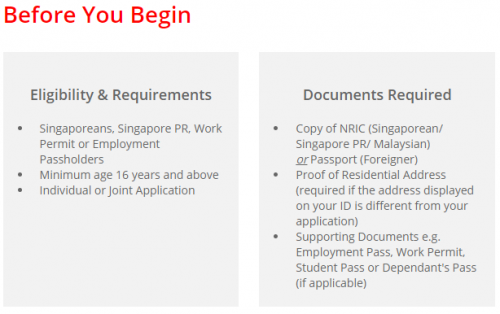
Thanks for the detailed instructions, was certainly very helpful. When I started the application for the CIMB FastSaver account, under the eligibility it mentions to for Singaporeans, Singapore PR, Work Permit or Employment Passholder. Are we still able to open the account without being any of these?But the most important part of the entire process? It's your e-KYC verification.
Make sure to link your Singapore account in your Malaysia CIMB Clicks - once linkage is done, you will see your Singapore account appearing under "My Accounts".
That's when you can initiate another self-verification e-KYC transfer (minimum 1 SGD). Go to Transfer Money (LOCAL) and you'll be able to select your Singapore account as recipient. Towards the end, it should say something like "ASEAN Transfer, 0 Fees".
More details: step-by-step blog post on opening CIMB SG account
 Quote
Quote


 0.1685sec
 0.81
0.81
 7 queries
 GZIP Disabled