

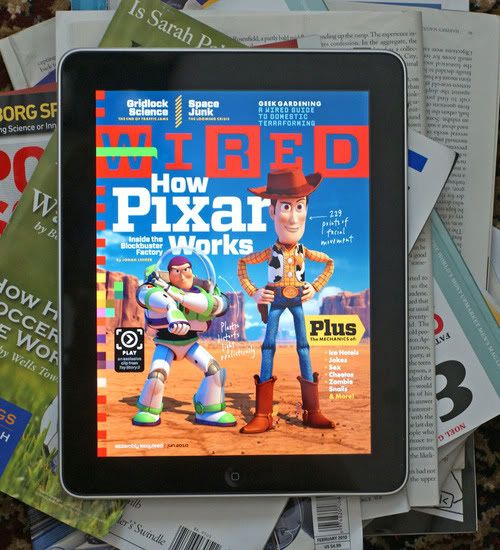
Anyone got the WIRED app? Can give a review please? It's really tempting.

Hardware Apple iPad Discussion Thread | V2, Everything about iPad
|
|
 May 28 2010, 12:39 AM May 28 2010, 12:39 AM
Return to original view | Post
#1
|
 
Junior Member
16 posts Joined: May 2010  
|
Anyone got the WIRED app? Can give a review please? It's really tempting. |
|
|
|
|
|
May 30 2010, 11:02 AM
Return to original view | Post
#2
|
|
Junior Member
16 posts Joined: May 2010
|
Just want to share my findings with others here. Finally downloaded the first iPad edition of the WIRED magazine today to see what’s the fuss was all about. Basically, it’s an interactive digital magazine where parts of a page could be clicked to reveal full screen videos on a featured article or commercials. Really, it’s nothing new. such digital magazines were available from GamerZines for a couple of years now. I think it’s just a matter of time before GamerZines would be porting their version onto the iPad - FOR FREE. IMHO - this is a case where FREE does not necessarily be inferior to paid services. But of course, if you've been a fan of the WIRED magazine, you'll be glad to have it in it's interactive form. Would I be getting the next issue? I doubt so. The 527Mb is a monster for my mere 32Gb iPad. |
|
|
Jun 4 2010, 02:55 PM
Return to original view | Post
#3
|
|
Junior Member
16 posts Joined: May 2010
|
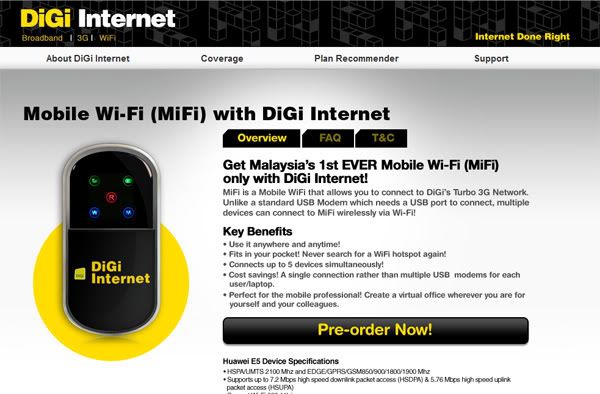 Good news for those looking for a MiFi device, DiGi will be launching it soon. More info here: http://www.digi.com.my/internet/promo_mifi_ov.html This post has been edited by MrHoh: Jun 4 2010, 03:18 PM |
|
|
Jun 17 2010, 05:47 AM
Return to original view | Post
#4
|
|
Junior Member
16 posts Joined: May 2010
|
QUOTE(hapeace @ Jun 17 2010, 02:31 AM) ... so after the tax refund the price will be RM2,903 for 64GB wifi +3G ... Wow! That's a pretty good price for a 64Gb 3G + Wifi unit.   Maybe I should upgrade and sell off my 32Gb Wifi only unit ..... Hmmmmmm ......  |
|
|
Jun 21 2010, 02:56 PM
Return to original view | Post
#5
|
|
Junior Member
16 posts Joined: May 2010
|
QUOTE(alfredtwl @ Jun 21 2010, 02:43 PM) the previous page mentioned wifi 16GB around RM2K ... ?? if possible, i want wifi + 3G 64GB leh .... Got my 32Gb Wifi iPad on April 19. From experience, 32Gb is fine for daily media consumption. Be it games, apps, podcasts, music or movies. Things will get overloaded when you wanna cramp as much for a trip. I find myself constantly having to decide what to remove or delete from my iPad the day before a trip. So, if you are planning on getting the iPad, avoid the 16Gb at all cost. The 32Gb will suffice on normal days but you'll have a hair pulling session when traveling. Bite the bullet and aim for the 64Gb WiFi + 3G if your budget allows. Just my 2 cents for the future iPad owners out there.  |
|
|
Jun 26 2010, 03:39 PM
Return to original view | Post
#6
|
|
Junior Member
16 posts Joined: May 2010
|
After using iOS4's folder feature for my iPhone, all these app icons on the iPad seems like a waste of space. Can't wait for Apple to release iOS4 for the iPad.
|
|
|
|
|
|
Jul 5 2010, 09:02 AM
Return to original view | Post
#7
|
|
Junior Member
16 posts Joined: May 2010
|
Just to share my upgrade experience. Was using Maxis Wireless Broadband 3Gb package for RM68 with my DLink MyPocket Router (Mifi device) for my WiFi only iPad. Note, you can only get Microsim from Maxis Centre (Eg. KLCC or Pavilion) and not at Maxis Exclusive Partner or Dealers (Eg. LowYat Plaza). So when I got my WiFi + 3G iPad, went over to KLCC's Maxis centre to get a Microsim. From this forum, I got the impression that you can just head over to Maxis and request for a Microsim by paying RM25. That's not the case.
Long story short. You can now get an Enchance Data Package for Microsim with UNLIMITED DATA (No 3Gb cap and 128k for subsequent usage nonsense) for RM99 a month. But I could not upgrade my existing RM68 3Gb wireless broadband package to this. So, I was told to sign up for this Enchance Data package and cancel my existing wireless broadband package. I had to pay a RM100 refundable deposit. There are no activation fee or contract. Speed wise. Got 2.6Mb down with Speedtest app. Switching from a WiFi only unit to a 3G unit - worth every penny. Not having to bring a second device and worry it will run out of juice in 4 hours is something I am glad to leave in the past. From my personal experience, if you are getting an iPad soon - seriously consider getting the 3G iPad instead. Get a 32Gb if budget is limited but aim for 64Gb if possible. Just my 2 cents for soon-to-be iPad users out there. |
|
|
Jul 10 2010, 04:36 PM
Return to original view | Post
#8
|
|
Junior Member
16 posts Joined: May 2010
|
QUOTE(Jarod @ Jul 10 2010, 03:04 PM) i went to check at a maxis authorised center. they say no enhanced data package for rm99 unlimited. where did you get yours? You are not the only one who were told the same "sorry not available" story. After I got mine, I told 2 of my friends to sign up for the same package. One went to KLCC and another, at Pavilion. Initially, at both locations, all Maxis staff said no such package. Since I already got it and my particulars and package subscribed is in their system, the staff (KLCC) over at the counter hesitantly signed my friend up for the same package. Went with my 2nd friend to Maxis Pavilion last nite and witnessed first hand their ignorance in their own products. Staff at Maxis Pavilion also said there's no such package. So, as I was with my friend - I gave him my IC number and Microsim number (for data, not calls) and like some idiots - they finally agreed to sign up my friend on the same package after checking their system. According to the person who first signed me up at KLCC (a senior Maxis staff who knows what she was talking about), this package is called Enhance Data Package for Microsim (iPad users). RM99 with Unlimited Data. No 3Gb cap with subsequent usage at 128k nonsense. She even told me, when iPhone 4 is available, I am able to retain my microsim number, and use it for iPhone 4. But the Unlimited Data will not be applicable as I will be tied to whichever data package the iPhone 4 comes with. (Eg. iValue 1 etc). BUT if I continue using it just for data, the package and offer stands. As I am not a Maxis mobile customer, I was required to pay a RM100 refundable deposit. Line was activated within 30 mins. Now, all 3 of us successfully signed up. If you wish to, PM me and I can give you my Microsim number. Ask them to search into their database and tell it to your face if I am not signed on to this Enhance Data package. |
|
|
Jul 11 2010, 07:59 AM
Return to original view | Post
#9
|
|
Junior Member
16 posts Joined: May 2010
|
QUOTE(benny888 @ Jul 10 2010, 06:05 PM) Sometimes I wonder why such a big corporate company such as Maxis do not even give proper training to their staffs. Unbelievable but is true - sometimes we consumers knows better than them Yeah. The sad part was - both were Maxis Centres. Not dealers or MEPs. You would think they could at least train those working at KLCC better. Clearly not the case here. QUOTE(nles @ Jul 10 2010, 11:14 PM) Can Sign up this package and use it with MIFI modem? the speed is the same as normal maxis broadband and without cap? Yes. Both my friends are using the Dlink MyPocket Router (MiFi device). But you will need a sim card adapter. To make the microsim into a standard sim. One of my friend just took an old sim card, cut out the mid part (with the right tools, it's easy) to fit the microsim and getting 2.9Mb speed at Kota Damansara area. Yes, no cap on data and speed depends on coverage of your area.This post has been edited by MrHoh: Jul 11 2010, 08:04 AM |
|
|
Jul 26 2010, 08:32 AM
Return to original view | Post
#10
|
|
Junior Member
16 posts Joined: May 2010
|
QUOTE(aztoys @ Jul 26 2010, 03:49 AM) Hello all, i bought a new ipad 3g and signed up for maxis broadband RM48 for 1.5GB plan, my problem is that when i connect to maxisbb via the provided modem it is faster then connecting via the ipad even though im at the same place, is there any extra setting i need to do? or do i need to get the enhanced data plan? I am facing the same situation as well. With the D-Link MiFi with Maxis, speedtest.net reads 2.9Mbps while on the iPad, merely 1.4Mbps. Same time, same location. Could it be that the app and it's website capture results differently? Any advice would be appreciated. Thanks. |
|
|
Jul 29 2010, 01:16 PM
Return to original view | Post
#11
|
|
Junior Member
16 posts Joined: May 2010
|
Just to share my findings with fellow iPad users here who are wondering if there is a 3Gb cap on Maxis's Microsim Enhance Data Unlimited package for iPad - the answer is NO.
I just pushed 3.2Gb data and my download speed remains on an average of 1.5Mbps. On good days, I can get 3.3Mbps. Yes, there is an unlimited package for RM99. No, don't believe if Maxis personnels say otherwise. |
|
Topic ClosedOptions
|
| Change to: |  0.0569sec 0.0569sec
 0.62 0.62
 7 queries 7 queries
 GZIP Disabled GZIP Disabled
Time is now: 11th December 2025 - 01:33 PM |
 Quote
Quote